

B2B buyers nowadays are buried in text, with cold emails and LinkedIn DMs landing in the same inboxes every day, and what’s worse is that most of them read exactly the same way. Phone calls used to be the way to cut through that noise, but these days, let’s be honest, most of us just let unknown numbers go straight to voicemail.
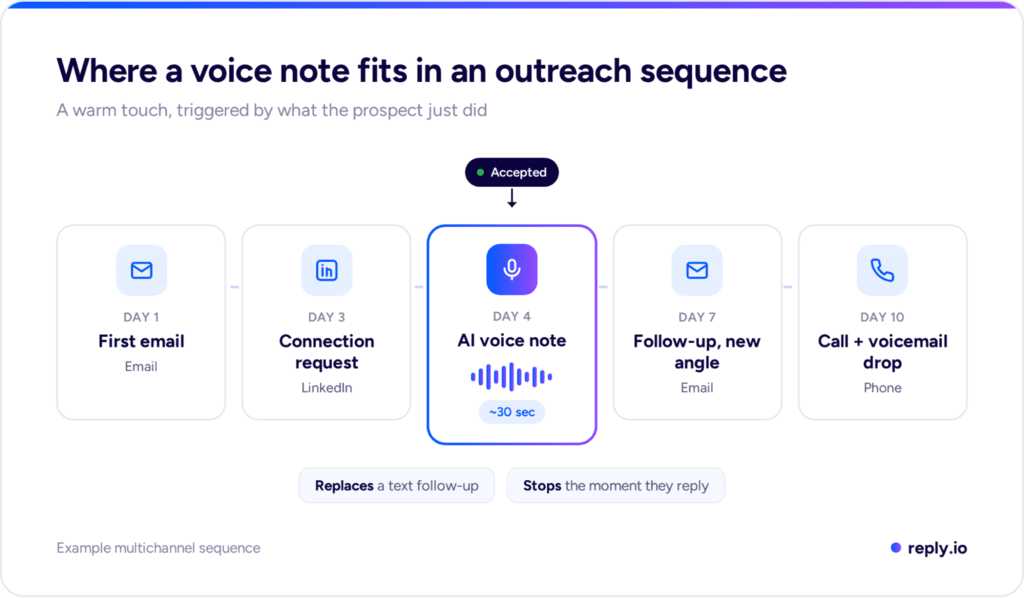
Voice still works when it’s used differently, though. An automated voice messaging system lets you send short, personal voice notes at scale, and when they arrive at the right moment in a multichannel sequence, prospects will actually listen.
In this article, we’ll cover what these systems are, how they work, where voice fits in B2B outreach, script examples you can adapt, and the compliance rules worth knowing before you send anything.
What is an automated voice messaging system?
An automated voice messaging system is software that creates and delivers voice messages to a list of contacts without anyone dialing or recording each one by hand. You set it up once, decide who gets it and when, and the system takes care of delivery and tracking.
The message itself can be produced in three ways:
- Pre-recorded audio → you record one message, and the same file goes to every contact.
- Text-to-speech → you type a script, and a synthetic voice reads it out, often with merge fields like first name or company.
- AI voice → you clone your own voice once, and AI generates a unique message for each contact that sounds like you recorded it personally.
So yes, AI can create a voice message, and that third option is the one changing outreach the most in 2026.
Traditionally, an automated voice messaging system for business meant appointment reminders and payment alerts. Sales teams now use the same technology for a very different job — starting conversations and keeping them moving.
How does automated voice messaging work?
Whatever the channel, almost every system follows the same six steps:
- Create the message: Record it, write a text-to-speech script, or generate it with AI from a template plus prospect data.
- Build the list: Upload contacts with the fields your message needs, such as first name, company, and a phone number or LinkedIn profile.
- Choose the delivery channel: A phone call, a direct drop into voicemail, or a voice note inside a messaging app like LinkedIn.
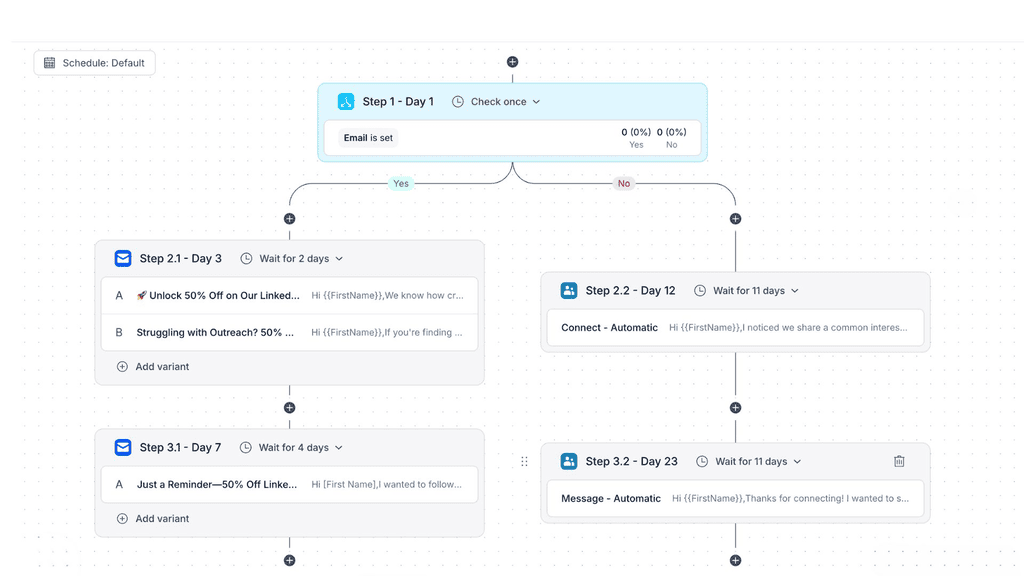
- Set the timing or trigger: Either a fixed schedule (Tuesday at 10am in the prospect’s time zone) or an intent signal, like a prospect accepting your connection request.
- Deliver: The system sends at scale, within whatever sending windows and daily limits you’ve set.
- Track and route replies: Answers, callbacks, and opt-outs get logged, and anyone who responds is pulled out of the automated flow so a person can take over.
The last step is where most notification tools fall short, but in sales it matters most. A reminder system only needs to confirm delivery, while an outreach system has to catch the reply and hand the conversation to a rep before the next automated touch goes out.
If all you want is an automated voicemail greeting for your own business line, that’s a much simpler job your carrier or VoIP provider handles in the phone settings.
Automated voice messaging vs IVR vs ringless voicemail vs voice notes
“Automated voice messaging” covers several delivery methods that work very differently in practice:
| Method | How it reaches people | Best for | Consent risk (US) |
| Voice broadcasting | Calls a list and plays a recorded message when someone answers or voicemail picks up | Alerts, reminders, event notices | High for marketing, as prerecorded calls fall under the TCPA |
| Ringless voicemail | Drops a message straight into voicemail without the phone ringing | Callback-driven B2C campaigns | High, since the FCC classified it as a “call” in 2022 |
| Voicemail drop | A rep dials live, and if voicemail answers, one click leaves a pre-recorded message | Cold calling teams saving time on unanswered calls | Medium, usually treated as a prerecorded message |
| IVR | Answers inbound calls and routes callers through menus or voice commands | Support lines and inbound routing | Low, because it only handles inbound calls |
| LinkedIn voice notes | Sends a voice message into a LinkedIn chat with a connection | B2B prospecting and follow-ups | Not a phone call, but LinkedIn’s own limits apply |
The main difference between voice broadcasting and ringless voicemail is the ring: broadcasting places a real call and plays the message if someone picks up, while ringless voicemail lands in the voicemail inbox without one. US regulators still treat both as calls.
Voice notes are the outlier in this table, because they never touch the phone network at all, and that changes both the rules and how prospects receive them.
Why phone-only voice outreach is losing ground in 2026
The phone network has a trust problem, and it keeps getting worse. YouMail’s Robocall Index counted just over 4.35 billion robocalls in the US in July 2026 alone, and roughly half of them were telemarketing or scams.
Let that number sink in for a moment. That’s why your sales voice message that’s sent over the same network competes with all of that, and it gets judged by the same instincts.
AI voice has made the problem even sharper, since voice cloning is now cheap and convincing, which is why scammers adopted it early and why the FCC moved to regulate it (more on that in the legal section below).
For outreach teams, the takeaway is to move voice away from cold phone blasts and toward short, personal messages sent to people who already recognize your name, on a channel where they expect to hear from other professionals. For most B2B teams, that channel is definitely LinkedIn.


![B2B SaaS Marketing Strategy in 2026 [Step-by-Step Guide]](https://reply.io/wp-content/uploads/marketing.agency-300x158.jpg "B2B SaaS Marketing Strategy in 2026 [Step-by-Step Guide]")

