
How to Build a Sales Outreach Plan in 2026 (All You Need to Know)

How to Build a Sales Outreach Plan in 2026 (All You Need to Know)

Most sales outreach still follows the same old formula: pull a few hundred or thousand of contacts, write three email and follow-up variations, launch, and then spend the rest of the time optimizing to try and improve results.

That stopped working for reasons that have nothing to do with effort or the messaging. Two things changed underneath outbound — buyers now research, shortlist, and form an opinion about products/services long before anyone reaches out to them, and Gmail and Outlook now decide how much mail you’re allowed to send at all.

Here’s what a sales outreach plan actually contains, a seven-step build that respects both constraints, how to execute it most effectively with AI, and the common mistakes that quietly kill campaigns.

What is a sales outreach plan?

A sales outreach plan is the system you create that decides who your team should contact, on which channels, in what order, with what message, at what volume, and the specific events that tell you to stop, fix, or scale. Ideally, it should be a written document, not an agreed-upon mindset. If nobody on your team could open it and run a campaign from it tomorrow, what you have is still a strategy, not an actionable plan.

A sales outreach strategy is the bet on which market, which motion, and why now. The plan is the executable version, with owners, volumes, and thresholds attached.

In 2026, two constraints have to be taken into account by any sales outreach teams:

  1. Buyers decided before you got there → Gartner’s 2026 sales survey found a whopping 67% of B2B buyers now prefer a rep-free experience, and as much as 45% used AI during a recent purchase. 6sense’s 2025 Buyer Experience Report, covering over 4,000 buyers, goes even further, finding that 94% of buying groups had already ranked a preferred vendor before their first seller conversation, and that pre-contact favourite went on to win roughly 80% of deals.

  2. Mailbox providers decided how much you can send → Google and Microsoft now enforce full authentication and complaint-rate rules on bulk senders, and those rules cap what your plan is physically allowed to attempt. Specifics in Step 2, but the main consequence is worth stating right away: you have a fixed contact budget, meaning precise targeting stopped being optional, and exceeding that budget can severely harm your company domain.

What a sales outreach plan actually includes

A complete plan comes down to seven moving parts, and skipping any one of them fails in a predictable way. But that’s also the useful part, since you can usually diagnose a broken campaign by finding the missing component(s):

Component What it commits to What breaks without it
Ideal customer profile (ICP) Who is explicitly out of scope, not just who’s in Contact budget gets spent on people who can’t buy
Volume ceiling How many contacts per day your infrastructure supports Domain reputation collapses around week three
Lead source Where records come from and how they’re verified Bounce rate takes the sending domain down with it
Channel mix Which channels, mapped per role Everything defaults to email, the most contested channel there is
Sequence design Touch count, spacing, branching, and exit rules Reps improvise and no two campaigns are comparable
Message tiers What gets human research versus a segment template Personalization either doesn’t scale or doesn’t exist
Success thresholds The numbers that trigger stop, fix, or scale Bad campaigns run for months because nobody defined “bad”

The 2026 AI outreach playbook

Your AI can write emails. But can it get replies? Discover how to combine ChatGPT with Jason AI SDR to run outreach 24/7, avoid reply-killing mistakes, and send campaigns that feel handcrafted—without spending hours on research.

How to build a sales outreach plan in 2026

Each step ends with the exact line that goes into your sales outreach plan document, so you finish with a working one-pager that you can then customize to your exact audience and niche. First, we’ll cover the step-by-step theory, and then we’ll put it into practice with actionable examples.

Step 1: Write your ICP as a disqualification filter

Building a simple ICP is relatively easy, but a key component that many forget to include is to clearly define who it excludes. “B2B SaaS companies with 50 to 500 employees” is a category, and a category will happily let three-quarters of the market through.

Write yours in three parts: a firmographic floor and ceiling (headcount, revenue, region), a signal that proves the pain exists, usually technographic or operational (e.g., expansion into a new market), and two or three hard disqualifiers you enforce without argument.

Then break it into role clusters, because in B2B, you’re rarely targeting just one person. The economic buyer, the practitioner who’ll use it daily, and whoever validates technical fit each need a different angle, and that split feeds straight into channel selection in Step 4.

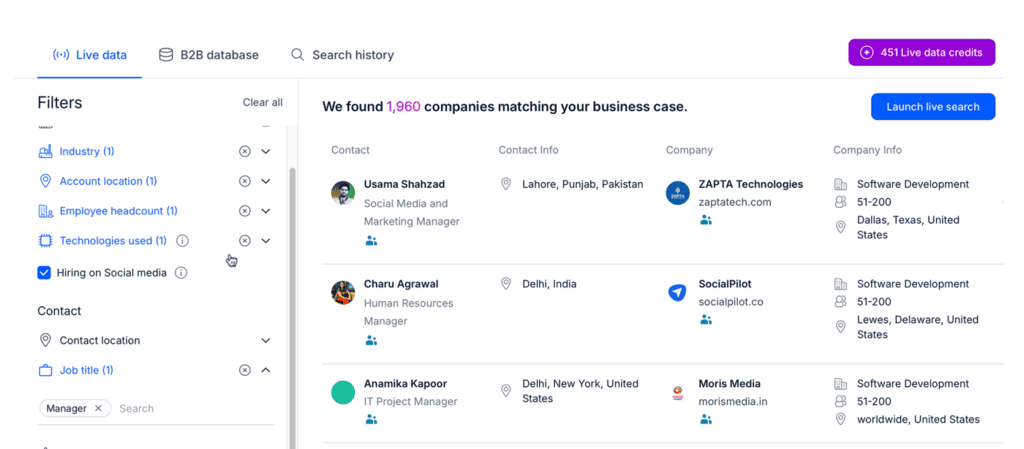
Lead databases like Reply Data, enrichment tools like Clay, and sales intelligence platforms like ZoomInfo are where you pressure-test whether your ICP returns enough targeted leads and accounts. Forty companies means it’s too narrow, but forty thousand probably means you aren’t being precise enough.

Reply Data live search results showing companies matched to an ICP, used when you build a sales outreach plan to pressure-test targeting

On the plan: the ICP definition, the proof-of-pain signal (per segment), and the disqualifier list.

Step 2: Set your volume ceiling before you build the list

Your infrastructure decides how many people you can contact. Calculate that number right after you decide who they are, because it constrains every step that follows.

The rules are public and specific. Google treats anyone sending 5,000+ messages a day to Gmail addresses as a bulk sender, which means: SPF, DKIM, and DMARC authentication, RFC 8058 one-click unsubscribe, and Postmaster Tools spam rates kept under 0.10% and never at or above 0.30%.

Microsoft applied equivalent requirements to Outlook.com, Hotmail and Live addresses from May 2025, rejecting non-compliant mail outright. LinkedIn has its own, not-so-public rules, but the rule of thumb is to stay under 50 messages a day to be safe.

Correct SPF, DKIM, and DMARC records are the entry ticket. The ceiling comes from the arithmetic underneath: mailboxes × conservative daily send × working days \= your monthly contact budget. At a common default of 20 to 30 sends a day on new mailboxes and 40 to 50 once warmed, eight mailboxes gets you roughly 7,000 contacts a month. Not 40,000. Everything in email deliverability flows from respecting that math.

On the plan: mailbox count, daily cap per mailbox, LinkedIn outreach accounts & limits, monthly contact budget, and your complaint-rate ceiling.

Step 3: Source and verify the list against that budget

A static export starts decaying the day you buy it, since people often change jobs, companies get acquired, domains get retired, and every dead record in a capped budget is a contact you don’t get back (and it slowly ruins your company domain in the background).

Live search plus email verification is the only approach that survives a capped budget. Filter on the attributes your ICP specified in step 1, verify every email address before sending out a single email, and enrich only for the fields that you will realistically need. So if what you’re really after is recent funding and headcount trends, enrich those two.

This is where a native database earns its place over a separate data vendor. Reply Data covers over a billion live contacts and accounts across 150+ countries, with advanced search filters to narrow down your ICP, real-time email verification, and built-in enrichment.

LinkedIn Sales Navigator still wins for very niche roles that databases index poorly, and pairs well with a broader outbound prospecting motion.

On the plan: your sources, the verification step, and the specific enrichment fields required.

Step 4: Map channels to the buying committee

Pick channels per role rather than per campaign. “Be everywhere” is how one contact budget gets spent three times on the same person.

The mapping falls out of Step 1 if you did that properly. Economic buyers in inbox-heavy roles respond to email and almost nothing else. Practitioners and technical validators often ignore cold email entirely but will accept a LinkedIn connection and read a relevant message. Calls earn their cost above a certain deal size and waste it below.

Multichannel means fewer touches per channel but across more surfaces. Three emails plus two LinkedIn steps (a connection request and a message once accepted) lands far better than 5 emails, and it keeps you under the Step 2 ceiling instead of blowing through it.

On the plan: the channel-per-persona mix.

Step 5: Design the sequence, including how it ends

A sequence is defined by its exit rules as much as its touchpoints. Many teams carefully design the first five steps carefully (e.g., initial email, LinkedIn connection request, email follow-up, LinkedIn message, etc.), but never set clear rules on what triggers and events should pause the sequence or change the channel, timing, and messaging.

Eight to twelve touches across three to four weeks is a solid default. Space them so gaps widen rather than tighten (day one, three, seven, twelve, twenty), because compressing follow-ups at the end reads as pressure and drives complaints, unsubscribes, and brand damage.

Branch the outreach plan based on behaviour rather than elapsed time. Opened-but-no-reply is a different situation from never-opened, and someone who clicked your pricing page is a third person entirely. Then write the exit criteria: after the final touch, the contact moves to nurture or leaves the system for six months. No infinite loops.

The entry condition deserves as much thought. Sequences launched off behavioral triggers (a funding round, a relevant exec hire, a job change into a role that owns your problem) consistently beat calendar-based launches. When most buying groups form a preference before ever speaking to a seller, timing is often the entire advantage.

On the plan: touch count/logic, spacing, branch conditions, entry triggers, and the exit rules.

Step 6: Decide what gets researched and what gets templated

Personalization is crucial to get your buyer’s attention, that’s no secret, and it’s also a budget allocation decision since you cannot hand-research thousands of contacts, and pretending otherwise is how plans quietly become unexecutable. Tier the list instead.

Three tiers works for most teams. Tier 1 is named accounts, maybe 5% of the budget, with real human research behind a custom first line, value prop, and CTA. Tier 2 is around 25%, and it gets segment-level messaging plus one AI-researched variable specific to the individual. Tier 3 is the remaining 70%, which can run with well-written segment templates with no per-contact research at all.

That used to be the case.

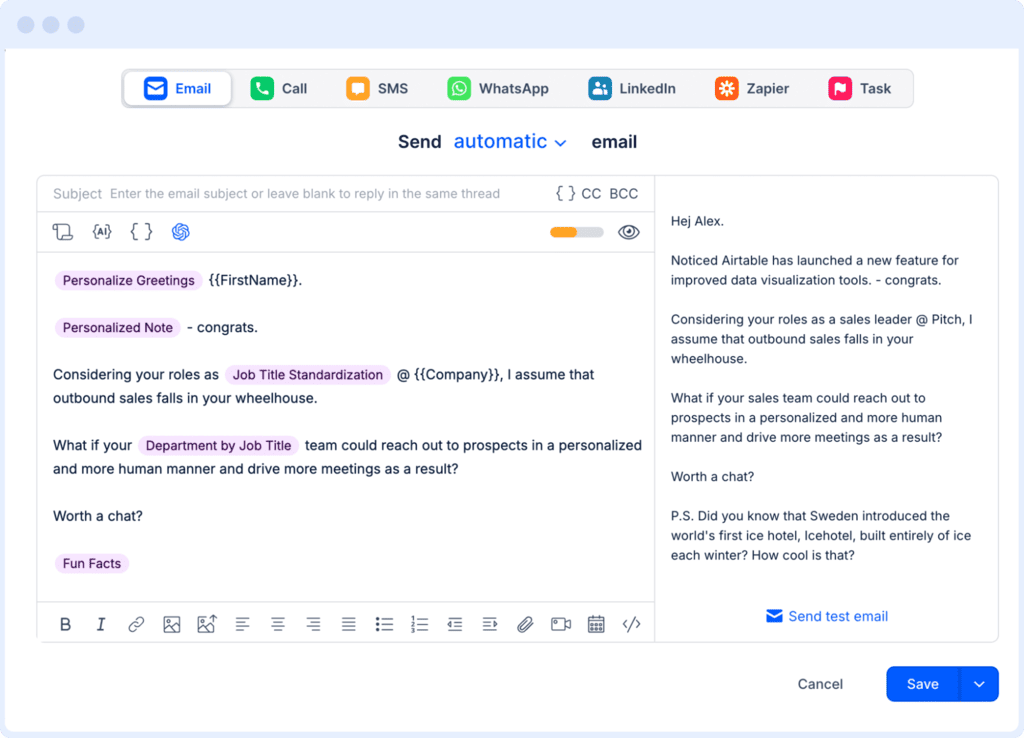
Now, with an AI outreach platform like Reply.io, even if you have thousands of potential leads, its AI engine will research each person and company from multiple sources (B2B lead database, LinkedIn, company websites, and more), and then use that context to hyper-personalize each and every email, follow-up, and LinkedIn message. And with its AI Variables feature, you can create your own email templates with custom variables, and Reply will research and fill in those gaps on autopilot before outreach:

Reply.io email editor with AI Variables like {{FirstName}} and {{Company}} for personalizing a sales outreach plan at scale

On the plan: the tier definitions and the share of contact budget each one gets.

Step 7: Set the numbers that decide stop, fix, or scale

Write the numbers that kill a campaign before you launch it. A plan without thresholds is how underperforming sequences run for a quarter because nobody agreed in advance what failure looked like.

Metric Healthy Investigate Stop and fix
Bounce rate Under 2% 2-4% Above 4%: re-verify the list
Spam complaints Under 0.05% 0.05-0.10% Approaching 0.30%: pause sending
Reply rate 5-8% 3-5% Under 2%: targeting or offer problem
Positive reply rate 4-6% 2-3% Under 2%: the offer isn’t landing

Always track positive replies separately, since out-of-office autoresponders or unsubscribe requests both technically count as replies, but flatten a number that then tells you nothing. Set the review cadence in the same breath: deliverability weekly, messaging every two weeks, ICP monthly.

On the plan: the threshold table and the review calendar.

How to execute your sales outreach plan

You now have the document “skeleton”. Execution is where most teams discover their plan quietly assumed the manpower they don’t have, since research, sequencing logic, deliverability monitoring, and reply handling all need an owner. Below are the practical steps to execute your sales outreach plan, along with how to leverage AI software like Reply.io or an AI sales agent like Jason AI for more efficiency and, most importantly, much better results.

In fact, if sales outreach is a critical part of your overall business strategy, an AI SDR like Jason AI can fully run your entire sales outreach plan. It first learns everything about your business, audience, and ICP, continuously finds targeted leads, researches and enriches them, and then uses that context to launch tailored outreach campaigns for each unique lead.

Turn the ICP into a live, scored list

The principle: a list has to refresh continuously, or the plan quietly degrades between reviews.

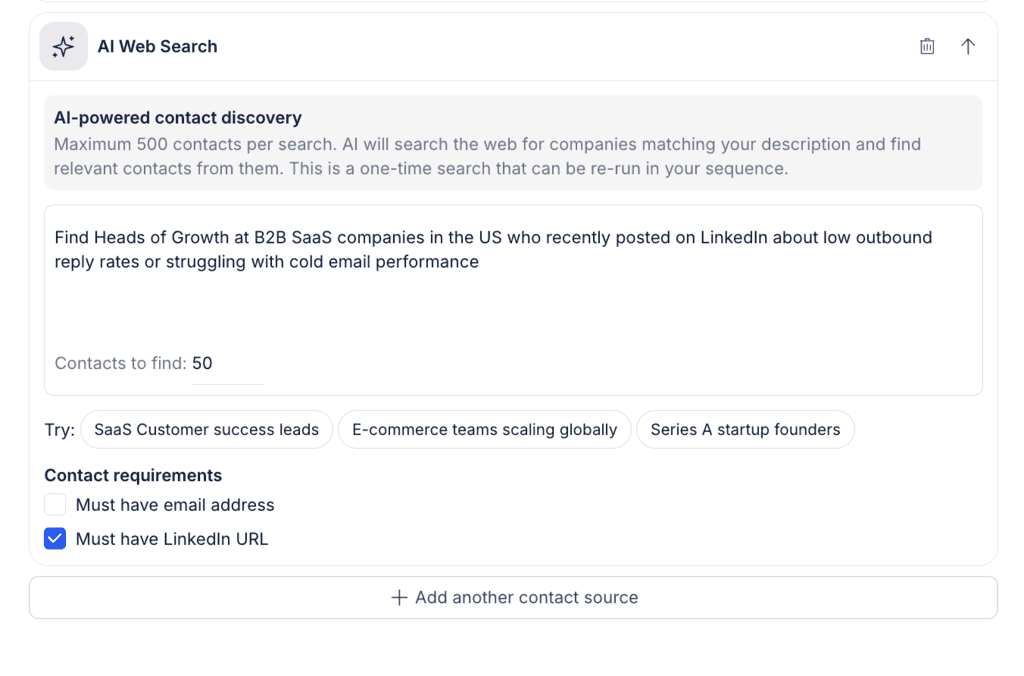
Reply Data’s filters handle the standard firmographic and technographic slicing. For ICPs that don’t fit into filter boxes, Jason AI’s AI Web Search lets you describe your ideal customer in plain language, including behaviours and situations that no static databases cover, and then finds those people across the web.

Jason AI's AI Web Search panel finding contacts from a plain-language description, part of executing a sales outreach plan

Competitor Followers is another Jason AI feature that pulls the audience already following one of your competitor’s pages and scores each contact against your ICP, so you start from existing category awareness instead of cold. Both allow Jason to score every lead against your ICP and won/lost deals (showing you its reasoning), which allows you to prioritize those who are most likely on the market at this very moment.

Build the cadence as a conditional sequence, not a calendar

The principle: static sequences send the identical follow-up to someone who clicked your pricing page and someone who never opened a single email.

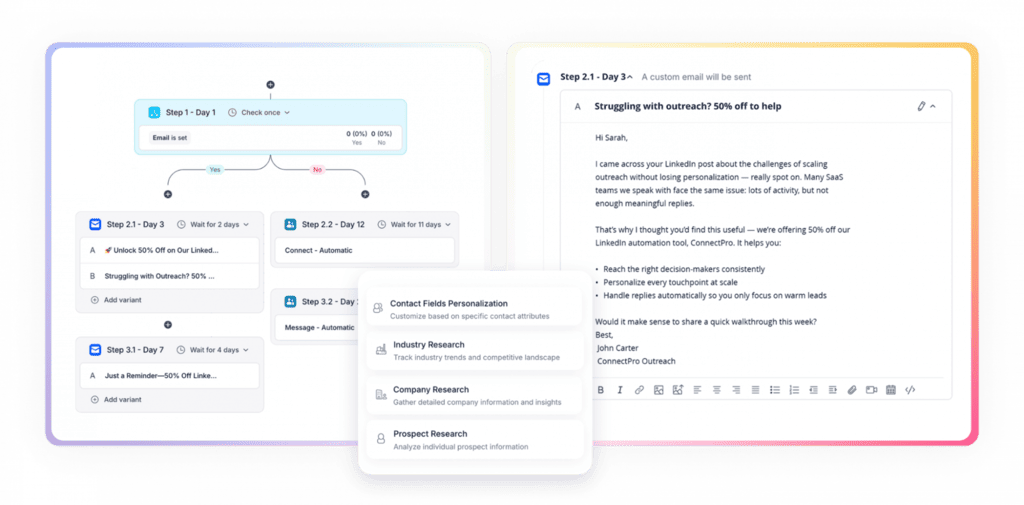
Reply and Jason both use conditional logic that makes each outreach sequence react to what your potential buyers actually do. No open after three days may trigger a LinkedIn connection request. Once the connection is accepted, it switches to a LinkedIn outreach path and cancels the queued follow-up. Pricing link visits move them into a more direct, CTA-driven branch, and so on.

Jason AI conditional sequence builder with branching steps and a sample email, showing how to build a sales outreach plan that reacts to buyer behavior

Personalize by tier without writing every line

The principle: research time is what limits manual personalization. Finding something relevant to say about each prospect is the expensive part, while writing the message around it takes minutes.

The only real solution here is to fully delegate this job to AI, which can research as many leads as you need across multiple sources across the web, keeping in mind your exact sales strategy and purpose of outreach.

It will then use all the researched data for completely tailored per-contact openers, value props, or CTAs. With Jason AI, you can go one step further and simply describe in plain language what insight you want for every prospect in the sequence, and it pulls that specific context across the whole list.

Layer in any relevant intent signals like recent funding, expansion into a new market, new technology deployed, and so on, and the moment Jason finds someone in your list who makes that trigger, they get more thoroughly researched and reached out to right away.

Protect the domain while you scale

The principle: Step 2 set the ceiling, and execution is about not drifting through it. Reputation damage is slow to appear and even slower to repair.

Once again, monitoring all the moving parts of email deliverability is very time-consuming, to say the least. The good news is that whether you go for an AI outreach platform like Reply.io or an AI sales agent like Jason AI, these tools fully cover deliverability quietly in the background.

Both Reply and Jason come with a built-in Email Health Checker that validates SPF, DKIM, DMARC, and DNS setup that it keeps monitoring in real time, native Google Postmaster integration that monitors your live spam rate so you never come close to the 0.3% limit, automated email warm-up, and unlimited mailboxes to spread your outreach volume instead of concentrating risk.

Handle replies fast enough to matter

The principle: reply speed compounds. A plan generating 40 replies a week is worth nothing if they sit unanswered for two days.

This is where Jason AI stands out among other AI sales agents, as it can autonomously classify incoming replies, answer common questions, handle routine objections, and even book meetings directly into your Google Calendar or Calendly. Jason’s answers will always follow your custom-set rules and guidelines, and follow clear hand-off rules for the more unique cases.

Approval Mode keeps you reviewing everything while you build trust in the output, and once specific sequences prove reliable, Automatic Mode takes them over.

Common sales outreach plan mistakes

5 failure modes that show up constantly, none of which are fixed by simply writing better copy:

  • Building the list before checking what the infrastructure can send → ambition isn’t the constraint here, but having four mailboxes is. Size the list to the ceiling you calculated, then spend the surplus on tighter targeting.
  • Treating multichannel as more touches → bolting LinkedIn onto an unchanged email cadence just doubles the pressure on the same person. Multichannel means redistributing touches across a coordinated outreach plan rather than stacking them.
  • Personalizing the opener but not the offer → a researched first line followed by an unchanged generic pitch reads worse than a clean template, because it demonstrates you looked and still didn’t adapt what you were trying to connect over.
  • Judging campaigns on open rates → Apple’s Mail Privacy Protection and image prefetching have inflated open rates to the point of uselessness. Replies, positive replies, and meetings booked are the only numbers that should drive decisions.
  • Rewriting copy when the problem is the list → most “our messaging isn’t working” diagnoses are targeting problems wearing a disguise. Check fit and timing before you commission a fourth subject-line rewrite.

Final thoughts

A sales outreach plan is only worth the thresholds written into it. Write the document, launch it under your actual volume ceiling, and let the first month’s numbers correct your assumptions instead of defending them.

The build itself is the easy part. Running it well means keeping the list live and updated, the sequences reactive to real-time triggers and events, the domain healthy, and the replies answered fast, every day. That second part is the one worth automating with an AI outreach platform like Reply.io or an autonomous AI sales agent like Jason AI.

FAQ

What’s the difference between a sales outreach plan and a sales outreach strategy?

A strategy is the bet: which market, which motion, why now. A plan is the executable version of that bet, with named owners, contact volumes, channel assignments, and pass/fail thresholds attached. If a new rep can’t run a campaign from it on day one, it’s still a strategy.

How many touchpoints should a sales outreach sequence have?

Eight to twelve touches across three to four weeks works for most B2B motions, with gaps that widen toward the end. More touches on one channel is not broader coverage, and stacking email follow-ups is the fastest route to a complaint rate you can’t recover from.

How do you keep cold outreach emails out of spam?

Authenticate with SPF, DKIM, and DMARC, keep the From domain aligned, and stay under the thresholds Google publishes: below 0.10% in Postmaster Tools, never approaching 0.30%. Then verify addresses before sending, warm new mailboxes gradually, and spread volume rather than concentrating it.

Can AI run a sales outreach plan on its own?

AI can run the execution layer end to end: sourcing, scoring, sequencing, personalization, reply handling, and booking. What it can’t do is decide your ICP, your positioning, or the thresholds that define success. Those are judgment calls, and an AI SDR executing a bad plan just fails faster.

Subscribe to our blog to receive the latest updates from the world of sales and marketing.
Stay up to date.

Related Articles

White Label LinkedIn Lead Generation w/ AI SDRs in 2026

White Label LinkedIn Lead Generation w/ AI SDRs in 2026

White Label LinkedIn Lead Generation w/ AI SDRs in 2026
How to Use Automated Sales Prospecting in 2026

How to Use Automated Sales Prospecting in 2026

How to Use Automated Sales Prospecting in 2026
How to Use Lead Prospecting in 2026 with AI SDRs (The Right Way)

How to Use Lead Prospecting in 2026 with AI SDRs (The Right Way)

How to Use Lead Prospecting in 2026 with AI SDRs (The Right Way)