

March is packed with updates that simplify parts of outreach that turn out to be the most difficult and very often slow you down the most – setting up sending infrastructure, finding the right prospects, booking meetings, and getting complete contact data. Here’s what’s new.
Buy domains and set up mailboxes without leaving Reply
Scaling outreach used to mean juggling multiple tools: buying a domain from one provider, configuring DNS records somewhere else, setting up mailboxes manually, then hoping everything connected properly. That’s gone now.
Reply lets you purchase domains directly from Google Workspace or Microsoft 365 and configure your mailboxes in the same flow. From there, warming happens automatically – so your new mailboxes build sender reputation safely and are ready to use without extra effort on your part.
The practical upside: when you need more sending capacity, you can add it the same day. No IT tickets, no context-switching, no waiting. More mailboxes mean more outreach, more replies, and more pipeline – without the setup headache.
And once they’re set up, everything lives in one place. Your mailboxes are a valuable sending asset – and Reply treats them that way. You get a clear view of the state of each mailbox, so you always know what’s healthy, what’s warming, and what needs attention. No more guessing which accounts are safe to use or frantically checking multiple dashboards.
There’s also a strategic advantage to buying from both Google Workspace and Microsoft 365. Mixing providers lets you distribute sending across different email ecosystems, which improves deliverability – especially when combined with Reply’s matching email provider feature, which automatically routes emails through the provider that best matches the recipient’s domain. The result is better inbox placement with no extra configuration.
To get started: Settings → Email Accounts → Purchase Domain. (Requires Beta features enabled.)
Build infrastructure and scale without limits
Add domains nowTarget companies by tech stack, hiring signals, and career moves
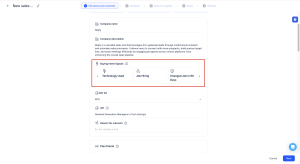
Jason AI SDR now supports three new intent signals that let you reach out to prospects at exactly the right moment – when context makes your message relevant, rather than random.
Technologies Used is the most precise targeting lever Jason has had yet. Instead of prospecting broadly, you can focus on companies already using tools that make your product a natural fit – or companies running a competitor’s solution where you have a clear alternative to offer. Since you know what’s already in their stack, Jason can reference it directly in the conversation, making every message feel researched rather than templated.
Job Hiring lets you identify companies actively recruiting for roles that signal buying intent. A company hiring five sales reps is probably also evaluating sales tools. A company posting for a data engineer likely has infrastructure decisions coming. Getting in front of those conversations early is a significant advantage.
Changed Job in 90 Days catches decision-makers in their most receptive window. New leaders are actively reassessing vendors, building their own processes, and open to conversations in a way they won’t be six months in. This signal puts you in front of them while the door is still open.
All three signals can be layered with ICP fit percentage and industry filters, so Jason only surfaces the prospects most likely to convert – not just the ones who technically match the criteria.
Run campaigns that are built to convert
Book a demoJason AI now books meetings for you – automatically
Meeting scheduling is one of those tasks that shouldn’t require human attention, and now it doesn’t. Jason AI can check your availability, propose times to prospects, book meetings, and handle cancellations – all without you stepping in. Everything syncs to the prospect’s card so your pipeline stays clean and current.
For teams already using AI replies to handle initial engagement, this closes the loop: Jason can take a prospect from first touch to booked meeting entirely on its own. Every hour you’re not chasing calendar slots is an hour you can spend on conversations that actually move deals forward.
Available on Email Volume, Multichannel, and AI SDR plans.
To set it up: Settings → Meetings → connect Calendly, then enable it inside your sequence under Jason AI / AI Replies. (Paid Calendly plan required. Currently in Beta.)
Let AI fill your schedule while you focus on closing
Add my calendarStop prospecting with incomplete data
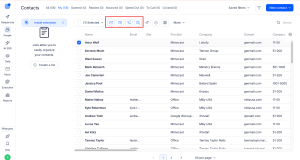
Incomplete contact records are a quiet productivity killer – you have the right company, the right person, but no email address or phone number to actually reach them. Reply’s enrichment now fills those gaps automatically.
If an email is missing, Reply searches public sources, generates candidates from the company domain, and verifies deliverability before adding anything to your list. You’re not getting guesses – you’re getting addresses that will actually land.
Phone enrichment works the same way: Reply searches for direct dial and mobile numbers, validates format and region, and adds them to the contact record. That means your contacts are ready for calling workflows without any manual research.
Combined with existing enrichment for LinkedIn URLs, job titles, and company data, your team can take a rough prospect list and turn it into a fully verified, multichannel-ready pipeline in a single workflow. The less time your team spends hunting for contact details, the more time they spend in actual conversations – and that’s where deals get made.
What’s New in Reply: Build Your Infrastructure, Reach Right People, Close Faster
Enrich your contactsTo wrap up
These March updates are about removing the operational overhead that gets between your team and actual selling. Set up infrastructure faster, find the right prospects sooner, let AI handle the scheduling, and start every conversation with complete data. Dig in and let us know what you think.
Subscribe to our blog to receive the latest updates
from
the world
of sales and marketing.
Stay up to date.




