What’s New in Reply: Jason Gets Smarter, Your Inbox Goes Mobile, and More

What’s New in Reply: Jason Gets Smarter, Your Inbox Goes Mobile, and More

Training an AI SDR shouldn’t feel like a part-time job. You want Jason to sound like your team, not like a chatbot wearing your logo – but getting there used to mean writing walls of prompts and correcting the same draft five different ways. Meanwhile, your actual outreach was scattered across your inbox, LinkedIn, Slack, and a phone that never stopped buzzing. Security wanted tighter controls on who could touch what. Sales wanted fewer tabs open, not more.

This July, we shipped enough updates to fix most of that at once. Jason picked up a real intelligence upgrade. Your whole workflow can now live inside Slack. Your inbox followed you onto your phone. And a batch of smaller fixes quietly cleared out friction you’ve been living with for months. Here’s everything that changed, and why it’s worth five minutes of your time.
Jason 4.5: Self-Learning AI SDR

Every time you rewrite a draft, you’re teaching Jason something. The problem was, he never remembered the lesson. You’d fix the same clunky opener, tone down the same overly formal line, or trim the same bloated intro, over and over, sequence after sequence.

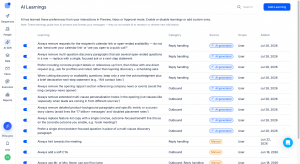
Jason 4.5 changes that. Now he watches what you edit – in Preview, in Approval, in the AI Draft view – and when you make the same kind of change a few times, he turns it into an AI Learning: a rule he applies automatically from then on. Every message also gets a thumbs up and thumbs down. Use them. Each tap is a data point on what “good” looks like to you.

Picture a rep who always deletes “Hope this finds you well” from cold opens. After the third edit, Jason stops writing it in the first place. That’s the shift: less time policing drafts, more time actually selling.

You stay in control the whole way. Every AI Learning lives in your settings, sorted into Reply Handling (how Jason responds to prospects) or Outbound Communication (how he reaches out first). Toggle it, edit it, delete it – nothing gets applied without a paper trail you can inspect.

Custom Playbook: Let Jason Build Your Sales Strategy

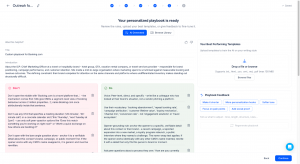
Writing a sales playbook from scratch takes real time, and a generic one rarely fits your actual buyers. Custom Playbook, a new step in Jason’s sequence generation, closes that gap by building the strategy for you.

It pulls from your offer, your ICP, your business context, and outreach best practices for your industry, then generates messaging that matches how your specific audience actually talks. Tone, terminology, message length, positioning – all tailored, not templated.

Say you sell to enterprise IT teams and to scrappy startup founders. Those are two different conversations. Custom Playbook writes each one in the right register automatically, instead of you manually rewriting the same sequence twice.

You’re never just accepting what Jason hands you. Review the generated playbook, edit it directly, regenerate it with a new prompt, upload your best-performing emails as a reference, or skip it entirely and build one manually or pull from the Playbook Library.

To try it, flip on Beta Features in your Account Settings, then start a new sequence and select Custom Playbook. Full details are in our support article.

Curious how Jason would build your playbook?

Book a demo

Jason AI Mobile App: Your Inbox, Wherever You Are

A hot reply doesn’t wait for you to get back to your desk. Until now, your outreach basically did.

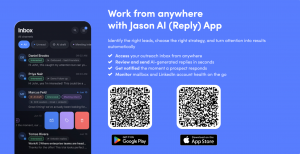
The Jason AI Mobile App puts your Reply inbox, AI-drafted replies, and real-time notifications in your pocket, on iOS or Android. Review, edit, and send AI-generated replies in seconds. Get pinged the moment a prospect responds. Check mailbox health and LinkedIn account status without opening a laptop. Sort conversations with the same labels and filters you use on desktop. And if you’re part of more than one team, the app now pushes notifications from all of them instead of just one, with the option to mute any team you’d rather not hear from.

Think about what that changes: you’re walking out of a client meeting, your phone buzzes, and a prospect just replied “let’s talk pricing.” You approve Jason’s draft from the elevator. By the time you’re in your car, the conversation’s already moving, instead of sitting untouched until tomorrow morning.

The app is available now for every Reply user, no extra setup beyond downloading it.

Promo banner: left side shows a dark inbox app interface, right side title and bullet benefits on a blue background with two QR codes and app-store badges


AI Voice Messages: LinkedIn Outreach That Sounds Human

AI-generated voice messages have a tell: they sound like AI generated them. Flat pacing, no breath, no personality. Recording your own, on the other hand, doesn’t scale past your fifth message of the day.

The latest update splits the difference. Write your voice message and hit Enhance, and the AI layers in natural pauses, breathing, laughter, and emphasis, so it sounds like a person talking instead of a script being read. You can also add optional background noise, a busy restaurant, a street with car horns, office chatter, a park with birds, to make the message feel recorded in a real place instead of a studio.

There’s also a custom dictionary with transcription support, so names, company names, and industry acronyms get pronounced correctly every time. Add “Nguyen” once, with the right phonetic spelling, and every future message to that account gets it right automatically.

The payoff is simple: your voice notes stand out in a LinkedIn inbox full of text, feel like a real person took the time, and start more conversations that turn into meetings.

Agentic Chat in Slack: Run Reply Without Opening Reply

Checking campaign performance, pausing a sequence, approving a draft – none of that should require four browser tabs and a login. Agentic Chat now connects directly to Slack, and it picked up dozens of new actions along the way.

Ask it in plain English, right in Slack, and it acts: 

  • manage contacts, sequences, inbox conversations, and tasks; 
  • review and approve AI-generated messages; work with AI SDR assets like Offers, Playbooks, Knowledge Bases, and Reply Handlers; 
  • search the web for current information; 
  • pull answers from your Reply Knowledge Base; even find Help Center articles.

A manager notices a sequence’s reply rate dip mid-morning. Instead of logging into Reply, digging through settings, and clicking pause, they type one line in Slack: “pause the Q3 outbound sequence.” Done, without leaving the channel they were already in.

Setup takes three steps: open Agentic Chat, go to Settings, and enable the Slack integration. The full list of supported actions is in the Help Center.

Tired of switching tabs just to keep your pipeline moving?

Try for free

API Key Scopes: Share Access Without Sharing Everything

Until now, a Reply API key was all or nothing. Hand one to a contractor, a partner, or a third-party integration, and you’d handed over full access to your entire account, contacts, sequences, inbox, settings, all of it.

Scoped API keys fix that. You can now create keys with one of four permission levels, None, Read, Operate, or Full, set independently for each module: Contacts, Sequences, Channels, Inbox, AI SDR, Tasks, Reporting, Webhooks, and Settings. 

The key secret is shown once at creation; after that, only a partial hint remains visible. Every endpoint’s required scope is documented, so there’s no guessing what a key can and can’t touch.

Say you’re integrating a reporting tool a contractor built. Instead of handing over a key with full account access, you create one scoped to Reporting: Read only. They get exactly what they need, and nothing they don’t.

Worth knowing: this doesn’t retroactively touch your existing keys. Legacy keys keep working exactly as before, full access, no changes, until you decide to replace them with a scoped one.

Reply MCP, New Version: Turn Any AI Assistant into a Reply Power User

Connecting an outside AI assistant to your Reply account used to mean a fairly limited MCP server. The new version widens that considerably.

Any MCP-compatible assistant, Claude, ChatGPT, or a custom agent, can now find, create, and update contacts and lists; inspect and run sequences, including assigning channels and schedules; pull analytics for one sequence or compare several side by side; read and reply to inbox emails; manage tasks; list connected channels and team members; and search your Knowledge Base or Help Center. It also handles the full AI SDR toolkit: Offers, Playbooks, Knowledge Bases, Reply Handlers, Reengagement Cards, and message Approvals.

Ask your assistant, “which of my sequences has the best reply rate this month?” and it checks live, through the MCP connection, no export, no dashboard, no tab switch.

One limit worth flagging: this connects as a single user, through a personal API key or OAuth. Team, workspace, or organization-level keys aren’t supported yet.

A Few Smaller Upgrades Worth Knowing About

Not everything needs its own headline. This batch is smaller, but you’ll feel it in your day-to-day.

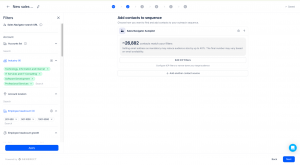
Audience estimation ( Sales Navigator search in Jason AI SDR): before you commit to a search, you can now see the approximate number of LinkedIn contacts your filters would return. It’s a rough map of your addressable market, not a final headcount, but enough to tell you whether your filters are too narrow before you spend a single credit.

Interface for adding contacts to a sequence: left filter panel with industry tags, right shows about 26,882 matching contacts and an Edit ICP Filters button.

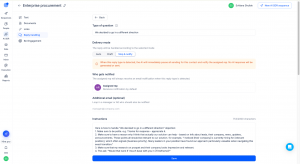
Stop & Notify for AI SDR reply handling: some replies, pricing objections, security questionnaires, legal terms, shouldn’t get an AI-generated answer. Set a Reply Handler to Stop & Notify, and Jason pauses automation and emails the original point of contact everything needed to take over, contact details, sequence, matched trigger, and the prospect’s message, instead of guessing.

Reply handling settings in Enterprise procurement: type of question, delivery mode Stop & notify, assigned rep notification, optional extra email, and instructions with Save.

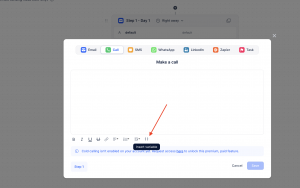
Variables for Call Steps: you can now drop the same {} variables you already use in email and LinkedIn messages straight into your call scripts, so reps stop hand-typing prospect names and company details before every call.

Modal titled 'Make a call' with top action chips (Email, Call selected, SMS, WhatsApp, LinkedIn, Zapier, Task) and a large text editor area showing a formatting toolbar and an 'Insert variable' tip.

Docx uploads in the Knowledge Base: drop a .docx file in directly. No more converting it to PDF first just to feed Jason your product docs.

None of these will make a headline on their own. Together, they’re a few less annoyances standing between you and outreach that runs itself.

The Bigger Picture

Line these updates up and a pattern shows: Jason is getting sharper at sounding like you, your workflow is showing up wherever you actually are, and the guardrails, human handoffs, scoped API access, are catching up to how seriously teams now rely on this stuff. That’s not a coincidence. It’s what happens when an AI SDR and a sales engagement platform are built to work as one system instead of two products bolted together.

None of this replaces your team. It gives them back the hours they were spending on prompt-writing, tab-switching, and manual playbooks, so they can spend it on the parts of selling that still need a human. Whether you’re scaling outbound with Jason or running your team’s engagement through Reply, July’s updates are built to make the whole operation faster without making it riskier.

Subscribe to our blog to receive the latest updates from the world of sales and marketing.
Stay up to date.

Related Articles

11 Best Intent Data APIs in 2026 to Find Ready-to-Buy Leads

11 Best Intent Data APIs in 2026 to Find Ready-to-Buy Leads

11 Best Intent Data APIs in 2026 to Find Ready-to-Buy Leads
11 Best Email Finder APIs in 2026 for Cold Email

11 Best Email Finder APIs in 2026 for Cold Email

11 Best Email Finder APIs in 2026 for Cold Email
11 Best AI Prospecting APIs in 2026 to Find More Leads

11 Best AI Prospecting APIs in 2026 to Find More Leads

11 Best AI Prospecting APIs in 2026 to Find More Leads