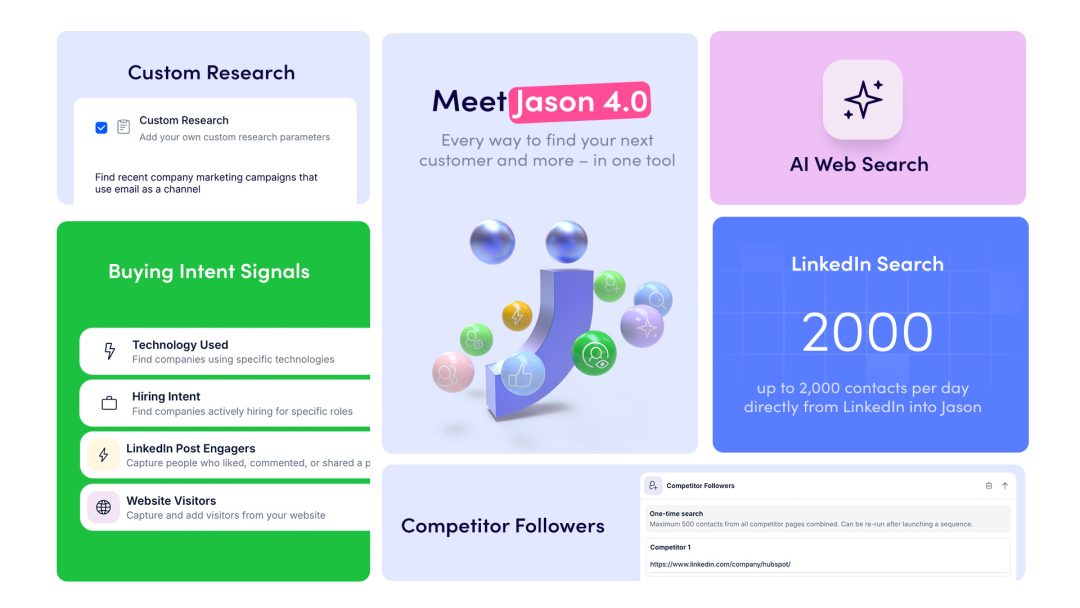
What’s New in Reply: Meet Jason 4.0 – Your End-to-End AI SDR

What’s New in Reply: Meet Jason 4.0 – Your End-to-End AI SDR

Outbound has never really been one process.

You find leads in one place, research them somewhere else, write messages in a different tool, and then spend hours managing replies and follow-ups. Even when everything works, it feels stitched together.

Jason 4.0 changes that.

This is the biggest update we’ve shipped this year – a new generation of AI SDR designed to run outbound as one continuous workflow. From sourcing to personalization to conversion, everything now happens inside one system.

Not as separate steps. As one flow.

Here’s what that means in practice.

Meet Jason 4.0: run your entire outbound in one workflow

Finding the right buyer has always been the hardest part of outbound. And in 2026, it’s only getting harder.

Databases go stale faster than they update. Filters flatten your ICP into something generic. Buying signals appear and disappear before you can act on them. And even when you find the right people, personalization rarely scales the way you want it to.

Solving that usually means adding more tools. More tabs. More manual steps. More cost. Most teams end up running a stack that costs thousands per seat, just to keep the process moving.

Jason 4.0 was built to remove that entire layer.


It’s an AI SDR designed around prospecting, but built to handle everything that comes after. Not as separate steps, but as one continuous flow where sourcing, scoring, research, outreach, and conversion all work together.

What this means in practice becomes clear once you look at how Jason actually runs outbound.

It starts with finding the right people.

Jason 4.0 doesn’t rely on a single sourcing method because your ICP doesn’t live in a single place. Some buyers show up through hiring signals or technology changes. Others are actively engaging with content. Some follow your competitors. Some are already sitting in your CRM. And some are too specific for any filter to capture.

Instead of forcing you into one approach, Jason gives you nine different sourcing methods, including AI Web Search, where you describe your ideal buyer in plain language and Jason finds them across the web.

The shift here is subtle but important. You stop adapting your strategy to your tools, and start matching your sourcing approach to the campaign you want to run.

Once leads are found, Jason decides who is actually worth reaching.

Instead of sending outreach to everyone who technically matches a filter, Jason scores every contact against your ICP. You define the threshold once, and only the leads that meet your bar move forward.

That changes list quality dramatically. Your team is no longer working through mixed lists where half the leads were never a fit. Every sequence starts with people who are much more likely to convert.

But finding the right people is only the beginning.

Jason then runs research on every contact automatically. It looks at signals like recent activity, hiring trends, company changes, and public data points that indicate what’s happening inside that business right now. And if you need something more specific, you can define your own research prompt and shape exactly what context gets extracted.

This research doesn’t sit separately. It feeds directly into the message.

So instead of writing generic outreach, every email starts from a real, relevant insight. Something that connects naturally to your value proposition. Something that feels like it was written after spending time understanding the prospect.

From there, Jason handles how the message is delivered.

Email alone is no longer enough. Jason runs multichannel outreach across email, LinkedIn, and calls in one coordinated sequence. Messages are spaced, adapted, and followed up automatically, so your outreach feels consistent without becoming repetitive.

What used to require multiple tools and manual coordination now runs as one system.

And finally, everything comes together in the outcome that matters most.

The combination of better sourcing, stronger qualification, deeper research, and coordinated outreach results in messages that actually feel relevant. Not “personalized” in a superficial way, but grounded in real context.

That’s why replies change. Instead of being ignored, your messages start conversations. Conversations turn into meetings. Meetings turn into pipeline.

This is what outbound looks like when every part of the process works together.

Let Jason 4.0 run outbound end-to-end

Add domains now

Use AI Web Search to find hyper-specific prospects

Most teams eventually hit the same wall with prospecting.

You know exactly who you want to reach, but you can’t express it through filters. The more specific your ICP becomes, the harder it is to find those people in traditional databases.

AI Web Search flips that dynamic.

Instead of adapting your thinking to fit filters, you describe your ideal customer the way you naturally would. You can include behaviors, signals, technologies, or even very specific situations – and Jason goes out and finds those people across the web.

What changes is not just how you search, but what becomes possible.

You can finally target those narrow segments that were always “almost reachable.” You can experiment with new audiences without rebuilding workflows. And because the data comes from real context, your outreach starts with something meaningful to say.

This is where prospecting becomes less mechanical and more strategic.

To use it, go to People, choose Add Contacts, and select AI Web Search.

Find prospects your filters could never reach

Book a demo

Personalize every message with Custom Research

There’s a moment in every outbound campaign where personalization becomes the bottleneck.

You either keep it simple and lose relevance, or go deep and lose scale.

Custom Research removes that trade-off.

Now, you can define exactly what kind of insight you want for each prospect in plain language. Jason takes that prompt and applies it across your entire sequence, pulling context from public sources and turning it into usable personalization.

What makes this powerful is not just automation, but flexibility.

You’re no longer limited to predefined fields or categories. You can align personalization directly with your value proposition. You can test different angles. You can tailor messaging for niche audiences that previously required manual work.

And because this runs automatically, every message feels intentional without slowing you down.

To enable it, open your sequence settings, go to Personalization points, and select Custom Research.

Personalize outreach on autopilot

Book a demo

Reach warm audiences with Competitor Followers

Starting conversations from scratch is always harder than continuing one that already exists.

Competitor Followers gives you access to audiences that are already paying attention to your category. People who follow similar companies have already shown interest – they just haven’t heard your perspective yet.

Instead of building lists from zero, you can now enter existing demand.

You simply provide a competitor’s company page, and Jason pulls the audience, evaluates each contact against your ICP, and filters out the noise. What you get is not just a list, but a qualified group of prospects who are more likely to engage.

This changes the tone of your outreach. You’re no longer introducing a problem – you’re joining an ongoing conversation.

To use it, go to People, select Add Contacts, and choose Competitor Followers.

Start with prospects who already care about your category

Book a demo

Import LinkedIn contacts directly – no extension required

LinkedIn has always been one of the most valuable sources of leads. It has also been one of the most inconvenient to operationalize.

Switching tools, relying on extensions, dealing with interruptions – all of it slows you down.

Now, that friction is gone.

You can take any LinkedIn or Sales Navigator search, paste it into Reply, and immediately turn it into a working list. No extra setup, no dependencies on browser sessions, no interruptions in your workflow.

What this really gives you is speed.

You move from idea to execution faster. You test campaigns without delays. You keep your sourcing process clean and predictable.

And once the contacts are in, they’re ready to be enriched, qualified, and added to sequences without leaving the platform.

To get started, go to People, choose Add Contacts, and select LinkedIn Search.

Connect Reply to your entire workflow with n8n

Outbound doesn’t stop at sending messages. Every reply, click, and interaction is a signal – and what you do with those signals determines your results.

With the n8n integration, those signals don’t sit idle anymore.

The moment something happens in Reply, it can trigger actions across your entire stack. A reply can create a deal. A high-intent lead can notify your team. A sequence can pause automatically when conditions change.

What used to require manual coordination now happens instantly.

This is where outbound becomes part of a larger system. Not isolated activity, but a connected process that reacts in real time.

Setting it up takes just a few minutes through the Integrations tab.

Final thoughts

Jason 4.0 is not about adding more features.

It’s about removing the gaps between them.

When sourcing, research, personalization, and execution work as one system, everything becomes faster, more relevant, and easier to scale.

You spend less time managing the process – and more time seeing results.

Explore Jason 4.0 and see how your outbound changes when everything finally works together.

Subscribe to our blog to receive the latest updates from the world of sales and marketing.
Stay up to date.

Related Articles

How to Use Reply.io + Jason for Lead Generation for Software Companies in 2026

How to Use Reply.io + Jason for Lead Generation for Software Companies in 2026

How to Use Reply.io + Jason for Lead Generation for Software Companies in 2026
Top 12 GTM Outbound Sales Platforms to Try in 2026

Top 12 GTM Outbound Sales Platforms to Try in 2026

Top 12 GTM Outbound Sales Platforms to Try in 2026
How to Use Reply.io + Jason for B2B Demand Generation in 2026

How to Use Reply.io + Jason for B2B Demand Generation in 2026

How to Use Reply.io + Jason for B2B Demand Generation in 2026