
How to Build and Use an Automated Follow Up System in 2026

How to Build and Use an Automated Follow Up System in 2026

Deals stall for all kinds of reasons, and the most common one is embarrassingly simple: somebody meant to follow up and never got around to it. Woodpecker’s analysis of over 20 million cold emails found that 42% of all replies come from follow-up steps, while 48% of reps send nothing at all once their first email goes unanswered.

Automating the send takes care of that much, but the harder problem in 2026 is working out what the next touch should be for each individual prospect and when, and that’s where most systems still fall short.

In this article, we’ll break the follow-up system into its two key layers, help you choose between them, and walk through the six steps to build one.

What is an automated follow up system?

An automated follow-up system is software that watches what a prospect does (and doesn’t do) after your first touch, then sends the right next message, on the right channel, at the right time, without anyone having to remember.

That last part is where most definitions stop, and it’s why so many teams end up disappointed with what they bought.

Plain email automation *schedules*. You write four emails, set them three days apart, and they go out on a timer whether the prospect ignored the first one, clicked your pricing page twice, or accepted your LinkedIn request that morning.

An automated follow-up system *reacts*. It reads engagement, pauses the second someone replies, and switches paths when the signal or behavior changes.

Which means every follow-up system really has two layers:

  • The execution layer → whether the touch goes out, on time, to the right person, without a rep in the loop.
  • The decision layer → what that touch should be. The channel, the angle, and the moment.

The execution layer is solved, since virtually every tool on the market handles it. The decision layer is where results now live, and it’s why two teams running near-identical sequences end up with wildly different numbers. If you want the practical version of this, we’ve covered specific AI-driven follow-up methods separately.

Why automated follow-ups stopped being enough

Because by 2026 everyone has them, including the several other vendors emailing your prospect this week.

The platform-wide cold email reply rate has fallen from 5.1% in 2024 to 3.43% in 2026, according to Instantly’s benchmark report. The causes are inbox saturation, tighter Gmail and Outlook enforcement, and a flood of low-effort AI-generated outreach. Automated follow-ups have become the entry fee for competing at all.

The gap between average and elite, though, has never been wider. Campaigns run as an actual system still land in the 10-18% range, on the same tools and the same channels as everyone else.

Gartner puts a sharp point on it, concluding that by 2028, AI agents will outnumber human sellers by ten to one, yet fewer than 40% of sellers will say those agents improved their productivity. Simply “more” automation buys you more digital activity, but not much more pipeline.

What separates the two groups is interpretation. The systems that actually perform well read previous interactions, enriched contact and company data, and live intent signals before they act, and only then decide the angle, the channel, and the moment for each specific person rather than for an entire segment, and they do it across thousands of leads at once.

That’s the whole job in 2026, and there are two very different ways to buy it.

The 2026 AI outreach playbook

Your AI can write emails. But can it get replies? Discover how to combine ChatGPT with Jason AI SDR to run outreach 24/7, avoid reply-killing mistakes, and send campaigns that feel handcrafted—without spending hours on research.

The two layers of an automated lead follow up system

You have two architectures to choose from, and they differ less in what they can do than in who’s holding the wheel.

Layer 1 is orchestration: you define the strategy and the rules, and the platform executes them across every channel. Layer 2 is an AI agent: you define the guardrails, and it runs the motion end to end, including everything that happens after someone replies.

Layer 1: orchestration Layer 2: AI agent
Who owns the strategy You The agent, within your playbook
Who builds the sequence You, or AI-assisted The agent, per prospect
Who decides channel and timing Conditional rules you set The agent, from live signals
Who handles replies Your reps The agent, with approval mode
Who books the meeting Your reps The agent, into your calendar

Layer 1: multichannel outreach with automated follow-ups

The first layer is a sales engagement platform running one cadence across every channel your buyers actually use: email, LinkedIn (profile visits, connection requests, DMs, voice notes), calls through an integrated dialer, plus SMS and WhatsApp where they fit. One sequence, instead of five disconnected tools with no idea what the others did.

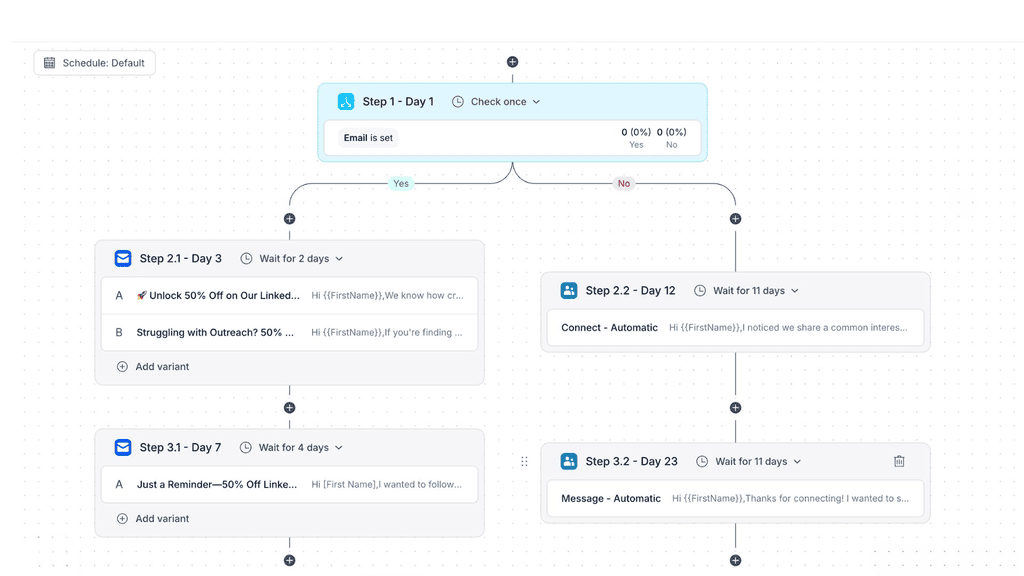
With an AI-powered outreach tool like Reply.io, what makes this really work is the conditional logic, more than the availability of multiple channels themself. This allows each campaign to not only be automated but also adjust the channel, message, and timing in real time based on the engagement level and actions of each individual lead.

Reply.io sequence builder showing a branching automated follow-up cadence with conditional Yes/No paths across email and LinkedIn steps

Say a prospect opens your first email and doesn’t reply, and three days pass. A basic tool fires follow-up #2 into the same inbox that already ignored you, whereas Reply may send an automated LinkedIn connection request and pause the email branch.

If they accept, a short personalized LinkedIn message goes out and the scheduled email follow-up gets cancelled. Had they clicked your pricing link instead, they’d have been moved into a shorter, more direct sequence with a “book time” CTA.

The same prospect can therefore travel four different routes through one sequence, with every turn decided by something they actually did.

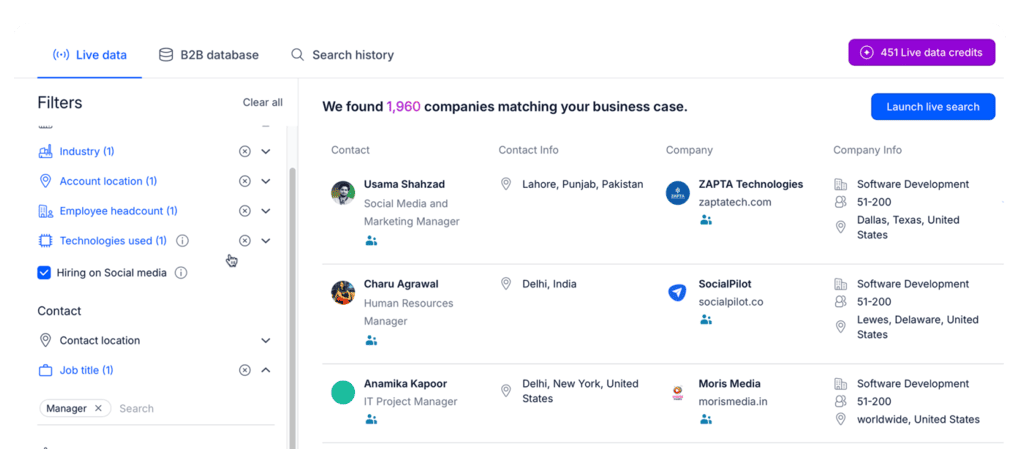
For any of that to work, the system needs concrete data in real time to decide on, and Reply Data supplies it. It’s a native lead database with 1B+ live contacts and accounts across 150+ countries, plus built-in enrichment for records that arrive from your CRM missing a role, a LinkedIn URL, or a headcount.

Reply Data live search results showing 1,960 companies matching a lead search, with contact and company details

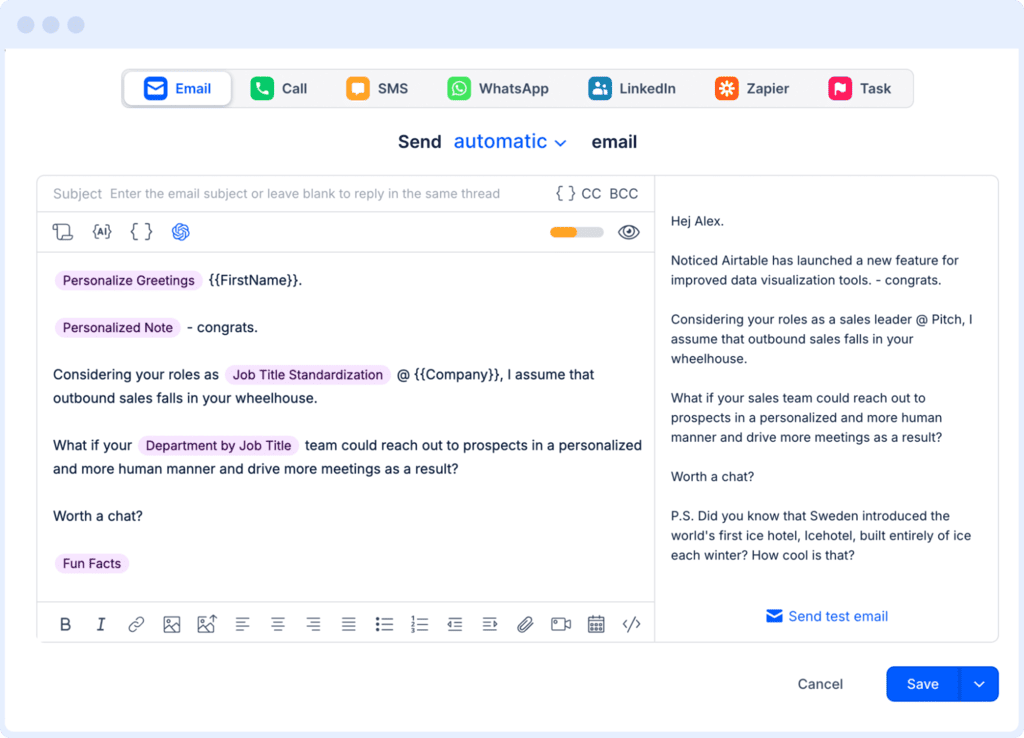
AI personalization then generates the opener, the value prop, and the CTA per contact, pulling from structured fields and unstructured signals alike: a recent LinkedIn post, something on their website, company news, and so on. When a prospect changes jobs or their company announces a raise, intent tracking surfaces it into the next touch instead of letting it pass unnoticed.

Reply.io email step editor showing AI-personalized variables like job title standardization inserted into a follow-up message

Timing is a decision too, and an underrated one. Send windows, per-step delays, and time-zone handling stop your 9am follow-up from landing at 3am local. A/B tests run on subject lines, hooks, and CTAs so the sequence sharpens itself over time.

For most teams, this is what an automated lead follow-up system looks like when you still want to own the strategy yourself.

Layer 2: an AI agent that runs the whole follow-up motion

The second layer changes what you actually do day to day. You stop building sequences and start defining the rules of the game.

With an AI sales agent like Jason AI, you train it on your product, your ICP, your tone, and your objection handling. The AI SDR Playbooks feature holds all of that as reusable rules: which angles to lead with, which proof points to use, which topics to avoid, and how the message shifts between a founder and a VP of Sales.

From there, Jason AI works on its own, finding leads through advanced ICP scoring, LinkedIn activity tracking, and website visitor tracking, and attaching a score, a label, and its reasoning to each one so you can see why it picked them.

Once Jason finds the right leads and researches them for more context, it right away builds sequences per prospect, with channels, structure, and timing recommended from patterns across millions of campaigns. Then the same conditional branching runs, except Jason builds and then manages those branches in real time.

https://www.youtube.com/watch?v=q5wz44kx5dU

It also handles the replies, which is where most tools in this category stop.

Jason classifies incoming messages, answers common questions, works through simple objections, and shares the right resource at the right moment. You keep it in Approval Mode while you build trust, reviewing everything before it goes out, then switch specific sequences to Automatic Mode once the quality is up to your standard.

When someone says yes, it connects to Google Calendar and Calendly, proposes times, sends the invite, and avoids double bookings. Prospects who go quiet get reopened or moved into long-term nurture, all based on custom rules you set.

Which layer should you actually start with?

Start with layer 1 if you already have opinions about your messaging that you want to keep, and start with layer 2 if nobody on your team currently owns top-of-funnel. Here’s the longer version of that answer:

Layer 1 fits when:

  • You have a CRM and at least one SDR who can read the data and act on it
  • Your volume is moderate and your ICP is already tight
  • You want to own the strategy and see exactly why each branch fired
  • Per-seat pricing suits how your team is structured

Layer 2 fits when:

  • Replies are piling up unanswered because there’s nobody to work them
  • You’re entering a market or segment you have no rep for
  • The realistic alternative is hiring another SDR
  • You want the loop closed all the way through to a booked meeting

None of this is a maturity ladder. Plenty of large, well-resourced teams stay on layer 1 deliberately, because they have strong opinions about messaging and want a human making the calls. One thing that de-risks the decision: layer 2 sits on top of layer 1. Same data, same sequence engine, same deliverability stack. Moving between them isn’t a migration.

How to build an automated follow up system in six steps

Whichever layer you land on, the build order is the same. Do these out of sequence and you’ll spend month two debugging month one:

1. Get the data right first

Every lead lands in one place, carrying the fields the decision layer actually needs: role, seniority, headcount, LinkedIn URL, source, and last engagement date. Enrich whatever’s missing before the first send goes out.

A system that decides can only decide on what it knows. Feed it a spreadsheet of names and email addresses and you’ll get exactly the same generic messages and follow-ups you were trying to escape in the first place.

The good news is that whether you choose an AI outreach platform like Reply.io or an AI agent like Jason AI, you get a built-in lead database with enrichment and intent signals, so your automated follow-ups will always be based on concrete, relevant, and real-time data.

2. Define your triggers, and your exit conditions

Triggers are the easy half. The usual set is: no reply after 3–5 days, opened but no click, pricing page visit, link click, positive reply, dormant for 14+ days.

Exit conditions are the half people skip, and they’re what stops the system embarrassing you. Any reply kills the sequence, and so does a booked meeting, an unsubscribe, or a job change that makes your message wrong or irrelevant. Write these before you write a single email.

3. Build 4–7 touches, spaced unevenly

Woodpecker’s data puts campaigns with 3-5 follow-up steps at an 8.3% reply rate, against 4.1% for sequences with no follow-ups at all. Past four follow-ups, spam-complaint and unsubscribe risk triples, so more isn’t automatically the answer.

Vary the intervals: three to four days to the first follow-up, five to seven to the second, seven to ten after that. Identical gaps read as automation to a human and as a pattern to their email client’s spam filter.

And remember, every touch has to add something, be it a new angle, a relevant proof point, news from their world. “Just checking in” is the worst-performing line in outbound, because it announces you have nothing to say. Our guide to writing AI follow-up emails goes deeper on the copy itself.

4. Write the branching rules for every step

Alongside the copy, define what happens on each outcome. Opened, no reply → which branch fires. Clicked a link → which branch fires instead. LinkedIn request accepted → what gets paused. No signal at all → what happens next.

This is the step that separates a follow-up system from a scheduler, and it’s the one almost everyone skips.

5. Protect deliverability before you scale

Get SPF, DKIM, and DMARC configured properly, warm up new inboxes before they touch a live campaign, and set daily caps, throttling, and ramp-up rules. Ideally, you should rotate sending across multiple inboxes and domains, and verify your list to keep bounces under 2%.

Gmail enforces a spam-complaint threshold under 0.1% for bulk senders. Cross it, and you get actively rejected rather than quietly filtered, and inbox placement is far harder to win back than it is to protect.

6. Measure at reply level and tighten

Each month, pull the two worst-performing steps and rewrite them. Test one variable at a time. Sequences nobody touches after launch decay quietly, and you usually notice a quarter too late.

How do you know the automated lead follow-up system is working?

Two numbers answer that: reply rate and meetings booked. Everything else on the dashboard is a diagnostic for those two.

Metric What it tells you When to act
Reply rate by step Which touch is dead weight Any step under 1%
Positive reply rate Whether targeting or copy is the problem It drops while total replies hold
Lead response time Whether speed is costing you deals Over an hour on inbound
Meetings per 100 contacted The only number that maps to pipeline Trending down two months running
Drop-off point Where the sequence loses people One step causes most exits

One trap worth naming is that the open rate is directional at best now. Apple Mail Privacy Protection pre-loads tracking pixels, which means a large share of your reported “opens” are a bot loading an image rather than a person reading your email.

The solution? Always optimize for replies, not simply opens.

Getting started

Sending the follow-up was solved years ago, so the work that’s left is deciding what each one should say, on which channel, at what moment, for one specific person. That decision is what still separates a full pipeline from a busy one.

So pick the layer that matches who owns strategy on your team today. Build the six steps in order, and don’t scale volume until deliverability is handled. Then let the system make those calls at a scale no rep could match on their own.

FAQ

How many follow-ups should you send, and how far apart?

Four to seven total touches, including the first email. Space them unevenly: three to four days to the first follow-up, five to seven to the second, seven to ten after that. Past four follow-ups, spam and unsubscribe risk climbs faster than your reply rate does.

How do you automate follow-ups without sounding like a robot?

Go deeper on each message rather than sending more of them. Woodpecker’s data shows research-backed personalization, meaning a specific article they wrote, a funding round, or a named pain point, averaging 17–18% reply rates against 7–9% for merge-tag basics like {{first_name}}. What prospects actually notice is emptiness, so put something in every message that could only apply to them.

What’s the difference between an automated follow-up system and an AI SDR?

An automated follow up system executes decisions you defined in advance. An AI SDR makes the decisions itself, building the sequence, choosing the channel, handling the reply, and booking the meeting. Here’s a fuller breakdown of what an AI SDR actually does.

Will an automated follow-up system hurt my email deliverability?

Only if you skip the fundamentals. Authenticate with SPF, DKIM, and DMARC, warm up every new inbox, cap daily volume, rotate across inboxes and domains, and verify your list to keep bounces under 2%. Done properly, an automated system is safer than manual sending, because the volume controls are enforced rather than remembered.

What does the best automated lead follow up system cost?

Per-seat sales engagement platforms run roughly $49–$89 per user per month, depending on whether you need LinkedIn, calls, and SMS alongside email. AI agents that handle the full motion, replies and booking included, start around $500/month for 1,000 active contacts. The best automated lead follow up system for you is the one that matches who’s making the decisions on your team.

Subscribe to our blog to receive the latest updates from the world of sales and marketing.
Stay up to date.

Related Articles

How to Build a B2B Marketing Automation Strategy for 2026 and Beyond

How to Build a B2B Marketing Automation Strategy for 2026 and Beyond

How to Build a B2B Marketing Automation Strategy for 2026 and Beyond
Best AI GTM Agent Tools for Future-proof B2B Teams in 2026

Best AI GTM Agent Tools for Future-proof B2B Teams in 2026

Best AI GTM Agent Tools for Future-proof B2B Teams in 2026
Best Sales Intelligence APIs in 2026 for Revenue Teams

Best Sales Intelligence APIs in 2026 for Revenue Teams

Best Sales Intelligence APIs in 2026 for Revenue Teams