Moving forward with your email outreach
As we’ve stated earlier, it usually takes 2-3 weeks to get your newly created email account ready for outreach. If you follow a consistent sending schedule and ensure positive engagement, your sender reputation can build up even faster.
However, this doesn’t mean that you can launch a full-scale cold outreach sequence the very next day. Rushing to increase the number of sent emails will likely result in deliverability issues and can seriously damage your reputation.
In this case, there are two things to consider:
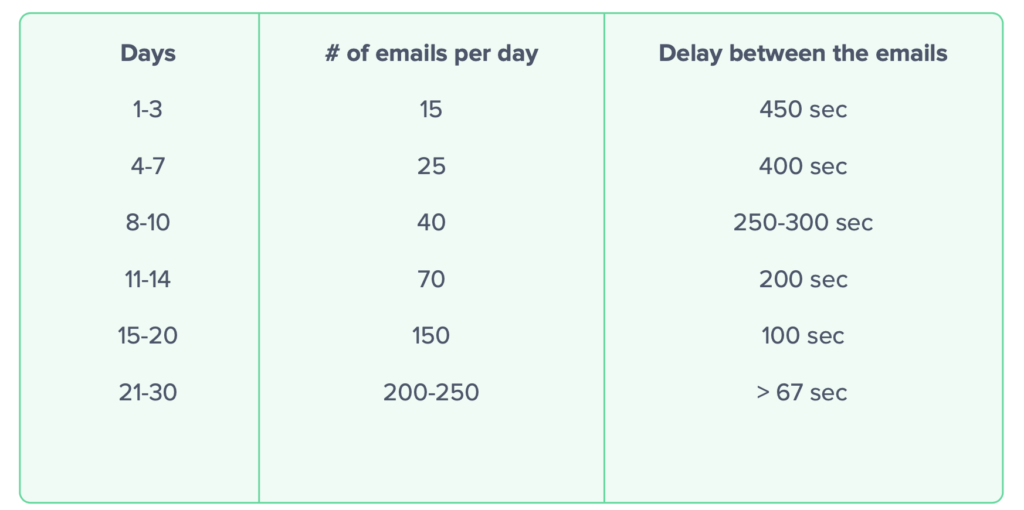
- First, gradually increase the sending volume to avoid raising any red flags. You can follow the schedule featured above to consistently increase the number of sent emails on a daily basis, safely scaling your outreach.
- Secondly, keep your warm-up enabled even if you’ve already reached the desired delivery rate. By sending automated messages that guarantee high engagement along with your cold emails, you level out possible changes in your sender score.
How to maintain a healthy sender reputation after warm-up
Finishing the initial email warm up doesn’t mean you’re done. It just means you’ve earned a good starting point and the greenlight to start your outreach campaigns. Keeping that sender reputation healthy is an ongoing process, however.
- Stay strict with list hygiene → regularly remove bounced, unengaged, or clearly dead addresses. Never dump in a purchased list “just to try it.” One bad batch can undo weeks/months of patient warm-up work.
- Keep sending patterns steady → huge spikes, long silent periods, and random blasts look weird to providers. If you need to ramp up, do it gradually, the same way you warmed up in the first place. Treat cold email warm up as something you revisit after any long breaks or big changes (new domain, new IP, new sending tool, etc.).
- Content still matters → personal, relevant emails get opened and replied to, which is exactly what inbox providers want to see. With Reply’s AI Variables and personalization features, you can keep messages feeling tailored without writing everything by hand.
A simple post–warm-up checklist:
- Clean your list on a schedule
- Keep volumes consistent and ramp slowly
- Watch open, reply, spam, and bounce rates
- Re-warm after long pauses or major changes
Keeping an eye on all these things can be quite challenging, which is why it’s always best to gear up with a reputable email automation platform like Reply.io which handles automated warm-up, monitoring, and reporting.
You focus on building strong connections with prospects, the platform handles the entire email infrastructure and helps protect the reputation in the long run.
And since getting your emails opened and replied to is just as crucial for domain longevity, this is where Reply really gets to shine. Its native lead database helps you find the most targeted prospects, while its AI engine launches scheduled multichannel sequences with personalized emails, follow-ups, and LinkedIn messages.
How to coordinate warm-up across multiple domains or IPs
Warming up one mailbox is straightforward, but warming up a bunch of domains or dedicated IPs at the same time is where things get interesting.
The main risk is pushing too much volume from too many places at once and blurring your reputation signals. Instead, stagger your warm-up schedules. Give each domain or IP its own ramp-up plan, with daily caps and a clear timeline. You want a smooth curve, not five domains all jumping from 0 to 500 emails in the same week.
This is where an email warm up service and proper tooling actually matter, with tools like Reply offering separate workspaces for different clients or projects, unlimited mailboxes, and one central hub to see how each inbox is warming up in real time.
Behind the scenes, Reply and MailToaster handle individual mailbox and IP warm up, engagement, and monitoring, and you get alerts the moment something looks off.
Every tool in this category describes itself the same way, so the marketing copy is close to useless for picking the best email warmup service for your stack. Six things actually differ, and five of them are visible before you pay.
| What to check |
Why it matters |
What good looks like |
| Network type |
Determines whether the “engagement” resembles real mail |
Real mailboxes on varied providers, not a single farm of lookalike accounts |
| Provider coverage |
Warm-up behaves differently on Google, Microsoft and custom SMTP |
Explicit support for the provider you actually send from |
| Placement reporting |
Tells you where mail lands, not just that it sent |
Inbox versus spam versus promotions, per provider |
| Ramp control |
A fixed schedule cannot fit every domain age |
Adjustable daily volume and reply rate |
| Per-mailbox pricing |
Costs scale fast across multiple sending domains |
A per-inbox price you can multiply out, not a vague “from” figure |
| Whether it stops |
Warm-up is not a one-time task |
Ongoing background warm-up, not just a 30-day ramp |
The first row is the one to weigh heaviest. A warm-up network is a set of mailboxes that open and reply to your messages, and its value depends entirely on whether those mailboxes look like real recipients to a filter. A network built from thousands of near-identical accounts on one provider produces engagement patterns that are themselves a signal, and it can do more harm than no warm-up at all.
Two questions cut through most sales conversations. Ask which providers the network mailboxes actually sit on, and ask whether placement reporting distinguishes the spam folder from the promotions tab. A vendor who cannot answer either is selling activity rather than deliverability.
Price sensibly against the number of mailboxes you will genuinely run. Teams underestimate this: three sending domains with three mailboxes each is nine subscriptions, and a per-inbox price that looked trivial becomes the largest line in the outbound stack.
How to monitor your email health during warm-up
Warming up emails is just the beginning. But staying warm? That’s where the real game begins.
Think of it like training for a marathon. You wouldn’t just run a few miles and stop tracking your progress, right? Same goes for email warm-up. You need to keep an eye on your email health—every step of the way.
Let’s break down how to do that without getting lost in techy overwhelm.
First, what does “email health” even mean?
Good question. Email health is the overall reputation and performance of your email account. If your account has “good health,” inboxes trust you. Your emails get delivered. People see them. Life is good.
But if your health drops? Your emails could start disappearing into spam folders, never to be seen again. No thanks.
So how do you keep tabs on your email health?
Start with the key metrics
You don’t need to track everything, but here are the big ones to watch:
- Open rate – Are people actually seeing your emails?
- Reply rate – Are they engaging?
- Bounce rate – Are your emails landing on bad or inactive addresses?
- Spam rate – Are people marking you as spam (ouch)?
- Placement rate – Are your emails going to the inbox, spam, or promotions tab?
Keeping an eye on these tells you if things are on track—or if you need to pivot.
Use email warm-up tools (they do the heavy lifting)
You don’t have to do this manually. (And honestly, you shouldn’t.)
Email warmup tools like Mailtoaster can:
- Send and reply to emails automatically.
- Track where your emails land (inbox vs. spam).
- Give you reports on your sender reputation.
- Flag issues before they become real problems.
It’s like having a personal trainer for your inbox.
Stay consistent, but don’t overdo it
Monitoring is important—but don’t panic if you see small dips. That’s normal.
Just make sure you:
- Warm up domain for cold emai gradually – don’t go from 5 to 50 emails overnight.
- Avoid spammy behavior – no shady links, no clickbait subject lines.
- Send to real, engaged contacts – not fake or purchased lists.
The goal is to build healthy habits over time. Not sprint your way into spam.
In short: monitoring your email health is your early-warning system. It tells you what’s working, what’s not, and when to make adjustments. Keep it simple, stay consistent, and let the data guide your next move.
Healthy inbox = happy outreach.
And that’s what we’re after.
How to troubleshoot common deliverability issues during warm-Up
Even with a good plan, email warm up can hit bumps. The trick is not to panic, but to read the signals and fix them in the right order.
Start with bounces — if you see a lot of hard bounces, your list is the problem, so clean it up by removing unverified and irrelevant contacts. If most bounces are soft, look at temporary issues like full inboxes or throttling. In parallel, double-check SPF, DKIM, and DMARC. A broken DNS setup will kill deliverability no matter how “natural” your inbox warm up looks.
Next, look at spam placement — if tests or warm-up reports show a lot of spam hits, review your content and sending pattern. Too many links, spammy phrases, or big sudden jumps in volume are classic red flags. Run a quick blacklist and domain reputation check with tools like Google Postmaster or MXToolbox to see if you’re already on anyone’s blacklist.
If things suddenly tank (open rates crash, spam rates spike, etc) — pause. Don’t keep pushing volume. Use the break to:
- prune bad or inactive contacts
- fix DNS/auth issues
- adjust your copy and sending schedule
Reply.io’s deliverability toolkit and its native MailToaster email warm up do most of this watching for you. They’ll flag problems early, show you where emails actually land, and help you improve email deliverability before it turns into a full-blown sender reputation crisis.
How long email warmup takes
The honest answer is that warm-up has a starting period and no end, and conflating the two is why people either send too early or stop too soon.
A new domain and a new mailbox need roughly three to four weeks before they can carry real campaign volume, and the constraint is not the tool. It is that reputation is built from observed behavior over time, and there is no way to compress the observation.
A workable ramp for a fresh mailbox looks like this:
- Before day one, publish SPF, DKIM and DMARC, and confirm they resolve. Warm-up on an unauthenticated domain is wasted time.
- Week one, warm-up traffic only, at low volume. No campaign sends at all.
- Week two, continue warm-up and add a handful of genuine daily sends to real recipients who are likely to reply.
- Week three, scale campaign volume slowly while watching bounce rate and placement, keeping warm-up running underneath.
- Week four onward, reach target volume, and leave warm-up running permanently at a reduced level.
Three things reset that clock, and it is worth knowing them in advance. A domain that has never sent mail starts from zero regardless of how old the registration is. A mailbox that has sat idle for months behaves like a new one. And a spike in complaints undoes weeks of accumulated reputation in days, which is why the ramp is gradual in the first place.
The last step is the one people skip. Warm-up is not a setup task you complete before launching; it is a background level of healthy activity that keeps a sending identity credible between campaigns. Turning it off the day a campaign starts removes the signal at exactly the moment volume rises, which is the worst possible timing.