
How to Use Automated Sales Prospecting in 2026

How to Use Automated Sales Prospecting in 2026

Many teams that say they automated prospecting really only have automated sending. The contacts are still found and researched by hand, nobody scores them, outreach campaigns follow the same structure and timing, relevant triggers and events aren’t picked up, and the only thing that actually scaled is volume.

That’s often the reason why the activity chart climbs, but the meetings chart doesn’t.

Truly automated sales prospecting runs on five key layers, and it pays off when all five work together. Below we’ll cover what those layers are, how much of the work AI agents can take on, the seven steps that take you from ICP to booked meeting, and the numbers that accurately tell you what’s working and what needs adjustment.

What is automated sales prospecting?

Automated sales prospecting is the use of software to run the top of your funnel, which includes finding accounts that fit your ICP, enriching them with additional data and scoring them, using that context to personalize outreach across multiple channels, and handling replies. As in any automated system, the human sets the rules, guardrails, hand-offs, and makes the judgment calls.

It ends at a qualified conversation, so everything past the booked meeting is still a human sales cycle, because in spite of automation and AI, virtually all buyers still want to buy from you, not your software.

The five layers of an automated prospecting system

Five layers sit on top of each other, and each fails in its own specific way. When you aren’t seeing the results you’d hoped for, the layer that broke tells you what to fix, though keep in mind that each broken layer affects all the layers following it:

Layer What it does What breaks when it’s weak
Data Finds, verifies, and refreshes who to contact You personalize beautifully to people who left in March, and the bounces burn your domain
Qualification Scores fit and intent, sets the send order Your team spends a week on accounts that were never going to buy
Orchestration Picks the channel, timing, and next step per prospect Everyone gets the same five emails no matter what they did
Personalization Turns research into copy the prospect recognizes Merge-tag mail that reads like mass mail, because it is
Delivery Authentication, warm-up, throttling, reputation The best campaign you ever wrote lands in spam

Where software ends and AI agents begin

There are three levels of autonomy here, and knowing which process requires each is how you can make the most use of your team’s skills and AI’s capabilities:

  • Rule-based automation is you writing the logic and the tool executing it. A simple example is saying: if an email isn’t opened in three days, send a follow-up. Excellent for automating, but completely blind to context. This is what “sales automation” used to mean back in the day.
  • AI-assisted automation adds a model inside a workflow that you still own, only it researches prospects and accounts, drafts the messages, scores each account, suggests the next step, and you approve. Faster, but you’re still in the loop.
  • Agentic automation hands over the loop itself. An AI SDR, also known as an AI sales agent, joins your team as a full-time sales rep that learns everything about your business, audience, and strategy, and then autonomously runs the entire cycle on its own, from finding the right leads to launching outreach and even booking meetings.

That third level stopped being theoretical. Salesforce’s State of Sales 2026, a survey of over four thousand sales professionals across 22 countries, found that 55% are already using AI for prospecting, and high performers were 1.7x more likely than underperformers to be running prospecting agents specifically. In fact, Gartner expects 90% of B2B buying to be AI-agent intermediated by 2028, so the other side of the table is automating too.

If you’re wondering whether agents can run prospecting end to end in 2026, the short answer is they do. What they can’t do is set your strategy or build personal relationships with clients/partners.
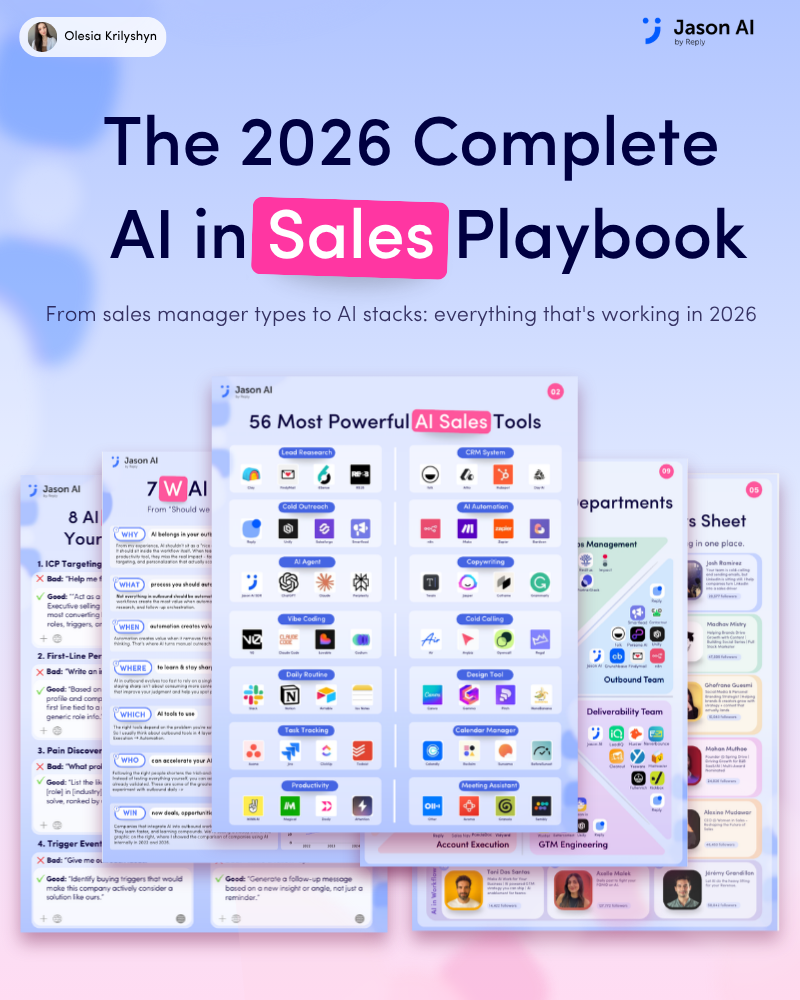
The 2026 AI in Sales Playbook

AI is changing sales fast. Most teams don’t need more noise. They need practical ways to save time, find better leads, personalize outreach, and build smarter systems.

What’s inside this guide:

→ 50+ AI tools for prospecting, outreach, research, CRM, automation, and productivity

→ AI workflows sales teams use to save hours every week

→ A simple framework for deciding what to automate and what to keep human

→ AI setups used across outbound, GTM, customer success, partnerships, and more

→ Real examples you can apply right away

Get your free copy and start building a smarter sales workflow today.

How to use automated sales prospecting: 7 steps from ICP to booked meeting

The order here is critical, because each one affects all the others following it. Each step below covers the theory first, then what it looks like built out in practice with Jason AI — an AI sales agent purpose-built for fully automating sales prospecting end to end.

1. Write an ICP a system can query

An ICP written for a pitch deck can’t be automated against. Nothing can filter on “mid-market SaaS companies that need marketing software.” An actionable ICP is a set of attributes something can actually query, for instance covering the revenue band, headcount, tech stack, funding stage, department size, trigger events, and so on.

Then write the disqualifier list, which is equally important. Current customers, accounts already in a partner conversation, segments that churned for structural reasons, regions you can’t support, etc. A rep may catch most of these by instinct, but automation has no instinct, so every exclusion has to exist in writing. The good news is that once the qualifiers and disqualifiers are explicitly written, AI software will always follow suit from there on.

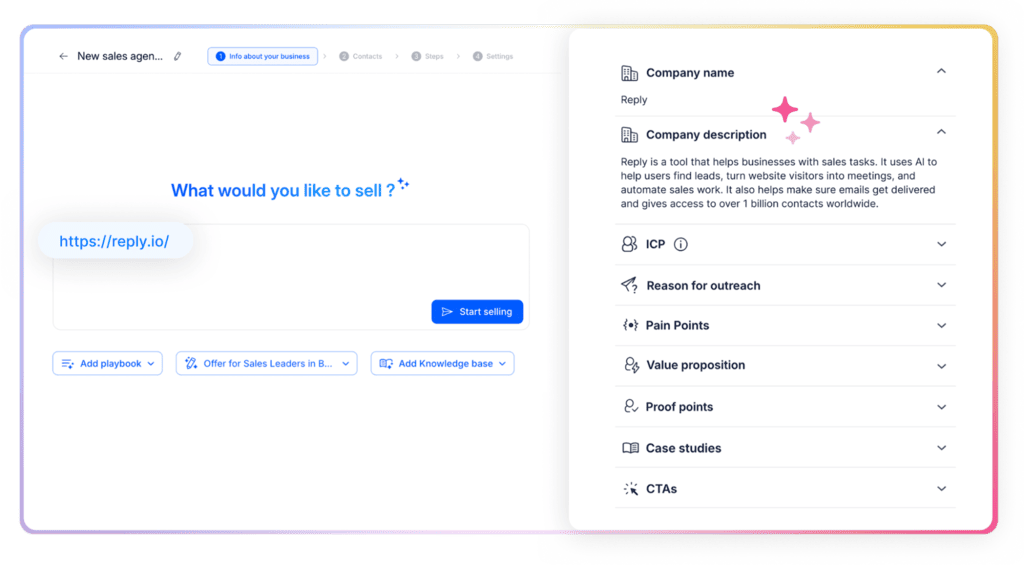
In practice, Jason AI gets briefed the way you’d brief a new SDR in week one, explaining the ICP, product, positioning, pains, value props, proof points, objection handling, and more. Jason then holds that as strict and reusable rules when finding leads, building outreach campaigns, and personalizing messages.

Jason AI onboarding screen collecting company info, ICP, and CTAs — the briefing step before automated sales prospecting can run

Once Jason AI is fully onboarded, its built-in ICP may become something like: B2B SaaS, $2–20M ARR, 5-25 reps, running HubSpot, posted a new sales role in the last 60 days, excluding anyone already in a partner program.

2. Source the list from live data

People change jobs, companies get acquired, mailboxes get retired, and a spreadsheet you bought in Q1 is quietly full of addresses that will not only not get your email, but will also damage your company domain.

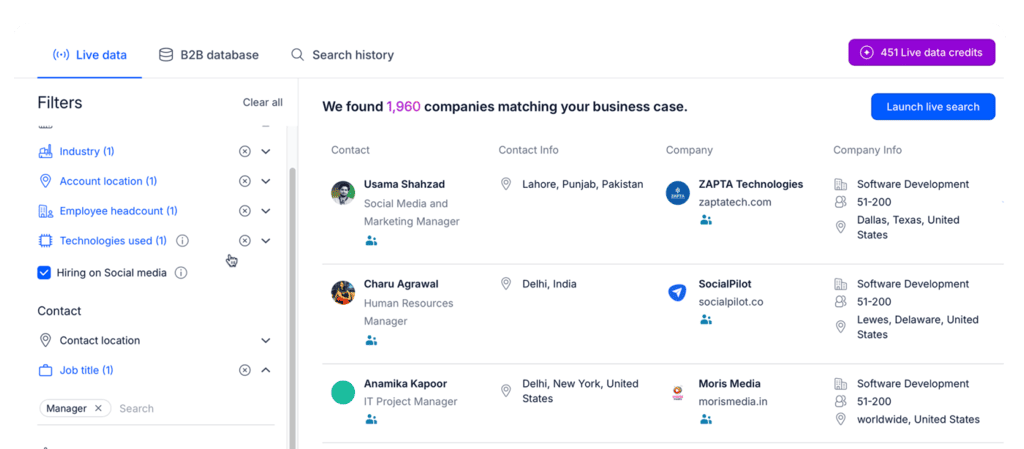
Reply Data runs on 1B+ live contacts and accounts across 150+ countries, along with advanced search filters, built-in email verification, enrichment, and even intent signals to pinpoint leads most likely to be on the market right now.

Reply Data live search results showing companies matched to an ICP, used to source the list for automated sales prospecting

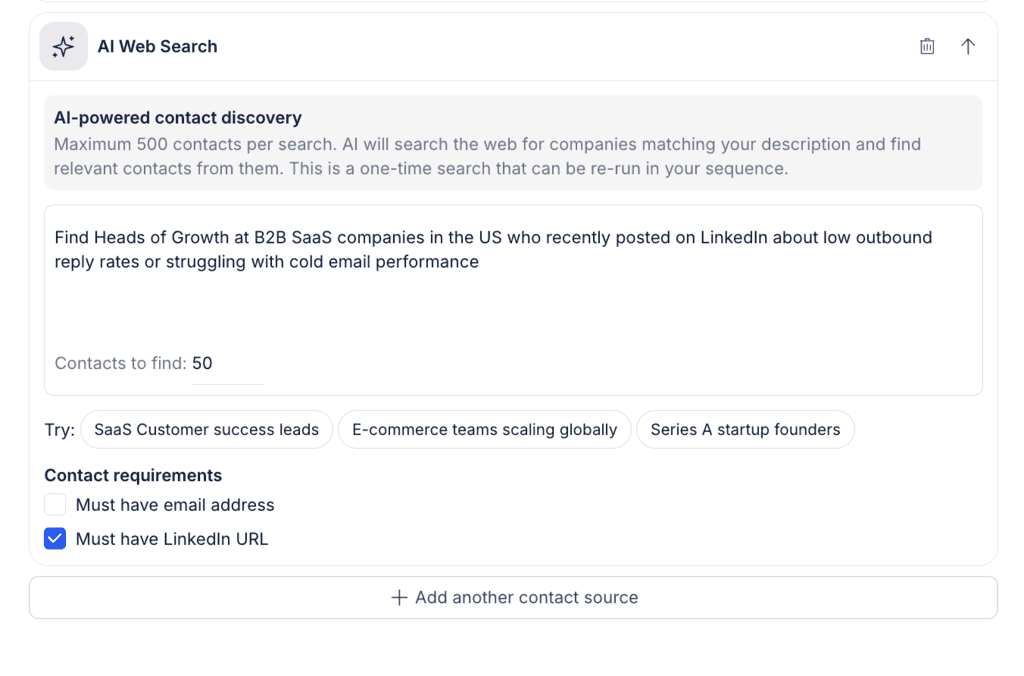
Jason AI takes this one step further with AI Web Search, where you simply type in the kind of buyers you’re looking for in plain English, and it takes care of the rest, and Competitor Followers to find leads already engaging with your competitors, qualifying them, and adding them to your pipeline.

Jason AI's AI Web Search panel finding contacts from a plain-language description, part of executing a sales outreach plan

3. Score for fit and intent before anything sends

Lead scoring is the layer that stops automation from becoming a volume play. It runs on two axes — fit asks whether the account matches the ICP you just wrote, and intent asks whether their pain point is live right now. Some of the most common intent signals in B2B include hiring signals, tech stack changes, funding, website visits, and engagement with your content.

Jason AI’s advanced ICP scoring returns a score, a label, and its reasoning, and it also keeps an eye out for certain intent signals in real time to ensure that if any potential buyer on your list hits a specific trigger, they get researched and reached out to (with the message angle based on that trigger) right away.

LinkedIn activity tracking and website visitor tracking feed the intent axis, and because the model adjusts based on live results, the accounts that actually reply reshape that definition in real time. Our guide to lead qualification with AI covers these two mechanics in more depth.

Getting these first three steps in the right order is where most of the difference gets made, especially if you’re building from scratch.

4. Build the sending infrastructure before you build volume

Google’s sender guidelines require anyone sending more than 5,000 messages a day to Gmail to authenticate with SPF, DKIM, and DMARC, always include one-click unsubscribe, and keep spam complaints below 0.30% in Postmaster Tools. Microsoft introduced comparable requirements for Outlook in 2025.

Sit with that 0.30% for a second. It’s just three complaints per thousand messages. That number is the real ceiling on your automation, and it’s why “just send more” stopped working as a strategy years ago.

Operationally, you have to warm up new mailboxes before they carry campaigns, spread volume across mailboxes and domains instead of hammering one, and treat reputation as a dashboard you check weekly.

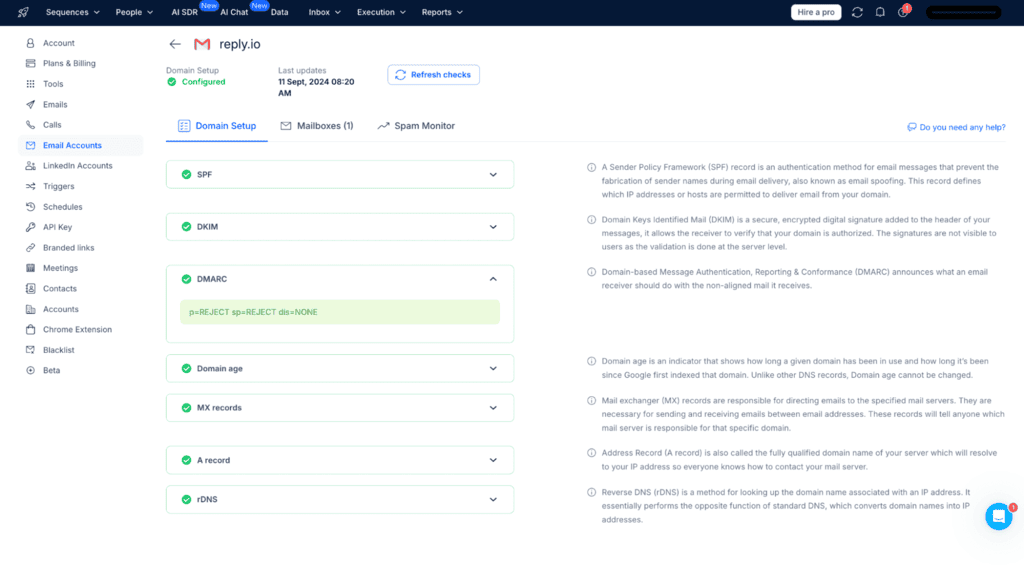
Reply.io handles this entirely with full email deliverability infrastructure running quietly in the background while you focus on the actual outreach. Its Email Health Checker walks you through SPF, DKIM, and DMARC setup and then monitors it, the Google Postmaster integration monitors spam rates, it warms new inboxes, all while the Gmail API sending plus unlimited mailboxes let you distribute volume properly. Daily caps, ramp-up settings, and per-step delays are all configurable.

Reply.io Email Health Checker showing SPF, DKIM, and DMARC setup, the deliverability layer behind automated sales prospecting

5. Build the sequence as a decision tree, not a drip

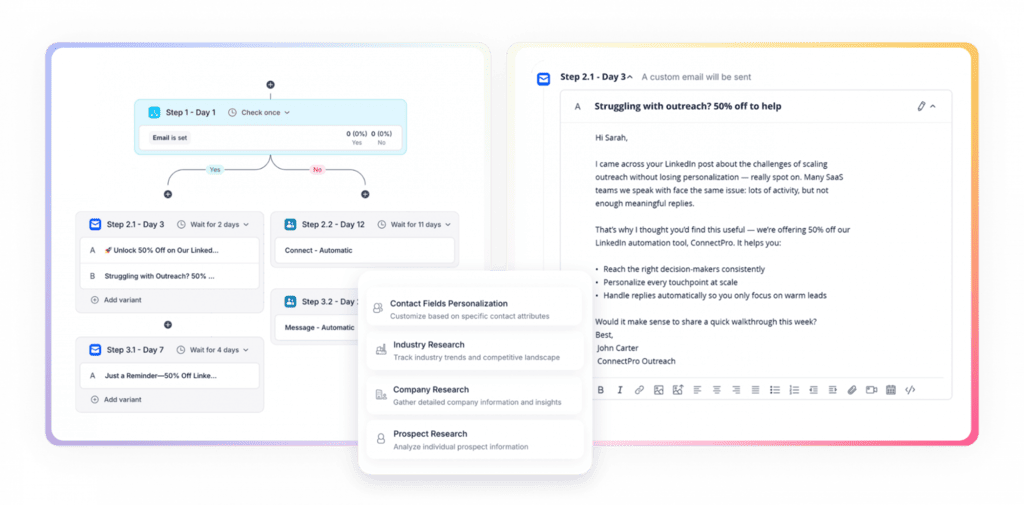
A drip sends the same five emails to everyone. A decision tree branches your outreach campaign based on what each prospect actually did, whether they opened an email but stayed silent, clicked the pricing page, accepted the LinkedIn connection request, replied with an objection, and the list goes on.

Reply’s conditional sequences run email, LinkedIn, calls, SMS, and WhatsApp inside one cadence with the branching built in. To put this in perspective, if your initial email goes unopened for three days, Reply triggers a LinkedIn connection request. An accepted connection cancels the queued follow-up and opens a LinkedIn thread instead.

Reply.io conditional sequence builder with branching steps and a sample email, showing how to use automated sales prospecting that reacts to buyer behavior

This way, the channel, timing, and messaging choice becomes a per-prospect decision instead of a campaign-level one, and a prospect that recently triggered an intent signal or visited your pricing page is automatically added to a shorter, more CTA-driven sequence.

6. Personalize on research, not merge tags

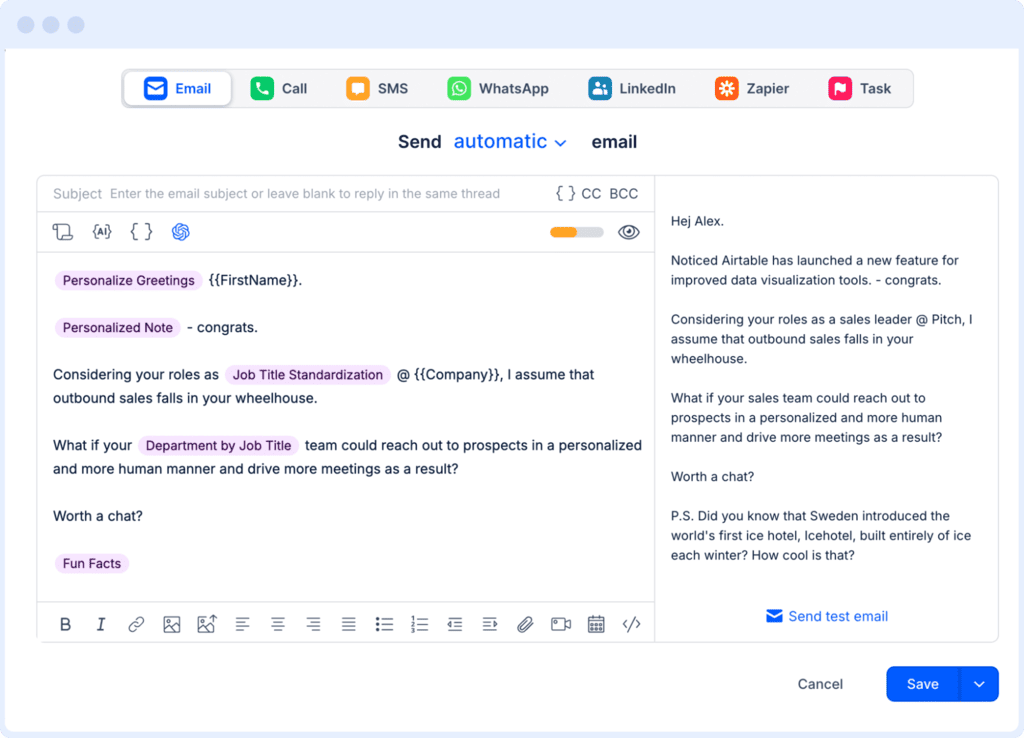
Simply adding {{first_name}} and {{company_name}} to an otherwise generic message isn’t personalization, and buyers stopped reading past it years ago. Real personalization is a specific, checkable observation, such as a role change, a hiring pattern, a product launch, something they posted last week on LinkedIn, etc.

If you’re using AI outreach software like Reply.io, every email, follow-up, and LinkedIn message is always personalized for each unique lead based on the researched data and engagement patterns, even across thousands of leads.

For those who wish for more control over their messaging, its AI Variables feature helps you build your own brand templates with custom variables, which Reply then fills in before outreach.

Reply.io email editor with AI Variables like {{FirstName}} and {{Company}} for personalizing a sales outreach plan at scale

Jason AI’s Custom Research goes one step further, where you can simply describe in plain language what insights you want pulled for every prospect, and it applies that across the whole sequence. Intent signals that both Reply and Jason keep monitoring feed this same engine, so a funding round or a new VP reframes the message automatically.

7. Automate the reply, book the meeting, hand it over clean

Replies are where automated prospecting usually collapses, all while a two-day response to “sounds interesting, what does it cost?” will most likely end with that potential buyer talking to one of your competitors in the meantime.

Automating the reply means three things in order:

  • Classification: whether the reply shows interest, poses a question, needs an objection, or means this lead should be removed from the list altogether.
  • Handling: an AI sales agent like Jason AI is trained to handle all the routine replies, which is most of them, with clear rules for when to hand over communication to a human.
  • The calendar: when the lead is qualified and positively replying, Jason will suggest times through your Google Calendar or Calendly link to book a meeting on your behalf.

Approval Mode lets you review everything before it ever sends, while Automatic Mode enables Jason to autonomously handle routine cases. Always start in Approval Mode, and only set to Automatic when you’re happy with the quality of the output and Jason’s earned your trust.

What to automate, and what to leave alone

Task Automate it? Why
Building and verifying lists Fully A data problem, and machines are better at it than you are
Research and first-draft personalization Fully Time was the only thing ever stopping you
Sequencing, timing, channel branching Fully Consistency beats intuition across thousands of touches
Reply classification and routine answers With approval first The failure mode is confident and wrong, so watch it before you trust it
Pricing, procurement, multi-stakeholder objections No This is where the deal lives, and deals need people
Your top 20 target accounts No Anything you can’t afford to lose deserves a person

The rule underneath the table is simple: automate every repeatable action, but keep every judgment call.

Getting started with your sales prospecting automation

Build the layers in order, and put the deliverability infrastructure in place before ramping up your outreach volume. If something is already running, there’s no need to rebuild all five from scratch. Instead, audit your existing layers, find the one costing you the most, usually data or replies, and fix that one first.

And if you want to keep that human-level personalization across volume, an AI platform like Reply.io or an AI sales agent like Jason AI are the only way to make it happen. These tools will find potential customers that fit your ICP, research them, and then leverage that data to launch tailored outreach campaigns, while you can focus on strategy and build meaningful relationships with your buyers or clients.

FAQ

Does automated sales prospecting hurt email deliverability?

Only if you skip the infrastructure. Google requires SPF, DKIM, and DMARC plus a spam complaint rate under 0.30% for senders above 5,000 messages a day, and those rules apply whether a human or an agent pressed send. Warm new mailboxes, spread volume across several of them, throttle, and check reputation weekly.

How much does automated sales prospecting cost?

Reply.io starts at $49 per user per month for email-only outreach and $89 for multichannel with LinkedIn, calls, SMS, and WhatsApp. Jason AI as a full AI SDR starts at $500 per month for 1,000 active contacts, with the Growth plan at $1,500 for 5,000. The fair comparison for that last tier is the loaded cost of an SDR hire plus ramp time, rather than other software.

How long does it take to see results?

Mailbox warm-up runs for weeks before you should be sending real volume, so budget for that first. Once campaigns are live, first replies arrive inside the first sequence cycle, usually a couple of weeks in. A reply rate you can trust needs a few thousand sends behind it, otherwise you’re reading noise.

Is automated sales prospecting legal?

B2B outreach is legal in most markets provided you identify yourself accurately, honor opt-outs promptly, and meet the rules that apply to you, which for most senders means GDPR in the EU and UK and CAN-SPAM in the US. Google’s one-click unsubscribe requirement sits on top of those. Check your own jurisdiction rather than assuming.

Subscribe to our blog to receive the latest updates from the world of sales and marketing.
Stay up to date.

Related Articles

White Label LinkedIn Lead Generation w/ AI SDRs in 2026

White Label LinkedIn Lead Generation w/ AI SDRs in 2026

White Label LinkedIn Lead Generation w/ AI SDRs in 2026
How to Build a Sales Outreach Plan in 2026 (All You Need to Know)

How to Build a Sales Outreach Plan in 2026 (All You Need to Know)

How to Build a Sales Outreach Plan in 2026 (All You Need to Know)
How to Use Lead Prospecting in 2026 with AI SDRs (The Right Way)

How to Use Lead Prospecting in 2026 with AI SDRs (The Right Way)

How to Use Lead Prospecting in 2026 with AI SDRs (The Right Way)