
7 Best Social Media CRM Tools for 2026 to Improve Your Outreach

7 Best Social Media CRM Tools for 2026 to Improve Your Outreach

A prospect likes your company’s post on Monday, comments on your VP’s post on Wednesday, and replies to your AE’s LinkedIn message on Friday. That’s three buying signals in one week, and your CRM most likely recorded none of them.

Social media CRM tools are built to fix that by moving social conversations out of individual inboxes and onto the customer record, where the whole team can act on them.

Below, we cover what these tools actually do, where most setups fall short on LinkedIn, how to choose one, and the 7 best options for 2026, compared side by side.

What do social media CRM tools actually do?

Social media CRM tools connect social interactions like comments, mentions, DMs, and profile data to customer records, so every team works from the same picture of each lead or customer. Some add social features to a CRM, while others add CRM-like features to a social media platform.

Most tool roundups blur that line and mix three different categories into one list:

  • Social media management suites with CRM features → Sprout Social, Hootsuite, and Agorapulse. They’re built for publishing and customer care, with contact profiles and CRM integrations added on top, so they’re strong on brand channels but light on pipeline.
  • CRMs with social built in → HubSpot and Zoho CRM. The contact record and pipeline come first, and social interactions get attached to them natively or through a connected social tool.
  • Relationship and social-selling tools → Nimble and Reply.io. These focus on individual people, either by enriching contacts with social profile data or by running one-to-one engagement from reps’ own profiles and pushing that activity into the CRM.

Whichever category you pick, the main jobs stay the same: listening, responding, capturing, and enriching leads, selling one-to-one, logging interactions, and attributing pipeline to social. No single tool does all of it well, so many B2B teams pair a social suite for the brand with a LinkedIn sales tool for reps.

If you mainly manage your own network, a lighter personal CRM tool may be enough, and if you want AI to handle record updates and lead scoring, dedicated AI CRM platforms are worth a look.

The LinkedIn blind spot in most social CRM setups

For B2B teams, LinkedIn is the social channel that matters most. It has more than 1.3 billion members according to LinkedIn’s own figures, and it’s where decision-makers research vendors (and vice versa) and answer messages from sales reps.

The catch is that most social CRM tools only see a small slice of that activity. Social inbox platforms connect to LinkedIn through its official API, which exposes Company Page activity but not personal profiles.
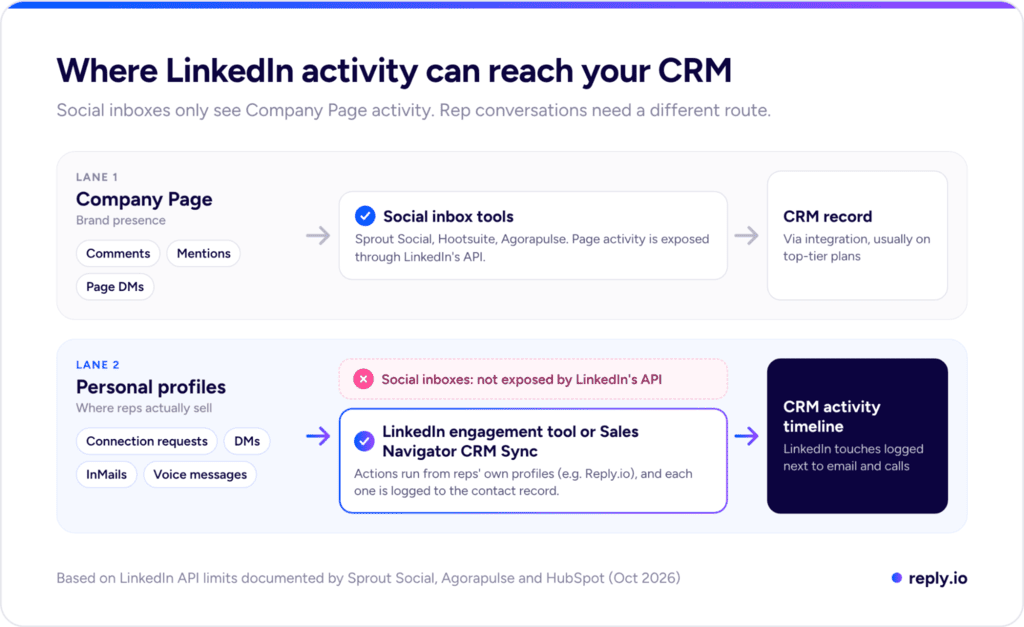
Diagram of where LinkedIn activity reaches your CRM: social inbox tools cover Company Page activity, while a LinkedIn engagement tool logs rep activity from personal profiles

B2B deals rarely start in a Company Page inbox, though. They start when a rep sends a connection request, follows up on a hiring post, or sends an InMail after a funding round, and none of that ever reaches a social inbox or the CRM behind it.

There are two ways to close the gap:

  1. LinkedIn Sales Navigator CRM Sync writes InMails, messages, and connection requests back to the CRM. It requires Sales Navigator Advanced Plus, and in HubSpot’s case a Sales Hub Professional or Enterprise seat on top of that.
  2. A LinkedIn engagement tool runs actions from reps’ own profiles and logs each one to the CRM, which is the role Reply.io plays in the lineup below.

If social selling on LinkedIn is still new territory for your team, our free guide walks through the fundamentals, from profile setup to the first message.

How to Dominate Linkedin in 2026

Your buyers are already scrolling LinkedIn.

Some of them are ready to buy, they just haven’t noticed you yet.

This playbook shows you exactly how to change that.

Inside, you’ll learn how to:

→ Turn LinkedIn posts into real sales conversations
→ Position yourself as the go-to expert in your niche
→ Write content that people save, share, and DM you about
→ Build a simple system that turns posts into meetings

How to choose the best tools for social media CRM

The best tools for social media CRM come down to which job you need covered and where the data has to end up. These five checks narrow the field quickly:

  1. Start with the job → If customer care and brand reputation are the priority, a social media suite fits. For pipeline, start with the CRM or the sales engagement layer, because a care tool won’t fix a sales problem.
  2. Test LinkedIn depth → “Supports LinkedIn” can mean Company Page publishing and nothing else, so ask whether the tool handles personal profiles, DMs, InMails, and connection requests, and whether that activity reaches the contact record.
  3. Check how data lands on the record → Native sync, browser extensions, and third-party connectors behave differently, and automatic matching by email or social handle beats a manual “assign contact” click that busy teams end up skipping.
  4. Find the plan where CRM sync starts → Many CRM social media integration tools keep it for top tiers. For example, Sprout Social’s Salesforce and HubSpot integrations need the $399/seat plan, and Hootsuite’s one starts at $800/month.
  5. Plan for response speed → According to Sprout Social’s 2025 Index, about three-quarters of consumers expect a brand to respond on social within 24 hours, which makes routing, assignment, and alerts as important as the inbox itself.

7 best social media CRM tools for 2026

Here are our picks for the best social media CRM tools 2026 has to offer, starting with the one that covers the LinkedIn layer most social platforms can’t reach.

1. Reply.io

Reply.io is an AI sales automation platform that offers a full LinkedIn automation toolkit, along with everything else your team needs to find the right leads, engage them, and close more deals.

It handles the part of social selling the other tools on this list can’t reach, which is one-to-one LinkedIn engagement from your reps’ personal profiles, with every action tracked and logged back to the CRM.

A single sequence can combine 10 LinkedIn actions: profile views, post likes, follows, skill endorsements, connection requests, messages, InMails, voice messages, AI voice messages, and AI-written comments on a prospect’s recent posts.

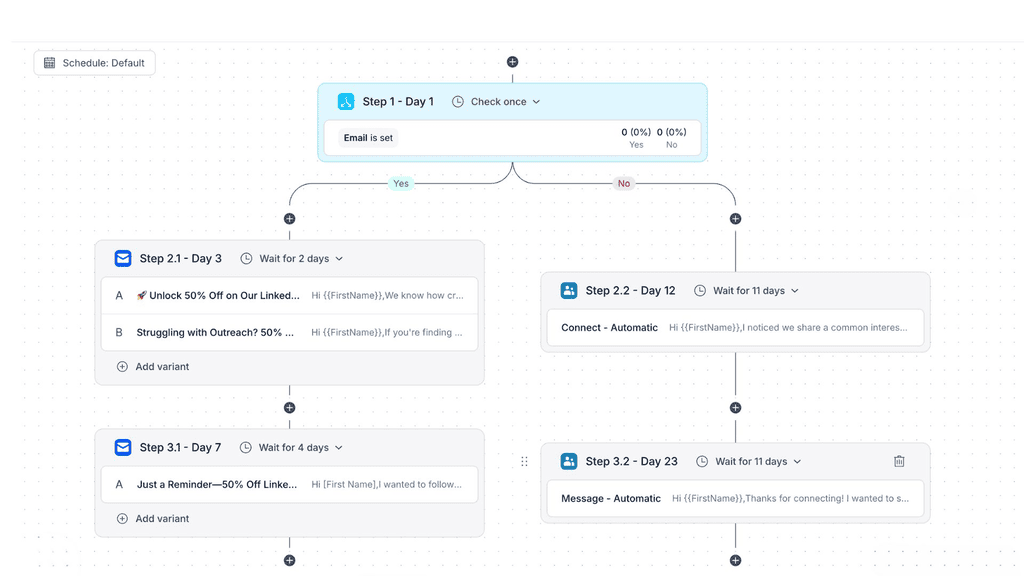
LinkedIn automation runs alongside email, calls, SMS, and WhatsApp, while conditional logic moves each prospect based on what they do, for example switching them to a LinkedIn-first branch once they accept a connection request:

Reply.io multichannel sequence with a conditional branch that sends email steps or LinkedIn connect and message steps depending on whether an email is set

When a prospect replies on LinkedIn, the message lands in the same unified inbox as email, their sequence stops automatically, and activity syncs to HubSpot and Salesforce as tasks on the contact record. Jason AI, Reply’s AI SDR, also researches each prospect’s recent LinkedIn posts and comments and works them into the outreach. The Multichannel plan starts at $89/user/month billed annually, with one LinkedIn account per user included.

Key features:

  • 10 LinkedIn actions in one sequence, including InMail, voice messages, and AI-written post comments
  • Branching on LinkedIn events like connection status, accepted InMails, and LinkedIn activity score
  • Sales Navigator support for InMail and for importing searches or saved lists straight into sequences
  • Unified inbox for LinkedIn and email replies, with AI reply categorization
  • Two-way CRM sync with HubSpot, Salesforce, Pipedrive, and Copper, with LinkedIn activity logged in HubSpot and Salesforce
  • Account safety controls, including per-action daily limits, randomized ranges, and natural pacing between actions

Best for: B2B sales teams and agencies where LinkedIn is the main social channel and every rep conversation needs to reach the CRM.

2. HubSpot

HubSpot is the CRM most teams think of first, and its social tool lives inside Marketing Hub. You can connect Facebook, Instagram, LinkedIn (personal profiles, Company Pages, and Showcase Pages), X, TikTok, YouTube, and Reddit, then publish, monitor keywords, and reply to comments from the same place your contact records live.

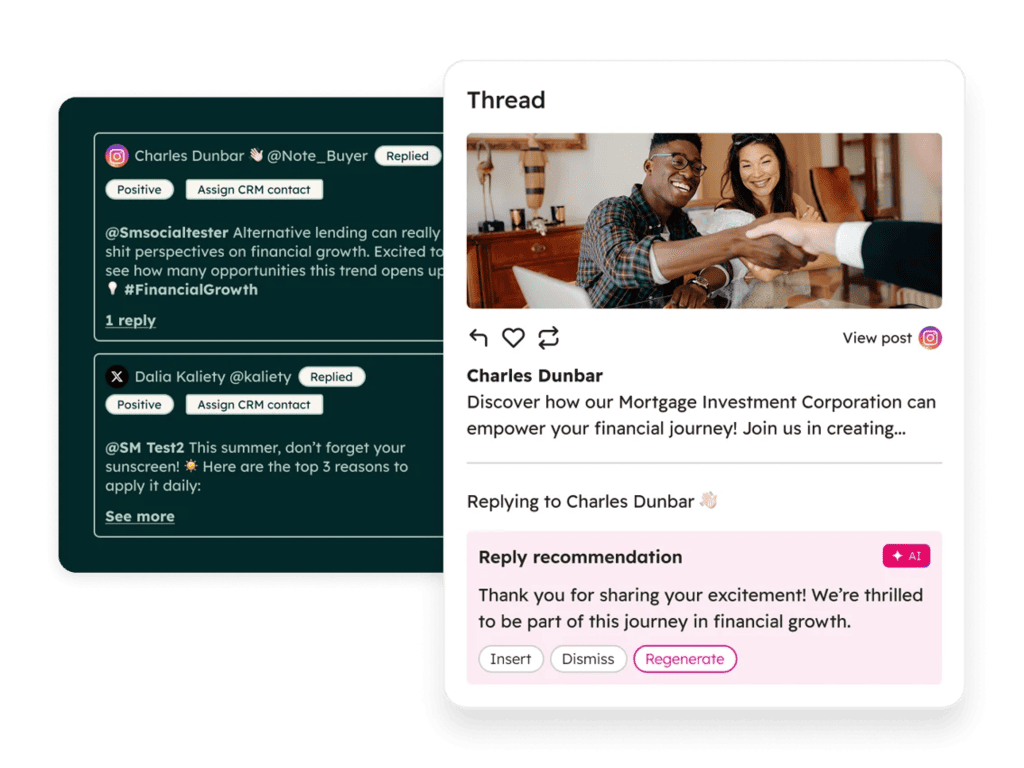
HubSpot social inbox showing Instagram and X comments with an Assign CRM contact button and an AI reply recommendation

The CRM connection is the main draw. Assigning a social interaction to a contact attaches their social profile and sets social as the original source, and social engagement can feed lead scoring. Lead ads from Facebook, LinkedIn, TikTok, and Google sync into contacts on every plan, Free included.

LinkedIn is where it falls short, since the social inbox covers comments and mentions but no messages. Social features start at Marketing Hub Professional, at $800/month with three seats, plus a one-time $3,000 onboarding fee.

Key features:

  • Publishing to 7 networks, with scheduling up to 3 years ahead
  • Social inbox for comments and mentions, plus Instagram DMs
  • Lead ads sync from Facebook, LinkedIn, TikTok, and Google on all plans
  • Sales Navigator card on contact records (requires Sales Hub Professional and Sales Navigator Advanced Plus)
  • Breeze social media agent (beta) for post ideas and posting times

Best for: B2B teams already running HubSpot that want social engagement and lead ads tied to the same contact record.

3. Sprout Social

Founded in 2010 and listed on Nasdaq, Sprout Social is a social media management platform built around its Smart Inbox, which pulls messages, comments, and mentions from every connected network into one queue. It’s also one of the few platforms with proper LinkedIn Company Page DM support.

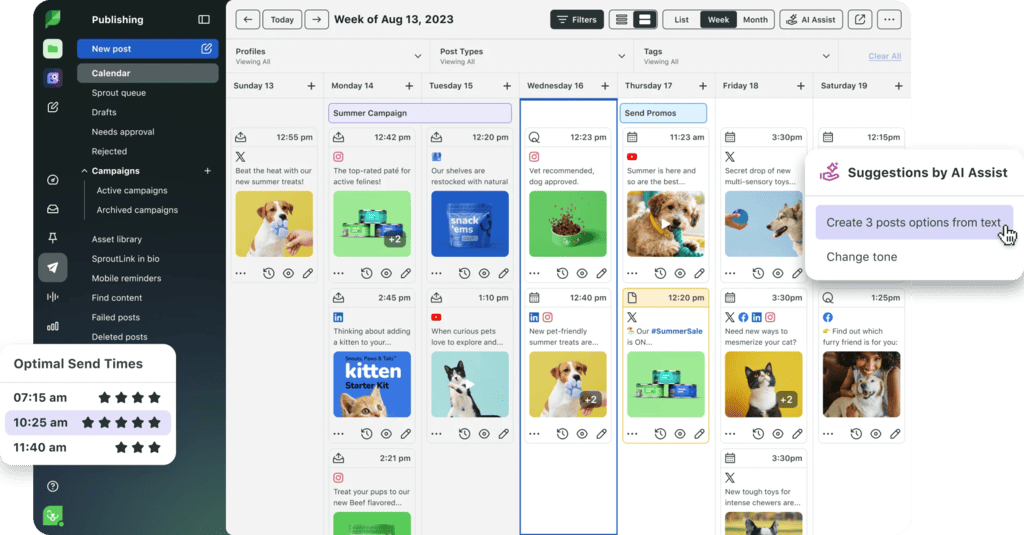
Sprout Social publishing calendar with a weekly content schedule, optimal send times, and AI Assist post suggestions

The CRM-like features sit around that inbox. Contact Profile View shows someone’s full message history next to custom fields and notes, and People View turns everyone who has engaged with you into a searchable contact database.

The Salesforce and HubSpot integrations go further, letting you create or link leads, contacts, and cases straight from a conversation, with records matched by social profile, name, or email. Plans start at $79/seat/month billed annually, but keep in mind that the CRM integrations require the Advanced plan at $399/seat/month.

Key features:

  • Smart Inbox with LinkedIn Company Page DMs, comments, and ad comments
  • Contact profiles with notes and full conversation history
  • Salesforce and HubSpot integrations (Advanced plan)
  • Social listening and Employee Advocacy as add-ons
  • Trellis AI agent for plain-language research across publishing, listening, and inbox data

Best for: Mid-market and enterprise social and care teams that want a polished inbox and are ready to pay for top-tier CRM sync.

4. Hootsuite

Hootsuite has been around since 2008 and reports more than 200,000 users. In June 2026, it relaunched as a “Social OS,” which renamed several products: the inbox is now Nest, employee advocacy (formerly Amplify) is Parliament, listening runs on Lumen by Talkwalker, and OwlyGPT has become the Wisdom AI assistant.

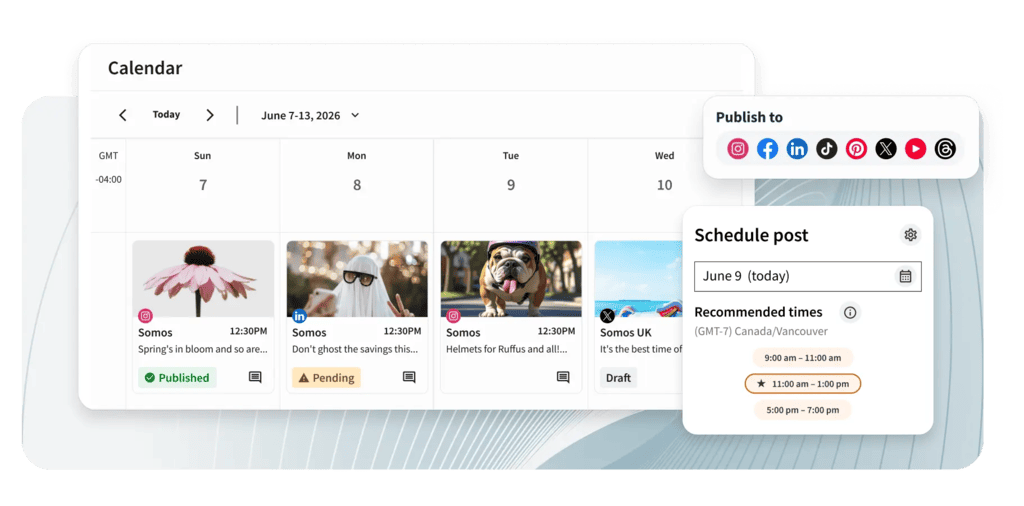
Hootsuite calendar view with scheduled posts, a Publish to menu of social networks, and recommended posting times

Channel coverage is where Hootsuite stands out, since its inbox handles Facebook, Instagram, X, Threads, YouTube, TikTok, WhatsApp, Google Business Profile reviews, and LinkedIn Pages, including private Page messages where LinkedIn grants access.

Customer contact profiles start on the Professional plan ($199/user/month) and the Enterprise-only Salesforce integration lets agents reply to social messages and see social history inside Salesforce.

Key features:

  • Unified inbox across 9 channels, including WhatsApp and TikTok messages
  • Customer contact profiles (Professional and up)
  • Salesforce integration for social customer care (Enterprise)
  • Lumen by Talkwalker for advanced listening
  • Wisdom AI assistant on every plan

Best for: Teams managing many networks, especially consumer-facing ones like WhatsApp and TikTok, and enterprises running social care in Salesforce.

5. Agorapulse

More than 11,000 businesses use Agorapulse, and it’s especially popular with agencies and SMB teams that want a clean inbox and solid reporting. In 2025, it acquired the social listening tool Mention.

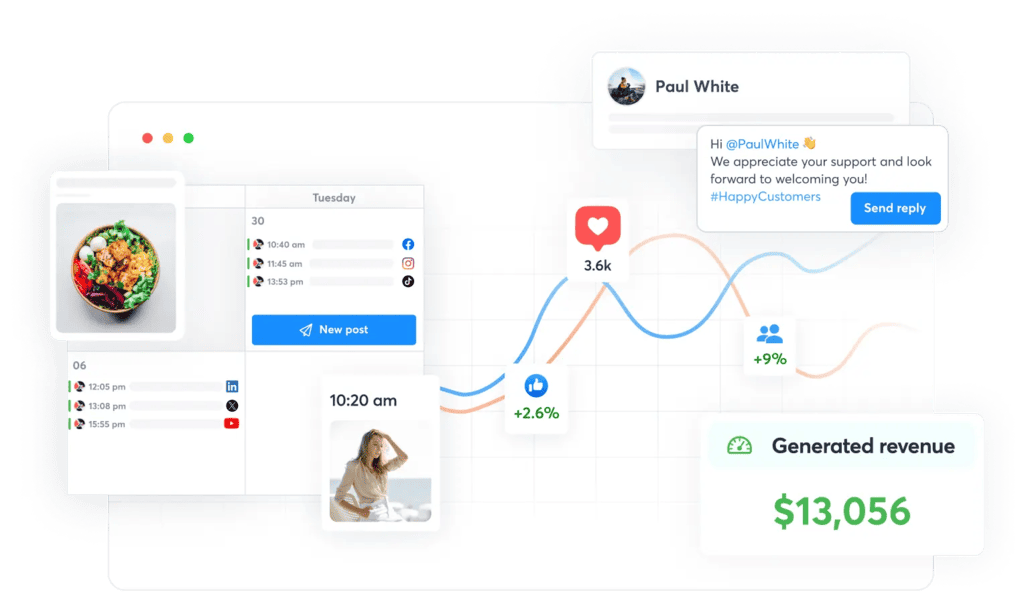
Agorapulse social media calendar with scheduled posts, a reply to a follower, engagement stats, and generated revenue reporting

Its social CRM features live inside the inbox, where each person who interacts with your accounts gets a profile with their cross-network activity history and internal notes, so whoever replies has the full context.

The ROI report pulls in Google Analytics data to show which profiles, posts, and team members drive traffic and revenue. An “Add to CRM” button creates or links Salesforce and HubSpot contacts, though only on the Custom plan. Paid plans start at $79/user/month billed annually, after a 30-day free trial.

Key features:

  • Unified inbox for 8 networks, including ad comments and reviews
  • User profiles with activity history and internal notes on all plans
  • ROI reporting tied to Google Analytics
  • Salesforce and HubSpot sync (Custom plan)
  • Inbox approval workflows that can be assigned to teammates or AI agents

Best for: Agencies and SMB teams that want contact context and ROI reporting at a lower price than enterprise suites.

6. Zoho CRM

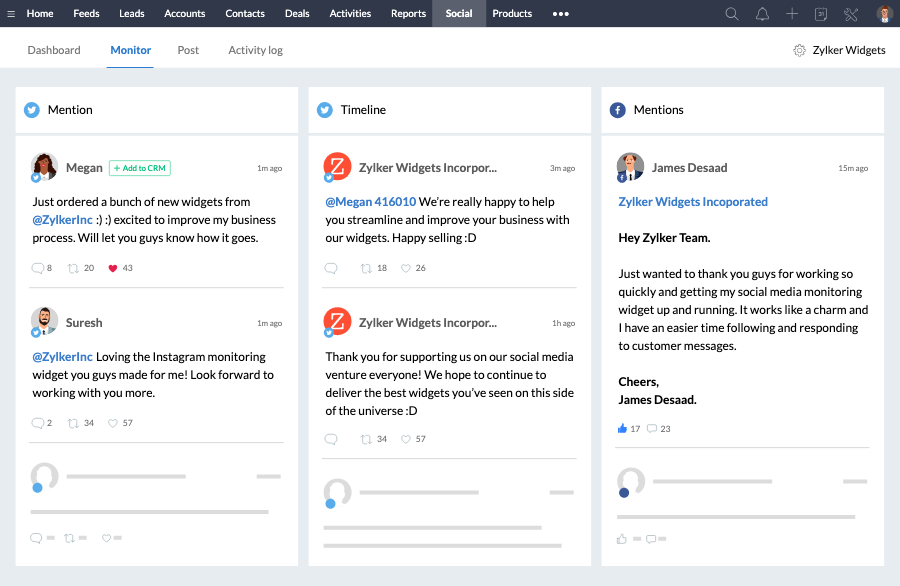
With a free edition for up to 3 users and the Standard plan at $14/user/month billed annually, Zoho CRM is one of the most affordable full CRMs available. Every paid edition also includes a Social tab that connects Facebook and X directly to the CRM.

Zoho CRM Social tab monitoring Twitter and Facebook mentions with an Add to CRM button on each message

From that tab, you can add people who interact with your Facebook and X accounts as leads or contacts, and set automation rules that create leads automatically when someone engages.

Paid editions bundle Zoho Social Lite for publishing, and the Zoho Social integration on its Premium plan flags which profiles are already in the CRM and alerts you in real time when a contact engages. On LinkedIn, sales activity runs through the Sales Navigator integration, which requires Advanced Plus.

Key features:

  • Social tab for Facebook and X inside the CRM
  • Automatic lead creation from social interactions
  • Zoho Social Lite included with paid editions
  • Real-time alerts when CRM contacts engage on social (Zoho Social Premium)
  • Sales Navigator integration for InMail and connection requests from CRM records

Best for: Budget-conscious SMBs that want automatic social lead capture inside a low-cost CRM.

7. Nimble

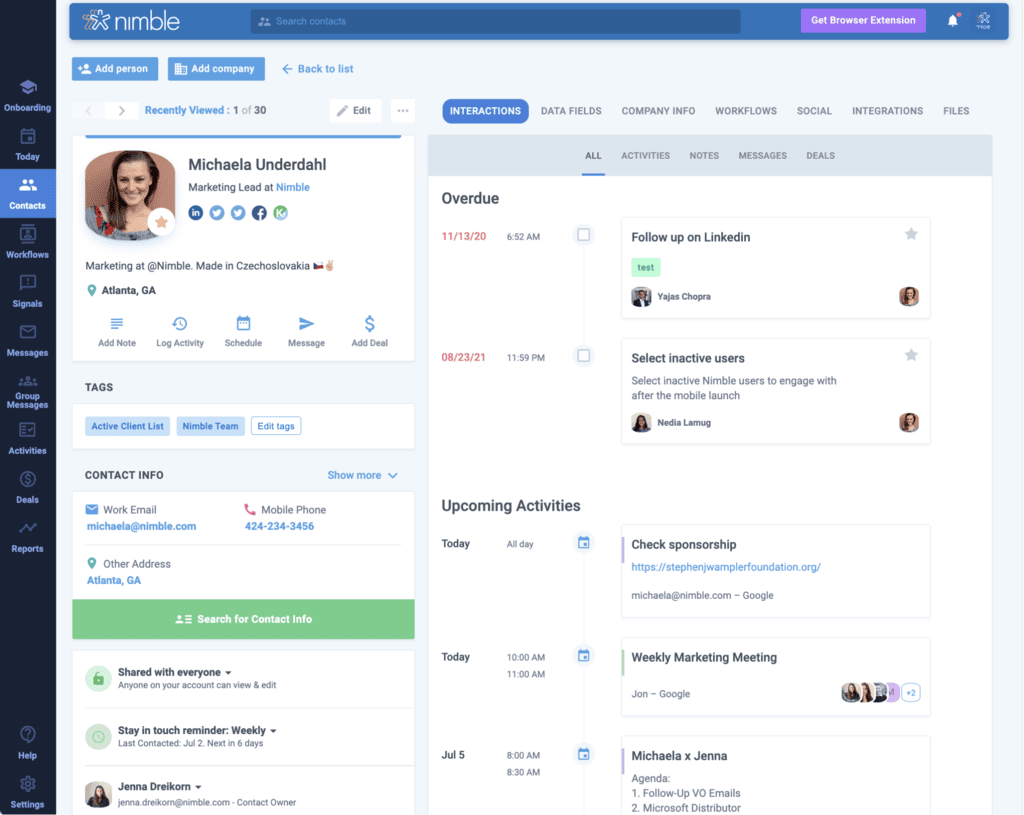
Launched in 2009 by Jon Ferrara, the founder of GoldMine, Nimble is a relationship CRM that skips publishing and inboxes entirely. Its focus is building complete contact records from email, social, and web data with as little manual entry as possible.

Nimble contact record showing social profile links, activity timeline, upcoming tasks, and a Search for Contact Info button

Social profile matching attaches public X, Facebook, and LinkedIn profiles to contacts automatically, and you can paste a profile URL when privacy settings block the match. The Prospector browser extension works on LinkedIn, Gmail, and any website, creating records with job titles, social profiles, verified emails, and phone numbers in one click.

Each user gets 100 enrichment credits a month, spent only when an email is found and verified. There’s also a single plan at $24.90/seat/month billed annually, with Prospector included.

Key features:

  • Automatic social profile matching for X, Facebook, and LinkedIn
  • Prospector extension for Chrome, Safari, Edge, Firefox, and Outlook
  • Verified email and phone enrichment straight from LinkedIn profiles
  • Up to 25,000 contacts per account
  • Engagement-triggered email sequences and workflows

Best for: Consultants, founders, and small B2B teams that want enriched contact records without paying for a full social suite.

Best social media CRM tools compared

Here’s how the seven tools stack up for B2B teams:

Tool Category LinkedIn coverage How social data reaches the CRM Starting price
Reply.io Sales engagement Personal profiles: connections, messages, InMail, voice, comments Native two-way sync, LinkedIn activity logged in HubSpot and Salesforce $89/user/mo (Multichannel)
HubSpot CRM with social Publishing, comments, and mentions (no DMs) Native, with manual contact matching $800/mo (Marketing Hub Pro)
Sprout Social Social media suite Company Page DMs, comments, and ad comments Salesforce and HubSpot integrations (Advanced plan) $79/seat/mo
Hootsuite Social media suite Page comments and Page DMs Salesforce integration (Enterprise) $99/user/mo
Agorapulse Social media suite Comments, mentions, and ad comments Salesforce and HubSpot sync (Custom plan) $79/user/mo
Zoho CRM CRM with social Publishing via Zoho Social, Sales Navigator integration Native Social tab (Facebook and X) Free, paid from $14/user/mo
Nimble Relationship CRM Profile matching and capture via Prospector Native enrichment and extension $24.90/seat/mo

All prices are starting prices on annual billing, checked in October 2026.

Build a social CRM stack that covers every conversation

Choosing between CRM social media tools gets easier once you separate the jobs. A social media suite fits teams whose social work is mostly brand care and listening, a CRM with social features suits teams that want everything on one record, and a LinkedIn engagement layer is the answer when pipeline depends on rep conversations.

For most B2B teams, that last layer is where the biggest gap sits. And if LinkedIn is your main channel, start your free Reply.io trial to find, enrich, and engage leads on LinkedIn, and see your LinkedIn activity land in your CRM.

Subscribe to our blog to receive the latest updates from the world of sales and marketing.
Stay up to date.

Related Articles

B2B SaaS Marketing Strategy in 2026 [Step-by-Step Guide]

B2B SaaS Marketing Strategy in 2026 [Step-by-Step Guide]

B2B SaaS Marketing Strategy in 2026 [Step-by-Step Guide]
How an Automated Voice Messaging System Will Improve Outreach in 2026

How an Automated Voice Messaging System Will Improve Outreach in 2026

How an Automated Voice Messaging System Will Improve Outreach in 2026
Outbound Marketing Software in 2026 (Top Picks)

Outbound Marketing Software in 2026 (Top Picks)

Outbound Marketing Software in 2026 (Top Picks)