Business Development Pipeline Management in 2026 with AI
Alex Dzhurasenko22 Jun 2026
Many sales and business development (BD) teams can effectively generate activity one way or another. The real challenge is what happens after all that activity starts piling up.
According to Ebsta’s 2025 GTM Benchmarks Report, 78% of sellers missed quota in 2025, up from 69% the year before. And at the same time, reps still spend too much of the day researching accounts, writing emails, chasing follow-ups, sorting replies, updating CRM records, and trying to get meetings booked instead of moving the right opportunities forward.
That’s where AI is starting to change business development pipeline management. Used properly, it helps teams find better-fit accounts, prioritize prospects, personalize outreach faster, handle replies, book meetings, and keep CRM data cleaner without adding even more manual work to the sales process.
This guide breaks down how AI improves business development pipeline management and how Reply.io helps teams turn prospecting activity into qualified meetings with AI.
What is business development pipeline management?
Business development pipeline management is the process of finding target accounts, starting conversations, qualifying interest, booking meetings, and moving early opportunities toward the sales pipeline.
It happens before a formal deal exists. A sales pipeline usually tracks opportunities that are already in an active sales process, while the business development pipeline covers the earlier work: prospecting, outreach, reply handling, qualification, meeting booking, and handoff to sales.
A well-managed business development pipeline gives teams a clear view of:
Target accounts: which companies fit the ICP, what makes them relevant, and why they should be worked now.
Engagement history: who was contacted, when it happened, which channel was used, and what message they received.
Response status: opened, replied, objected, referred, booked, unsubscribed, went cold — all the messy but useful stuff.
Next actions: who needs a follow-up, who needs qualification, who should be routed, and who belongs in a different sequence.
Pipeline risk: where future meeting volume may slow down before the revenue forecast starts showing the damage.
The goal isn’t just to move names between stages but to build a repeatable system that shows reps who to contact, what to do next, and where qualified pipeline is most likely to come from, so BD teams can then double down on what works.
The 2026 Partnership Ecosystem Playbook
We’ve packed this playbook with the frameworks, checklists, and cheat sheets modern SaaS teams use to build and grow successful partner programs. Whether you’re launching your first partnership or scaling an existing ecosystem, you’ll find ideas you can put to work right away.
What’s inside this playbook:
→ A simple breakdown of the 5 partnership career levels and what each role actually does
→ 5 proven SaaS reseller models, with when to use them and common mistakes to avoid
→ A step-by-step white-label agency partnership framework
→ A practical co-sell playbook, from account mapping to expansion revenue
→ A curated list of 20+ partnership, co-selling, and AI tools
→ A partnership tech stack and AI workflow cheat sheet
Grab your free copy and start turning partnerships into a real growth channel.
How does AI improve business development pipeline management?
AI improves business development pipeline management by removing a lot of the manual work that slows down prospecting, follow-up, qualification, and CRM hygiene before a meeting ever gets booked.
Instead of asking reps to research every account, write every message, track every reply, and update every record by hand, AI can handle the repetitive parts of the workflow while reps focus on judgment, buyer conversations, and serious opportunities.
Here’s where AI usually has the biggest impact:
Account research and prioritization → AI can look at firmographics, job titles, tech stack, hiring activity, funding, website visits, and other intent signals to find accounts that are most likely to match your ICP and be interested in your product/service at this very moment. Reps spend less time building lists from scratch and more time working accounts that actually deserve attention.
Lead scoring and segmentation → AI can group prospects by role, company type, pain point, trigger, or buying context, then score them based on fit and engagement. That makes the pipeline easier to work because high-intent accounts don’t sit next to random contacts that should probably stay out of outreach.
Personalized outreach → AI can draft openers, value props, CTAs, and follow-ups using prospect and account context. The win isn’t just faster writing, although that helps, but more consistent messaging across the team and fewer generic templates that ignore what the buyer actually cares about.
Follow-up management → AI can trigger the next step based on what the prospect does, like opening an email, clicking a link, accepting a LinkedIn connection request, missing a reply, asking for a meeting, or saying “circle back later”, which keeps active accounts from slipping through the cracks without forcing reps to manually track every touch.
Reply handling and qualification → AI can classify replies, spot positive intent, qualify prospects, route referrals, and if you’re using an AI sales agent like Jason AI — even answer incoming replies, handle objections, and book meetings on your behalf. Less inbox noise, more time spent on replies that could realistically turn into meetings.
Meeting booking and CRM hygiene → AI can schedule meetings, update contact records, log activity, and keep pipeline stages current. Cleaner CRM data gives managers a better view of meeting volume, conversion rates, stalled accounts, and pipeline gaps before they turn into revenue problems.
AI doesn’t replace the human part of business development — reps still need to understand the buyer, handle nuanced objections, ask good discovery questions, and build trust. The real value is that AI makes the pipeline process more consistent, so every qualified prospect gets the right follow-up, the right routing, and the right next step.
What are the stages of the business development pipeline?
A business development pipeline usually has seven stages: prospecting, qualification, first contact, relationship building, proposal, negotiation, and deal closing.
The names, mix, and order can change from team to team, but the traditional B2B path is pretty much the same. You find the right accounts, decide which ones are worth pursuing, start the conversation, build trust, create a real opportunity, work through objections, and move the account toward a signed deal or a longer-term relationship.
Stage 1: Prospecting
Prospecting is where you find accounts that match your ideal customer profile before any outreach happens.
The goal here is to first build a clean list of companies and buyers that have a real reason to care about your offer. For an AI agency, that might mean ecommerce brands with high support volume, SaaS companies hiring sales reps, law firms dealing with manual intake, or service businesses that respond to leads too slowly.
Good prospecting starts with ICP discipline — look at industry, company size, role, location, tech stack, hiring activity, funding, growth signals, recent company updates, or any other trigger that makes outreach feel timely.
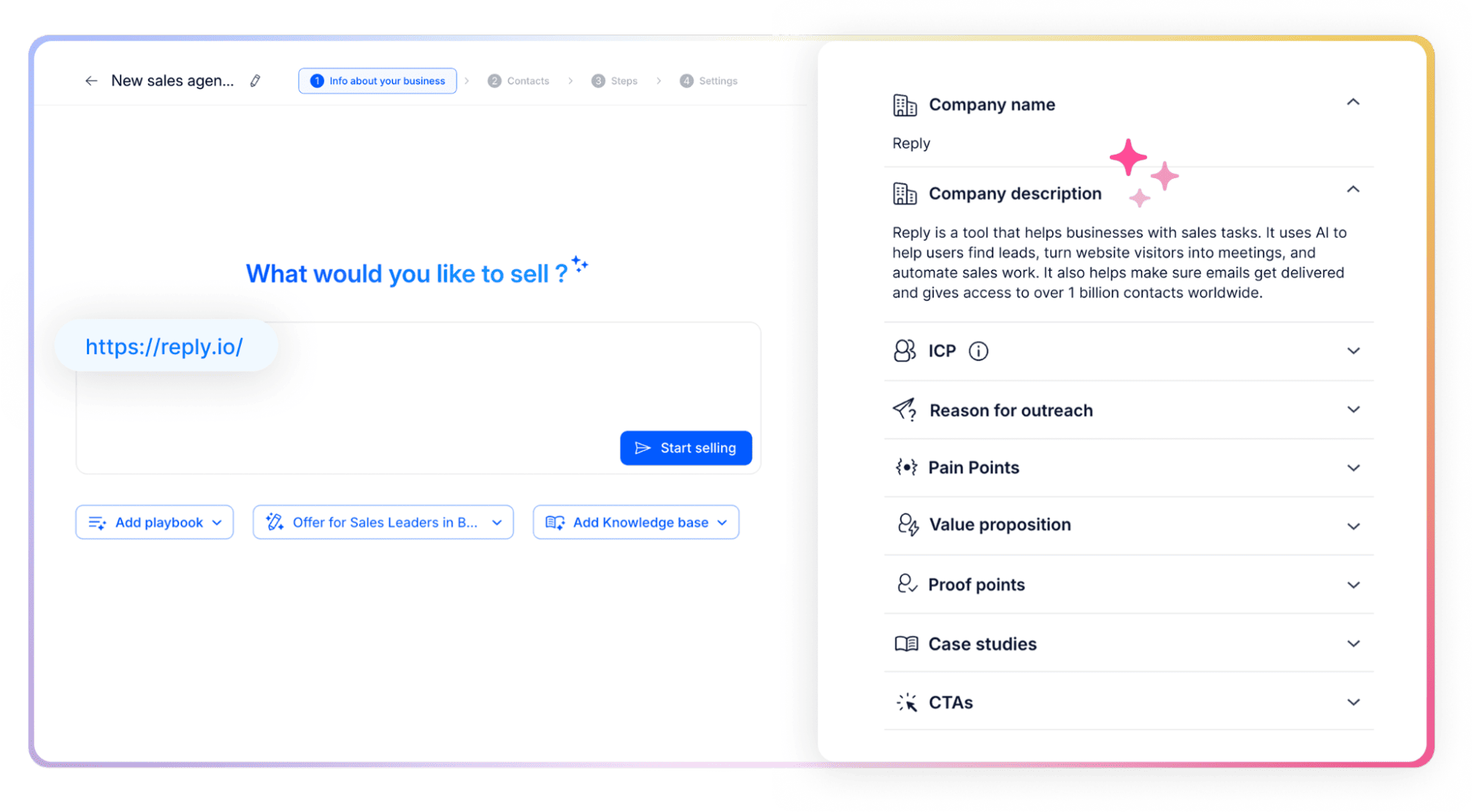
AI can already help here. Once an AI sales agent like Jason AI joins your team, it learns everything about your business, audience, and strategy, helps define your ICP, and then starts finding targeted leads on autopilot.
Stage 2: Lead qualification
Lead qualification is how you decide which prospects deserve active sales attention.
A company can look perfect on paper and still be a weak opportunity. The timing might be wrong, the problem might not be urgent, the buyer might not have authority, or the account might not have the budget to act.
Strong qualification looks at fit, pain, timing, authority, budget, intent, and the likely business impact of solving the problem. The point is to separate accounts that should move into outreach from accounts that need more nurturing, or just need to be removed from the pipeline.
Stage 3: Initial contact
Initial contact is the first real touchpoint with the prospect, whether it happens through email, LinkedIn, phone, SMS, or another channel.
The goal isn’t to explain the whole offer in one message but to earn a reply or a next step by connecting the message to something the buyer already cares about.
A strong first touch usually has a clear reason for reaching out, a problem or opportunity tied to the prospect’s role, and a simple CTA that doesn’t ask for too much.
An AI outreach platform like Reply.io will help you launch coordinated multichannel campaigns in minutes, using the available and enriched data to ensure every email, follow-up, and LinkedIn message is perfectly timed and highly relevant.
Stage 4: Relationship building
Relationship building is the follow-up, education, and trust-building that happens after the first touch.
Most prospects don’t book a meeting after one message. They may need more context, a stronger reason to act, a relevant use case, or proof that you actually understand their situation. This is where teams answer questions, handle light objections, share examples, and stay visible without annoying the buyer.
The balance is important — push too hard and the prospect disappears, but go quiet and the opportunity goes cold. A good pipeline process defines when to follow up, which channel to use, what to say, and when to stop.
Stage 5: Proposal or pitch
The proposal stage starts when the prospect is interested enough to look at the solution properly.
That might mean a demo, a written proposal, a quick audit, a pricing call, or a more strategic walkthrough. Depends on the sales motion. But either way, this is not the time to walk through every feature just because it exists.
The pitch has to stay close to what the buyer already told you. What problem are they trying to fix? What happens if they don’t fix it? What would a better version of the process look like?
This is also where you need to capture the important deal context: pain points, decision criteria, stakeholders, timeline, objections, and next steps. Otherwise, the opportunity looks good on the call and becomes a mess two weeks later.
Stage 6: Negotiation and commitment
Negotiation is where the prospect works through price, scope, timeline, risk, stakeholders, and final objections before making a decision.
Objections are normal at this stage. A buyer who challenges pricing, implementation, timing, or internal buy-in is often showing serious interest, not rejection. The job is to understand the concern behind the objection and respond with the right mix of clarity, proof, flexibility, and urgency.
This is also where deals tend to stall. Slow answers, unclear ownership, missing stakeholders, or vague next steps can turn an active opportunity into dead pipeline pretty quickly.
A strong process keeps negotiation moving by documenting objections, assigning next actions, confirming decision steps, and making sure every stakeholder has what they need.
Stage 7: Close and post-sale engagement
The close happens when the prospect signs, pays, or formally commits to the next step.
But the business development pipeline should not just end at the signature. Onboarding, handoff quality, early results, and post-sale communication decide whether the customer stays, expands, refers others, or becomes a useful case study later.
For many teams, existing customers become the most efficient source of future pipeline. Renewals, expansions, referrals, partner introductions, and testimonials often come from accounts that were managed well after the deal closed.
Treat the final stage as the start of account growth — a clean handoff from business development to sales, customer success, or delivery helps preserve context, set expectations, and turn the first deal into a longer-term relationship.
Here’s the whole path at a glance:
Stage
Goal
What done looks like
Metric to watch
Prospecting
Find accounts worth contacting
A verified list that matches your ICP
Qualified accounts added
Lead qualification
Decide who deserves attention
Prospects ranked by need, timing, and value
Qualified lead rate
Initial contact
Start a conversation
The prospect receives a relevant first touch
Reply rate
Relationship building
Earn enough trust for a meeting
The prospect asks questions or accepts follow-up
Positive reply rate
Proposal or pitch
Explain the offer
The buyer understands scope, outcome, and price
Proposal-to-close rate
Negotiation and commitment
Resolve final concerns
Terms, timeline, and approval path are agreed upon
Sales cycle length
Close and post-sale engagement
Turn the deal into account value
The client starts, renews, or refers
Retention and expansion rate
How AI runs each stage of the business development pipeline
AI is most useful in the early and middle parts of business development, where reps are usually buried in research, list building, qualification, outreach, follow-ups, reply sorting, and meeting booking.
The human part still matters, of course. Discovery calls, pricing, negotiation, stakeholder alignment, and deal strategy still need judgment. But AI can take a lot of the repetitive work out of the system, which is usually what keeps reps from getting enough qualified conversations in the first place.
Here’s how AI supports the business development pipeline from account research to booked meetings:
1. Finding the right accounts
The first pipeline problem is usually that too many accounts are a bad fit, poorly timed, or just not relevant enough to contact right now.
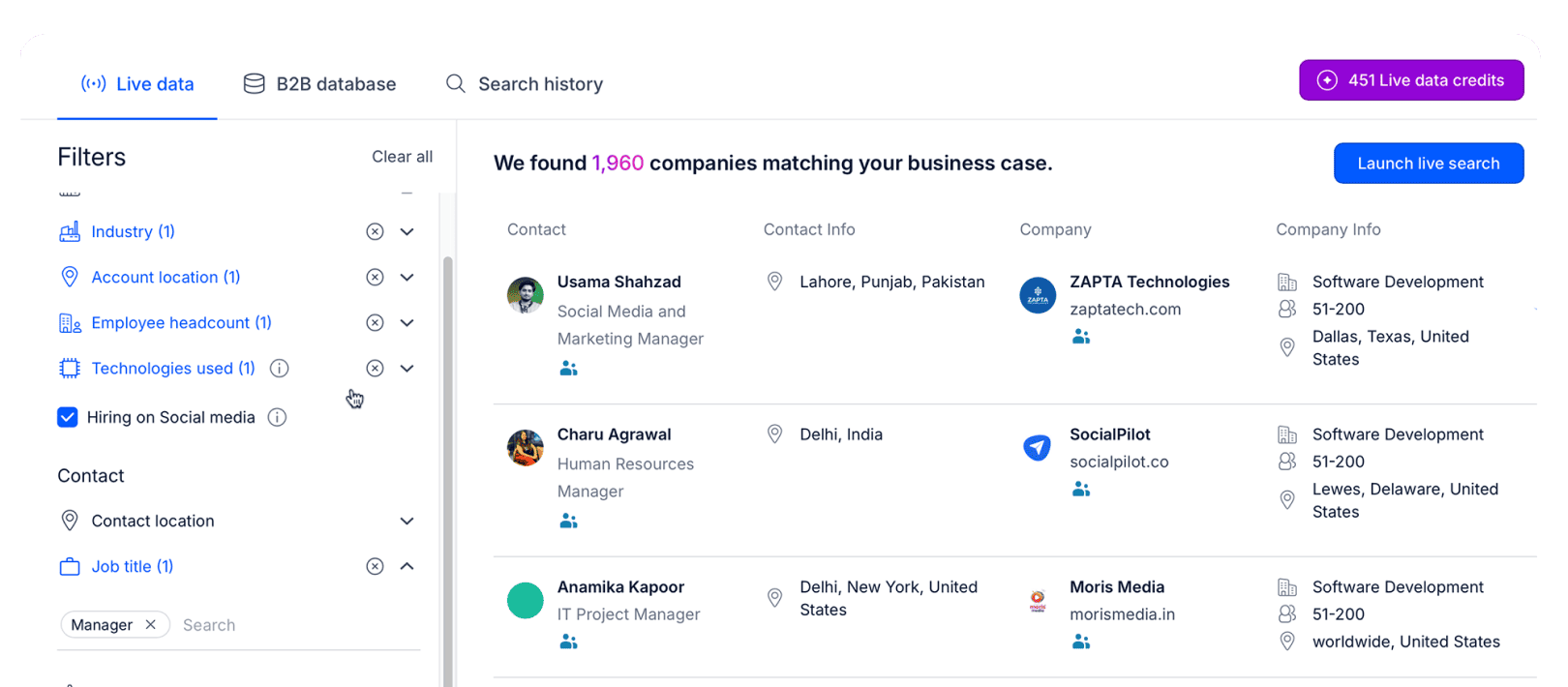
AI can look at company data, job titles, industry, headcount, tech stack, hiring activity, funding, website visits, and intent signals to find accounts that are more likely to match the offer. That gives reps a better starting point than pulling a broad list and checking every company manually.
In Reply.io’s AI sales suite, users get access to its native database of over 1 billion live contacts and accounts, along with advanced search filters, email validation, built-in enrichment, and intent signals to prioritize leads showing active signs of interest.
You simply set the targeting criteria of your ICP, and Reply’s AI engine handles the rest — filling missing company and contact details, validating emails, spotting job changes, active hiring, expansions, tools used, and more, as well as identifying decision-makers and refreshing stale records.
At the end, this gives your team researched and enriched prospect profiles with enough context for tailored outreach.
2. Scoring and prioritizing leads
Not every qualified account deserves the same level of attention.
AI can score leads based on firmographic fit, role, seniority, intent signals, engagement history, website activity, and similarity to past successful opportunities. That helps reps decide which accounts need immediate outreach, which ones belong in a lower-touch sequence, and which ones should probably stay out of the active pipeline.
The practical value is prioritization. A low-fit contact who opened one email should not get the same attention as a high-fit decision-maker from an account showing real buying signals.
With Reply.io, teams can use ICP filters, intent signals, website visitor tracking, and engagement data to focus outbound effort on accounts that are more likely to turn into qualified conversations.
3. Personalizing outreach at scale
AI improves outreach when it uses real buyer context, not when it just drops in a first name and a generic company mention.
Good personalization connects the message to the prospect’s role, company situation, pain point, trigger, or likely priority. That could be hiring growth, a new market, a tech stack change, website engagement, recent funding, or a common operational problem in that segment.
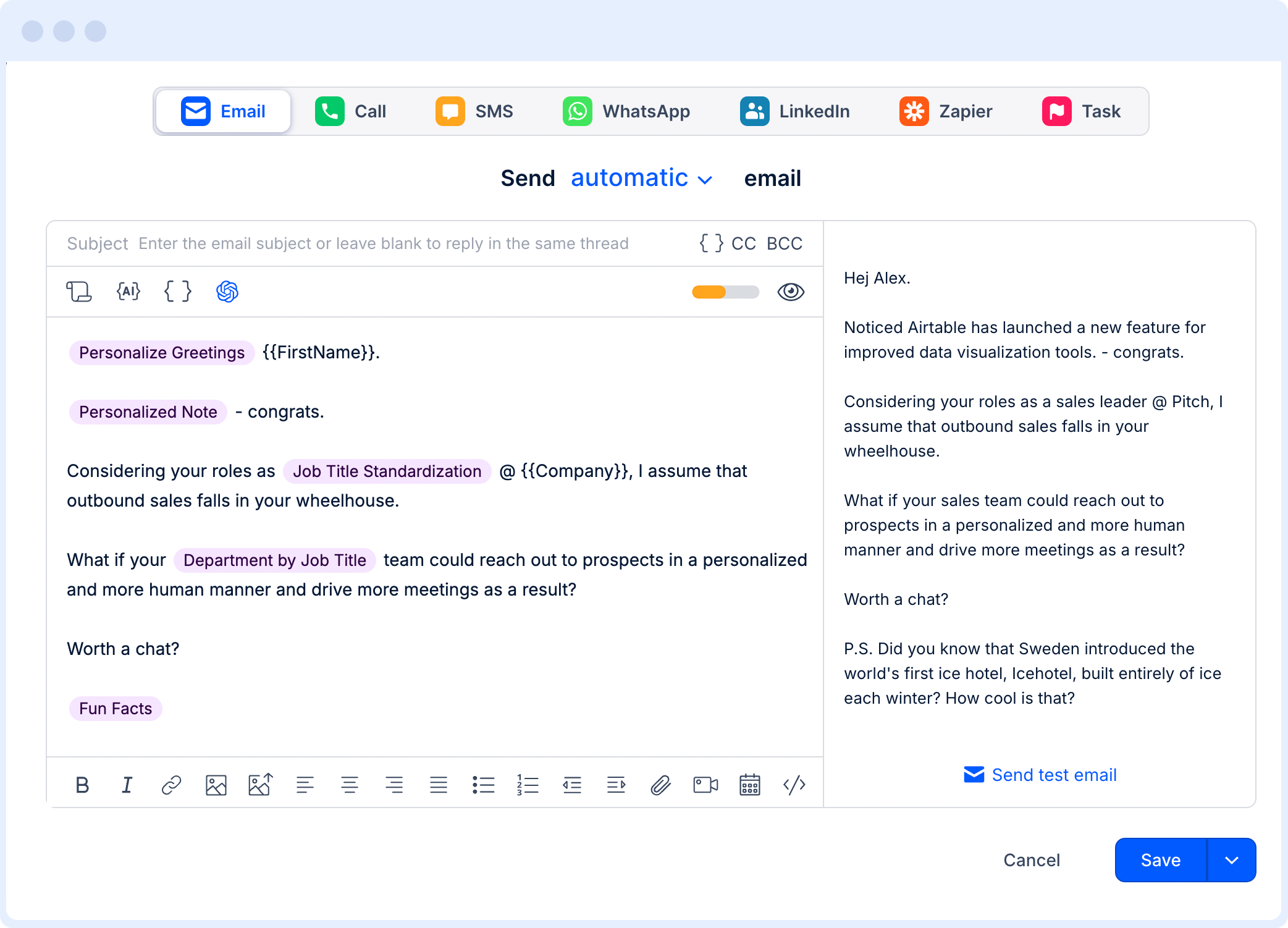
In practice, AI can generate tailored openers, value props, CTAs, and follow-ups for each contact while keeping the message aligned with the team’s positioning. Reps move from writing everything from scratch to simply reviewing, adjusting, and approving the strongest angle.
Reply.io does this by enriching prospect profiles with additional context from LinkedIn, company websites, and more, and then using that data to personalize every email, follow-up, and LinkedIn message, even in the context of thousands of leads. You can also use the AI Variables feature if you wish to create your own brand templates with custom variables, which Reply’s AI engine will fill in before launching outreach.
4. Running coordinated multichannel outreach
Business development rarely works through one channel only. A prospect may ignore the first email, recognize the rep after a LinkedIn touch, reply to the second follow-up, or convert after a call task tied to a high-value account.
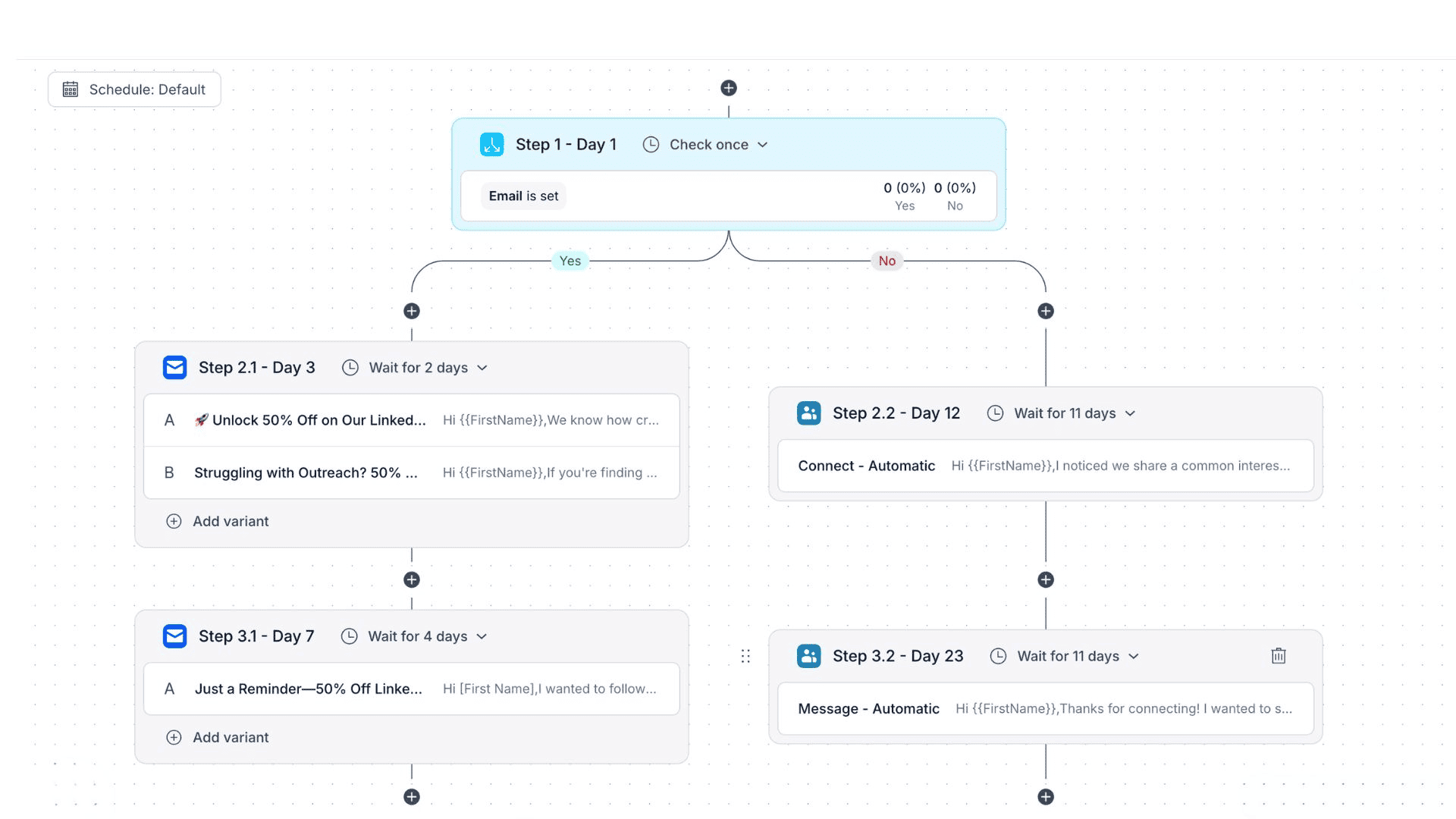
AI and automation turn those touches into one coordinated sequence instead of scattered rep activity. The next step can change based on what the prospect does: opens, clicks, replies, no-shows, missed follow-ups, or no engagement at all.
Reply.io lets teams run sequences across email, LinkedIn, calls, SMS, WhatsApp, and Zapier steps. Conditional logic adjusts each sequence in real time based on lead engagement behavior, so an unopened email can trigger an automated LinkedIn connection request, while a pricing-page click can move the prospect into a shorter sequence with a meeting CTA, and so on.
As a result, once you’ve found your potential leads, you can launch numerous multichannel outreach campaigns with just a few clicks, while Reply’s AI takes care of the messaging, channel mix, and timing — all based on each lead’s unique information and engagement.
And for those of you who want to take it a step further, Jason AI can run this entire workflow on your behalf, from sourcing and researching qualified leads to launching tailored multichannel campaigns and personalizing all messages. Oh, and he can also handle incoming responses and book meetings on your behalf!
5. Managing replies and follow-ups
Replies are one of the easiest places for pipeline to leak.
A positive reply, objection, referral, unsubscribe, out-of-office message, and “circle back next quarter” response all need different handling. When reps do that manually at scale, warm opportunities get buried, follow-ups happen late, and the CRM slowly stops matching reality.
AI can classify replies, draft responses, route interested prospects, schedule follow-ups, and re-engage leads when the timing improves. Every reply gets a next action instead of sitting in a crowded inbox and hoping someone remembers it later.
Jason AI can handle incoming replies, qualify interest, answer routine questions, and book meetings based on your custom sales playbooks, internal docs, and instructions. Teams can keep more control in Copilot mode or let Jason handle more of the workflow in Autopilot mode.
6. Protecting deliverability before outreach scales
Pipeline generation depends on inbox placement. Strong targeting and messaging won’t help much if emails bounce, land in spam, or damage sender reputation.
AI and automation can monitor the technical side of outreach before the problem shows up in reply rates. That includes email validation, mailbox setup, warm-up, spam checks, sending limits, bounce control, and sender reputation monitoring.
Reply.io includes email deliverability tools for mailbox setup, warm-up, validation, anti-spam monitoring, and SPF, DKIM, and DMARC support. That gives teams a safer base for outbound volume and helps protect the pipeline from deliverability issues that are painful to fix later.
7. Booking meetings and keeping pipeline data clean
The handoff from interest to meeting is another place where good opportunities can stall.
When reps have to manually reply, send calendar links, confirm availability, update CRM records, and move stages, interested prospects can cool off before the meeting is even booked. AI can connect reply intent to scheduling and pipeline updates, so a qualified response turns into a calendar event without extra back-and-forth.
Jason AI can qualify replies and book meetings through calendar sync, while Reply.io analytics helps teams track replies, positive replies, meetings booked, sequence performance, and campaign outcomes.
That creates a cleaner BD engine because the workflow moves each prospect toward the next step while giving managers a clearer view of where meetings come from, which segments convert, and where the process needs work.
Which metrics show your pipeline is working?
A full pipeline only matters if it turns into qualified meetings, real opportunities, and revenue you can actually forecast. Otherwise, it’s just a busy CRM with a lot of names sitting in it.
Qualified leads → the number of ICP-fit prospects added to the pipeline during a specific period. If this starts dropping, meeting volume usually follows soon after.
Stage-to-stage conversion rate → the percentage of prospects moving from one step to the next, like contact to reply, reply to meeting, or meeting to proposal. When this looks weak, you can usually see where the pipeline is leaking.
Average deal size → the usual value of a closed deal. If the number keeps sliding down, the team may be discounting too much, chasing smaller accounts, or letting weak-fit opportunities through qualification.
Sales cycle length → the time between first contact and closed deal. If deals start taking longer, look at qualification, next steps, follow-up speed, and stalled opportunities before blaming the market.
Pipeline coverage → open pipeline value compared with the revenue target. Many teams aim for 3–4x coverage because, obviously, not every opportunity will close.
Meetings booked → one of the clearest signs that the front end of the pipeline is working. Qualified meetings show that targeting, messaging, follow-up, and reply handling are creating real sales opportunities.
With Reply.io, teams can track campaign performance, replies, positive replies, meetings booked, sequence results, and segment performance from one dashboard, so pipeline reviews are based on actual outreach data instead of manual updates.
Use AI to build a cleaner business development pipeline
A strong business development pipeline shows which accounts are worth pursuing, where each prospect stands, and what needs to happen next.
Reply.io helps teams run the front end of that pipeline with B2B data, enrichment, AI personalization, multichannel sequences, deliverability tools, reply management, analytics, and Jason AI for lead sourcing, reply handling, qualification, and meeting booking.
Start your free Reply.io trial and start turning your BD strategy into a revenue-generating pipeline.
FAQ
What is a business development pipeline?
A business development pipeline shows how prospects move from target account to qualified opportunity. It usually covers prospecting, qualification, outreach, follow-up, meeting booking, and early relationship building before the prospect becomes an active sales deal.
What are the main business development pipeline stages?
Most business development pipelines include seven stages: prospecting, lead qualification, initial contact, relationship building, proposal or pitch, negotiation, and close. The names can change by team, but the job is the same: move the right prospects from first touch to signed deal.
What is the difference between a sales pipeline and a business development pipeline?
A business development pipeline covers the work before there is a real sales opportunity: finding accounts, starting conversations, checking interest, and booking meetings. A sales pipeline usually begins once the prospect has shown enough buying intent to become an active deal.
How does AI improve business development pipeline management?
AI helps with the repetitive front-end work reps usually lose time on: account research, lead scoring, enrichment, outreach personalization, follow-up timing, reply sorting, meeting booking, and CRM updates. That gives reps more room for discovery calls, objections, negotiation, and closing.
Which metrics show a healthy business development pipeline?
Look at qualified leads, stage-to-stage conversion, average deal size, sales cycle length, pipeline coverage, and meetings booked. If those numbers are moving in the right direction, the pipeline is probably creating revenue potential instead of just filling the CRM.
Subscribe to our blog to receive the latest updates
from
the world
of sales and marketing. Stay up to date.
We use cookies to enhance your browsing experience, serve personalised ads or content, and analyse our traffic. By clicking "Accept All", you consent to our use of cookies.





![B2B SaaS Marketing Strategy in 2026 [Step-by-Step Guide]](https://reply.io/wp-content/uploads/marketing.agency-300x158.jpg "B2B SaaS Marketing Strategy in 2026 [Step-by-Step Guide]")


