How to Build a Simple GTM Process That Just Works in 2026
Amon Githae15 Jul 2026
A go-to-market process should make execution easier, not drag the team into endless planning.
The best GTM systems are simple enough to run every single week, but structured enough to get better over time. That means being clear on who you’re targeting, why now, what you’re saying, how you’re reaching them, who owns each step, and what gets reviewed after launch.
This guide breaks the process into six practical steps that small and mid-sized teams can actually use, even without a big RevOps function or some complicated operating model.
What is a GTM process?
A GTM process sets out how your team moves from identifying the right accounts to booking qualified sales meetings. In very simple terms, it can be broken down into targeting, outreach, sales handoff, and the review cycle used to improve each campaign.
The strategy decides where to compete, and the process defines what happens after that.
For example, a strategy may focus on B2B SaaS companies with 50 to 200 employees. The GTM process turns that into a weekly workflow like this:
identify recently funded or actively hiring companies
find the right buyers, such as VP Sales or Head of Growth
build messaging around a relevant trigger or pain point
launch outreach across the chosen channels
qualify responses and route meetings
review results before the next batch goes live
GTM strategy
GTM process
Defines the market
Turns the market into action
Sets the ICP
Builds the account list
Shapes positioning
Turns positioning into messages
Picks channels
Sets the outreach sequence
Sets revenue goals
Reviews replies, meetings, and pipeline
A strong GTM process also creates rhythm for the team. Everyone knows what happens day to day, what gets reviewed weekly, and which changes should be tested before anything gets scaled.
Building Outbound from Scratch: 2026 Playbook
We broke down what actually works in outbound. No fluff. No theory. Just real steps you can use right away.
What’s inside:
→ How to define your ideal customers (and avoid wasting time on the wrong ones) → A simple way to write messages that actually get replies → Real examples of cold emails you can reuse → A basic outbound system you can set up in a few days → The exact tools you need (and what to skip) → Benchmarks so you know if you’re doing it right
If you’re starting outbound or trying to fix what’s not working, this will save you a lot of time.
Grab your copy and start booking more meetings.
Why do most GTM process frameworks fail?
Most GTM frameworks fail because they were built for large organizations with dedicated RevOps, enablement, analytics, and demand gen teams. Smaller companies copy the structure, but they don’t have the resources needed to actually run it.
The most common failure points are:
Too many steps and unclear ownership → the work is documented, but no one truly owns execution.
Planning is mistaken for progress → teams spend weeks filling in templates while outreach and market feedback get pushed back.
No feedback loop → the framework ends at launch instead of showing the team how to use replies, objections, meetings, and conversion data to improve the next campaign.
A GTM process doesn’t need to be overly elaborate, but it does have to be repeatable, clearly owned, and tied to measurable revenue outcomes.
Another important element that will play a huge role in the success or failure of your GTM system is the software you choose to use. Many teams start leveraging too many tools, then stitching them together, and then managing them all.
For small to mid-sized businesses, it’s always better to go for a more consolidated platform that covers most, if not all, of the GTM operations with AI under one roof.
Reply.io is a great example — it’s an AI sales automation platform that helps teams identify targeted leads, find out more about them and their companies, use that data to personalize messages, and launch coordinated multichannel sequences across emails, LinkedIn, calls, and more.
Its analytics then help teams to double down on the channels, buyer segment, messaging, and buying signals that work best, and double down on that.
What GTM process flow should your company build first?
Start with a process your team can realistically run next week. It does not need to account for every edge case right away, but it should clearly define the core path from account selection to booked meeting.
A practical GTM process can be built in six steps.
Step 1: Define your ICP and buying triggers
Everything else depends on this step, because if the target segment is too broad or loosely defined, even a strong sequence will struggle to generate qualified opportunities.
Start with one segment where you already have real evidence of fit. Look for shared patterns across:
industry
company size
buyer role
geography
sales motion
deal size
common pain points
For example:
B2B SaaS companies
50 to 200 employees
US-based
sales-led growth model
actively hiring [target role]
showing signs of [common pain]
Then layer in buying triggers. An ICP tells you who could buy, while a trigger helps explain why they might be ready to engage now.
Once those answers are clear, you have a usable segment for the first campaign.
Step 2: Choose one core channel and one supporting channel
Trying to launch email, LinkedIn, calling, and SMS all at once usually gives you four weak playbooks instead of one motion that actually works.
Start with two channels only:
one core channel for the first touch and most follow-ups
one supporting channel that reinforces the message
The right mix depends on how your buyers prefer to engage.
For example:
Sales and marketing leaders: email first, LinkedIn second
Early-stage founders: LinkedIn first, email second
Buyers in phone-driven industries: calls first, SMS second
Only add a third channel once the first two are producing useful data. The goal early on is not to maximize touch volume. It is to learn what works.
Step 3: Build the message and offer
Once the audience and channels are clear, the next step is figuring out what you’re actually going to say.
The strongest first messages are built around the buyer, not the seller. That means no leading with product features, awards, or company credentials. Start with a relevant trigger and connect it to a problem the prospect is likely to recognize.
A simple structure works well here:
Trigger: What changed in the account?
Problem: What pressure or risk does that change create?
Offer: What useful next step can you provide?
The first CTA should feel easy to accept. Instead of pushing for a long demo right away, offer a useful next step that gives the prospect a reason to reply.
Then write two follow-ups:
one that adds proof or a relevant example
one that asks a short, direct question
That gives you a focused three-message sequence without turning the campaign into a mess.
Step 4: Set up outreach and qualification
At this stage, the process should do two things reliably: send messages on schedule and assign a clear next action to every reply.
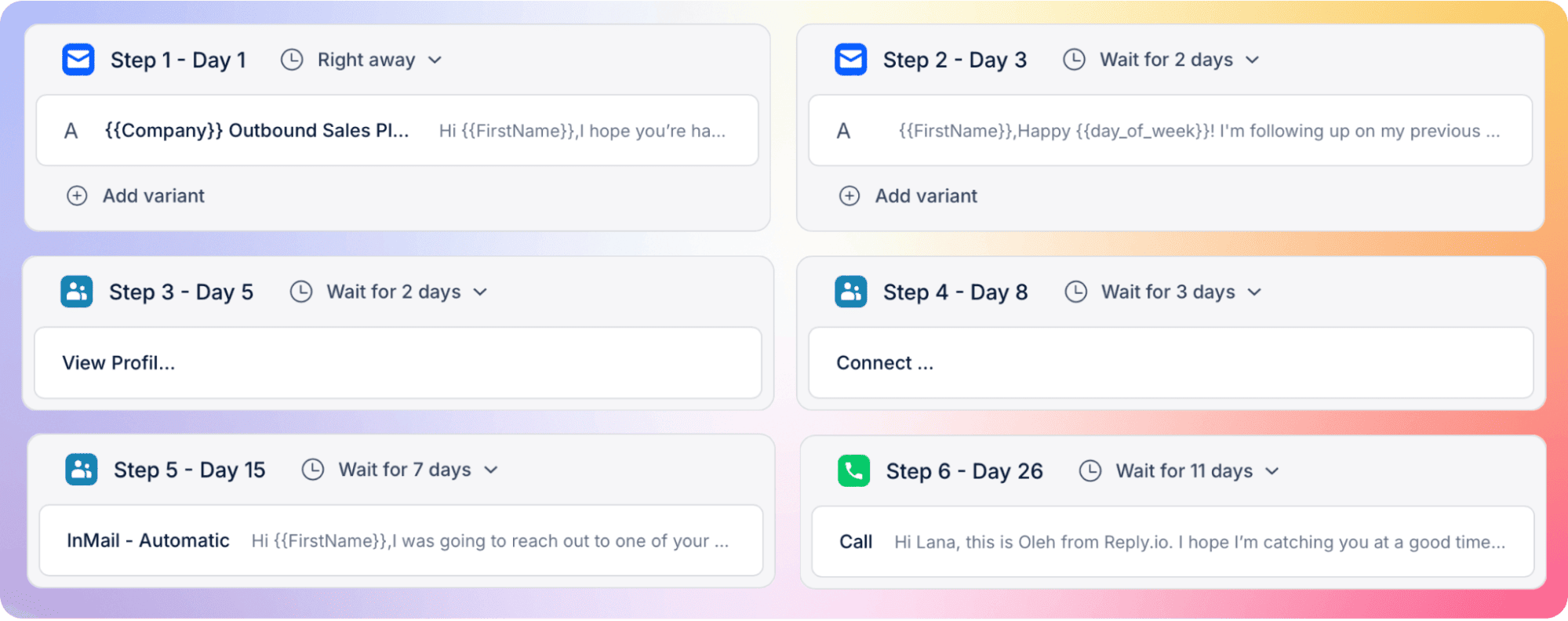
A basic sequence might look like this:
Day 1: Initial email
Day 2: LinkedIn connection request
Day 4: Follow-up email
Day 6: Call task
A sales engagement platform such as Reply.io can fully automate and run those sequences for you, all while staying dynamic — so the channel, timing, and messaging adjust in real time based on lead engagement patterns.
Next, define how replies should be handled. Most responses will fall into four buckets:
Positive: Book the meeting quickly.
Objection: Address the concern and move the conversation forward.
Referral: Start a new thread with the recommended contact.
Later: Schedule follow-up for the date the prospect suggests.
Assign one owner to review and route replies every day, because interest loses value fast when responses just sit there.
Step 5: Define the sales handoff
A lot of GTM processes break in the gap between a qualified reply and a booked meeting.
The best way to avoid that is to define the handoff before the campaign even launches. Be clear on:
what counts as qualified
who books the meeting
what context must be passed to sales
how quickly the handoff should happen
The handoff should also include the trigger, message thread, relevant objections, and any context gathered during outreach.
Even in founder-led sales, this still matters. The handoff may not be between two different people, but there is still a shift from prospecting work into an actual sales conversation, and that transition needs to be clear.
Step 6: Measure, review, and repeat
The first five steps create activity. This final step is what determines whether the process gets better over time or just stays busy. Track a small set of metrics that connect outreach to pipeline:
reply rate
positive reply rate
meetings booked
bounce rate
meetings per 100 contacts
Review performance every week and change one meaningful variable at a time.
For example:
narrow the ICP
rewrite one email
change the CTA
adjust sequence timing
replace one channel step
Do not change the segment, message, timing, and channel mix in the same test, because once you do that, you will not know what actually doesn’t work well.
The process is pretty simple in practice: run a focused batch, review the outcome, change one variable, and repeat.
How Reply.io helps build an automated GTM system
To have an automated and scalable GTM engine, teams need a connected system for defining the ICP, finding qualified prospects, acting on buying signals, running outreach, managing replies, protecting deliverability, and reviewing performance for continuous refinement.
Reply.io serves as the execution layer for that entire GTM process. It connects lead data, enrichment, multichannel engagement, AI automation, deliverability, and analytics in one platform, while syncing qualified opportunities and activity back to your CRM.
Turn your ICP into a qualified prospect list
Reply.io helps teams move from a written ICP to an actionable audience.
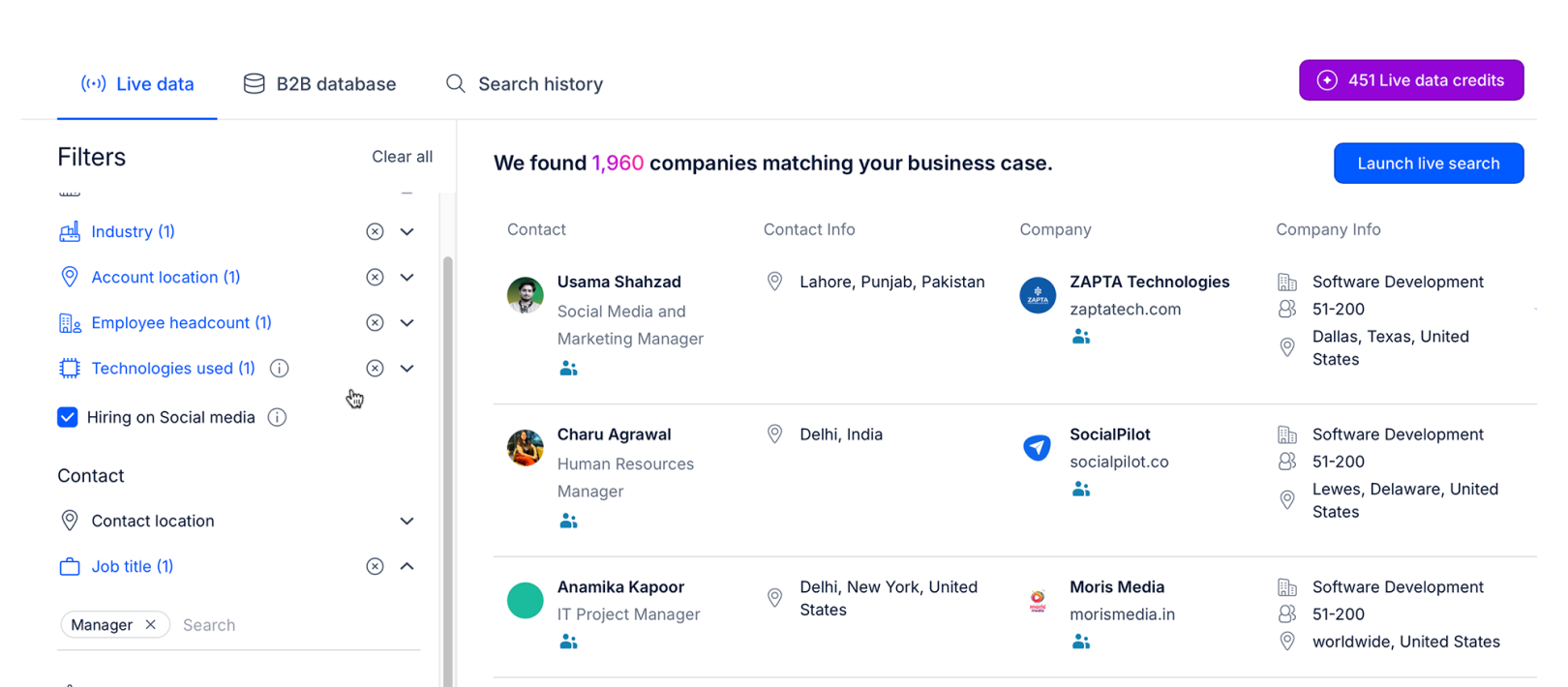
Reply Data includes more than 1 billion global contacts and 60+ million company profiles across 150+ countries. Teams can filter prospects by criteria such as role, seniority, industry, location, company size, department, and technology stack, then validate emails, enrich incomplete records, and push qualified contacts directly into lists, sequences, or the CRM.
Intent signals add timing to that targeting. Reply can surface companies showing indicators such as hiring activity, technology usage, company growth, and LinkedIn engagement, helping teams prioritize accounts with both ICP fit and a credible reason to engage now.
Website visitor tracking can also identify companies and decision-makers already researching the business and route them into relevant sequences.
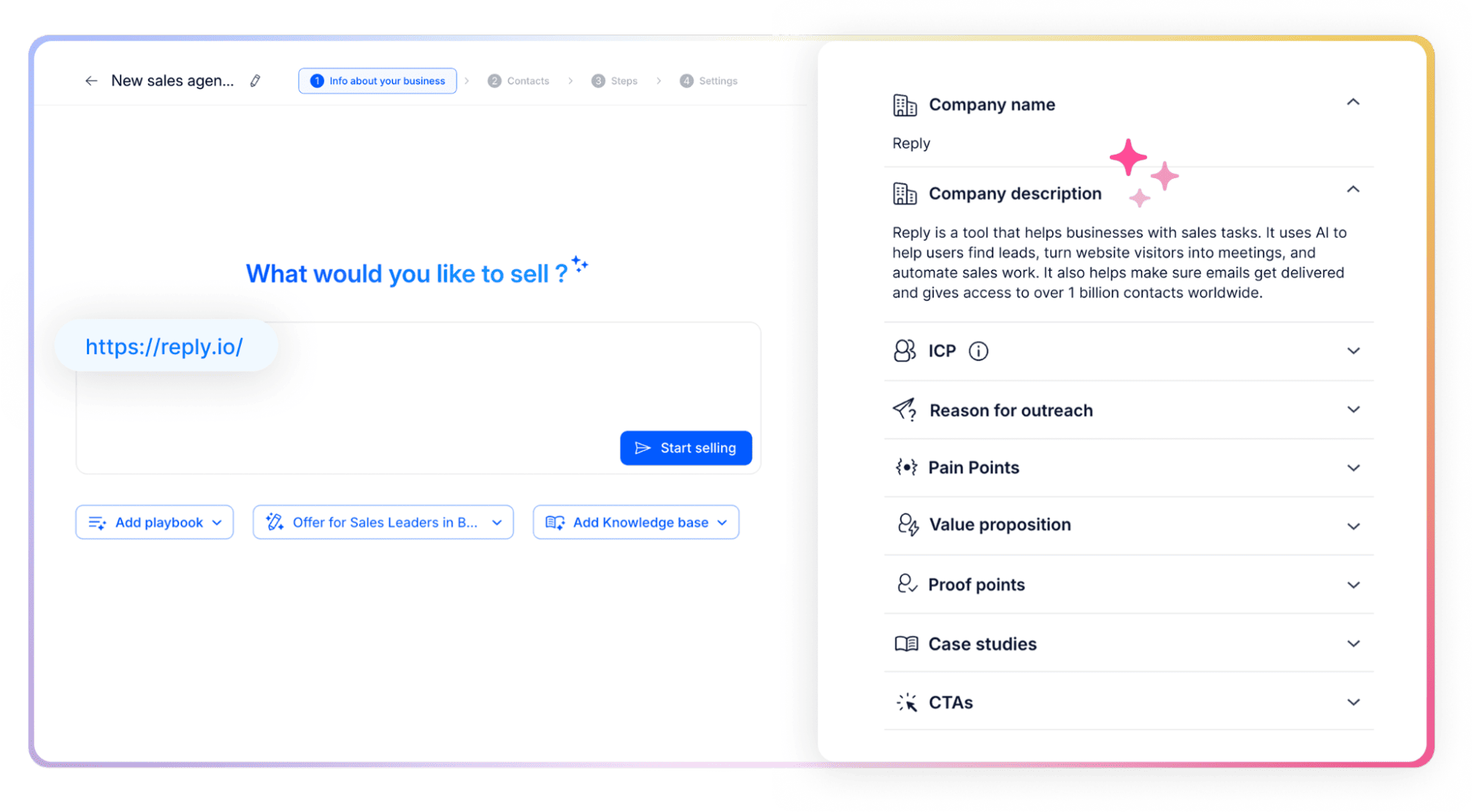
Reply’s AI sales agent — Jason AI, can take this one step further by learning everything about your business, audience, positioning, and sales strategy, then defining or refining your ICP, recommending target audiences, and continuously finding prospects that match the approved playbook.
Convert the GTM playbook into multichannel sequences
Once the segment and message are defined, Reply.io turns them into coordinated outreach across email, LinkedIn, calls, SMS, and WhatsApp.
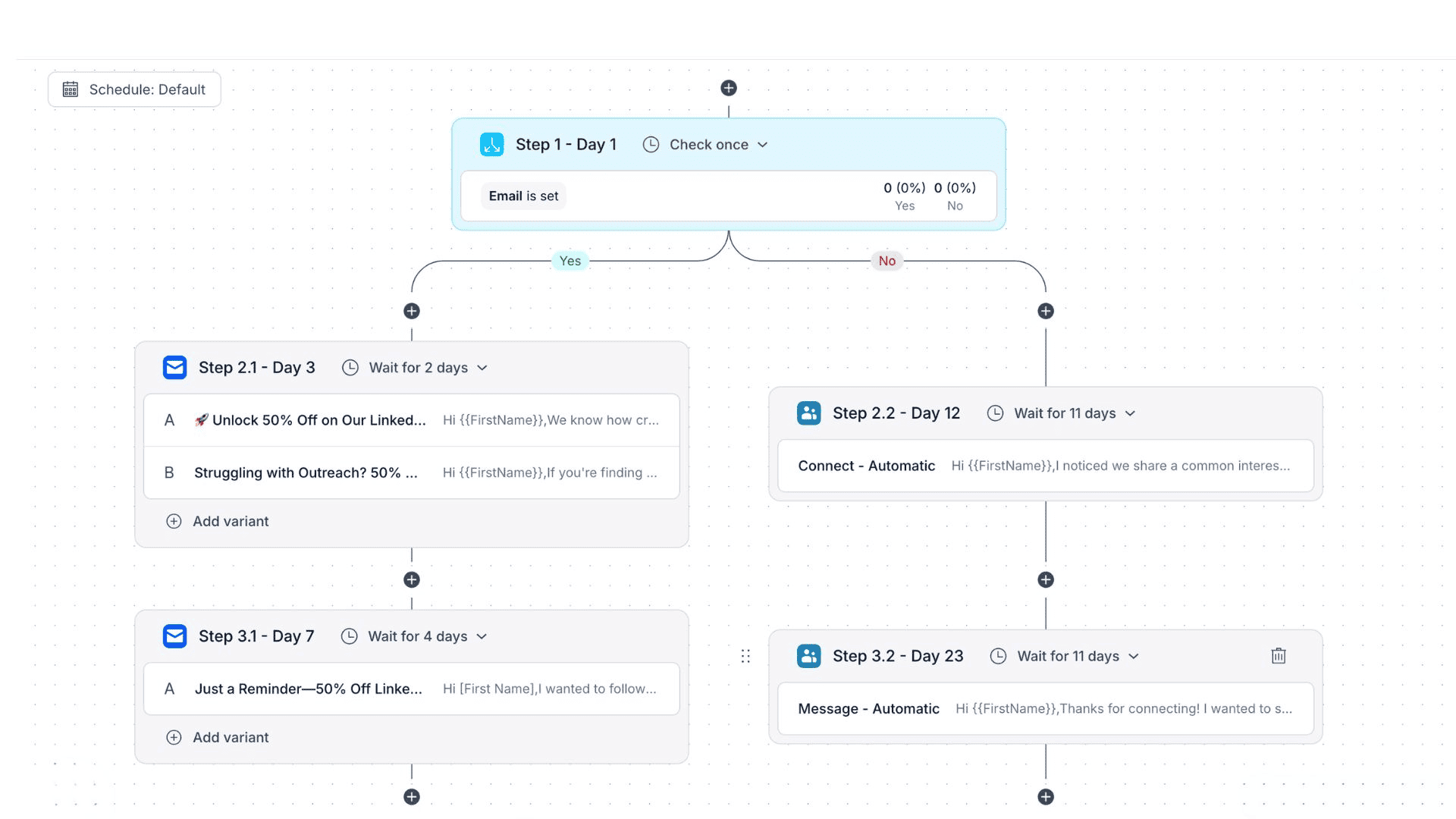
Conditional sequences can adjust the next step based on prospect behavior rather than forcing every contact through the same path. A prospect who engages with an email may receive an automated LinkedIn connection request next, while a higher-intent account showing signs of purchase-readiness can be routed toward a call or a different follow-up sequence, and so on.
AI Variables and prospect research help personalize openers, value propositions, follow-ups, and CTAs using account and contact context. This allows GTM teams to keep the same strategic message across a segment while adapting the wording to each buyer.
Standardize reply handling and qualification
A GTM process can break down even after a successful campaign if replies are not reviewed, qualified, and routed consistently. Reply.io brings responses into a unified inbox and supports workflows for categorizing interest, assigning next steps, and booking meetings.
But the real value here is with Jason AI, which can not only launch multichannel sequences and personalize messages, but also handle replies — nurturing, qualifying, answering questions, working with objections, and even booking meetings on your behalf.
Teams can keep human approval in place for sensitive conversations or automate more routine responses once the rules are proven.
This gives the revenue team a defined path from first response to sales handoff instead of relying on individual reps to manage conversations differently.
Protect the process with deliverability controls
Reliable GTM reporting depends on reliable inbox placement. A weak sender setup can make a strong segment or message appear ineffective.
Reply.io comes with the entire email deliverability suite, including email validation, mailbox warm-up, sender monitoring, spam and domain-health tools, Gmail API support, and other deliverability controls designed to protect sending infrastructure as outreach scales.
Treating deliverability as part of the process helps teams distinguish between targeting, messaging, and infrastructure problems before changing the wrong variable.
Use analytics to improve each campaign cycle
Reply.io tracks performance across sequences, channels, teams, tasks, calls, replies, and meetings. These reports give GTM teams the inputs needed for a weekly review: which segments engaged, which messages produced positive replies, which channels contributed, and where prospects dropped out.
The team can then adjust one variable, run the next batch, and compare the result. That turns the GTM process into a measurable operating rhythm rather than a one-time launch plan.
Add Jason AI as the autonomous execution layer
Reply.io provides the core infrastructure for the entire GTM process: lead database, built-in enrichment, intent signals, AI personalization, multichannel sequences, deliverability, and analytics.
Jason AI joins your team and can operate that system as a full-time AI SDR. It learns the business and playbook, finds and researches prospects, builds personalized outreach, handles replies and objections, and books meetings. Copilot mode keeps a human in the approval loop, while Autopilot mode can execute approved workflows with greater independence.
Together, Reply.io and Jason AI connect a full-scale AI engine that helps GTM teams align and coordinate the entire process from ICP definition and lead discovery through outreach, qualification, and meeting booking.
A sample GTM process flow from first account to booked meeting
A simple GTM process can run in two-week batches, which is usually enough time to launch quickly, collect meaningful data, and improve the next batch without rebuilding the whole motion from scratch.
Day 1: Build the account list
Translate your ICP into practical filters such as industry, company size, buyer role, and geography, then narrow the list further using relevant triggers like recent funding, leadership hires, expansion, or active recruiting.
Start with 50 to 100 contacts. That range is large enough to surface real patterns, but still small enough to review properly without losing the signal in the noise.
Day 2: Launch the first sequence
Turn your messaging into a short multichannel sequence:
Day 1: Initial email
Day 2: LinkedIn profile visit or connection request
Day 4: Call task
Day 5: Follow-up email
Day 7: LinkedIn message
Launch once the list, message, and routing process are ready. The point of the first batch is not perfect execution. It is to generate evidence you can actually use.
Days 3–10: Route replies
Review responses every day and assign each one a clear next action:
Positive: Book the meeting promptly.
Objection: Address the concern and keep the conversation moving.
Referral: Open a new thread with the suggested contact.
Later: Schedule follow-up for the date requested.
One person should own reply routing, because interested prospects lose momentum fast when no one picks things up.
Days 11–14: Review performance
Track the core metrics:
reply rate
positive reply rate
meetings booked
bounce rate
meetings per 100 contacts
Then look for patterns across the batch. Identify which segments, triggers, messages, and channels produced the strongest results.
Use those findings to improve one variable in the next batch. That’s how the process gets sharper over time and starts aligning with how your market actually responds.
Build a GTM process your team can repeat
A working GTM process does not need dozens of stages or months of planning. It needs a clear ICP, relevant triggers, focused messaging, defined channels, reply ownership, a reliable handoff, and a review cycle that happens consistently.
Start with one segment and a small batch. Measure what happens, change one variable, and repeat. That approach gives your team real market feedback much faster than a more elaborate framework that never makes it into execution.
Reply.io brings prospect data, enrichment, multichannel sequences, deliverability tools, analytics, and Jason AI SDR into one workflow.
You can start with the free 14-day trial and test the process on your first campaign.
FAQ
What is a GTM process?
A GTM process is the operating routine your team follows to move from target account selection to a sales conversation. It covers list building, messaging, outreach, reply handling, qualification, handoff, and weekly review.
How is a GTM process different from a GTM strategy?
A GTM strategy decides who to target, what to sell, and which channels to use, while the GTM process defines how those decisions get executed day to day and improved from one campaign batch to the next.
How long does it take to build a GTM process flow?
A lean first version can be launched within a week. You need one ICP, a short trigger list, a simple sequence, clear reply ownership, and a basic review framework.
Which tools do you need to run a GTM process?
At minimum, you need reliable prospect data, an outreach platform, deliverability controls, analytics, and a CRM. A platform like Reply.io helps reduce tool sprawl by combining prospecting, enrichment, multichannel outreach, AI automation, and reporting.
How do you know whether your GTM process is working?
Track whether the process produces qualified replies, booked meetings, and opportunities at a sustainable cost, then compare results by segment, trigger, message, and channel to see what should be repeated and what needs to change.
Subscribe to our blog to receive the latest updates
from
the world
of sales and marketing. Stay up to date.
We use cookies to enhance your browsing experience, serve personalised ads or content, and analyse our traffic. By clicking "Accept All", you consent to our use of cookies.