AI for Improving Your GTM Operations in 2026: No BS Guide

AI for Improving Your GTM Operations in 2026: No BS Guide

Building a GTM plan on paper is one thing, but making sure that execution runs smoothly once people, tools, data, and follow-ups get involved is a whole separate, full-time job. 

The ICP is written down, the positioning looks solid, and the channels are already chosen. But then the actual day-to-day work still runs on manual prospecting, random follow-ups, messy CRM records, and handoffs where half the context disappears somewhere between sales, marketing, and customer success.

AI can fix parts of that execution layer, but the catch is that it only works when the GTM foundation is already crystal clear. In this guide, we’ll look at how successful GTM operations work, where AI fits, and how to use it to maximize speed, efficiency, and revenue. 

What is GTM operations?

GTM operations refer to the system that turns your GTM strategy into everyday execution.

It connects the people, processes, tools, and data behind sales, marketing, customer success, and RevOps, so teams can move from planning nice ideas to actually creating pipeline.

A GTM strategy defines your target market, positioning, channels, and revenue priorities. GTM operations makes sure those decisions show up in the work itself: which accounts sales goes after, which leads marketing hands over, how customer data moves between teams, and which numbers leadership actually reviews.

At its core, GTM operations comes down to three areas:

  • Pipeline visibility → knowing where every deal stands, why it is moving, and where it is getting stuck.
  • Cross-functional alignment → keeping sales, marketing, customer success, and RevOps focused on the same accounts, data, and priorities.
  • Process consistency → building repeatable workflows that produce predictable results without depending on one rep, one spreadsheet, or one weird manual workaround.

Without GTM operations, a company can have a strong strategy and still miss pipeline because execution breaks somewhere between tools, teams, and handoffs.

Why do GTM operations fail?

Most GTM operations fail when work moves from one team to another and the context gets lost somewhere along the way. 

Some of the most common problems are:

  • Siloed data: sales lives in the CRM, marketing lives in the automation platform, and nobody sees the full coordinated buyer journey, because it doesn’t even exist.

  • Weak handoffs: marketing sends leads to sales without context, or sales sends customers to success without the full deal history.

  • No single source of truth: teams pull numbers from different dashboards, so performance reviews turn into debates instead of decisions.

  • Too much manual work: reps spend time researching accounts, updating fields, sorting replies, and chasing follow-ups instead of having actual sales conversations.

AI won’t magically fix unclear strategy, bad data, or broken ownership. Used properly, though, it removes the manual work that makes those problems harder to manage once the system starts scaling.

The Ultimate AI Sales Playbook for 2026

We built this playbook to show what modern sales teams are actually doing with AI today, and how you can use the same ideas in your own process.

What’s inside this guide:

→ AI tools top sales teams use for prospecting, outreach, meetings, CRM, and daily work

→ Ready-to-use AI prompts for research, cold emails, follow-ups, account planning, and proposals

→ Real examples of using AI across every stage of the sales process

→ A practical system for building pipeline with AI

→ Tips for improving outreach and personalization without adding more work

→ Sales workflows you can copy and start using right away

Get your copy and learn how to use AI to work faster, stay organized, and close more deals.

Where does AI fit into your GTM strategy and operations?

AI should not replace your GTM motion. It should make the execution layer faster, cleaner, and easier to measure.

The best use cases are usually where teams already lose time: prospect research, enrichment, lead scoring, personalization, follow-up, reply handling, forecasting, and CRM updates.

Here’s where AI can make the biggest difference.

  • Prospecting and lead qualification → AI can enrich account data, score leads against your ICP, spot buying signals, and surface the accounts most likely to convert, which helps reps spend less time guessing and more time working on real opportunities.

  • Outreach personalization: AI can turn account context into relevant email, LinkedIn, and follow-up messaging at scale, so campaigns don’t depend on the same generic template for every buyer.

  • Pipeline data and forecasting: AI can analyze engagement, deal activity, and stage movement to flag stalled opportunities earlier and give revenue leaders a cleaner view of performance and risk areas.

  • Cross-channel follow-up: AI-triggered sequences can fully automate coordinated touchpoints across email, LinkedIn, calls, and SMS, which reduces missed follow-ups and keeps potential buyers moving through the motion.

AI performs best when the GTM process underneath it is already defined. A vague ICP, untested messaging, and messy CRM data will not suddenly produce better outcomes simply because AI is involved. Set the foundation first, then use AI to remove the repetitive work that often slows GTM execution down.

How does an AI-powered GTM operations stack look?

Any solid GTM stack runs across four functions: prospecting, outreach, pipeline management, and customer success.

Typically, you need different AI tools for these functions. The trickiest part, however, is making those tools “talk” to each other.

The table below summarizes what AI does at each stage of your GTM motion, helping you see how the four functions connect into a single system:

GTM function What AI does Example tool type
Prospecting Enriches contact data, pulls intent signals, and scores accounts on quality Data enrichment + intent platforms
Outreach Writes and runs personalized multichannel sequences Sales engagement platforms
Pipeline management Scores deals on engagement and predicts which ones close Predictive forecasting tools
Customer success Tracks account health and warns you before churn Health-scoring platforms

With that out of the way, here’s how all the key layers work in more detail: 

The data layer: prospecting

GTM operations start with the quality of your data. If contact records are outdated, job titles are wrong, or company details are missing, every next step becomes less reliable, because targeting gets weaker, personalization gets thinner, and reps waste time on accounts that no longer match the ICP.

AI enrichment tools help keep prospect and account data clean by filling in missing fields, refreshing records, validating emails, and surfacing key intent signals like hiring, funding, product launches, website visits, or tech stack changes, giving teams a much stronger base for prioritizing leads and launching timely outreach. 

The engagement layer: outreach

Once the data is clean, the next layer is engagement. AI outreach tools turn prospect and account context into sequences across the channels your buyers actually use, whether that’s email, LinkedIn, calls, SMS, or other follow-up steps.

The value comes from conditional sequencing logic, which is where things get interesting. A prospect who opens an email, visits a pricing page, or replies with interest should not get the same next step as someone who never engaged. AI can help adjust timing, personalize follow-ups, and keep the next touch aligned with what the prospect has already done, in real time.

The scoring layer: pipeline management

Pipeline scoring is more useful when it looks at behavior, not just static rules.

Traditional scoring usually looks at title, company size, industry, or region. AI scoring adds intent on top, like website activity, content engagement, email replies, product usage, and CRM history.

For example, a lead who reads your technical docs, visits the integration page, and replies to an outbound email is probably more urgent than a perfect-title contact with no engagement. That helps reps prioritize based on real buying signals, not profile data alone.

The retention layer: customer success

GTM operations don’t stop after the deal closes. Customer success still needs visibility into usage, activity, risk, onboarding progress, and expansion potential.

AI can flag accounts that go quiet, use fewer features, miss onboarding steps, or show early renewal risk. It can also spot expansion moments when usage grows, new teams join, or customers keep hitting plan limits.

That closes the GTM loop by connecting acquisition, onboarding, retention, and expansion into one operating system.

Why GTM tools need to share the same data

One of the main challenges with AI in GTM operations is how seamlessly all the data moves between all your software, which is needed to ensure your AI engine has all the uncovered context to work with and therefore make better decisions. 

A prospecting tool may enrich a contact, an outreach platform may run the sequence, a CRM may track the opportunity, and a customer success platform may manage the account after close. But if those systems don’t sync properly, teams end up working from different versions of the same buyer, which is where the usual mess starts.

A stronger GTM setup connects the layers, so targeted leads are sourced and enriched with additional account context, then that data feeds personalized outreach, engagement updates the CRM, lead scores inform sales priority, and closed-won context reaches customer success. 

That’s another reason why GTM teams should prioritize more consolidated tools that cover multiple functions under one roof. For instance, Reply.io is an AI sales engagement and lead generation platform that helps teams find potential buyers, enrich them, pick up intent signals, launch multichannel outreach campaigns, and analyze performance, covering pretty much every key aspect of outbound operations. 

What GTM operations problems can AI help solve?

AI is most useful in GTM operations when it removes the repetitive work that slows down pipeline, improves timing, and gives reps better context before they act. The biggest gains usually come from these areas:

  • Slow response to new leads: AI can reply when a lead comes in, ask a few qualifying questions, and route or book the meeting while the interest is still fresh. Wait a few hours, and that same lead is usually much harder to convert.

  • Reps buried in admin work: AI can log activity, summarize calls, draft follow-ups, update CRM fields, and create next steps. Basically, it takes some of the CRM cleanup off the rep’s plate so they can spend more time in real conversations.

  • Outreach sent at the wrong moment: AI can watch signals like website visits, funding, hiring, product launches, or replies to earlier emails, then trigger outreach when the account is more likely to care.

  • Good leads slipping through unnoticed: AI lead scoring can rank prospects by fit and intent, so reps don’t just chase the loudest reply in the inbox. They can focus on accounts that actually show stronger buying signals.

  • Slow ramp for new reps: AI can give new reps proven sequences, suggested replies, objection-handling notes, and next-step recommendations based on similar deals. It won’t replace experience, but it does help them follow the playbook faster.

How does Reply.io fit into your GTM operations?

Reply.io fits into the front half of your GTM ops stack, where prospecting, enrichment, outreach, deliverability, reply handling, and meeting booking usually happen across too many disconnected tools.

Instead of stitching all of that together manually, teams can use Reply’s native lead database to find and enrich prospects and accounts, build multichannel sequences, personalize messages with AI, protect deliverability, sync activity back to the CRM, and see which campaigns actually create revenue.

Jason AI for autonomous lead gen and outbound execution

Jason AI is Reply’s very own AI sales agent that joins your team as a full-time SDR, learns everything about your business, audience, and sales strategy, and then autonomously finds targeted leads, launches outreach, personalizes messages, and even handles replies and books meetings on your behalf. 

It can run in Autopilot mode, where more of the workflow is handled automatically, or Copilot mode, where Jason drafts replies and waits for approval before sending (ideal for the more high-value accounts). For GTM operations, that means teams can fully automate repetitive outbound work without fully giving up control over messaging and campaign quality.

Multichannel sequences for coordinated follow-up

Reply.io lets teams run coordinated outreach across email, LinkedIn, calls, SMS, WhatsApp, and other workflow steps from one sequence. These sequences follow conditional logic, where each step adjusts in real time based on prospect behaviour, so for instance, if the initial email goes unopened for 3 days, Reply will automatically send a LinkedIn connection request; once accepted, it will send a short personalized LinkedIn message and cancel the scheduled email follow-up, and so on. 

Personalize outreach at scale with Reply.io’s multi-channel conditional sequences

This is usually where GTM execution gets messy — keeping all communication structured and moving forward, especially in the context of hundreds or thousands of leads. With Reply.io, teams can set the channel order, timing, and next steps in advance, then let the sequence keep moving until the prospect replies, books, or exits the campaign.

AI personalization tied to prospect context

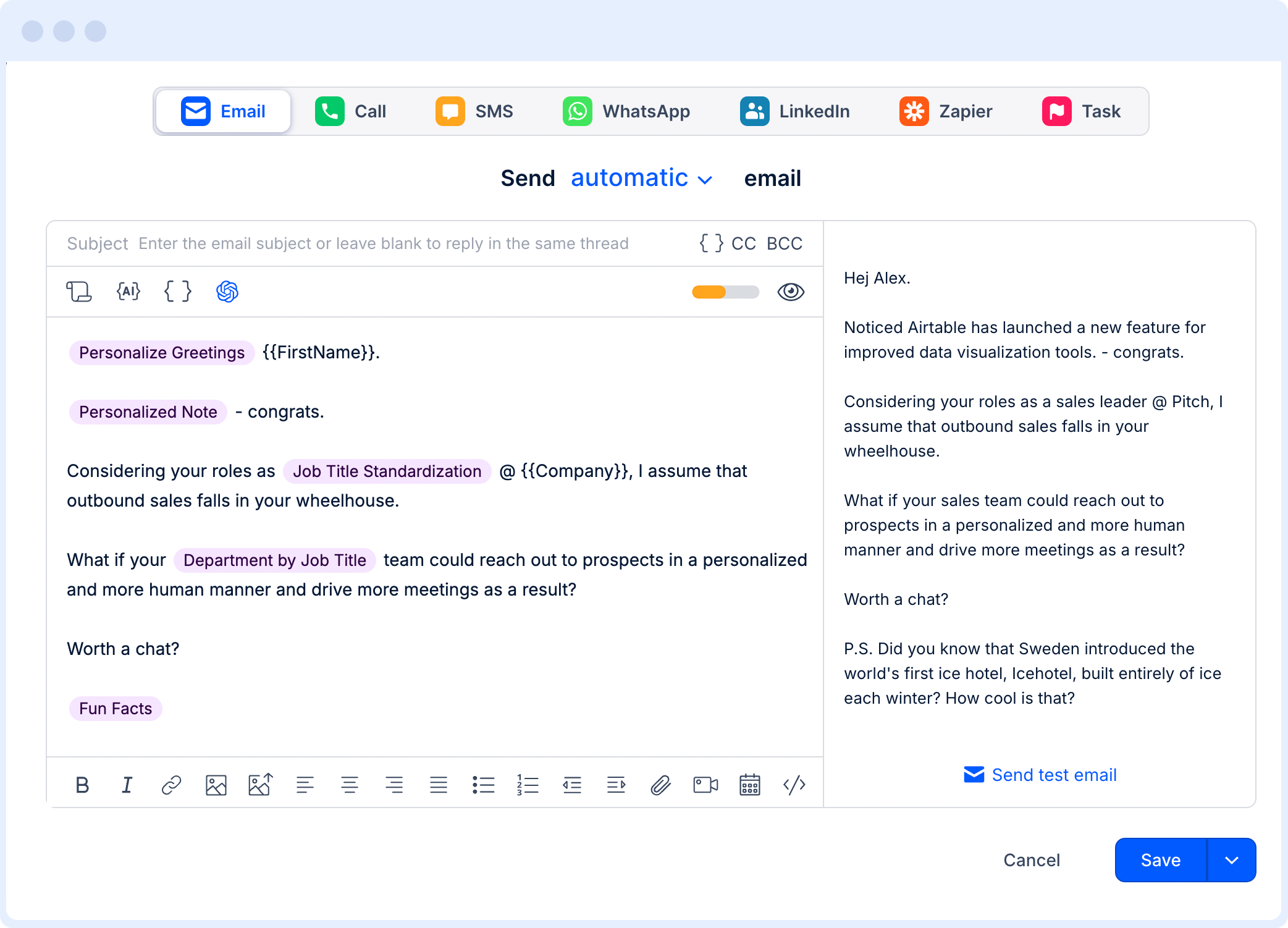
With all the uncovered data from Reply’s database and enrichment, its AI engine then uses all that context to personalize every email, follow-up, and LinkedIn message for each unique lead, taking into account company info, roles, pain points, engagement history, and more. 

Instead of sending the same email to every account in a segment, teams can also create their own custom templates with AI variables for openers, value props, CTAs, and more, and then Reply will research each lead to fill in the gaps before outreach: 

AI personalization

For GTM operations, this keeps targeting and messaging connected at all times — your ICP decides who gets contacted, while Reply’s AI personalization makes the message specific and relevant enough to earn a reply.

Built-in deliverability for outbound scale

Email deliverability belongs inside GTM operations because outbound only works when emails actually reach the inbox, and once you start scaling sales and marketing outreach, that gets much trickier than most realize. 

Reply includes deliverability and infrastructure tools like mailbox health visibility, domain warmup, email health checks, inbox rotation, and Google Postmaster spam monitoring across its outbound workflows.

Scale without deliverability usually just creates more bounced emails, weaker sender reputation, and campaigns that look active but don’t create many real conversations. At worst, they can also blacklist entire company domains and LinkedIn accounts. 

Analytics and CRM sync for GTM visibility

Reply.io gives GTM teams visibility into which sequences, channels, steps, and reps are producing replies, meetings, and pipeline opportunities.

That activity can sync with CRMs like Salesforce, HubSpot, Pipedrive, Copper, and Close, so sales data doesn’t stay trapped inside the outreach platform. 

Reply.io also has customer proof around this workflow, including Revenue Accelerator building a $400,000 pipeline in 45 days and Saleshive generating 700+ replies in six months from event-focused outreach.

How to build an AI-powered GTM strategy and operations playbook

AI only improves GTM operations when there’s already a clear process underneath it. Before automating anything, define where the workflow breaks, what data AI should work from, and which numbers will prove whether it’s actually helping.

Step 1: Audit the current GTM workflow

Map how a lead moves from first touch to closed deal, including prospecting, enrichment, outreach, qualification, handoff, CRM updates, and reporting. Mark the manual steps, slow handoffs, duplicate records, and places where ownership gets fuzzy, because those are usually the first spots where AI can create real leverage.

Step 2: Lock down the ICP and buying signals

AI needs precise targeting to produce anything useful. Define the ICP by industry, company size, role, geography, tech stack, pain point, and trigger events like hiring, funding, product launches, website visits, or leadership changes. A loose ICP will just help AI scale bad-fit pipeline faster, which is obviously not the goal.

Step 3: Test the sequence before automating it

Run the first version manually, or at least with tight human review, before giving AI permission to run it at volume. Test the message, channel mix, timing, CTA, and follow-up logic with a small list, then use replies, objections, positive responses, and meetings booked to decide what should actually be automated.

Step 4: Set the reporting baseline

Define the metrics that show real GTM progress: reply rate, positive response rate, meetings booked, pipeline created, win rate, and revenue sourced. Capture the baseline before AI goes live, otherwise you won’t know whether automation improved performance or just made the team look busier.

Step 5: Automate one layer at a time

Start with the layer where manual work costs the most and the risk is easiest to control, usually outreach, follow-up, reply sorting, or lead qualification. Once that workflow is stable, expand AI into prospecting, scoring, forecasting, and CRM updates instead of trying to automate the full GTM motion in one go.

Step 6: Review and reiterate every week

AI workflows still need management, which is the part people like to skip. Review which ICP segments, channels, messages, and sequence steps create qualified conversations, then cut weak branches, improve prompts, update data rules, and adjust routing based on what actually moves pipeline.

Metric What it tells you Benchmark to aim for
Email reply rate How well your messaging and targeting land 5–10% cold; higher with AI personalization
Lead-to-meeting rate How many leads turn into real conversations 10–20% for a healthy outbound motion
Pipeline velocity How fast deals move from first touch to close Trending up quarter over quarter
Sales cycle length How long the average deal takes to close Shorter than last quarter
Customer acquisition cost What you spend to win one customer Falling as AI removes manual work
Time-to-first-response How fast you reply to an inbound lead Under 5 minutes

Turn GTM operations into pipeline

GTM strategy only works when execution is consistent, meaning the data is clean, ownership is clear, follow-up happens on time, handoffs are qualified, and reporting is tied to pipeline.

Reply.io helps teams run that execution layer with prospect data, AI personalization, multichannel outreach, deliverability tools, CRM sync, analytics, and Jason AI for fully autonomous prospecting, reply handling, and meeting booking.

Start your free 14-day Reply.io trial and see it in action right away (no credit card required). 

Frequently asked questions

What is GTM operations?

GTM operations is the system that turns go-to-market strategy into daily execution across sales, marketing, RevOps, and customer success. It connects targeting, outreach, qualification, handoffs, reporting, and ownership so teams work from the same data.

What is GTM operations versus GTM strategy?

GTM strategy defines the plan: who you target, how you position, which channels you use, and what revenue motion you follow. GTM operations turns that plan into repeatable workflows, campaign execution, CRM hygiene, reporting, and team accountability.

How does AI improve GTM operations?

AI improves GTM operations by taking manual work out of prospecting, enrichment, personalization, follow-up, reply sorting, lead scoring, and CRM updates. The real benefit is cleaner execution and faster movement from account signal to sales conversation, not just more activity.

What tools do GTM operations rely on?

A GTM operations stack usually includes a CRM, prospecting database, enrichment tool, sales engagement platform, analytics layer, and customer success system. Reply.io covers the front half of that stack with B2B data, multichannel outreach, AI personalization, deliverability, analytics, and CRM integrations.

Is AI replacing sales reps in GTM operations?

AI is taking over repetitive GTM work like research, data updates, follow-ups, reply sorting, and basic qualification. Sales reps are still needed for live conversations, discovery, negotiation, stakeholder management, and closing, where judgment and trust matter more than automation.

Subscribe to our blog to receive the latest updates from the world of sales and marketing.
Stay up to date.

Related Articles

What’s New in Reply: Pre-Warmed Domains, Agentic Chat, LinkedIn Enrichment, and More

What’s New in Reply: Pre-Warmed Domains, Agentic Chat, LinkedIn Enrichment, and More

What’s New in Reply: Pre-Warmed Domains, Agentic Chat, LinkedIn Enrichment, and More
Lead Generation for Startups in 2026: How to Get Leads Fast

Lead Generation for Startups in 2026: How to Get Leads Fast

Lead Generation for Startups in 2026: How to Get Leads Fast
How to Build a Systematic Cold Outreach Marketing Strategy in 2026

How to Build a Systematic Cold Outreach Marketing Strategy in 2026

How to Build a Systematic Cold Outreach Marketing Strategy in 2026