
Average Cold Email Response Rate in 2026 (and How to Improve Yours Today)

Average Cold Email Response Rate in 2026 (and How to Improve Yours Today)

Ask five B2B professionals what the average cold email response rate is, and you’ll hear five different numbers. One 2026 study puts it at 0.45%, another built on 31 million emails says 4.5%, and popular LinkedIn posts confidently quote 8.5%. So if your own campaigns are pulling 2%, that spread makes it impossible to tell whether you have a real problem or a perfectly normal result.

In this guide, we’ll go through what the most credible benchmarks say and why they disagree, the four levers that move reply rates in 2026, and how to put each of them into practice with an AI outreach platform like Reply.io, all the way to handing the entire process to an AI SDR.

What is the average cold email response rate in 2026?

The average cold email response rate in 2026 sits between 3% and 5% for most B2B campaigns, measured as human replies divided by the number of people contacted. Hunter’s State of Email Outreach, which analyzed over 30 million cold emails sent in 2025, puts the average at 4.5%, while our own research across millions of emails sent through the platform landed at 3.02%.

Anything consistently under 1% usually points to a structural issue with deliverability or targeting, unless your data counts every single send as a separate attempt (more on that below).

To calculate your own number:

Reply rate = unique human replies ÷ contacts who received the sequence × 100

So if 400 prospects went through a sequence and 18 of them wrote back, not counting out-of-office messages and bounce notifications, your reply rate is 4.5%.

You should also track the positive reply rate next to it, since technically speaking a “please remove me from your list” counts as a reply too. In our own research, roughly 23% of all replies were classified as Interested, so a healthy 4% reply rate usually translates into about one interested prospect per 100 contacts. That’s the number that actually fills your calendar.

Why every benchmark gives you a different number

Benchmarks disagree because they measure different things under the same label, and three variables explain most of the gap:

  • Denominator → some studies divide replies by contacts, others by every email sent. In a four-step sequence, each prospect gets counted four times in the second method, so the same campaign can look several times worse.
  • Numerator → some count every reply, others strip out auto-replies, and a few only count positive responses.
  • Population → an agency sending high volumes for dozens of clients produces very different averages than a platform where users run smaller, hand-built campaigns.

Belkins is the clearest example of this, as its 2026 study analyzed over 7 million cold emails, counted unique replies against every email sent, and had open tracking switched off. The result was a 0.45% average, a fraction of what per-contact studies report, without the campaigns being any worse:

Source Dataset Average What’s counted
Hunter, State of Email Outreach 2026 31M cold emails sent in 2025 4.5% Replies per recipient across the whole campaign
Reply.io research Millions of emails sent via Reply 3.02% Any reply per email sent, with 22.99% of replies marked Interested
Belkins 2026 study 7.53M emails and 34,393 replies, 2025 0.45% Unique replies ÷ every email sent, auto-replies and bounces excluded
Mailchimp benchmarks All Mailchimp users, December 2023 2.62% Clicks on marketing emails, not replies

The practical move is to pick one formula, use it consistently, and compare yourself only against sources that count replies the exact same way you do.

Average cold email response rate B2B teams should aim for

Measured per contact, here’s how we’d read a B2B reply rate in 2026:

  • Under 1% → almost always a deliverability or data issue that copy changes won’t fix
  • 1-3% → working, but the list or the offer is too broad
  • 3-5% → healthy and in line with the 2025 averages
  • 5-10% → strong, usually tight segments with a clear trigger
  • 10%+ → possible, but almost always on small, highly specific lists

Who you’re emailing shifts these ranges a lot. In the Belkins data, founders and owners replied at 0.57% compared with 0.32% for VPs, and companies with 0-10 employees replied more than three times as often as those with 10,000+ (0.72% vs. 0.22%). The goal of the campaign matters too, as Hunter found that sales outreach averaged 3% while marketing-focused campaigns reached 6.2%.
How to Write Un-ignorable Cold Emails: An Ultimate Guide

This e-book is your essential tool for mastering effective cold email outreach. Dive into a comprehensive guide that walks you through refining your outbound strategy, from crafting compelling subject lines to creating irresistible email templates tailored to your target audience.

Unlock the secrets of personalization, ensure your emails reach their destination with best practices for email copywriting and get practical and data-driven insights on cold emails, subject lines, email frameworks, and more.

How to increase cold email response rate: the 4 levers that move the number

Copy tweaks get most of the attention, but the 2025/2026 data points to a clear order: fix what stops emails from landing, then who receives them, then what they say, and only after that how you follow up.

1. Deliverability sets the ceiling

Every other optimization assumes your email lands in the primary inbox, and in 2026 that’s no longer a given. Google’s sender guidelines require anyone sending 5,000+ messages a day to Gmail accounts to authenticate with SPF, DKIM, and DMARC, offer one-click unsubscribe, and keep spam complaints below 0.3% (ideally under 0.1%).

Microsoft introduced similar rules for Outlook.com, and high-volume domains that fail authentication get rejected outright with a “550 5.7.515” error. If you’ve never set these records up properly, start with our guide to DMARC, DKIM, and SPF.

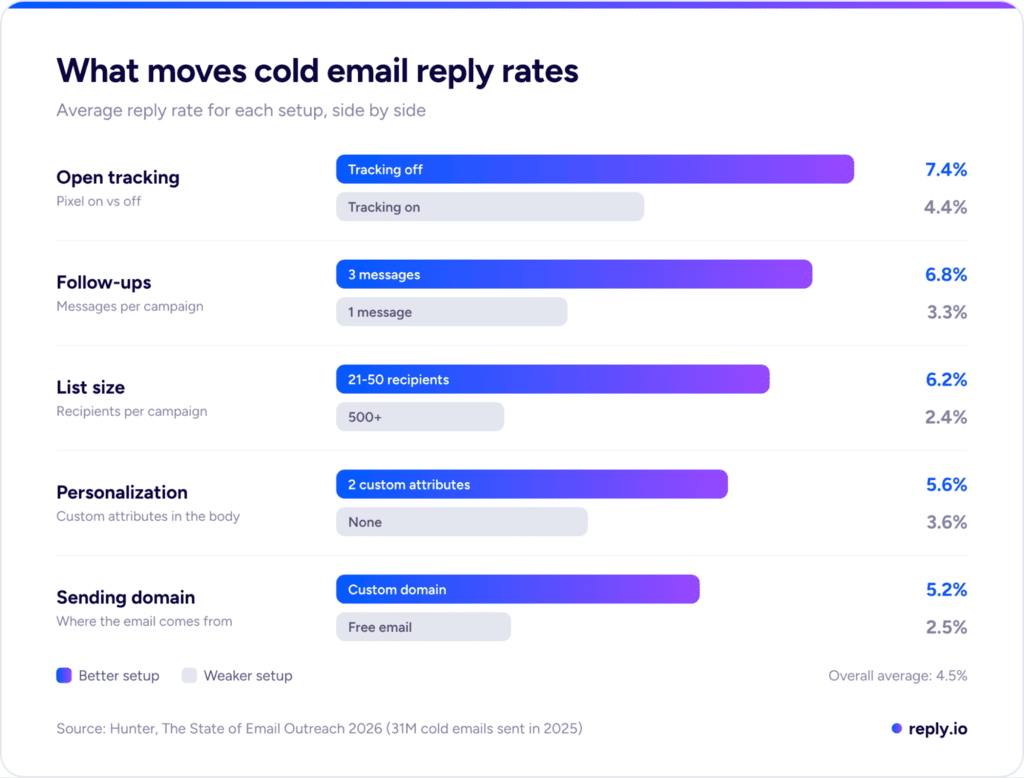
Emails sent from a custom domain average at double the reply rate compared to free addresses like Gmail, while campaigns with open tracking turned off reply almost twice as often than those with tracking on.

2. Smaller, sharper lists beat volume

In Hunter’s data, campaigns sent to 21-50 recipients averaged a 6.2% reply rate, more than 2.5x the 2.4% for campaigns sent to 500+ people. The average sequence in 2025 had 449 recipients, which puts most teams on the wrong side of that gap. The same goes for how many people you contact at one company, as emailing one or two contacts per account averaged 5.1%, while three or more dropped to 3.5%.

Small lists work because they force you to be specific. When you only email 40 people who share the same trigger, like a recent funding round or the same tech stack, you can write one message that’s relevant to every one of them. A short, verified list also produces far fewer bounces than a scraped one.

This is exactly where most teams stall, because building dozens of tight, verified micro-segments by hand means jumping between a database, an email verifier, and a spreadsheet for every new list.

In Reply.io, that whole process happens in one place. You filter Reply’s B2B contact database of 1B+ live contacts by industry, headcount, tech stack, seniority, and location, and every email gets verified before it enters a personalized multichannel sequence, so splitting one broad ICP into five focused 40-person segments takes only a few minutes per segment.

3. Relevance beats personalization tokens

Personalization works, but only when it says something of value. Hunter found that emails with no personalization averaged 3.6%, while those with two custom attributes in the body reached 5.6%. At the same time, Reply’s own research showed that emails relying on merge variables alone had a 26% lower Interested rate than average, because recipients can easily tell a {{company_name}} swap apart from a sentence that proves you did your homework.

The line that moves replies explains why you’re reaching out to this person at this very moment, whether that’s a new VP who just joined their team or a region they’re expanding into, and it connects that moment directly to the problem you solve. That is real personalization, and that is what gets your emails much more likely to get replied to.

4. Follow up, then switch channels

Hunter’s data makes a clear case for follow-ups, with single-message campaigns averaging 3.3% and three-message campaigns reaching 6.8%. Past the third message, though, the average reply rate started to drop. In practice, that means two follow-ups a few days apart in the same thread, each with a new angle like a short case study or a different pain point. Our guide on how to send a follow-up after no response has templates for both.

After the third email, the next touch should move to another channel, such as a LinkedIn connection request, LinkedIn message, or perhaps a call if your situation allows it. A prospect who ignores three emails may simply not live in their inbox. That’s the whole logic behind multichannel outreach, where you add touchpoints across channels without hammering one inbox.

average response rate for email marketing

How to improve your email response rate with Reply.io (step by step)

Reply.io brings every lever above into one workflow. Here’s how to set it up so each piece pushes your reply rate up.

Step 1: Find the right leads with live data

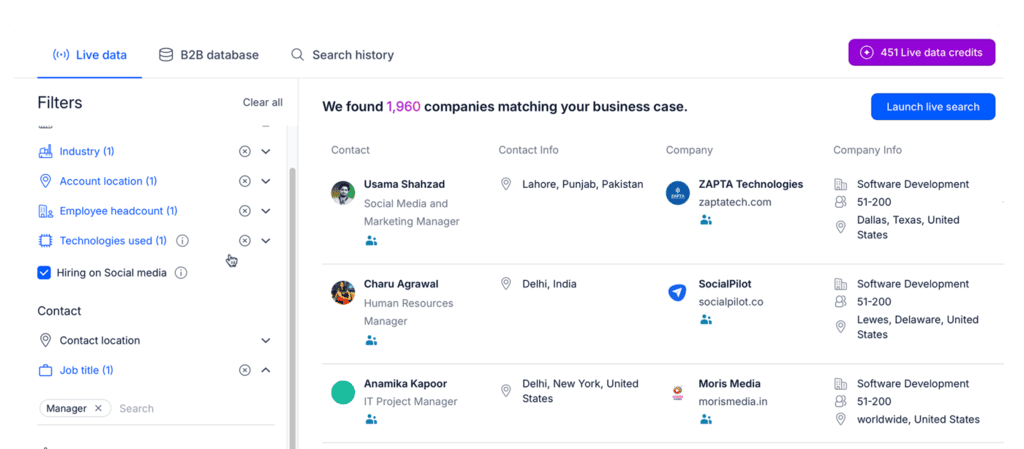
In Reply Data, you can filter 1B+ contacts and accounts across 150+ countries by location, industry, headcount, tech stack, department, role, and seniority, then preview the results before spending any credits.

Reply Data filters for building a B2B contact list

When standard filters can’t capture who you’re after, you have a few more options:

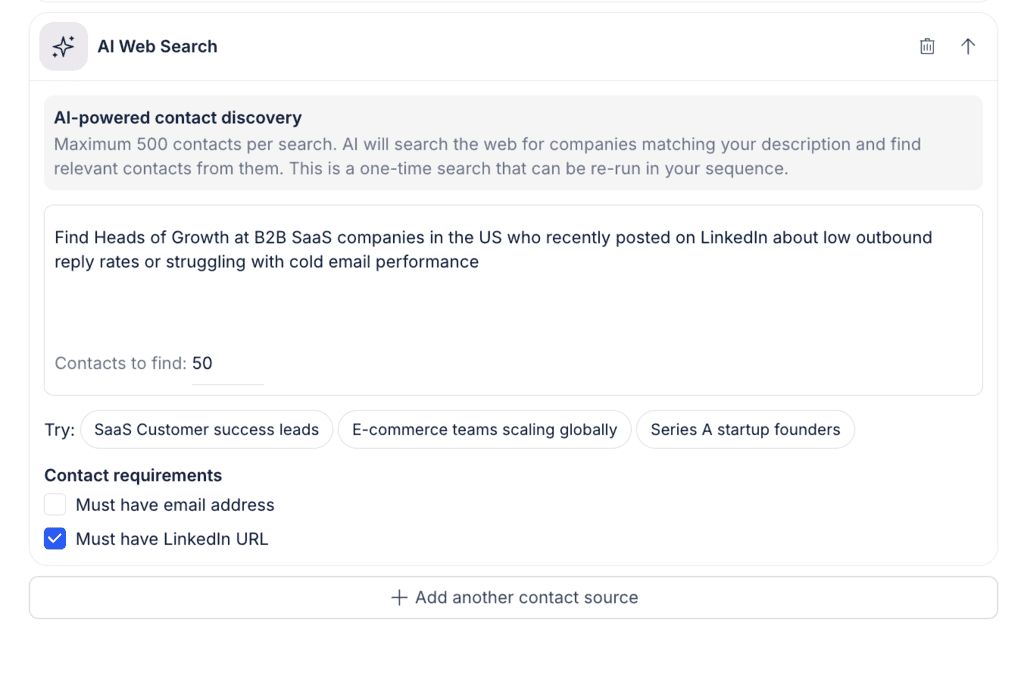
  • AI Web Search → describe your ideal prospect in plain language, and Jason AI (Reply’s AI sales agent) finds matching people across the web
  • Competitor Followers → paste a competitor’s company page, and Reply pulls its followers and filters them against your ICP
  • LinkedIn Search import → paste any LinkedIn or Sales Navigator search into Reply to turn it into a list, no extension required

Reply AI Web Search finding prospects from a plain-language prompt

Step 2: Validate every address before it enters a sequence

Reply’s built-in email verification flags invalid or risky addresses before they’re added to a sequence, which keeps your bounce rate low and makes sure your reply rate is calculated on real inboxes. The same check applies to CRM imports, and Findy, Reply’s email finder extension, returns verified emails while you browse LinkedIn or Sales Navigator.

Step 3: Enrich for AI personalization that reads handwritten

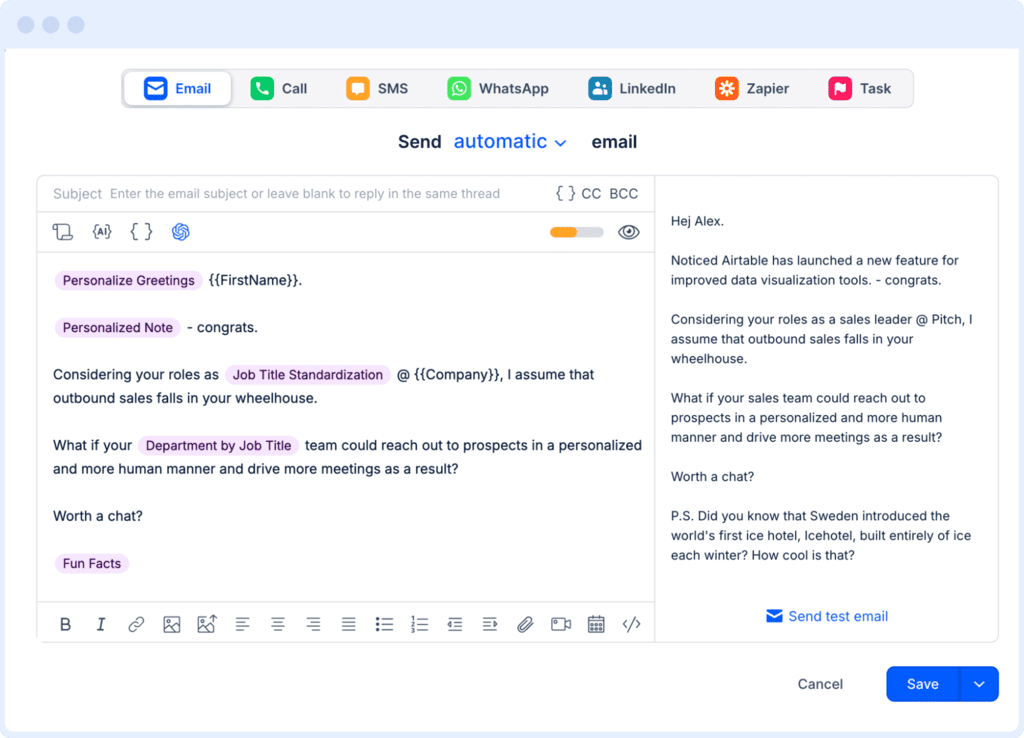
AI personalization is only as good as the data behind it, and Reply automatically enriches missing fields like role, LinkedIn URL, and company size, and pulls extra context from LinkedIn profiles, company websites, and public news. AI Variables then turn that context into a custom opener, value prop, or CTA for every prospect.

Reply email editor with AI variables for personalization

For deeper research, Custom Research lets you describe the exact insight you want in plain language, for example, “the most recent product launch on their website and how it affects their sales team.” Reply applies that prompt across the whole sequence, giving you the kind of relevance lever 3 describes for hundreds of prospects at once.

Step 4: Build multichannel conditional sequences

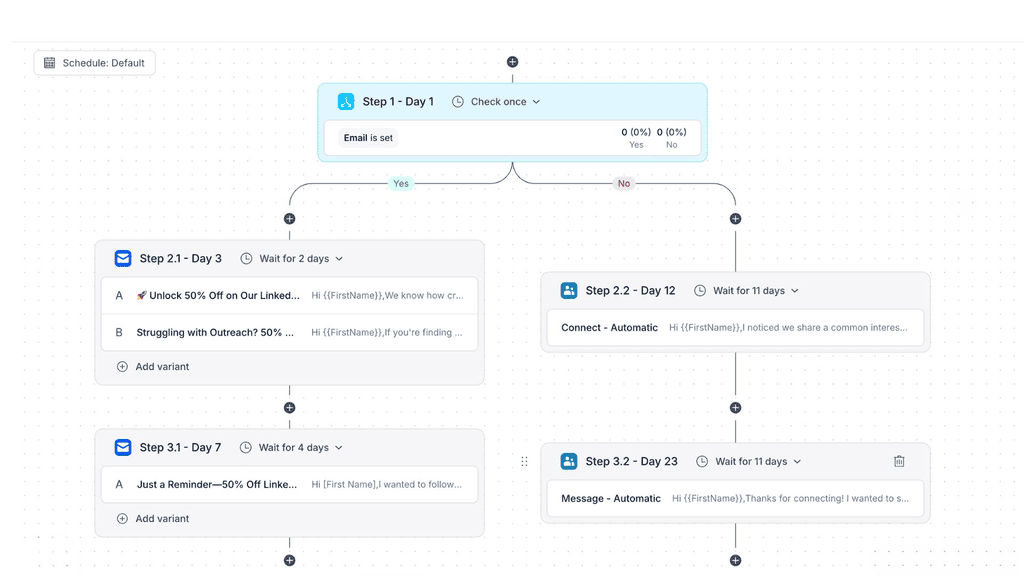
With Reply’s conditional sequences, each prospect’s path changes in real time based on their engagement behavior so a typical setup could look like this:

  1. Day 1: a short, personalized email
  2. Day 4, no reply: a LinkedIn profile view and connection request
  3. Request accepted: a short LinkedIn message, and the scheduled email follow-up gets canceled
  4. Request ignored: a follow-up email in the same thread with a new angle
  5. Pricing link clicked: the prospect moves to a shorter, more direct track with a booking CTA

Reply conditional sequence combining email and LinkedIn steps

Make sure you also turn on contact time zones. When Reply analyzed 60M+ emails sent through the platform, prospects with an identified time zone averaged a 9.3% response rate, compared with 6.5% for those without one.

On top of that, A/B test your subject lines, openers, and CTAs one variable at a time, so you always know which change made the difference.

Step 5: Protect deliverability at the infrastructure level

All of the deliverability work from lever 1 is built in:

  • Email Health Checker → guides you through SPF, DKIM, DMARC, and DNS setup, then keeps monitoring them
  • Google Postmaster integration → shows your spam rate and domain reputation, so you can act before Gmail does
  • Native email warm-up → ramps up new or inactive mailboxes gradually before they join real campaigns
  • Gmail API sending + unlimited mailboxes → spreads volume across multiple inboxes and domains
  • Sending controls → daily caps, delays between emails, ramp-up, and throttling at both the email and LinkedIn level

A practical setup is several mailboxes sending 20-49 emails a day each, the range that performed best in Hunter’s data.

Step 6: Measure replies by step, channel, and outcome

Reply’s analytics break replies down by sequence step and channel and tie them to meetings booked. Track reply rate per contact, positive replies, and meetings, and if step three barely gets any replies, cut it or turn it into a LinkedIn touch.

Let Jason AI run the whole motion on autopilot

If you’d prefer not to run all six steps yourself, Jason AI can handle them end to end. Jason is Reply’s AI sales agent, and once you train it on your product, ICP, proof points, and objection-handling rules, it works around the clock to:

  • Find and score leads from Reply’s live database, using fit and intent signals like LinkedIn activity, hiring spikes, and more
  • Research every prospect and write personalized emails and LinkedIn messages, including connection requests, DMs, and voice notes, in 50+ languages
  • Run conditional sequences across email and LinkedIn and adapt each path to how the prospect behaves
  • Handle replies by answering questions and working through common objections, then book meetings straight into Google Calendar or Calendly

You can start in Approval Mode and review every response before it goes out, then switch routine scenarios to Automatic Mode once you’re happy with the quality.

In short, once Jason AI joins your team, you’ll have a full time SDR that finds targeted leads, researches them and their companies, uses that data to write hyper-personalized emails and LinkedIn messages, and even handles replies and books meetings on your behalf.

And while Jason does all that, your entire email deliverability infrastructure including authentication, email warm-up, sending limits, spam monitoring, and so on, is quietly running in the background.

Closing thoughts

Your reply rate comes down to four things: whether you land in the inbox, who you email, what you say, and how you follow up. Fix them in that order, benchmark against sources that count replies the same way you do, and judge every campaign by positive replies and meetings booked.

A good first step is to pull one tight 30-50 person segment this week and compare the result against your current average. When you’re ready to run the full system in one place, Reply.io covers every step, and Jason AI can run the entire outbound for you.

Subscribe to our blog to receive the latest updates from the world of sales and marketing.
Stay up to date.

Related Articles

B2B SaaS Marketing Strategy in 2026 [Step-by-Step Guide]

B2B SaaS Marketing Strategy in 2026 [Step-by-Step Guide]

B2B SaaS Marketing Strategy in 2026 [Step-by-Step Guide]
How an Automated Voice Messaging System Will Improve Outreach in 2026

How an Automated Voice Messaging System Will Improve Outreach in 2026

How an Automated Voice Messaging System Will Improve Outreach in 2026
Outbound Marketing Software in 2026 (Top Picks)

Outbound Marketing Software in 2026 (Top Picks)

Outbound Marketing Software in 2026 (Top Picks)