Sales tactics keep changing, but the fundamentals haven’t moved an inch. Revenue still comes from being able to start the right conversations, with the right people, at the right time — and then actually keep those conversations going.
In B2B, that path is rarely clean — deals drag over weeks or months, multiple people get involved, and you’re constantly bouncing between channels: email, LinkedIn, calls, and so on.
The main headache? Most teams are forced to stitch together multiple random tools. One platform for finding leads, another for cold email, something else for LinkedIn, a separate tool for email deliverability, and then some DIY reporting on top. It all works… until it doesn’t.
Reply.io is built to solve exactly this problem. It bundles B2B data, multichannel outreach, AI personalization, analytics, and email infrastructure into one AI sales engagement platform. As of 2026, it’s one of the top-rated sales automation products on G2, has been around for 10+ years, and powers thousands of businesses worldwide.
This Reply.io review takes a practical look at what the platform actually does in 2026: how it fits into real sales workflows, where it shines, and, ultimately, answers the main question: Is Reply.io worth it for your team?
What is Reply.io?
Reply.io is an AI sales automation platform for B2B teams that want to run scalable outbound across email, LinkedIn, calls, SMS, and WhatsApp, all backed by a built-in lead database and powerful AI personalization.
In short, instead of duct-taping five different tools, you get one, AI-powered system to run your entire outbound engine: from “where do we find potential clients” to “demo booked.”
Reply.io pulls together the core pieces of a modern outbound setup:
Real-time B2B data and enrichment to find and qualify contacts and accounts that actually match your ideal customer profile (ICP).
Multichannel outreach automation to run email, LinkedIn, calls, SMS, and WhatsApp from a single sequence.
AI-driven personalization and assistance so your messaging, channel, and timing adapt to each prospect instead of blasting generic templates.
Email deliverability and infrastructure tools to make sure high-volume outreach still lands in the inbox, and your brand domain stays safe.
Analytics and reporting across sequences, channels, and team performance so you know what’s working and what’s not.
With the current feature set, maturity, and market traction, Reply.io is a full-scale AI sales automation suite. Once up and running, it brings businesses a steady flow of qualified leads, so teams can focus on demo calls and closing deals.
That’s also why you’ll see it show up often when people compare the best sales engagement tools and AI sales software in 2026.
Who is Reply.io best for?
Reply is built first and foremost for outbound-driven B2B teams, startups, SMBs, and even solo professionals that want one unified place to manage lead generation, outreach, and reporting.
The most common use cases include:
Outbound sales and SDR teams → teams that live in daily lead generation and outreach: building ICP-based prospect lists, communicating with potential clients via email, LinkedIn, and calls, and owning monthly meeting quotas.
Business development and partnership teams → people running longer, more strategic plays like partner programs, channel sales, co-selling, where deals involve several stakeholders and a lot of email + LinkedIn back-and-forth over time.
Recruiting and talent sourcing → talent teams that need structured, repeatable outreach to passive candidates via email and LinkedIn, but still want messages to feel 1:1 and relevant.
Marketing and campaign-led outreach → marketers running event invites, launch campaigns, or nurture plays that require more flexibility, personalization, and reporting than typical marketing automation tools provide.
Sales and lead gen agencies → teams running outsourced lead generation and outbound for multiple clients often turn to Reply’s agency plan, with custom agency-specific features, to manage everything under one roof.
Consultancies and boutique firms → founder-led or small commercial teams that want serious outbound infrastructure and AI automation to help with growth, instead of hiring a full team of SDRs.
Whether you’re a startup, established sales team, or agency trying to build a powerful lead generation and outbound engine powered by AI, Reply.io is precisely designed for that job.
Reply.io features: 2026 review
Reply.io’s real power is in how all the pieces connect: Reply Data for lead discovery, sequences for multichannel outreach, AI for personalization, email setup and deliverability tools to protect your domain, and analytics to keep improving the system over time.
Now, let’s go over the main Reply.io features in more detail.
Reply Data: 1+ billion live B2B contacts
Reply Data is the platform’s built-in B2B database, and it’s one of the biggest reasons many teams pick Reply.io over other outreach tools.
Instead of operating on static lists, you get access to a large, constantly updated dataset with 1+ billion contacts and around 60M+ accounts across 150+ countries, including hundreds of millions of contacts in the US alone.
In practice, this means you define your ICP once, and then keep pulling fresh lists that match it:
Build tightly targeted prospect lists using filters like location, industry, headcount, tech stack, department, role, seniority, and more.
See both contact-level details (emails, titles, LinkedIn profiles) and company-level data (size, industry, high-level info) in one place.
Preview and validate search results before you spend credits or drop contacts into sequences, so quality and costs stay under control.
The important bit here is that Reply leans heavily on live search and updated data, not just static data that changes over time. Combined with built-in email verification, Reply Data is solid enough to act as your primary lead generation source, not just a backup.
On top of that, you get solid contact enrichment. If a lead comes from your CRM or another source but is missing key pieces (role, LinkedIn URL, company size, etc.), Reply.io will enrich the record so you have enough context for AI-powered personalization to work properly.
To support that workflow, Reply also ships Findy, its native LinkedIn email finder extension. You can grab verified emails directly while browsing LinkedIn or Sales Navigator, and push those profiles straight into your active Reply.io sequences.
Net result: you go from “we’ve defined our ICP” to “we’re actively sourcing entire lists of verified, targeted leads” without ever leaving the product.
Multichannel outreach
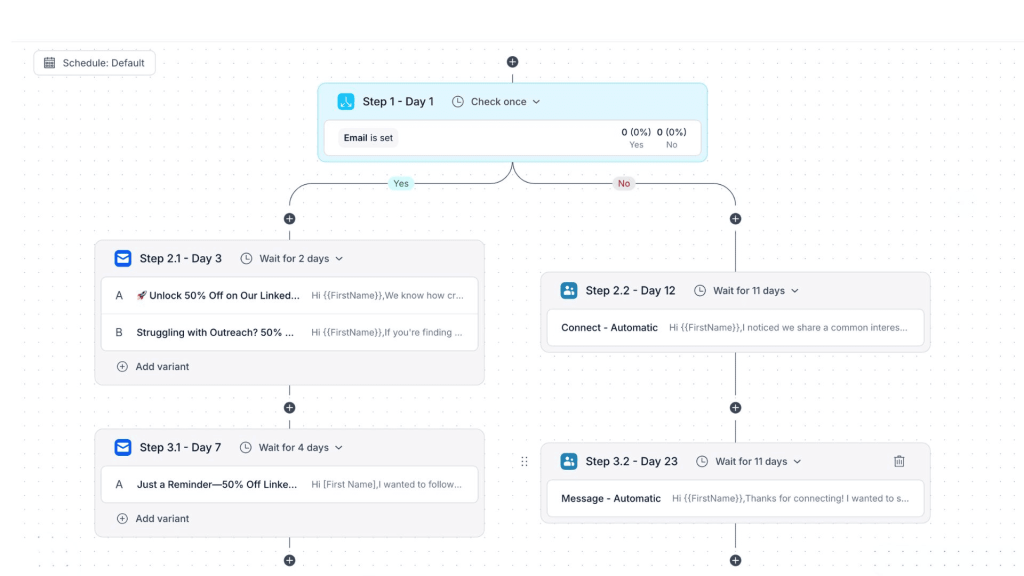
Reply.io is positioned as a multichannel sales engagement platform, and multichannel sequences are at the core of that. Inside the sequence builder, you can combine:
Email steps for initial outreach and follow-ups.
LinkedIn actions like profile visits, connection requests, and DMs.
Calls via the integrated dialer, plus tasks for manual touchpoints.
SMS and WhatsApp steps where those channels make sense for your audience.
All of this sits inside one cadence, so prospects move through a defined journey instead of receiving random one-offs.
You can build custom sequences yourself or just let AI handle it. Either you set channels, steps, delays, and conditions manually, or you ask the AI assistant to suggest a structure based on a goal such as “book demos with Series A SaaS founders” or “re-activate closed-lost accounts.”
A key capability here is conditional logic. Reply’s AI will monitor each sequence and each lead in your pipeline in real time, and make the necessary changes based on their online behavior.
This way, sequences stay agile, and Reply.io ensures that each lead gets contacted with the right channel, with the right message, at the right time:
Email opened, but no reply? Move them to a softer nurture branch and send an automated LinkedIn connection request.
Clicked a pricing link? Switch them into a shorter, more direct sequence with a “book time” CTA.
Accept your LinkedIn request? Kick off a LinkedIn-first conversation instead of another email.
Timing is also under your control. You can set send windows, delays between steps, all while Reply handles time zone rules to ensure your outreach doesn’t show up at 3am local time and bother your prospects.
To keep messaging sharp, Reply.io supports A/B tests on emails and, in some cases, LinkedIn messages. You can test subject lines, hooks, CTAs, and use the data to standardize what actually works.
In 2026, single-channel outreach just doesn’t cut it at scale. Buyers drift between channels, and you often need several touches before they respond, so being able to coordinate email, LinkedIn, calls, and SMS in one system is a big reason why so many teams use Reply.io.
AI personalization
Another one of Reply.io’s main features is its AI personalization engine, which makes sure that every email, follow-up, and LinkedIn message is highly relevant, even when you start scaling to thousands of prospects.
The workflow usually looks like this:
You identify and segment leads via Reply Data or by importing data from your CRM and other tools.
You design a multichannel sequence as outlined in the step below (channels, tasks, timing, outreach purpose, etc.).
You let AI adapt each touch to each prospect based on the available context.
Reply.io can mix structured data (title, company size, industry) with unstructured signals (LinkedIn profile info, website content, public news) to enrich each profile and then generate:
Personal subject lines and hyper-personalized opening sentences, for instance, referencing their latest LinkedIn post about a recent promotion.
Value propositions that are tailored to the prospect’s exact role, industry, and stage in their buyer journey.
Follow-ups that reflect what already happened: opens, clicks, site visits, or previous responses (where tracking is in place).
One of the more practical pieces here is the AI Variables feature. Instead of writing a custom opener for each person or using a generic template, you drop in an AI variable that auto-generates a relevant intro, value prop, CTA, or closing line for each contact based on their profile and available online data. Think of it as AI doing your research and first-line writing in the background.
Reply.io also tracks intent signals and context changes in real time, so if a prospect switches jobs or something meaningful happens at the target company, Reply will bring that up in your outreach.
A simple example: congratulating a buyer on their new role and then positioning your offer as something that helps them win early in that position.
When you put it all together, you get outreach that keeps the feel of a researched, hand-written message, while operating at a volume that would never be realistic manually.
Website Visitor Tracking
In our most recent product update, we’ve added a long-awaited feature our users have been asking for — website visitor tracking. Now, Reply covers more than just outbound.
With this new built-in feature, you can see who’s actually showing up on your site, as Reply captures identified visitors automatically and enriches their profiles. When you’re ready, you simply add those prospects to your custom inbound sequences with just a few clicks.
Reply’s AI will ensure that each message is based on the pages they visited for extra relevancy. For instance, someone who hits the pricing page might go into a short, high-intent sequence, while a blog reader gets a lighter, educational follow-up.
Your website visitors may very well be your target buyers, but once they’re gone — that’s a wasted potential opportunity, and that’s exactly what Reply aims to prevent.
Because this all runs inside the same platform as your outbound campaigns, you get one unified view of how inbound and outbound together are feeding your pipeline.
Email deliverability and email infrastructure
The major email providers like Gmail, Outlook, and Yahoo have become increasingly strict over the years, and so has LinkedIn, for that matter. This means that scaling email and LinkedIn messages has to be done carefully, or else your brand domain and LinkedIn profile will get blacklisted.
Reply.io ships several deliverability-focused features to help teams properly set up their email infrastructure, monitor spam rates and sending limits on email and LinkedIn, and protect against any issues from ever happening:
Email Health Checker to help you configure SPF, DKIM, DMARC, and other DNS/auth settings properly and keep an eye on them over time.
Google Postmaster integration so you can see spam rates and domain reputation, and act before things go sideways.
Email verification and risk checks to keep bad or risky emails out of your sequences and reduce bounce rates.
Native warm-up engine with MailToaster, so new and inactive mailboxes start with low volume and positive engagement before they are plugged into real campaigns.
Gmail API sending and unlimited inboxes, which makes it easier to distribute sending volume across multiple inboxes and domains without triggering spam filters.
You also get detailed sending controls: daily caps, delays between emails, ramp-up settings, and throttling at both the email and LinkedIn level. All of this makes your outreach look more “human” and less like automation.
For teams that rely heavily on outbound for pipeline, this built-in infrastructure is one of the less flashy but most important parts of the Reply.io review 2026 story.
Cold Email Deliverability Playbook: Your Ultimate Guide
To build this e-book, we’ve analyzed over 50,000,000 emails over the past 2 years to uncover what really works—and now, we’re sharing all that insight with you, absolutely free!
Get step-by-step guides on setting up domains, choosing providers, warming up accounts, creating effective content, improving list quality, and using top deliverability tools. The list goes on.
Analytics
Reply.io’s analytics are built to serve both operators in the trenches and managers who want a clean view of performance. At the sequence and campaign level, you can track:
Deliverability: bounce rates, spam indicators, inbox vs “other” placement where available.
Engagement: opens, clicks, replies broken down by step and channel.
Outcomes: meetings booked, opportunities created, conversion rates from contact to meeting.
This is what helps you see which touchpoints actually move deals forward. For example, you might notice that adding a LinkedIn visit + connection before your second email bumps reply rates, or that one subject line quietly outperforms everything else you’re using.
At the team level, you get insights such as:
Activity by user, team, or project (emails sent, calls made, tasks completed).
For agencies, per-client dashboards showing which projects, sequences, and accounts are producing results.
If you use Reply.io’s calling features, you’ll also see call-specific stats like total calls, duration, and outcomes, tying everything back to the pipeline in one view.
In reality, this is what turns outbound into a controllable system instead of a black box. You can stop guessing and start iterating based on data.
Jason AI — AI sales agent
Jason AI SDR is Reply.io’s AI assistant that plugs into the whole sales engagement flow. Once trained on your business, product, and audience, Jason will join your team and work autonomously 24/7, looking for leads, launching outreach campaigns, personalizing messages, and even handling replies.
We’ve written a detailed Jason AI review for those interested, but as a quick summary, Jason AI can:
Help you sketch out targeting and messaging based on your ICP and offer.
Draft multichannel sequences and adjust copy for different stages and channels.
Handle common objections, answer questions, and book meetings on your behalf.
Because Jason is wired into Reply Data and the sequence builder, it’s not just a generic text generator — it works with live data and your specific campaigns.
Reply.io Whitelabel
Reply.io Whitelabel is for companies that want to offer “their own” AI sales engagement platform without spending years building one. In practice, the whitelabel setup allows you to:
Rebrand the interface so your clients log into your domain, see your logo, your colors — not Reply’s.
Bundle Reply.io’s capabilities (data, multichannel outreach, AI personalization, deliverability) into a productized service or platform.
Scale licensing and management across many client accounts, with Reply.io handling the heavy technical part in the background.
This is especially appealing for outbound agencies, lead-gen shops, and consultancies that want to move up-market with a platform component instead of being “just another agency” in the eyes of clients.
What is the Reply.io pricing in 2026?
Reply.io pricing is set up to cover different levels of complexity, from just launching outbound to integrating a full-on AI engine at the center of your sales operations. That’s why there are dedicated pricing plans tailored to your exact business goals.
Free trial
Reply.io offers a 14-day free trial with access to core modules: B2B database and data credits, email finder extension, multichannel sequences, analytics and reporting, integrations, and AI for sequences and templates.
Two weeks is usually more than enough to run at least one small campaign and get a feel for whether the platform fits your workflow and goals.
Email Volume
This plan is built for teams that only rely on Email for outbound and need: email automation and follow-up sequences, unlimited mailboxes, a starter pack of data credits from Reply Data, unlimited email warmup, and basic analytics.
The Email Volume plan starts at $49/user/month, and is a good fit if you’re early-stage or just validating outbound before going fully multichannel. It’s basically the “starter pack” of Reply.io. You can also always simply purchase more AI and live data credits, and LinkedIn add-ons to further expand your platform.
Multichannel
Next up is the multichannel plan, which, as the name suggests, is designed for teams that already know they need more channels on top of email in one flow. This plan comes with access to LinkedIn automation (connection requests, profile views, messages), SMS & WhatsApp steps, and calling, as well as more advanced reporting.
The Multichannel plan starts at $89/user/month, and if you’re serious about outbound as a primary motion, this is where most teams land.
Jason AI SDR
Next up, we have a dedicated Jason AI plan for teams that want the full power of AI in their operations.
Think of Jason as an AI worker that joins your team and works 24/7, continuously looking for relevant contacts, launching multichannel campaigns and personalizing messages, and last but not least, handling responses and booking meetings on your behalf.
This is where Reply.io truly becomes a full-scale AI sales suite that will fully automate and scale the entire sales process for your team.
Agency plans
Finally, there are three dedicated plans for sales and lead generation agencies that wish to use Reply.io to help their clients grow:
Agency core → run high-volume multichannel outreach for multiple clients with shared workspaces, advanced reporting, and all the core sales engagement features your agency needs.
Agency AI SDR → supercharge your agency services with AI SDR agents that research prospects, generate personalized messages, and help handle replies at scale for every client account.
Hybrid plans → get the best of both worlds by combining standard multichannel features with AI-powered agents for hyper-personalized outreach. Talk to sales for more details and pricing info.
Reply.io reviews: what users like (and don’t)
We’re happy to say that public Reply.io reviews across major platforms are consistently strong:
G2 → 4.6/5 ⭐️
Capterra → 4.6/5 ⭐️
Once you dig into those reviews, a few clear themes show up. The most commonly-mentioned positive Reply review points include:
AI and automation that actually help → many users praise the AI features: better copy, faster personalization, automated follow-ups, and less “busywork” for reps and founders.
From ICP to live outreach in one place → a lot of teams mention how much they like having data + outreach in a single workflow. Being able to go from finding clients to starting outreach right away is a common highlight.
True multichannel sales engagement → many Reply.io reviews on G2 talk about the value of coordinating email, LinkedIn, SMS, and calls without hopping between tools.
Support and onboarding → support is mentioned often: quick responses, real deliverability help, guidance on sequences, and help with troubleshooting weird edge cases.
No tool is perfect, and Reply.io is no exception. There are a few common elements that Reply review highlights show that:
Initial learning curve → because Reply.io packs in data, sequences, AI, deliverability, and reporting, the product can feel like a lot at first. Power users appreciate the depth, but new users may sometimes feel overwhelmed.
Some UI/workflow friction → a smaller but still noticeable number of users mention UX quirks: extra clicks for certain actions, or workflows that could be smoother (like editing active sequences).
To Reply’s credit, the product is updated frequently, and we constantly take into account user feedback to continue delivering the best possible solution to the world.
Is Reply.io worth it for your team?
This is the core question behind any Reply.io review. The honest answer: it depends on how serious you are about outbound and how much you want AI involved in your process.
Reply.io tends to be a great fit when:
You want one unified AI sales engagement platform: if you need separate tools for data, sequencing, personalization, and analytics, but the idea of juggling them sounds overwhelming, Reply’s “all-in-one” approach will feel refreshing.
You’re trying to scale without increasing hiring: startups and growing B2B companies can use the built-in data, automation, and AI to stretch their existing headcount further, turning a small team into one that behaves more like a larger org.
You already run or want to run serious multichannel → if your motion involves even just email and LinkedIn, having all of it orchestrated in one place is a big win. That way, you can run multichannel sequences for each lead.
You want AI in the core of your process, not just for copy → if the goal is to use AI not only for writing generic copy, but also for research and personalization, Reply.io is one of the more complete options in the AI sales software category.
Reply.io might be overkill if you only send the occasional cold campaign and aren’t ready to put in some work on ICPs, cadences, and deliverability — in that case, a lighter email tool will probably do the job.
If you’re comparing Reply.io alternatives, the smart move is a side-by-side trial focused on your real use case: data quality, multichannel execution, AI output, deliverability, and total cost at your actual volumes.
See Reply.io in action
In a crowded market full of point solutions, Reply.io stands out as a full-stack, AI-first sales engagement platform. You get live B2B data, multichannel sequences, AI personalization, solid email infrastructure, and analytics all under one roof.
For teams that rely on outbound to bring in more customers and grow their revenue, having an all-in-one suite like Reply.io is a real game-changer.
When the setup is done, you’ll have a reliable AI engine that finds targeted prospects for your business, launches multichannel campaigns, and personalizes messages, at scale. As a result, less manual work, better messaging, more leads, and more time for your team to focus on closing deals.
The fastest way to decide if any software is worth it for your team is to properly test it. Sign up for a free trial or book a demo — our team will be more than happy to present Reply’s features and answer any questions you may have.
Reply.io FAQ
Is Reply.io worth it in 2026?
If outbound is a meaningful part of your pipeline and you want one AI-driven system to handle data, multichannel outreach, personalization, and deliverability, then yes — Reply.io is usually worth serious consideration and often delivers strong ROI once fully implemented.
Who is Reply.io best for?
Reply.io is a good fit for sales, SDR, business development, and agency teams running structured outbound, plus startups and mid-market B2B companies that want to scale meetings and revenue without scaling headcount at the same pace.
Does Reply.io offer a free trial?
Yes. There’s a 14-day free trial that includes access to the B2B database, email finder, multichannel sequences, analytics, integrations, and AI features so you can run a realistic test instead of a sandbox demo.
How much does Reply.io cost?
Reply.io pricing depends on the plan type (email-focused, multichannel, AI-centric, or agency/whitelabel) and your usage across data, AI, and channels. There are entry-level options for small teams and more advanced tiers for heavier usage. Always check the latest pricing on the site or with sales.
Is Reply.io safe for cold outreach and LinkedIn automation?
Reply.io includes safeguards like deliverability health checks, reputation and spam monitoring, email verification, warm-up, and sending caps across email and LinkedIn. As always, compliance with platform rules and regulations comes down to how you configure and run your campaigns.
Subscribe to our blog to receive the latest updates
from
the world
of sales and marketing. Stay up to date.
We use cookies to enhance your browsing experience, serve personalised ads or content, and analyse our traffic. By clicking "Accept All", you consent to our use of cookies.