
How to Automate Email Marketing Lead Generation in 2026

How to Automate Email Marketing Lead Generation in 2026

Most companies can quite easily secure everything they need to generate leads through email: prospect data, a CRM, some kind of automation software, and perhaps more AI tools than anyone knows what to do with.

Still, the results are all over the place. Poor-fit leads get pushed into campaigns, generic emails go out with zero regard for buying intent, interested prospects wait hours for a reply, and teams keep increasing volume without properly protecting their sending domains.

The real solution is to connect all these separate activities into one coordinated and automated system. This guide covers the step-by-step process on how to build it, including targeting, data enrichment, multichannel outreach, deliverability, reply handling, and booked meetings.

Email marketing lead generation in 2026

At its core, email marketing lead generation is the process of using email outreach to identify, engage, qualify, and convert leads into customers.

There are two different motions involved:

  • The first is permission-based email marketing, where people voluntarily enter your database, whether it’s by subscribing to a newsletter, downloading content, creating an account, registering for an event, or taking another trackable action.
  • The second is outbound email, where your company proactively contacts relevant potential buyers who haven’t yet interacted with your brand.

Both use email, but the way they work is quite different:

Area Permission-based email Cold outbound email
Audience Subscribers and known leads Net-new B2B prospects
Entry point Form, event, content, or product action ICP fit, intent signal, or account research
Main goal Nurture and convert existing interest Start a qualified business conversation
Typical CTA Read, register, start a trial, or upgrade Reply, confirm relevance, or book a meeting
Core metrics Conversions and revenue per lead Positive replies, meetings, and opportunities
Infrastructure Marketing automation environment Dedicated outbound sending setup

In practice, email marketing B2B lead generation goes far beyond scheduling newsletters or setting up a few automated follow-ups. It covers the full chain:

Audience definition → contact acquisition → enrichment → qualification → engagement → response → conversion → CRM feedback

Automating the sending stage alone normally makes existing issues worse. A weak list gets contacted faster, irrelevant messaging reaches more people, and poor deliverability starts limiting every campaign that follows.

A proper automated system makes decisions across the entire process, controlling who enters a campaign, which signals affect the timing, what message gets used, when another channel should be added, and when the automation needs to stop.
How to Write Un-ignorable Cold Emails: An Ultimate Guide

This e-book is your essential tool for mastering effective cold email outreach. Dive into a comprehensive guide that walks you through refining your outbound strategy, from crafting compelling subject lines to creating irresistible email templates tailored to your target audience.

Unlock the secrets of personalization, ensure your emails reach their destination with best practices for email copywriting and get practical and data-driven insights on cold emails, subject lines, email frameworks, and more.

How to automate cold email outreach for lead generation

The workflow below is built for B2B teams looking to channel the great powers of email into an automated and scalable acquisition channel. Every step affects what comes next, so skipping targeting, data QA, or email deliverability and hoping that simply good messaging will carry the campaign rarely ends well.

Step 1. Define your ICP, buying committee, and conversion goal

Every reliable outbound lead generation system starts with a precise ideal customer profile (ICP) (we can’t stress this enough).

Use evidence from your current customers, especially closed-won and closed-lost opportunities, and look for the common characteristics shared by accounts that purchase, see value quickly, and stay with you over time.

Your ICP should cover all the basics:

  • Industry, company size, geography, revenue, and growth stage
  • Business model and existing technology
  • Operational problems your product can realistically solve
  • Trigger events that commonly create demand
  • Exclusion criteria for poor-fit accounts

If you’re in B2B, the next step is to map the buying committee within those companies.

A VP of Sales may care about pipeline and rep productivity, a RevOps leader will probably focus more on workflow control, data quality, and attribution, while IT stakeholders may be looking at security, integrations, and implementation.

One pitch is very unlikely to work across all three.

You also need to define what counts as a conversion in your books. Depending on the campaign, that could mean a positive reply, completed qualification, product trial, or booked meeting.

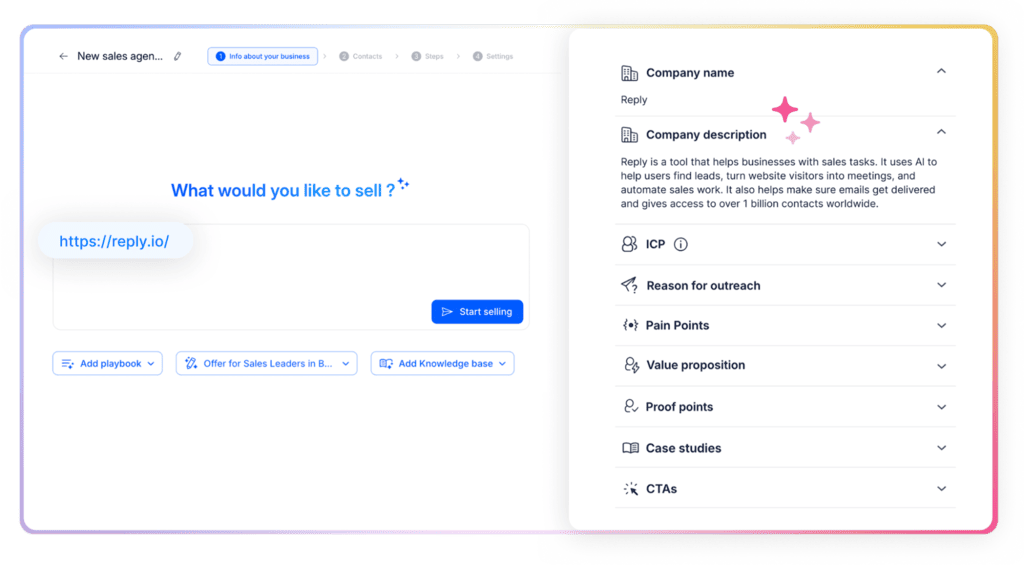
With an AI sales agent like Jason AI, teams can delegate this to AI. Jason will learn everything about their product, pain points, proof, then help build the ICP, and then use all that context to start finding targeted leads.

Jason AI sales agent setup with company description and ICP fields

Once those leads are found, Jason will automatically enrich them with additional data from company websites, LinkedIn, and more, and launch tailored outreach campaigns where every email and follow-up will be highly relevant and personalized based on all the uncovered context.

Step 2. Source, verify, enrich, and monitor your leads

A name and business email aren’t enough to run meaningful outreach anymore. A useful prospect record needs four layers of information:

  1. Identity data: name, title, company, email, and LinkedIn profile
  2. Fit data: industry, size, location, revenue, role, and technology
  3. Context data: recent initiatives, hiring activity, company news, content, and likely business challenges
  4. Intent data: behaviors or events suggesting the timing may be right

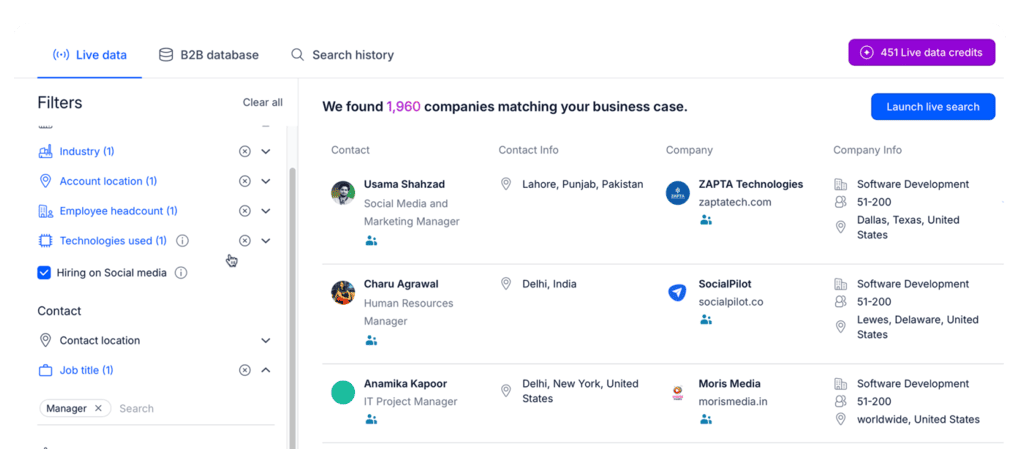
Teams can use Reply Data to search a live B2B database of over 1 billion real-time contacts and accounts, and move them directly into AI-powered outreach sequences. Reply users also get built-in enrichment, email validation, and even intent signals to identify leads showing signs of purchase-readiness.

Reply Data live search results with ICP filters and verified contacts

For more depth, you could add LinkedIn Sales Navigator for account research, ZoomInfo or Seamless for sales intelligence, Clay for enrichment workflows, and tools such as 6sense, Bombora, or G2 for even more intent data.

The important part is combining fit with timing.

In our case of offering a sales automation platform, a Series B announcement alone doesn’t tell us much. A Series B SaaS company that matches our ICP, recently hired a new VP of Sales, and is now recruiting 12 SDRs gives us a much stronger and more relevant reason to reach out.

Before a contact enters any sequence, verify the email and remove invalid, disposable, catch-all, or high-risk addresses based on your own risk tolerance. Old data and unchecked CSV files can quickly drive up bounces, hurting both campaign performance and your email sender reputation.

Step 3. Score and segment leads before outreach

Once the data is ready, don’t treat every contact the same. A practical scoring model separates three factors:

  • Fit score: How closely does the company match your ICP?
  • Intent score: Is there evidence of an active or emerging need?
  • Engagement score: Has the person interacted with your emails, website, content, or sales team?

Those scores should determine what happens next.

High-fit accounts with strong intent can enter immediate, research-heavy multichannel sequences. High-fit accounts without active signals may be better suited for slower educational campaigns. A low-fit company showing intent should probably go through manual review before any outreach begins.

You can also split contacts into personalization tiers:

  • Tier 1 accounts receive individually researched, human-reviewed messages
  • Tier 2 accounts receive AI-generated personalization based on verified company and prospect data
  • Tier 3 contacts receive segment-level messaging with lighter personalization

This makes B2B email lead generation much more efficient because your team spends its deepest research time on accounts where the potential return actually justifies it.

Step 4. Build dynamic multichannel sequences

Traditional email campaigns run on a fixed schedule. The first email goes out on Monday, another one follows three days later, and everyone gets the same sequence unless they reply.

Modern automation should react to what is actually happening, and with AI, that’s become very easy to do. Each sequence needs:

  • A clear entry condition
  • A defined audience and objective
  • A message angle for each buying role
  • Channel and timing rules
  • Branch conditions
  • Stop conditions
  • A fallback nurture path

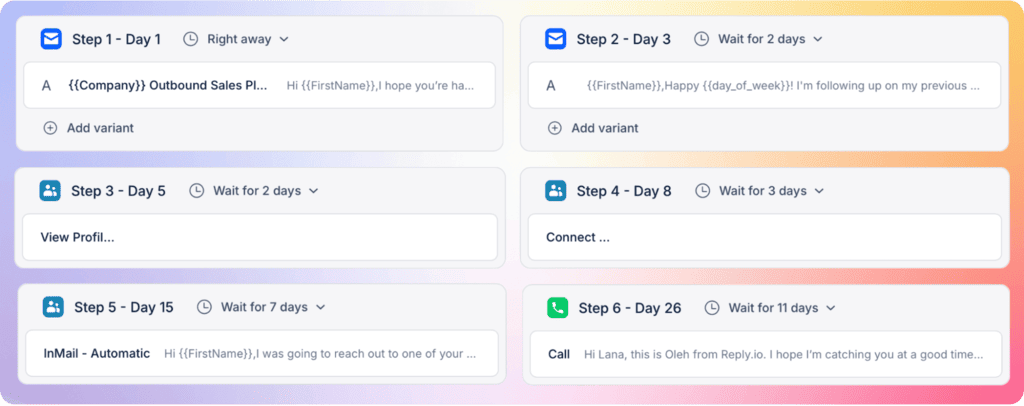
A simple sequence could look like this:

  • Day 1: personalized email referencing a relevant trigger
  • Day 3: LinkedIn connection request
  • Day 5: proof-focused follow-up with a short customer example
  • Day 8: call task for high-fit accounts
  • Meeting booked: remove all remaining steps
  • “Not now” response: move the lead to a timed nurture campaign
  • Unsubscribe request: add the contact to the global suppression list

Multichannel outreach sequence with email, LinkedIn, InMail and call steps

With an AI outreach platform like Reply.io, this flow will also stay dynamic and adjust in real-time based on each lead’s engagement behavior.

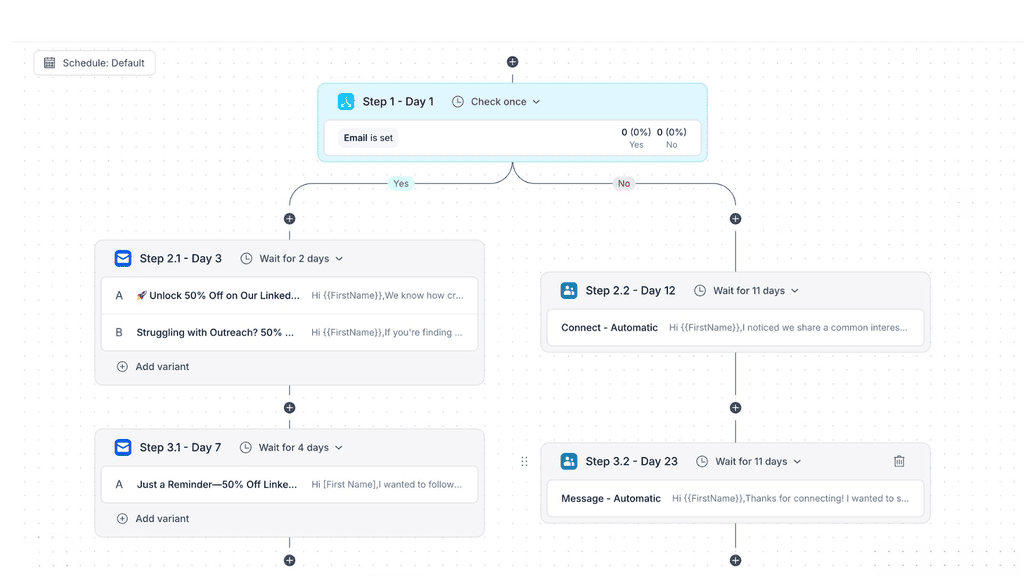
Reply’s multichannel conditional sequences combine email, LinkedIn, calls, SMS, and WhatsApp in one workflow, where teams can build branches around prospect information and activity, set custom schedules, add AI variables, and A/B test individual email steps. So for instance, if the initial email goes unopened for 3 days, Reply will send an automated LinkedIn connection request; once accepted, it will send out a short personalized email follow-up now that you’re fresh in the prospect’s mind, and so on.

Conditional sequence branching into separate email and LinkedIn paths

Its AI sales engine also determines which channel, messaging, and timing are best-suited for each buyer persona in the account. A CFO may receive an ROI-focused email first, while a sales leader might get a LinkedIn touch before the second email.

Step 5. Protect deliverability before increasing volume

Great targeting and strong messaging won’t generate many leads if the emails never reach the inbox. Sounds simple, yet so often overlooked when launching email marketing lead generation campaigns.

The technical setup needs to happen before campaigns go live, rather than after bounce rates climb or spam complaints start appearing.

At a minimum, your sending setup should include:

  • SPF, DKIM, and DMARC authentication
  • Properly configured sending domains and mailboxes
  • Email verification before enrollment
  • Gradual warm-up and volume ramp-up
  • Daily sending caps and delays between messages
  • Mailbox rotation for higher-volume campaigns
  • Clear opt-out and suppression rules
  • Monitoring for bounces, spam complaints, and domain reputation

Google requires all senders delivering more than 5,000 messages per day to Gmail accounts to follow additional requirements, including SPF, DKIM, DMARC alignment, and one-click unsubscribe for marketing and subscribed messages. Google also tells senders to keep Postmaster spam rates below 0.3%.

These numbers are maximum thresholds, by the way, not healthy targets. In reality, your spam and complaint rates should stay as close to zero as possible.

Reply.io includes an Email Health Checker for SPF, DKIM, DMARC, and DNS setup, along with a Google Postmaster integration, email verification, warm-up by MailToaster, ramp-up controls, daily caps, throttling, and support for distributing volume across multiple mailboxes.

Compliance needs separate attention as well. CAN-SPAM applies to commercial emails in the US and requires accurate sender information, non-deceptive subject lines, a physical postal address, and a working opt-out process. Regulations in the EU, UK, Canada, and other markets differ, so teams should review the recipient’s jurisdiction and get legal advice where necessary.

Step 6. Use AI personalization based on real context

AI personalization works when it connects verified prospect information with a relevant business reason for reaching out. A useful message usually includes:

  1. A specific observation or trigger
  2. A role-relevant problem hypothesis
  3. A credible outcome or proof point
  4. A low-friction call to action

Say a company is hiring 12 SDRs.

A generic AI opener might congratulate the prospect on growing the team. A better message will connect that hiring signal with a likely operational problem, such as maintaining outreach quality, onboarding new reps, or protecting deliverability as sending volume grows.

The data behind the message also needs to be reliable — AI should work with approved information from company websites, LinkedIn profiles, CRM fields, job descriptions, or trusted databases. When person-level data is weak, use role- or segment-level personalization instead of inventing a connection point. Prospects can usually tell.

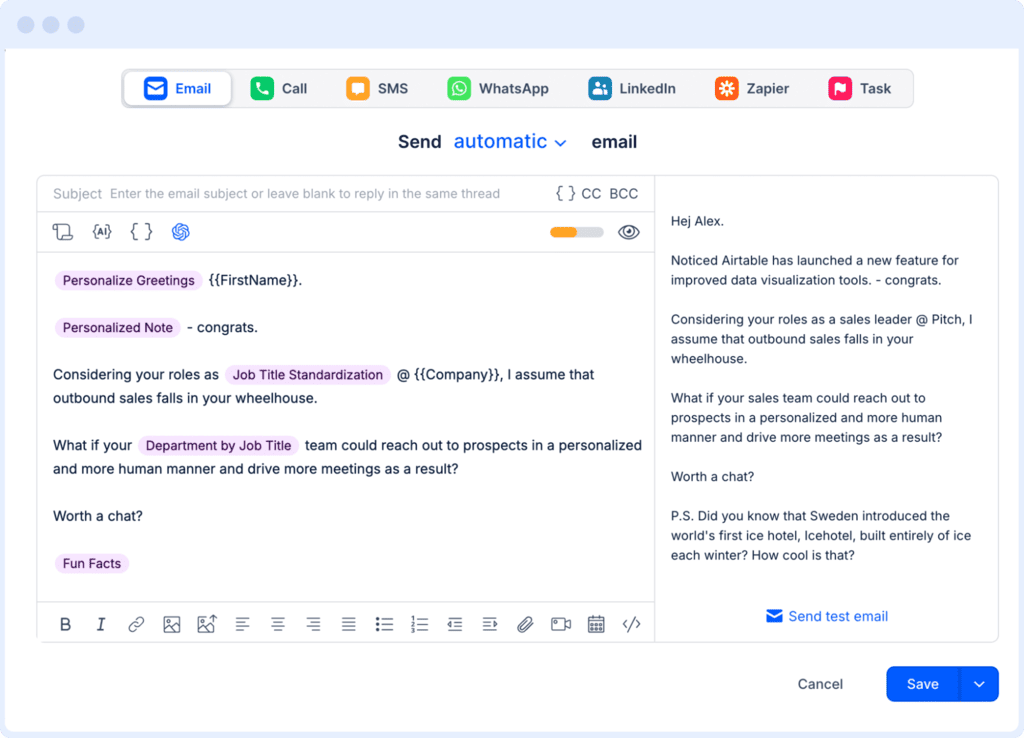
This is where an AI outreach platform like Reply.io becomes critical. It takes all the available and enriched prospect/account data to personalize every email, follow-up, and LinkedIn message with relevant, real-time context. Teams can also choose to use the AI Variables feature to create their own email templates with completely custom variables, and Reply’s AI will then fill in those gaps before sending out the email.

AI variables personalizing a cold email in the Reply.io sequence editor

Step 7. Automate replies, qualification, and handoffs

A campaign doesn’t create much value until someone responds. Still, reply handling remains one of the most overlooked parts of email automation.

Incoming replies should be classified into categories such as:

  • Positive interest
  • Question or objection
  • Referral to another person
  • “Not now”
  • Out of office
  • Unsubscribe
  • Invalid contact or bounce

Each category should trigger a different ‘next’ action.

Positive replies can move into qualification and scheduling. Common questions can receive approved answers from a knowledge base. Referrals can trigger enrichment for the new stakeholder while keeping the original account context. “Not now” responses can be scheduled for future re-engagement, while opt-outs should stop every active campaign immediately.

Sensitive questions involving pricing, contracts, security, procurement, or unusual objections are usually better handled by a human rep.

Jason AI, Reply’s AI sales agent, takes this a step further by researching prospects and accounts across LinkedIn, company websites, and other online sources before writing and launching any email or follow-up. Jason also follows the conditional logic where your email campaigns will adjust in real-time, and on top of that, Jason works with incoming replies.

That’s right, he can answer questions, handle objections, qualify leads, provide more information, and even book meetings on your behalf!

Users can define specific personalization points and retain approval control, which is especially useful when working with strategic accounts, and Jason also comes with both Copilot and Autopilot mode for you to choose how autonomously you wish him to work.

Step 8. Measure pipeline and refine the system

Even the strongest lead generation strategies need regular refinement because audiences, offers, inbox filters, and buying conditions keep changing.

The most useful cold email outreach for lead generation metrics fit into four 4 groups:

Data health:

  • Verified email rate
  • Bounce rate
  • Percentage of contacts matching the ICP

Email deliverability:

  • Delivered messages
  • Spam complaints
  • Domain and mailbox health
  • Unsubscribe rate

Engagement:

  • Reply rate
  • Positive reply rate
  • Objection categories
  • Response rate by channel and sequence step

Revenue

  • Meeting rate
  • Opportunity conversion
  • Pipeline generated
  • Cost per meeting
  • Pipeline per 1,000 delivered emails

It’s important to use these numbers to actually diagnose problems, not just fill up another dashboard.

High delivery with almost no replies normally points to poor targeting, weak timing, or an offer that doesn’t connect. Healthy reply volume with very few meetings suggests the CTA or qualification process needs work. A rising bounce rate usually leads back to sourcing and verification, while growing complaints are a clear sign to reduce volume and improve relevance.

Reply.io provides sequence, channel, team, deliverability, engagement, and meeting analytics, helping teams connect everyday activity with actual pipeline results.

Review campaigns weekly, evaluate the full funnel monthly, and revisit the ICP and offer at least once per quarter. If job-change campaigns keep outperforming funding-based campaigns, that insight needs to shape the next prospect list rather than sit untouched inside a report.

Connect inbound email marketing for lead generation with outbound

Inbound and outbound workflows should share customer data without pushing every contact into the same campaign.

A few common examples of connecting inbound and outbound email marketing for lead generation include:

  • A newsletter subscriber enters a permission-based welcome sequence
  • An ebook download from a high-fit account triggers additional enrichment and lead scoring
  • A webinar attendee matching your ICP receives a personalized follow-up
  • Repeated pricing-page visits from a target account create an alert for sales
  • An existing customer viewing an expansion page enters an account-management workflow

The routing logic is pretty straightforward: fit tells you whether the account is relevant, while behavior tells you what should happen next.

This is where AI B2B lead generation becomes especially useful. AI can process website activity, CRM records, fit criteria, and recent engagement far faster than a rep manually reviewing every new lead.

Your CRM should remain the central customer record, whether you’re using HubSpot, Salesforce, or another platform. Lifecycle stage, owner, last interaction, consent status, suppression rules, and active campaigns should stay synced across sales and marketing systems.

Reply.io can then turn those qualified account signals into fully automated and scalable email or multichannel outreach while keeping inbound and outbound activity connected to the same pipeline.

Build the system before you scale it

Start with one clearly defined ICP, one relevant offer, and one signal-based sequence. Validate the data, deliverability, messaging, reply quality, and meeting conversion before adding more contacts or mailboxes.

And once those pieces work together, email becomes a controlled acquisition channel that improves with each campaign rather than a collection of disconnected tasks.

Reply.io brings prospect data, multichannel sequences, AI personalization, deliverability, and analytics into one system. When you’re ready to automate the execution itself, Jason AI can find buyers, run outreach, handle responses, and turn qualified conversations into booked meetings.

FAQ

Can email lead generation be fully automated?

Most repetitive tasks can be automated, including sourcing, enrichment, verification, scoring, sequence execution, follow-ups, routine reply handling, scheduling, CRM updates, and reporting. Humans should still own the strategy, messaging high-value accounts, sensitive objections, unusual conversations, and, of course, the final sales discussions. Automation works best when the rules, limits, and human-handoff points are clearly defined from the start.

What is the difference between marketing automation and cold email automation?

Marketing automation usually engages people who already know the company and have subscribed, registered, or interacted with its content or product. Cold email automation starts conversations with relevant, net-new business contacts. These two motions need different audience rules, messaging, sending infrastructure, compliance processes, and success metrics.

Which metrics show whether email automation is working?

Focus on verified contact rate, bounce rate, positive replies, meetings, opportunities, pipeline, spam complaints, and cost per meeting. Email volume, opens, and clicks can help diagnose performance, but none of them proves the system is generating revenue. The real goal is to produce more qualified opportunities while keeping your data quality and sender reputation healthy and compliant.

Subscribe to our blog to receive the latest updates from the world of sales and marketing.
Stay up to date.

Related Articles

How to Build an Automated Sales Pipeline in 2026 w/ AI SDRs

How to Build an Automated Sales Pipeline in 2026 w/ AI SDRs

How to Build an Automated Sales Pipeline in 2026 w/ AI SDRs
10+ Best Personal CRM Tools for Sales in 2026

10+ Best Personal CRM Tools for Sales in 2026

10+ Best Personal CRM Tools for Sales in 2026
How to Build a Simple GTM Process That Just Works in 2026

How to Build a Simple GTM Process That Just Works in 2026

How to Build a Simple GTM Process That Just Works in 2026