Oneshot AI Review 2026: Can It Really GTM for You?
Eugene Suslov05 May 2025
You’re about to read an in-depth Oneshot AI review.
In fact, we’ve covered everything you’d typically want to know about Oneshot.ai to decide if it’s a good fit for your business
This review answers fundamental questions regarding Oneshot, including:
What features does Oneshot offer?
How much does Oneshot.ai cost?
What do Oneshot.ai user reviews say about the service?
Is the tool worth your attention? And if it’s not, what are the best Oneshot.ai alternatives
…and much more.
Sounds good?
Let’s dive right into it.
What is Oneshot AI?
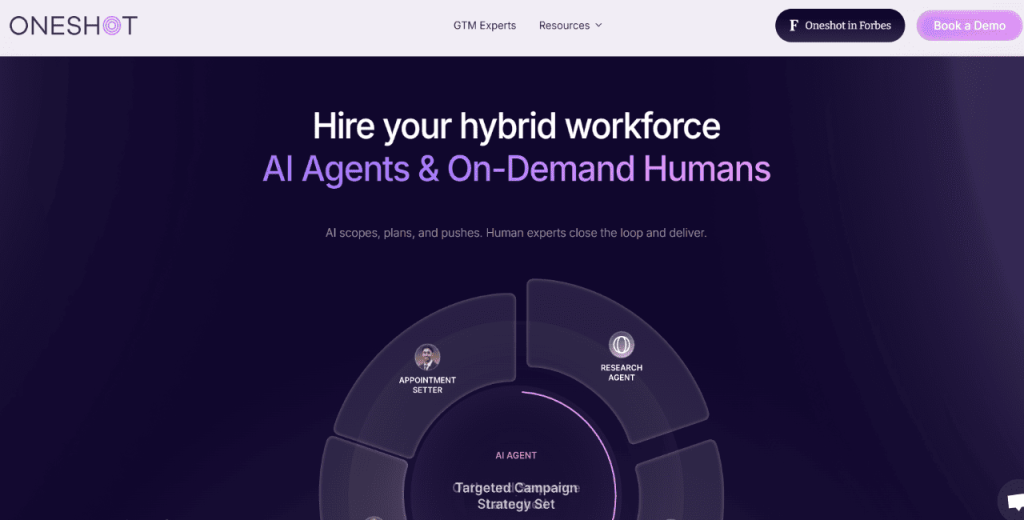
Oneshot.ai is a sales enablement platform for go-to-market (GTM) teams.
It uses AI to run outbound campaigns, research leads, and create content.
Here’s how it works:
You input a GTM goal, say “book meetings,” “rank for this keyword,” or “create viral content.”
Oneshot scopes the task and builds a step-by-step plan based on your goal.
It creates AI agents trained in your context to handle specific parts of the work.
The platform then assigns tasks to the right AI agents and, if necessary, brings in human experts from its talent network.
Oneshot tracks progress and manages the entire workflow from start to finish.
You receive finished work like emails, lead lists, call scripts, or published content ready for use.
Side note: Oneshot also comes with an AI SDR, a tool for automating prospect research and personalizing outreach at scale, which is what we’ll talk about for most of this review.
…switching gears.
How to get started with Oneshot AI?
The first step to get started with Oneshot is to book a demo to connect with a product expert.
To do this, click the “book a demo” button on Oneshot’s website.
You’ll be taken to a scheduling page where you can choose a time that works best for you.
Enter your info and hit “Confirm” to book your meeting. In the demo, you’ll get a clear walkthrough of how Oneshot AI works, from start to finish. It’s not about pitching features — it’s about showing you how to actually use the tool in a real setting.
They’ll start by walking you through the core functions so you know where everything is and how to get started. Then it gets more specific.
You’ll go through:
How to set up your workspace based on what you already do
Ways to customize templates so they match your content or tasks
Training the AI with examples you already use — things like tone, structure, or preferred formats
How to automate routine tasks you’d usually do manually
You won’t just watch — you’ll be working alongside them. If you have a project or example in mind, bring it. They’ll use it to guide you through setup and help you adapt the tool to fit that exact use case.
What are the main Oneshot AI features?
Oneshot.ai packs a host of features and capabilities. These are:
Insight Agent
Oneshot’s Insight Agent handles all the prospect research for you.
It scans the web, finds prospects, pulls in relevant information, and summarizes what matters most about each lead. It gathers details such as job titles, recent company news, pain points, and anything that helps you understand your target.
In addition, Insight Agent highlights important details that connect a prospect to your product or service. For example, if a company just raised funding, it marks that as a good opportunity to pitch. Or, if a lead recently posted about a problem your product solves, it brings that to your attention.
Insight Agents help SDRS save time, reduce repetitive work, and make every outreach more relevant.
Personalization Agent
Oneshot’s Personalization Agent takes the insights gathered from research and uses them to create tailored outreach.
It writes custom messages for each lead using the insights gathered, such as a pain point, job change, or recent company update. Furthermore, the personalization Agent adjusts the tone, structure, and content according to the context. That way, outreach messages are relevant and personal.
The Personalization Agent can create email, LinkedIn, and cold call content.
Integration Agent
Oneshot’s Integration Agent connects directly with your sales tools to keep data in sync. It retrieves prospect details from CRMs like HubSpot and platforms like Apollo, Outreach, and Salesloft.
The Integration Agent helps further personalize outreach, avoid duplicate work, and ensure that messages align with what’s already known about the prospect.
It also logs activity back into your CRM, enabling users to automatically maintain up-to-date lead information.
Persona Agent
Oneshot AI Persona Agent segments and personalizes outreach based on the prospect’s points and processes.
It can, for instance, create segments such as demand-gen marketers looking to increase pipeline efficiency, or sales enablement managers trying to improve rep onboarding.
With hyper-targeted segments like these, SDRs can be sure that their messaging speaks to the specific challenges of each persona and, therefore, increases the chances of engagement and response.
Scaling Agent
The Scaling Agent allows outreach that changes based on the prospect’s buying stage. It changes the messaging based on whether a lead is cold, warm, or engaged.
Cold leads receive messages geared toward building trust and addressing common industry pain points. Warm leads, on the other hand, get more targeted messaging, offering specific solutions and implementation details. Meanwhile, engaged leads see detailed ROI messaging and value tailored to particular stakeholders.
The Scaling Agent also personalizes communication for each person involved in the deal, enabling SDRs to run relevant multi-touch campaigns throughout the buying process.
Prompt library & templates
OneShot leans heavily on its prompt library, giving its users a set of pre-built templates to generate effective cold emails without having to start from scratch. You pick a prompt, feed it some basic info, and OneShot turns it into an email or LinkedIn message in a certain tone or style. It’s a quick way to get copy out the door, especially if you don’t have a strong messaging foundation or don’t want your team writing everything manually.
The limit here is that most of the “heavy lifting” still depends on how good the starting prompt is. If your input is too generic, the output tends to feel the same. With Jason AI, you don’t need to rely on templates because the system builds tailored, data-driven messaging around your offer, ICP, and target audience — leading to more relevant outreach without prompt-hunting.
LinkedIn touchpoints
OneShot isn’t only about email drafting — it also helps you create LinkedIn content and touchpoints to support your outreach. The idea is to give SDRs and founders a way to stay active on LinkedIn without spending hours coming up with post ideas or custom comments. You can generate short posts, comment ideas, and quick touches that help keep prospects warm or visible before you reach out. For smaller teams that don’t have an established personal branding engine, this can be a handy add-on.
That said, it’s more of a “content helper” than a full LinkedIn automation engine. If LinkedIn is part of your lead generation strategy, keep in mind that there are numerous Oneshot AI alternatives that have much more impressive automation features.
Jason AI, for instance, automates LinkedIn connection requests and crafts personalized messages as part of a more cohesive multichannel outreach sequence. This way, the moment Jason AI sends the initial cold email, he will then automatically send a LinkedIn connection request in a day or two to keep you fresh in mind of your prospects.
What are the Oneshot AI pricing plans?
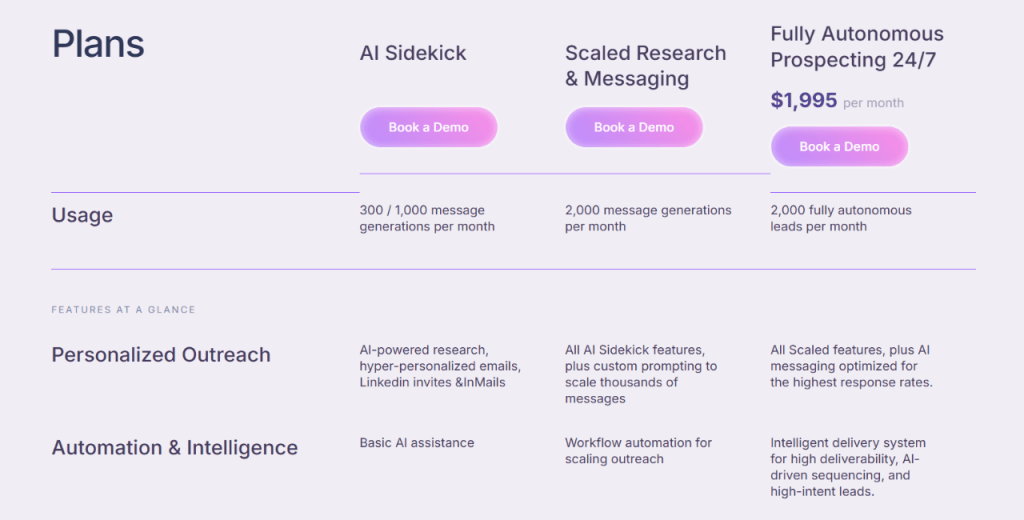
Oneshot AI pricing is structured in three tiers as follows:
1. AI sidekick → Book a demo for pricing
AI Sidekick is Oneshot’s entry-level plan, optimized for personalized, one-on-one outreach.
It includes features like AI-powered research, hyper-personalized emails, and LinkedIn invites and InMails.
You also get 300–1,000 message generations per month, supported by basic AI assistance. In addition, LinkedIn, HubSpot, Apollo, Salesloft, and Outreach integration come as a standard.
According to Oneshot, AI Sidekick works best for individual outreach and 1:1 personalized messaging.
2. Scaled research and messaging → Book a demo for pricing
Scaled Research and Messaging is Oneshot’s mid-tier plan for SDRs sending outreach at higher volumes.
It comes with all AI Sidekick features and custom prompting. Scaled and Research offers 2,000 message generations per month and workflow automation.
The package includes LinkedIn, HubSpot, Apollo, Salesloft, and Outreach as a standard.
3. Fully Autonomous Prospecting → $1,995 per month
Fully Autonomous Prospecting is Oneshot’s top-tier plan.
It offers all Scaled features and AI-optimized messaging.
In addition, the plan comes with 2,000 fully autonomous leads per month, powered by an intelligent delivery system, AI-driven sequencing, and high-intent lead targeting.
Fully Autonomous Prospecting is ideal for high-scale outreach. It allows you access to 400M contacts and advanced analytics.
The plan includes LinkedIn, HubSpot, Apollo, Salesloft, and Outreach as a standard.
Oneshot AI pricing: final takeaway
Since the entry and mid-tier plans sit behind a “book a demo” wall, it’s worth going into the call with a clear idea of what you need. Some people use Oneshot purely as a writing assistant, while others want it to support research and outbound workflows — and that difference impacts what you’ll be quoted.
If you prefer tools with upfront pricing and an easier way to test the waters before committing, Jason AI is more transparent, but if you’re specifically after an AI writing layer for email + LinkedIn, Oneshot can still be a solid fit.
What are Oneshot AI reviews by real users?
To get a better sense of how Oneshot AI fits into real workflows, it helps to hear from people who’ve actually used it. These are everyday users sharing their experience — what works well, what could be better, and how it’s showing up in their day-to-day tasks.
Positive Oneshot AI review examples
One of the first things people mention is the time savings. Prospecting — which usually takes several minutes per lead — gets compressed into a few seconds. As Greg M. puts it, “It takes 30 seconds vs 5–8 minutes per prospect.” That kind of shift doesn’t just save time — it changes how much you can get done in a single day.
Others notice a ripple effect: less time spent on prep means more time for actual selling. One user wrote, “This really gives me back an hour or so a day, giving me more time for cold calling.” That’s a practical outcome — not just a nice-to-have.
Digging deeper, people also talk about how Oneshot helps uncover useful context about prospects. Instead of jumping between tabs or piecing together info manually, the tool pulls everything together in one place. Ben F. noted, “It quickly returns a wealth of information on prospects,” which makes it easier to write messages that actually connect.
Ease of use comes up a lot too. Getting started doesn’t seem to require much setup. Gina Y. shared that “Getting it up and running took a few clicks… super straightforward to use.” That’s helpful if you’re not the type who loves digging into complicated tools.
There’s also a lot of appreciation for how the tool fits into existing workflows, especially with LinkedIn. One user said, “The extension works really well with our Sales Navigator workflow,” which is key if you’re already relying on LinkedIn for outreach.
Negative Oneshot AI review examples
Of course, no tool is perfect. Some people mention that the AI-generated messages sometimes need a little editing to sound more natural. As Ben F. put it, “The AI messaging can feel a bit generic… just needs a few moments to adjust.” That’s not unusual with AI tools — a bit of human touch often makes the final version better.
There are a few technical notes, too. Some users experienced syncing issues with certain CRMs. One reviewer mentioned, “The integration with certain systems could be smoother.” It’s not a deal-breaker, but it’s something to keep in mind if your setup depends on tight integration.
Others wanted more flexibility when editing or creating prompts. Matthew A. wrote, “Would like to see more prompting abilities,” which suggests there’s room to expand customization options. And when it comes to onboarding, a couple of users said it can feel a bit too reliant on AI support. One mentioned that “Back and forth with the AI Prompt Engineer can make onboarding a little difficult.”
What are the best Oneshot AI alternatives?
Although Oneshot AI is a solid tool, it has drawbacks and is, therefore, not perfect for everyone.
Some reasons to consider an Oneshot.ai alternative include:
You want an AI SDR whose message output doesn’t sound overly generic.
You prefer a service with upfront pricing to plan your budget better.
You want a tool that offers more 3rd party integrations
You’d rather set things up in one go without back-and-forth support.
You’re looking for a Oneshot.ai alternative that supports bulk LinkedIn outreach.
With that in mind, here’s a rundown of top alternatives to Oneshot AI.
In a hurry? Here’s a quick comparison table.
Regie.ai
Jason AI SDR (Best value)
Luna.ai
Lead database access
Lead sourcing via integrations
1B + real-time contacts with intent data
275 M+ verified contacts with filters
Personalization
ABM-style, lead quality–based targeting
Multilingual, natural tone, customizable inputs
ORBIT engine scrapes web and social for copy
Multichannel outreach
Email, calls, social
Email, LinkedIn, cold calls
Email
Reply automation
Partial, some follow-ups guided by AI
Yes, with Autopilot and Copilot
❌
Meeting booking
❌
Yes, auto-scheduling built-in
❌
Buying-stage awareness
Some persona-driven engagement
Evergreen sequences auto-adjust by engagement
❌
Email infrastructure
Limited to platform-level warmup and IP setup
Built-in warmup, dedicated IPs, spam protection
Fully managed, auto-warmup, and deliverability
CRM and calendar integration
CRM sync, no calendar booking
Full CRM and calendar sync with conflict checking
CRM sync, no calendar support
Pricing
Starts at $35,000/year + $150/rep/month
$300–$10,000/month (public plans)
Not publicly listed
Best for
Users looking to replace multiple sales tools
Business looking for full-funnel AI SDR with high ROI
Jason is the best AI SDR, averaging an impressive 4.7-star rating on user review platforms like G2 and Capterra, making it a common point of reference when evaluating Jason AI SDR alternatives.
Here’s how it stacks against Oneshot.ai.
Jason AI SDR vs Oneshot AI
Oneshot is a robust sales enablement tool with automation agents for research, personalization, and segmentation.
Jason AI SDR, in comparison, not only holds its own in these areas but also pulls ahead in multichannel automation, lead discovery, and meeting booking.
Sure, Oneshot’s Insight Agent can scan the web to gather prospect data and summarize details like job titles and company news.
Jason AI matches this capability and, more importantly, builds on it.
The platform uses real-time intent signals from over 1 billion global contacts, tracking hiring trends, tech usage, and behavioral activity to zero in on prospects with active buying intent. Do you know what this means? It means that besides pulling data, Jason allows you to continuously identify the right moment to engage.
And when it comes to messaging, both platforms can generate personalized content across email, LinkedIn, and cold calls.
Oneshot’s Personalization Agent creates tailored messages based on lead data. Jason does the same but adds multilingual support and social media-based personalization. It also lets you feed in proof points, value props, and case studies for richer messaging.
That way, Jason AI SDR gives users more control over how they apply personalization. Plus, Jason creates messages that sound natural and human, enabling you to avoid the stiff, robotic tone reported in Oneshot AI reviews.
Oneshot’s ability to use different agents to manage buyer stages is quite something. However, Jason manages this more efficiently through evergreen sequences that continuously update with new, qualified leads.
In addition, Jason AI SDR automatically handles replies, understands context (e.g., reschedule vs. meeting interest), and replies accordingly. Oneshot doesn’t offer this level of reply automation and routing.
Integration is another area where Jason AI beats Oneshot.ai.
While Oneshot syncs with tools like HubSpot and Outreach, Jason pushes the envelope with calendar integration, smart scheduling, and real-time conflict checking. Jason AI can book meetings directly into your calendar based on mutual availability, a feature you don’t get with Oneshot.
In addition, Jason is easier to set up and use.
Unlike Oneshot, which has a more layered onboarding experience and may require help from an AI prompt engineer, Jason guides you through the setup using its AI assistant.
And yes, Jason SDR can create your ICP, choose outreach channels, and adjust the tone and language preferences in a few clicks, just like Oneshot.
Jason AI SDR pricing vs Oneshot AI pricing
Who offers more value between Jason AI and Oneshot?
Let’s find out.
First, Oneshot AI pricing is not transparent, save for the Fully Autonomous Prospecting plan.
Jason takes a different approach, with pricing publicly available on the website.
Oneshot AI’s top-tier plan, Fully Autonomous Prospecting, costs $1,995/month and comes with 2,000 leads, AI-optimized messaging, and access to 400M contacts.
Although Oneshot promises end-to-end automation, you must book a demo to see pricing for the two lower plans, AI Sidekick and Scaled Research and Messaging.
The lack of pricing transparency makes it harder for buyers to compare options or plan budgets, which is a cause for concern for smaller teams or time-strapped decision-makers.
In contrast, Jason AI SDR pricing starts at $300 per month (billed annually) for the Starter plan. At this entry-level tier, you get 500 active contacts, AI personalization, autopilot and copilot reply modes, as well as multichannel automation, with no feature restrictions. That’s a set of powerful features without burning through your wallet.
Move up to Jason’s Growth plan at $1,500/month, and you get 5,000 contacts, 5 LinkedIn accounts, white-glove onboarding, custom playbooks, and Slack support. The package already offers more reach and support than Oneshot’s $1,995 plan at a lower price.
Meanwhile, Jason’s Enterprise plan ($10,000/month) caters to large-scale outreach, giving you access to 25,000 contacts. The plan includes custom prompt engineering, CEO strategy calls, and full team scaling.
One important point to note is that Jason AI SDR gives you access to all features, regardless of which plan you choose.
Other notable Oneshot.ai alternatives include;
Regie.ai
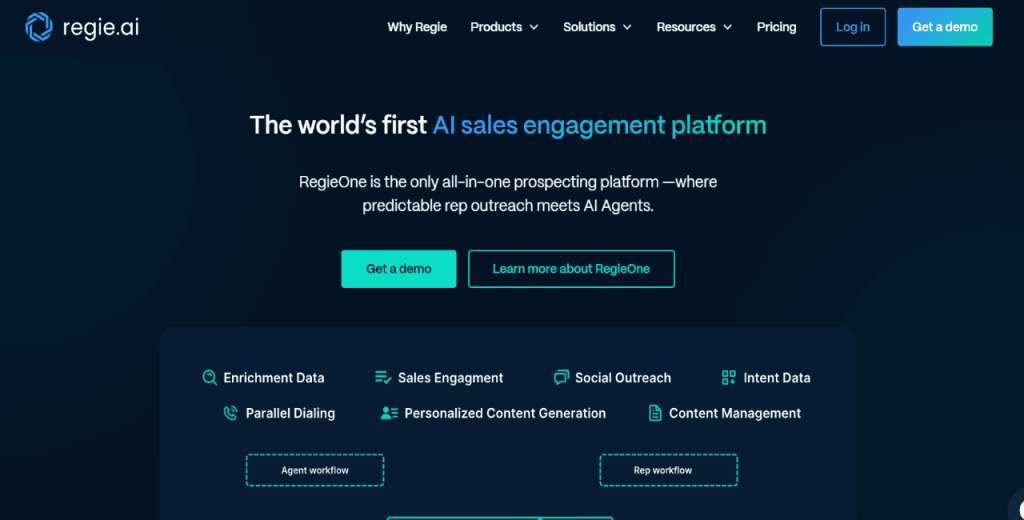
Regie.ai is a good Oneshot alternative if you’re looking for a more minimalist, all-in-one platform for outbound sales.
Unlike Oneshot, which breaks the process into multiple AI agents, Regie merges workflows into one unified experience.
That said, one area where Regie outshines Oneshot is personalization.
The platform leans more toward ABM-style targeting. It customizes outreach based on lead quality, giving more attention to high-intent accounts while automating engagement for lower-tier prospects.
Although that’s similar to Oneshot’s Scaling Agent, Regie makes it more actionable with built-in AI follow-ups and multichannel support.
However, Regie.ai is significantly more expensive than Oneshot.
Regie AI pricing starts at $35,000 per year, with additional charges like $150 per rep per month for parallel dialing. So, unless you have a big budget, Regie may not be a practical option, which makes Jason AI SDR a practical Regie AI alternative if you’re on a tight budget.
With Jason, you get 5,000 contacts, unlimited users, full feature access, and multichannel outreach for $1,500/month. That’s $18,000 per year, less than 50% of Regie’s $35,000 base price. Did we mention that Regie still charges extra per rep for standard features like parallel dialing?
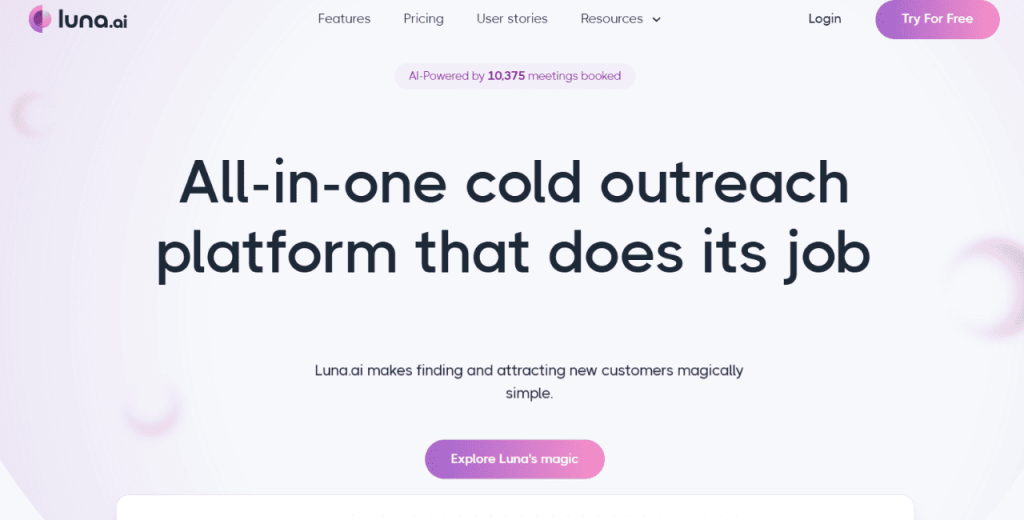
Luna.ai
Luna.ai gives access to 275+ million verified contacts, coupled with built-in filters for tech stack, hiring, funding, and keyword activity.
Luna, like Oneshot, allows you to automate personalization using AI. However, Luna’s ORBIT engine pulls data from websites, social profiles, and more to write highly personalized cold emails.
Although that’s similar to what Oneshot’s Insight and Personalization Agents offer, Luna keeps it all in one flow, so you don’t have to switch between agents.
Luna also automatically manages email infrastructure, including warmup, dedicated IPS, and health. Oneshot users need to manage this separately or through another tool.
However, Luna’s automation could be limiting for end-to-end outreach. For instance, it doesn’t manage replies, update messaging based on lead engagement, or schedule meetings automatically.
So, while Luna can help you find leads and send personalized emails at scale, it fades in comparison to a Oneshot.ai alternative like Jason AI SDR.
Jason takes it further by managing the entire outbound workflow from lead generation to booked meetings on autopilot.
How to choose your AI-powered sales tool
Pinpointing an AI sales toolthat works for your needs can be a tricky balancing act. But if you know what to look for, the decision becomes much easier.
Here’s how to choose a good AI-powered sales tool
Start with your sales workflow
The first thing you need to do is to map out how your team sells.
Are they heady on cold outreach? Do they run inbound campaigns? Do your SDRs qualify leads before follow-up?
A good AI tool should match that sales flow.
For example:
If you do heavy outbound, choose a tool that automates prospecting, writing, and follow-ups.
If you have reps responding to leads, focus on AI that speeds up reply writing or scheduling.
You want a tool that fits your sales process, not one that forces you to change your working style.
Check for end-to-end coverage
Many AI outreach tools claim to be all-in-one. However, few are.
Look for a platform that offers more lead lists and emails. You want full-funnel support. Think:
Prospect research
Lead qualification
Multichannel outreach
Reply handling
Calendar integration
Meeting booking
The more steps the sales platform covers, the less juggling between tools.
Watch out for “hidden work”
Some AI tools look powerful at a glance …until you start using them.
Then you realize:
You need to prompt it for every message.
You have to import leads manually.
The software doesn’t know what to do with replies.
So, before you spend money on any AI-powered sales service, ask yourself: Does this tool actually save time?
If you still have to research, write, follow up, and book meetings, you’re not getting value for your money.
Consider data quality
An AI-powered sales tool is as good as the data it runs on.
So, if the one you want to buy comes with a lead database, ask yourself:
How recent is the data?
How does the platform verify emails and contacts?
Can it detect buying intent?
In addition, check how well the tool can sync with CRM.
Bad or stale data leads to missed opportunities and wasted messages.
Jason AI SDR checks all these boxes.
It mines from over 1 billion global contacts, including verified U.S. emails and company profiles.
It also tracks real-time intent signals such as hiring activity, tech stack usage, and behavioral insights, enabling you to reach out to leads when they’re most likely to respond.
You also get high-accuracy email validation and CRM sync to keep your database up to date.
Consider reply and meeting automation
The ability to handle replies is where many AI outreach tools drop the ball.
It’d be good, therefore, to determine the platform’s AI knows how to:
Identify interest vs rejection
Auto-respond based on intent
Schedule a meeting or pass to a rep
Ideally, you want an AI SDR tool that can start conversations and, more importantly, move them forward.
Look for multichannel support
Email outreach is good, but it’s not enough. You need more than one channel to generate a steady stream of leads.
Your tool should support:
Email
LinkedIn
Phone scripts or call planning
On top of that, check if the platform can manage these in the same sequence to increase your reach and improve results.
Don’t overpay for fancy features
The more features an AI sales tool has, doesn’t necessarily mean better results.
Therefore, focus on what helps your reps sell more, not what looks good in a demo.
Also, avoid tools with hidden pricing.
If you can’t find the price on their website, you’ll likely pay more than you should. Remember what we said about Oneshot AI pricing?
Now you know why transparent pricing is important.
Look for tools that:
Offer flat pricing or clear tiers
Don’t charge extra per user
Don’t lock key features behind higher plans
Ask these questions before you buy
Here’s a quick checklist of important questions to ask yourself before pulling out your wallet:
Does this tool replace 2–3 tools I use today?
Will it save my team at least 10 hours a week?
Can I set it up without help from a developer or engineer?
Does it help with both outreach and follow-up?
If the answer is “no” to most of these, keep looking.
Try before you commit
A live demo is good. However, a trial is better.
So, be sure to test the platform with your real data. If possible, use it for at least one campaign.
That way, you can see what’s automated and what still falls on you.
If the sales tool can create tangible outcomes (meetings, replies, conversations), then it’s worth considering.
Why is Jason AI the best Oneshot AI competitor?
Oneshot AI may deliver outbound automation for go-to-market teams.
However, it has some serious drawbacks that cannot go unnoticed.
Pricing is unclear for most plans, the learning curve can be steep, and it lacks deeper automation features like reply management and meeting booking.
If you’re in for an AI-powered sales tool that offers hands-off automation and transparent pricing, Jason AI SDR is a worthwhile Oneshot alternative.
Apart from covering the full outreach cycle, it is significantly cost-effective than Oneshot.ai.
If you’d like to see what Jason can do, simply click the link below to book a demo.
Subscribe to our blog to receive the latest updates
from
the world
of sales and marketing. Stay up to date.
We use cookies to enhance your browsing experience, serve personalised ads or content, and analyse our traffic. By clicking "Accept All", you consent to our use of cookies.



![B2B SaaS Marketing Strategy in 2026 [Step-by-Step Guide]](https://reply.io/wp-content/uploads/marketing.agency-300x158.jpg "B2B SaaS Marketing Strategy in 2026 [Step-by-Step Guide]")

