
Clay Review in 2026: The Right Sales Tool for Your Business?

Clay Review in 2026: The Right Sales Tool for Your Business?

Sales tools have drastically evolved in 2026, with artificial intelligence (AI) driving most of the innovation. What goes hand in hand with AI is data, and given the growing importance of creating personalized sales journeys and making data-driven decisions, sales intelligence tools have secured a spot in most businesses’ tool stacks. 

One tool that steadily rose on the radar of many businesses in 2026 is Clay, an AI-driven sales intelligence platform that provides accurate data-driven insights and prospecting automation for sales teams.   

Given the recent trend of sales tools consolidating with additional features to cover numerous sales processes, it’s no surprise that Clay has also incorporated pretty impressive inbound and outbound sales features into its platform. 

But as more sales tools become available, each with unique pros and cons, it’s become increasingly challenging for businesses to identify the right software for their sales operations. 

In this review, we’ll explore Clay’s main features, various pricing plans, top user reviews, and the top alternatives, with the ultimate goal of helping you determine if it’s the right tool for your business.

What is Clay? Product overview

Clay is a bit of a chameleon when it comes to sales software categories—it’s primarily positioned as a sales intelligence platform but it can also be a lead enrichment tool, an AI prospecting tool, and even a sales outreach tool, depending on your business needs. 
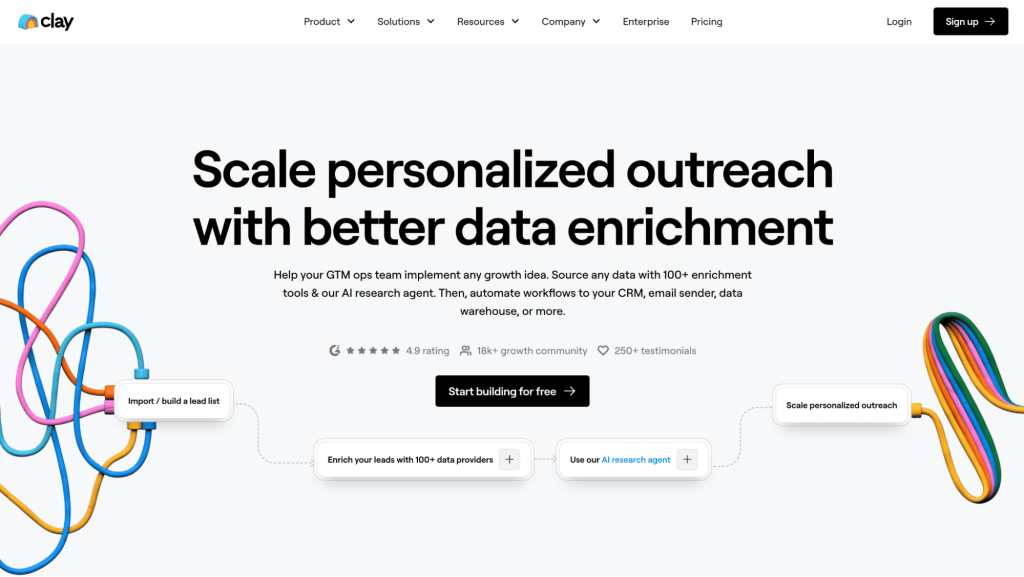
Clay website with Clay CRM pricing

The most standout part of Clay is its AI capabilities designed to enhance sales prospecting efforts with accurate and actionable data. Finding the most relevant prospects, prioritizing leads based on real-time buyer signals, and enriching existing customer profiles with concrete data are the primary goals of this tool. 

Clay achieves this thanks to its access to 150+ external data sources, including public databases and social media platforms, with the help of impressive AI algorithms. 

Moreover, Clay comes with several inbound and outbound sales automations, making it a versatile sales automation solution. Compared to dedicated inbound software and outbound sales platforms like Reply.io, Clay doesn’t quite reach that level of specialized automation. 

When it comes to their primary goal, however, which is sales intelligence and data enrichment, Clay is one of the best in the game, suitable for teams of all sizes looking to harness AI for their lead generation efforts. 

Getting started with Clay

Much like with most modern sales tools, getting started with Clay is fairly straightforward, and given its pretty impressive free plan (more on that later) and free trials available, everyone can give it a go. 

Simply enter your work email, answer a few simple questions about your business and what you’ll be primarily using Clay for, and you’re good to go! 

Once your account is ready and you’ve logged in, you’re greeted with a clean and intuitive interface that differs from most other B2B software dashboards. And that’s because…it’s a bit overly clean, it’s basically a blank canvas: 
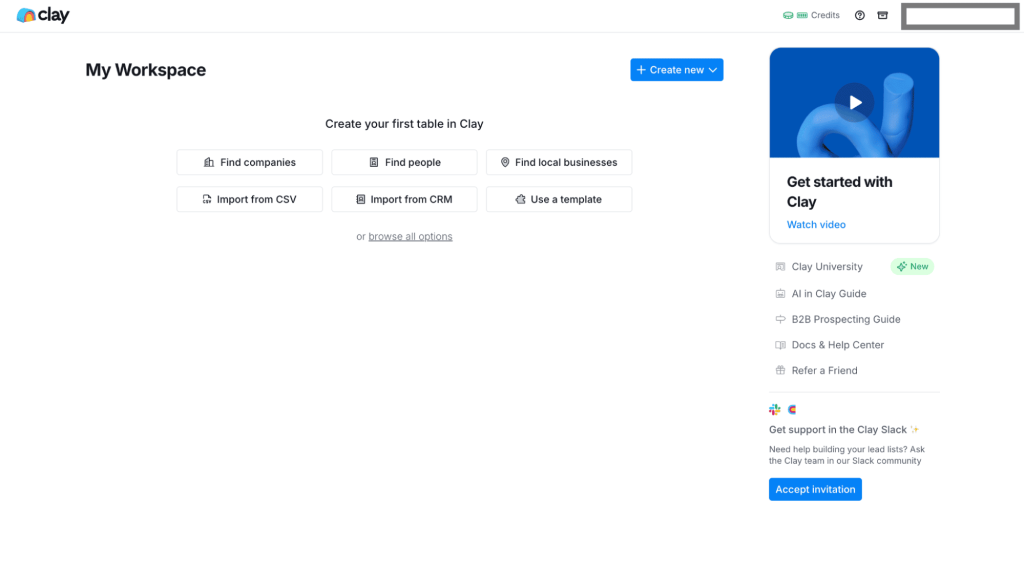
Getting started with Clay AI Pricing

Now, this blank canvas may seem a bit intimidating at first glance, but after a bit of exploring it’s clear that they make it fairly easy to get acquainted with the platform. To take it a step further, they have an introductory video for all new users with a short yet informative product demo. 

Right away, users can create their first table, reminding an Excel-like workflow, to start gathering their prospects and relevant prospect data. 

Afterward, you’re ready to start using Clay’s main features, which we will cover right away. But first…
What are the main Clay features?

As previously mentioned, Clay is a versatile tool with features covering multiple sales processes, even though most users use it for building enriched prospect lists with top-quality sales intelligence, which they then leverage with an outreach tool like Reply.io to act upon. 

In fact, we’ve recently announced a joint integration to empower sales teams with the powers of AI-driven sales intelligence and AI-powered sales outreach. 

Back to our main topic, here are Clay’s 5 main features to streamline your sales workflow:

Multi-provider data

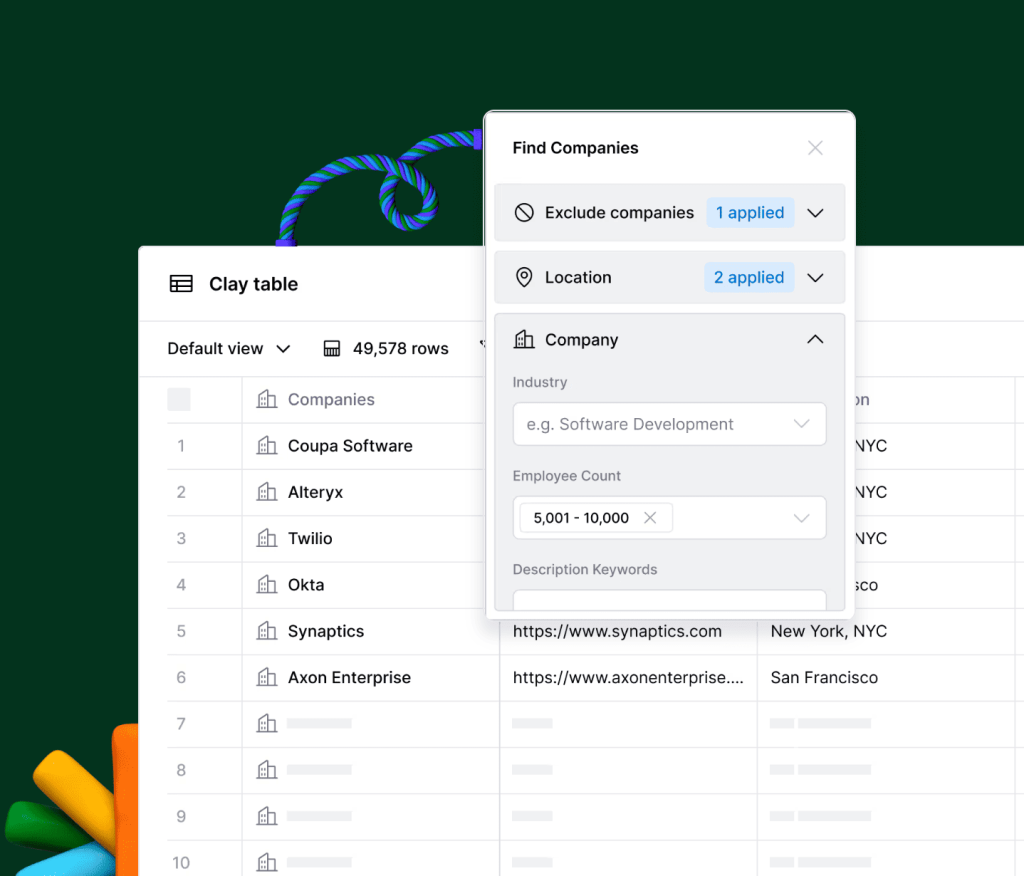
One of Clay’s most noteworthy features is its ability to source various prospect and company data from over 150 providers, including LinkedIn and ZoomInfo, as well as job boards, public databases, and news outlets, empowering sales teams to be more accurate and relevant in their sales strategies. 

With its extensive search filters, rest assured that you can be extra precise in your targeting, sorting your leads by location, company size, experience, social network connections, and so on. 

Multi-provider data in Clay review

This multi-provider approach ensures that sales teams have access to the most up-to-date and relevant information when building prospect lists or launching their outreach.

Besides prospecting data, Clay offers real-time intent data by tracking job changes, new hires, promotions, company updates, etc. of your prospects, helping you engage them at the most relevant time. It also empowers sales reps to prioritize leads who show signs of interest. 

Last but not least, Clay has a pretty unique AI research agent named Claygent that acts as a virtual scout, sourcing the web to find all the necessary prospect and company information you may need. Simply instruct what you’re looking for and it will return with answers, virtually eliminating all manual data searching and enrichment.

Account & lead scoring

Creating a steady flow of prospects is half the battle in lead generation, the other half is ensuring they are qualified to be potential buyers, whether it’s now or in the future. 

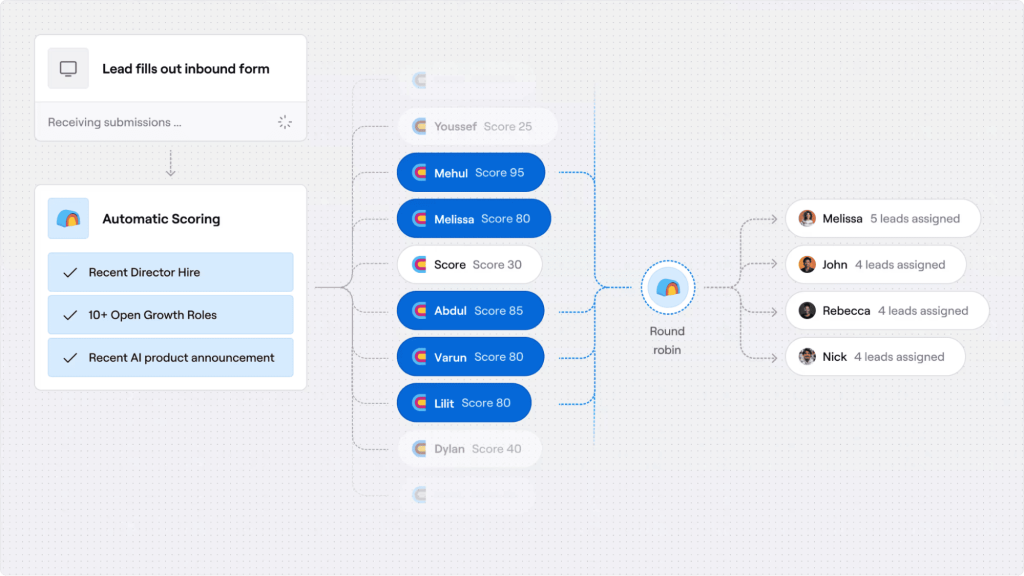
Clay offers an AI-powered lead scoring tool that automates the lead qualification process on autopilot. Every business can set up its own criteria for what qualifies or disqualifies prospects, for example—a recent AI product or feature announcement = +10 points, a recent sales team expansion = +15 points, and so on.   

Account & lead scoring in Clay AI sales

Once all set up, Clay’s AI will put each unique lead through the ringer to determine how likely they are to make a purchase, and it will keep updating scores of existing prospects in real-time, should they take any actions that either add or subtract from their score.  

Once again, this empowers sales teams to maximize their efficiency and resource allocation by focusing their time on prospects likely to convert, while simultaneously removing another manual, time-consuming activity of their shoulders.

The 2026 AI outreach playbook

Your AI can write emails. But can it get replies? Discover how to combine ChatGPT with Jason AI SDR to run outreach 24/7, avoid reply-killing mistakes, and send campaigns that feel handcrafted—without spending hours on research.

AI formula generator

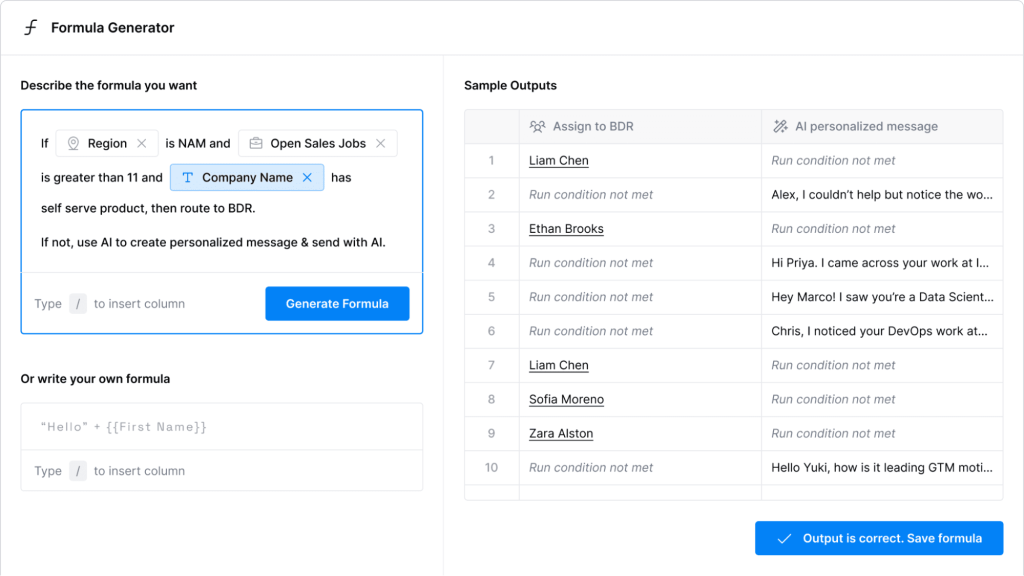
Another AI feature, and this time it’s Clay’s AI Formula Generator which allows users to create customized data sourcing and enrichment workflows that fit their specific needs. Besides saving an incredible amount of time, this AI engine ensures precision and facilitates scalability: 

AI formula generator in Clay review

The way it works is fairly simple, much like with ChatGPT users simply describe their desired workflow in plain English, spanning from finding relevant prospects and creating that lead scoring system to data enrichment criteria and beyond. 

You can imagine just how much this AI formula generator can free up your sales team’s time to focus on higher-value tasks, such as personalized outreach and relationship-building.

Automated outbound

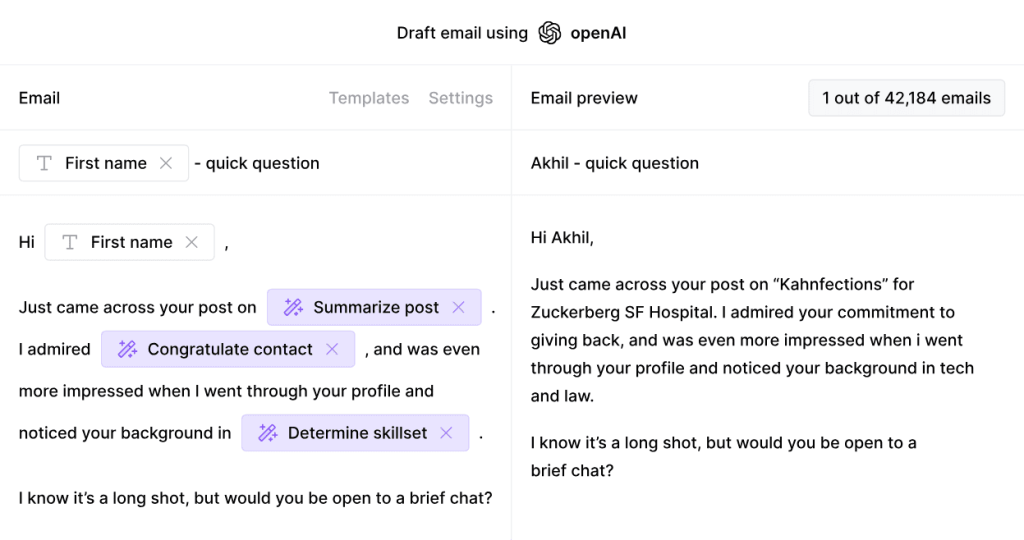
Once you build your targeted and qualified prospect lists, the next step is to not waste any time and begin your sales engagement efforts. Clay offers simple outbound features with automated emails, follow-ups, and LinkedIn touches, as well as AI personalization based on the sales intelligence it has for each prospect. 

Users can turn to the Clay AI sales email generator that runs on ChatGPT to save time on their outreach efforts right through the platform, but when it comes to sales engagement, that’s about it. 

Automated outbound in Clay CRM review

The good news is that Clay seamlessly integrates with dedicated sales engagement tools like Reply.io that have superpowers when it comes to outreach. With Reply, users can create conditional multichannel sequences for each unique lead, leveraging emails, calls, LinkedIn messages, SMS, and WhatsApp. 

Reply’s AI sales agent will leverage the sales intelligence provided by Clay to hyper-personalize each message and determine which channel and timing is most appropriate for each lead. To take it a step further, it will also respond to your prospects, handle objections, and book meetings on your behalf. 

With Clay’s AI data researching and Reply’s AI outreach features, businesses can create a fully automated and powerful sales engine, from finding targeted leads all the way to closing deals.

Automated inbound

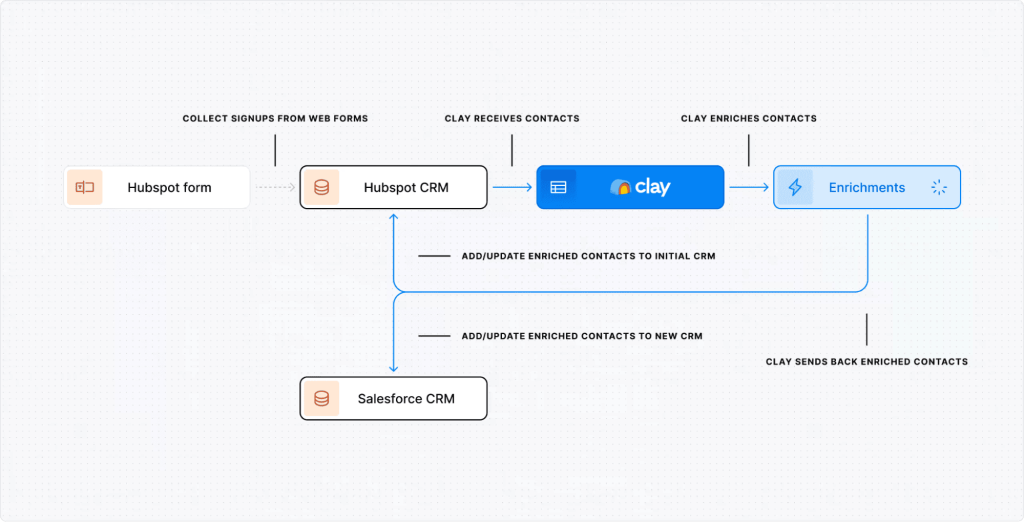
When it comes to inbound lead generation, Clay doesn’t technically have any features designed to capture and nurture inbound leads, but it does have the ability to integrate with several inbound tools. Afterward, Clay will qualify those inbound leads using your custom lead scoring system and enrich their customer profiles with additional data points. 

Clay software seamlessly integrates with Hubspot, Marketo, or Salesforce, but hopefully, more integrations will come along shortly. 

Automated inbound in Clay

Clay fills all the gaps when it comes to getting to know your inbound leads that come through your website, lead magnets, or social media, ensuring all data is accurate and up-to-date.  

If you’ve integrated Clay with an outreach tool like Reply.io, it will also categorize your inbound leads and assign them to the most appropriate sales sequences you’re running. 

Last but not least, Clay has the ability to automatically send AI-personalized emails based on your created workflows, ensuring that your leads are continuously nurtured with relevant information until they’re ready to convert.

Coupling this with a Campaign Health Score provides a clearer picture of how inbound leads engage over time, revealing strengths and weaknesses in your nurturing process to boost conversion rates.

What are the Clay pricing plans?

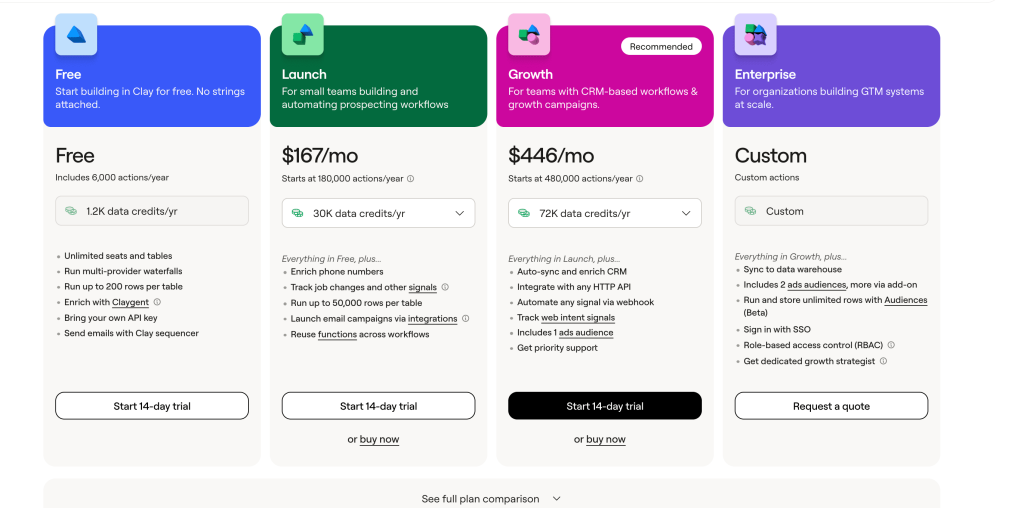
Clay pricing has changed quite a bit in 2026, now featuring four separate plans: Free, Launch, Growth, and Enterprise.The bigger shift, though, is how pricing actually works. Clay now splits usage into “Actions” and Data Credits. 

Actions track platform usage across enrichment and GTM workflows, while Data Credits are used for data pulled from Clay’s marketplace. Which means the real cost depends not just on the plan itself, but also on how much Clay data you find/enrich and how heavy your workflows are.

Free plan

Clay’s Free plan is a solid starting point for teams that want to test Clay software before paying for it. It includes 500 actions per month, 100 data credits per month, unlimited seats and tables, multi-provider waterfalls, up to 200 rows per table, Claygent enrichment, and the ability to send emails through Clay Sequencer.

As far as free plans go, this is truly impressive, as it’s sufficient enough for solo professionals and very small teams to get starting. Of course, it’s not nearly enough for serious outbound workflows. 

Launch plan

The Launch plan starts at $185/month billed monthly or $167/month billed annually. It’s aimed at individuals and smaller teams building more complex and fully automated Clay prospecting workflows.

It includes 15,000 actions and 2,500 data credits per month on the base tier, though you can opt for more credits at an extra cost, plus everything in Free. It also adds phone number enrichment, job-change and other signal tracking, up to 50,000 rows per table, email campaign integrations, and reusable functions across workflows.

Growth plan

The Growth plan starts at $495/month billed monthly or $446/month billed annually. This is the plan Clay recommends for teams building CRM-based workflows and large growth campaigns.

It includes 40,000 actions per month and 6,000 data credits per month on the base tier, plus everything in Launch. It also adds CRM auto-sync and enrichment, HTTP API integrations, webhook automation, web intent signal tracking, one ads audience, and priority support.

Enterprise plan

The Enterprise plan uses custom pricing and is built for larger GTM teams running Clay at scale.

It includes custom actions and data credits, plus everything in Growth. It can also include data warehouse sync, extra ads audiences, unlimited rows with Audiences, SSO, role-based access control, and a dedicated Growth Strategist.

All in all, the Clay AI tool is reasonably priced given the value you get for data enrichment, prospecting, and GTM workflow automation. The catch is that buyers should budget for both Actions and Data Credits before committing, because enrichment-heavy workflows can get more expensive than the headline plan price makes it seem.

What are Clay reviews by real users?

There’s no better way to determine how good a product truly is than to see what the users are saying about it. We’ve skimmed through the main review sites and it’s safe to say that Clay has built an excellent reputation: 

  • G2 →   4.9 ⭐️/ 5 
  • Product Hunt →  4.9 ⭐️/ 5 

After looking through hundreds of Clay reviews from real users, the most often-mentioned pros and cons include: 

✅Many users appreciate Clay’s adaptability to various workflows, allowing them to create custom lead scoring and enrichment systems;
✅Users love Clay’s ability to source data from multiple providers into a single, intuitive interface;
✅Reviewers really appreciate Clay’s intuitive interface that’s super easy to navigate.

❎On the contrary, some users feel that the interface resembles a spreadsheet, which isn’t visually appealing to all;
❎There are numerous mentions that certain features, like Clay’s search credits, are a bit overpriced compared to direct API usage;
❎Users have noted the absence of bulk selection or sorting options on most plans, which hinders efficiency. 

Now, here are some real-world Clay review examples:

“I love how Clay takes the busywork out of my outreach, pulling all the data I need into one place so I can move faster and focus on what actually matters.”

“Provides the most accurate data by using multiple providers so it has improved our reachability a great deal. Has the feel of a spreadsheet so it’s quite easy to get up and running.”

“We were able to reduce the time of prospect list creation by a few times thanks to AI based company scoring that we’ve set-up based on our needs.”

What is the best Clay alternative?

Choosing which tools to equip your sales team with is a serious business decision that has the potential to directly impact your revenue. Therefore, it’s always best to do your research and weigh up your options before committing to a purchase. 

When it comes to sales intelligence, Clay is truly one of the top solutions out there. 

However, if you’re primarily looking for a sales outreach tool, then it’s definitely worth considering some of the more specialized tools available, and then integrating them with Clay to leverage the best of both worlds.

One of the leading sales outreach platforms is Reply.io, which we kindly invite you to check out and explore its advanced AI features to see if we would be a good fit. 

So even though Clay and Reply.io are slightly different in nature, the key differences include: 

  • Reply.io comes with a native AI SDR agent that hyper-personalizes your outreach AND handles responses on your behalf (including booking meetings); 
  • With Reply.io, you get more channels for your outreach campaigns (including email, cloud calls, LinkedIn, SMS, and WhatsApp); 
  • With Reply’s Google Postmaster and MailToaster integrations, and a dedicated deliverability team at their disposal, users can enjoy enhanced email deliverability for their outreach campaigns; 
  • Last but not least, Reply.io provides powerful team management features to keep better track of sales reps’ performance, tasks, KPIs, etc.

Verdict—how much is Clay worth?

Hopefully, our Clay CRM review was informative and helped you on your journey of finding the right sales tool(s) for your business. 

Keep in mind that there are numerous AI sales software out there, each with its own unique standout features, integration capabilities, and prices. 

Clay is undoubtedly a powerful tool for B2B sales teams with its AI-driven features, multi-source data integration, and customizable workflows. Still, many sales teams find value in comparing it with other Jason AI SDR alternatives before deciding. So if your primary focus is data-driven prospecting and lead scoring, Clay AI tool is definitely a viable option. 

However, if you’re seeking a solution to supercharge your sales outreach with AI sales agents, Reply.io will undoubtedly offer more specialized features to meet those needs. 

That being said, if you want the best of both worlds, the integration between Clay and Reply.io allows you to enjoy the fusion of Clay’s AI-driven data with Reply.io’s advanced sales outreach capabilities.

FAQ: Clay Review

What is Clay used for?

Clay is mostly used to build custom prospecting, enrichment, and GTM workflows. Teams use it to find leads, enrich contact and company data, track signals, and push better data into outreach tools or CRMs.

Is Clay easy to use?

Yes and no. Clay is powerful, but it’s not the easiest tool for beginners. It works best when the person using it is comfortable with workflows, prompts, data sources, and credit usage.

What types of teams benefit most from using Clay software?

Usually RevOps, growth, and GTM-focused teams. The more comfortable a team is with setup, enrichment logic, and testing, the more value they tend to get from Clay software.

How does Clay AI tool handle data errors or outdated info?

It helps reduce them, mainly through waterfall enrichment. So if one provider misses, another one gets checked next. Still, bad or outdated data can absolutely slip through, which is why validation and re-checking still matter.

Can Clay prospecting scale easily for large sales teams and campaigns?

It definitely can. Clay prospecting scales best when there’s a clear system behind it — staged enrichment, usage monitoring, prompt control, and so on. Otherwise credits disappear fast and data quality gets messy.

How do Clay data credits compare to costs in other prospecting tools?

That depends on the workflow. Clay data credits can add up quickly when you’re using multiple providers, AI steps, or deeper enrichment. So comparing Clay properly means looking at both the subscription and the actual credit burn.

What’s a simple setup approach for new Clay prospects?

Start small. A few hundred leads is usually enough to test the workflow, data quality, and credit usage without committing to large budgets. Once that works, you can start gradually scaling.

Subscribe to our blog to receive the latest updates from the world of sales and marketing.
Stay up to date.

Related Articles

Top 12 GTM Outbound Sales Platforms to Try in 2026

Top 12 GTM Outbound Sales Platforms to Try in 2026

Top 12 GTM Outbound Sales Platforms to Try in 2026
What’s New in Reply: New API, AI Custom Fields, LinkedIn Enrichment, and More

What’s New in Reply: New API, AI Custom Fields, LinkedIn Enrichment, and More

What’s New in Reply: New API, AI Custom Fields, LinkedIn Enrichment, and More
Best 12 CRM for Marketing Agencies in 2026

Best 12 CRM for Marketing Agencies in 2026

Best 12 CRM for Marketing Agencies in 2026