
How a Dedicated Email Server Can Improve Your Outreach in 2026

How a Dedicated Email Server Can Improve Your Outreach in 2026

Most teams look into a dedicated email server for one key reason — they want more of their emails to land in the inbox. Then they make the switch, send the first campaign from a brand-new IP, and watch it go straight to spam, because that IP has no sending history and mailbox providers don’t trust senders they know nothing about.

A dedicated server can improve your sending, but only for certain kinds of emails and, more importantly, only once you clearly understand what it changes. In this guide, we’ll cover what you’re actually paying for, when it’s worth it, your hosting options and costs, how to set one up, and how it all maps to sales outreach.

What is a dedicated email server?

A dedicated email server is a mail server whose resources and IP addresses send only your organization’s email. Nobody else’s campaigns run through it, so nobody else’s sending behavior affects how receiving servers treat your mail.

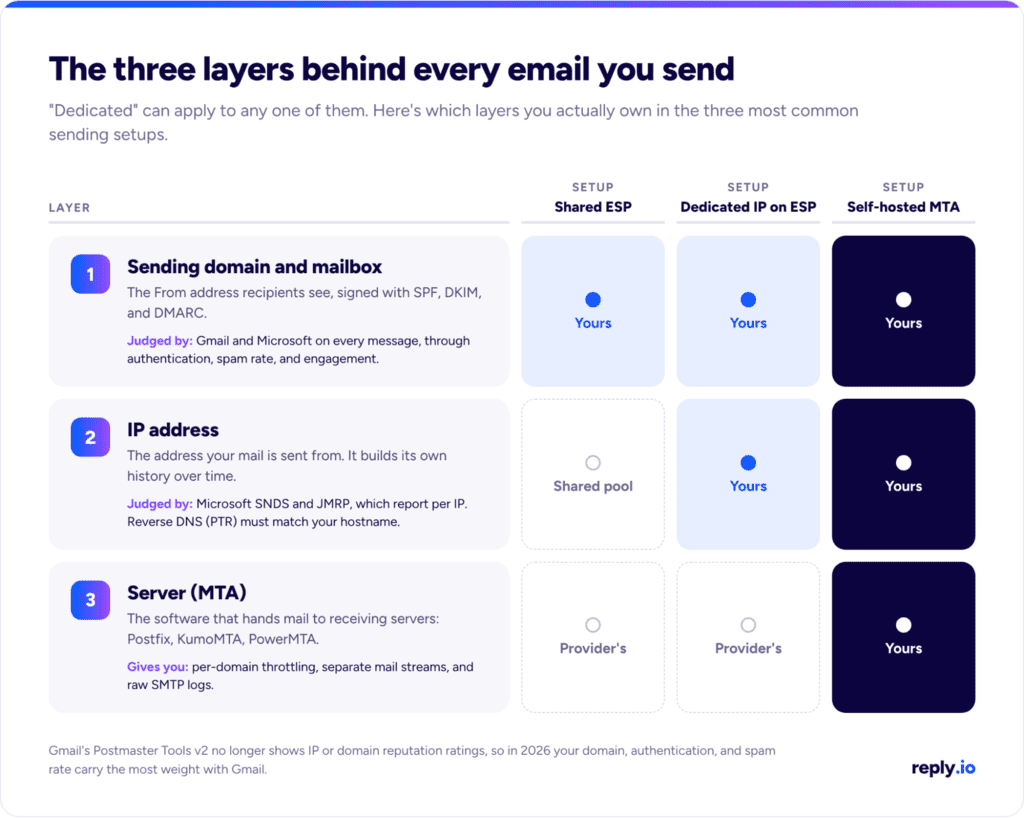
Where it gets confusing is that every email you send travels through three layers, and “dedicated” can apply to any one of them:

  • The server (MTA): the software that hands your messages to receiving servers, such as Postfix, KumoMTA, or PowerMTA.
  • The IP address: the address your MTA connects from, which builds its own sending history over time.
  • The sending domain and mailbox: the From address your recipients see, authenticated with SPF, DKIM, and DMARC.

This is why shopping for dedicated email server hosting can be so misleading at times. The same phrase is used to sell three different products, including a private mailbox hosting that replaces Google Workspace, a dedicated IP on an email service provider (ESP) like SendGrid or Amazon SES, and your own MTA running on a VPS. Only the last two actually change how your mail gets delivered, and only the last one puts all three layers under your full control.
dedicated email server hosting

Does a dedicated email server improve deliverability?

A dedicated email server doesn’t improve email deliverability by itself. It isolates your sender reputation and gives you control over it, but the reputation still has to be earned, and a fresh IP has no history at all. In fact, for the first few weeks, it often performs worse than the well-managed shared pool you just left.

The bigger shift is in where mailbox providers look in 2026. Google’s Postmaster Tools v2 doesn’t show IP or domain reputation ratings at all, and the v1 dashboards that did are now being phased out.

What Gmail shows senders instead is compliance status and spam rate, which says a lot about what it weighs most: authentication, complaints, and how recipients engage with your mail.

Microsoft still gives senders IP-level data, since both its SNDS portal and JMRP complaint feedback loop report per IP, so a clean dedicated IP still counts with Outlook and Hotmail recipients.

Here’s what a dedicated server does improve:

  • No noisy neighbors → On a shared pool, another customer’s bad list can drag down the IPs you send from, while on your own IP, the only reputation you carry is yours.
  • Per-domain traffic shaping → Your own MTA can send to Gmail, Outlook, and Yahoo at different rates and back off automatically when one of them starts returning 4xx deferrals.
  • Separate mail streams → Password resets and invoices go out from one IP pool and newsletters from another, so a weak campaign never delays a login code.
  • Full visibility → You get raw SMTP logs and the exact bounce code from every receiving server, which makes problems far easier to trace.

What it can’t fix are the things behind most placement problems in the first place, which include list quality, relevance, complaint rates, and content. If those are weak, a dedicated server simply gives you a clearer view of them.

Book cover for 'Email Deliverability Playbook for Outbound Teams' on a blue gradient background with '10 Actionable Slides' text at the bottom, and author/ logo elements nearby.

Email Deliverability Playbook for Outbound Teams

Want more of your outbound emails to reach the inbox instead of spam?

This playbook gives you a practical setup you can follow to protect your domains, warm up inboxes, keep your email lists clean, and send at safer volumes.

What’s inside:

→ A step-by-step email deliverability setup, from SPF, DKIM, and DMARC to warm-up and sending limits

→ A practical checklist to check your domains, inboxes, email copy, and prospect lists before you send

→ Simple sending guidelines, including how to start at 10–15 emails per inbox and safely increase your volume

→ The key deliverability metrics to watch, including bounce rate, spam complaints, inbox placement, and domain reputation

When is a dedicated bulk email server worth it?

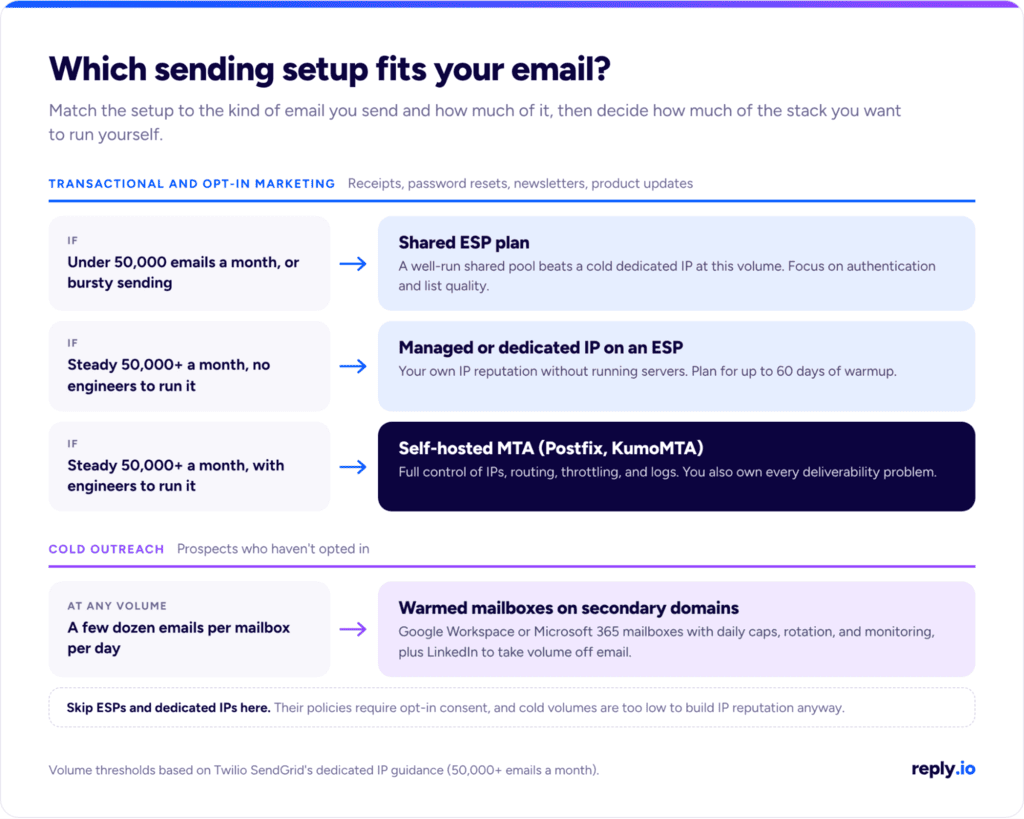
A dedicated bulk email server is worth it when you send a high, steady volume of opt-in email and have someone who can run it. Twilio SendGrid only recommends a dedicated IP for senders above 50,000 emails a month, and below that line, there isn’t enough consistent traffic for providers to form an opinion of your IP, while one quiet week can undo a month of warmup.

Crossing certain thresholds also changes the rules you’re held to. Once you send 5,000 or more messages a day to personal Gmail accounts, Google classifies you as a bulk sender permanently, which means: SPF, DKIM, and DMARC, valid forward and reverse DNS, TLS, one-click unsubscribe, and a user-reported spam rate below 0.1% that never reaches 0.3%.

Microsoft uses the same 5,000-a-day threshold for Outlook.com and rejects non-compliant mail with a 550 5.7.515 error.

As a rule of thumb, a dedicated server pays off if you have consistent opt-in volume above 50,000 a month, several mail streams worth separating, data residency or compliance requirements, and an engineer or deliverability lead who owns it. It doesn’t if your sending is bursty, sits below that threshold, or nobody is going to maintain the logs.

Dedicated bulk email server for sales outreach

The same principle carries over to sales outreach, only at a different layer. Mailbox providers trust senders whose sending is consistent and predictable, which is why outreach teams spread their sends across many mailboxes, each with a modest daily cap, instead of pushing everything through one address.

The good news is that modern sales automation platforms take care of this in the background.

Reply.io handles this at the mailbox level with custom daily limits per mailbox, Ramp-Up Mode for new mailboxes, randomized delays between sends, and mailbox rotation within a single campaign, all part of its email infrastructure toolkit. No single mailbox ever spikes, which is exactly the pattern a well-run dedicated server is built to protect. All that happens so your team can focus on tailored outreach campaigns across email and LinkedIn, even at high volumes.

Dedicated bulk email server hosting: your options

Dedicated bulk email server hosting comes in a handful of practical forms, and they differ more in who does the work than in what you pay. Here’s how the main options compare:

Option What you control Typical cost Ops load Cold email allowed? Best for
Shared ESP plan (Amazon SES, SendGrid, Mailgun, Postmark) Domain and content From $0.10 per 1,000 emails (Amazon SES base rate) Low No, opt-in only Senders under 50,000 emails a month
Managed dedicated IPs (Amazon SES) Domain, IPs assigned and warmed by the provider $15/month plus $0.08 per 1,000 emails (up to 10M) Low No Opt-in senders above 50,000 a month who don’t want to manage IPs
Standard dedicated IP (Amazon SES) Domain and specific IPs, warmed by you $24.95 per IP per month, plus sending Medium No Steady high-volume senders separating mail streams
Self-hosted MTA on a VPS (Postfix, KumoMTA) Server, IPs, domain, routing, and logs About $5 to $10/month for the VPS, plus engineering time High Set by your host’s acceptable use policy, and most ban unsolicited bulk mail Teams with in-house email engineering
Google Workspace or Microsoft 365 mailboxes Domain and mailbox Per-user license, with Workspace capped at 2,000 messages per user per day Low Low-volume, one-to-one outreach Sales outreach and day-to-day business email

Before paying for any dedicated SMTP server mass email package, read the provider’s acceptable use policy. Resellers renting out PowerMTA or KumoMTA servers by the IP are easy to find, and some will take any traffic you send, but receiving servers don’t care what your host allows. Gmail and Microsoft will still judge every message by their own authentication and complaint data.

If you’re comparing API-first providers, our roundup of the best email APIs breaks down their pricing and limits. And if all you need is SMTP for low-volume app or internal mail, a free SMTP server may be all it takes.

How to set up a dedicated email server for outbound mail

Running your own server for outbound mail comes down to six steps, and skipping any one of them shows up quickly in your bounce logs:

  1. Pick a host with port 25 open and a clean IP

Google Cloud blocks outbound port 25 on all VMs, Azure blocks it on most subscription types, and AWS throttles it on EC2 until you request removal. Among VPS providers, Hetzner unblocks it on request once your first invoice is paid, while DigitalOcean keeps it blocked on Droplets. Check the IP against Spamhaus and the other major blocklists before you send anything, since recycled cloud IPs often come with history.

  1. Set up forward-confirmed reverse DNS

Create an A record for your mail hostname (for example, mail.yourdomain.com), ask your host to point the IP’s PTR record to that same hostname, and use it as your HELO name. Gmail requires valid forward and reverse DNS from every sender, and a mismatch is one of the first things receiving servers check.

  1. Publish SPF, DKIM, and DMARC

Add the server’s IP to your SPF record, sign with a 2048-bit DKIM key, and roll out DMARC in stages: p=none while you read the aggregate reports, then quarantine, then reject once every legitimate source passes. Our guide to DMARC, DKIM, and SPF walks through each record.

  1. Turn on TLS and one-click unsubscribe

Enable STARTTLS on outbound connections, add List-Unsubscribe and List-Unsubscribe-Post headers (RFC 8058) to every marketing stream, and process unsubscribe requests within 48 hours.

  1. Warm up the IP

Start with a few hundred messages a day to your most engaged recipients and increase gradually from there. SendGrid notes that warm-up can take up to 60 days, though most of its customers finish within 30.

  1. Monitor from day one

Track spam rate and compliance status in Postmaster Tools, enroll your IPs in Microsoft SNDS and JMRP, and watch bounce codes by receiving domain so you catch a 4.7.x deferral before it turns into a 5.7.x block.

Why cold outreach doesn’t belong on a dedicated server

Everything above applies to emails people have asked to receive. Cold outreach is a different stream entirely, and it doesn’t fit a dedicated server for three reasons:

  1. Policy rules it out at the providers most teams would turn to, since the ESPs that rent out dedicated IPs don’t allow cold email. It instead requires affirmative consent before any non-transactional email and specifically bans sending to addresses obtained from the internet or social media without it, which describes most prospect lists. Amazon’s acceptable use policy prohibits unsolicited mass email as well, and breaking those terms gets the account suspended, IPs included.
  2. Even where a host allows it, cold volumes are far too low. Healthy cold outreach runs at a few dozen emails per mailbox per day, which is nowhere near the 50,000 a month SendGrid sets as the floor for a dedicated IP. An IP that sends little and irregularly never builds a reputation worth having.
  3. And then there’s where your emails are going. Most B2B prospects sit on Google Workspace and Microsoft 365, and mail sent from those platforms already goes out through Google’s and Microsoft’s established IP pools, so what you actually control in cold outreach is the domain and the mailbox.

The dedicated principle still applies, just one layer up. Keep outreach on secondary domains so your main domain and its marketing and transactional mail stay protected, spread volume across warmed mailboxes, cap each one, and monitor them all.

Outreach platforms built for this, like the ones in our list of unlimited email sending software, manage exactly this part of the setup, and staying within Gmail sending limits on every mailbox becomes part of the plan.

dedicated bulk email server

Take volume off email: put LinkedIn into the sequence

Spam rate is calculated per recipient, so every prospect you engage on another channel first is one less chance of a complaint and one less send counted against a mailbox’s daily cap.

LinkedIn is the natural second channel for B2B, since your prospects are already there and a light touch on it warms up the email that follows. A simple pattern may look something like this: view the prospect’s profile and like a recent post before the first email, send a connection request if that email gets no reply, and follow up with a short voice note once they accept. LinkedIn enforces its own daily limits on connection requests and messages, so the same rule holds on both channels — cap activity per account and keep it consistent.

The best of both worlds is having emails and LinkedIn working alongside, in cohesive outreach sequences where one action affects the next step. Certain outreach platforms like Reply.io cover this with conditional logic, where the AI engine decides on the best channel, timing, and messaging for each individual prospect based on what they actually do, and that’s exactly what we’ll cover below in more detail.

How Reply.io handles the sending layer for outreach

Reply.io is an AI outreach platform that covers everything your team needs to find, enrich, and engage targeted leads at scale. It comes with a native lead database with over 1 billion contacts and accounts, multichannel sequences, LinkedIn automation, AI personalization, and a full-scale email deliverability toolkit.

On the email side, you can buy Google or Microsoft mailboxes inside Reply, new or pre-warmed, along with pre-warmed domains that come with three warmed-up mailboxes each.

Reply configures SPF, DKIM, and DMARC automatically for purchased mailboxes, warm-up runs on a peer-to-peer network and is included with every mailbox, and you can connect as many mailboxes as you need. The Email Health Checker audits your DNS records, the Google Postmaster integration surfaces spam rates, and email validation flags invalid and risky contacts before they turn into bounces. Gmail mailboxes can send through the Gmail API, and every mailbox gets its own rotation settings, daily cap, and randomized delays.

dedicated smtp server mass email

For LinkedIn automation, Reply covers connection requests, messages, InMails, voice messages (including AI voice), profile views, endorsements, follows, and likes on recent posts. It works with Basic, Sales Navigator, and Recruiter accounts, lets you connect multiple LinkedIn accounts with their own daily limits, and pulls every reply into one unified inbox.

Jason AI — the AI sales agent to run your entire outreach

Jason AI is an AI SDR that runs the whole lead generation and outreach motion on top of the Reply.io infrastructure described above. After joining your team and learning everything about your business, strategy, and ICP, Jason starts finding prospects, researching each one, launching multichannel sequences across email and LinkedIn, and handling replies and objections all the way to a booked meeting. There’s also an approval mode for teams that want to review responses before they go out in the early stages.

And while Jason is busy working around the clock finding, enriching, and engaging your prospects, your entire email infrastructure gets maintained and monitored in real time, including your authentication records, spam rates, email account health, sending limits, and more.

Final thoughts

A dedicated email server is the right call when you send steady, high-volume opt-in email and have someone to run it. It keeps your reputation isolated and fully in your hands, and from there, what you build with it is up to you.

For cold outreach, rather than focusing on a dedicated email server, put the effort where results are actually decided — secondary domains, warmed mailboxes with sensible caps, and a second channel like LinkedIn to keep email volume in check.

If you’d rather not build that layer by hand, try Reply.io free for 14 days and launch your first sequence on infrastructure that’s already set up.

FAQ

Is a dedicated email server the same as a dedicated IP?

No, a dedicated IP is a single address used only by you, often rented from an ESP that still runs the server. A dedicated email server means the MTA itself is yours, usually with one or more dedicated IPs attached, which also gives you control over routing, throttling, and logs.

How much does dedicated email server hosting cost?

A self-hosted server on a VPS costs around $5 to $10 a month, plus the engineering time to run it. On Amazon SES, a standard dedicated IP costs $24.95 per IP per month, and managed dedicated IPs cost $15 a month plus $0.08 per 1,000 emails up to 10 million.

Can you use a dedicated SMTP server for mass email?

Yes, for opt-in mass email like newsletters and product updates, as long as you meet Gmail’s and Microsoft’s bulk sender requirements. For cold email, most ESPs prohibit it, and a dedicated server won’t solve the low volume and engagement issues that hurt cold sends anyway.

How long does IP warmup take?

IP warm-up usually takes about a month. SendGrid says most of its customers finish within 30 days, some wrap up in one to two weeks, and others need up to 60, depending on volume and how engaged their recipients are.

Subscribe to our blog to receive the latest updates from the world of sales and marketing.
Stay up to date.

Related Articles

B2B SaaS Marketing Strategy in 2026 [Step-by-Step Guide]

B2B SaaS Marketing Strategy in 2026 [Step-by-Step Guide]

B2B SaaS Marketing Strategy in 2026 [Step-by-Step Guide]
How an Automated Voice Messaging System Will Improve Outreach in 2026

How an Automated Voice Messaging System Will Improve Outreach in 2026

How an Automated Voice Messaging System Will Improve Outreach in 2026
Outbound Marketing Software in 2026 (Top Picks)

Outbound Marketing Software in 2026 (Top Picks)

Outbound Marketing Software in 2026 (Top Picks)