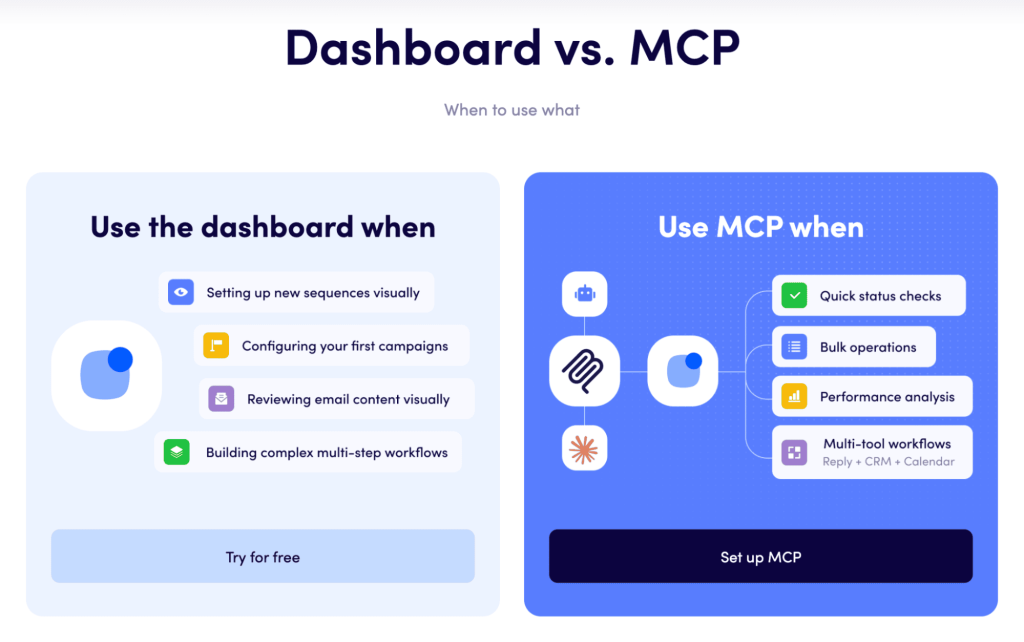

How to Automate Sales Outreach with HubSpot MCP Easily

How to Automate Sales Outreach with HubSpot MCP Easily

Complex sales automation workflows that used to require custom scripts, webhooks, IT specialists, and months of tinkering can now be done by AI, acting as the magnet that holds different processes and software together. 

HubSpot’s Model Context Protocol (MCP) is right in the middle of that shift, giving AI agents and tools safe, structured access to your HubSpot data.

In this article, we’ll walk through what HubSpot MCP actually is, how the HubSpot MCP server works in real life, and how to pair it with Reply.io  so your sales outreach runs almost on autopilot, from finding the right prospects to booking meetings.

What Is HubSpot MCP?

To understand HubSpot MCP, we first need to zoom out and look at Model Context Protocol as a concept.

In simple terms, Model Context Protocol (MCP) is an open standard that lets AI models talk to tools and data sources through a single, predictable layer instead of hundreds of custom integrations.
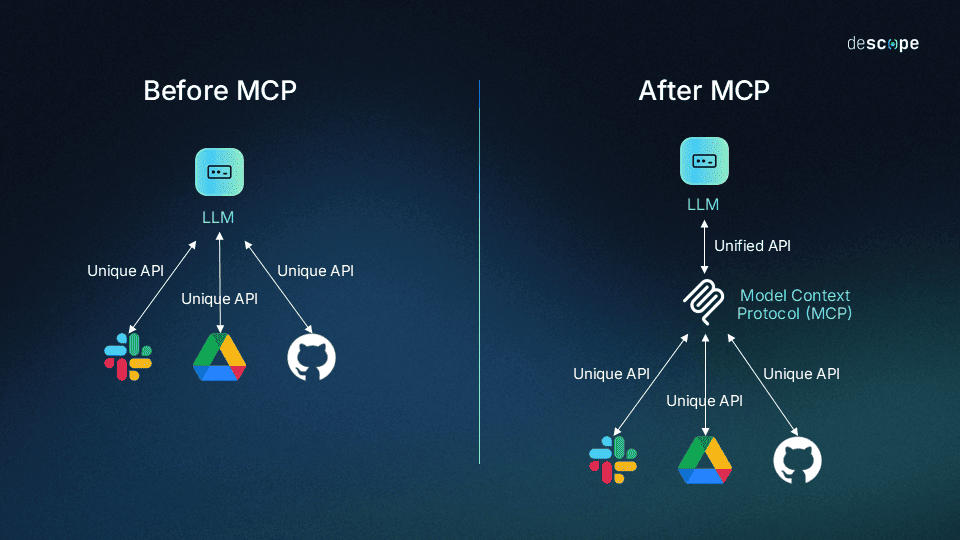
Source: Descope 

In practice, an AI client connects to a set of “MCP servers.” Each server represents a specific system (CRM, data provider, ticketing, sales engagement platform, etc.) and exposes what it can do in a structured way, for example:

  • Listing records (contacts, companies, deals)
  • Searching or filtering by properties
  • Triggering narrow, well-defined actions, like creating tasks or logging notes

For AI assistants and agents, MCP is basically the “tool belt”, standardizing how they discover:

  • What a system can do
  • Which objects and fields are available
  • How to call those capabilities safely, without free-for-all access

When you connect Model Context Protocol HubSpot into this picture, you’re effectively giving AI a clean, well-documented way to understand and use your CRM data for other processes. 

How the HubSpot MCP server works

HubSpot MCP is HubSpot’s implementation of this protocol for its CRM. Think of it as a remote server that sits between MCP-compatible AI clients (like Claude) and your HubSpot CRM data.
At a high level:

  • You connect an AI client to the HubSpot MCP server and authorize it against your HubSpot account.
  • The HubSpot MCP server exposes tools that let the AI query CRM objects such as contacts, companies, deals, tickets, products, and more.
  • The AI then uses natural language prompts to pull insights from live CRM data instead of you manually clicking through reports and filters.

The official HubSpot MCP server provides access to supported CRM objects and their properties, meaning it’s mainly a powerful “read layer” for AI-driven analysis, segmentation, and recommendations.

In other words, the AI does not update HubSpot directly through MCP. Instead, it uses this real-time CRM context to decide which records need attention and then either (a) suggests changes to humans, or (b) calls other tools and integrations (such as Reply.io or HubSpot’s standard APIs) to actually perform those updates.

Core HubSpot MCP use cases for sales outreach

For sales teams, HubSpot MCP gives AI eyes on what’s actually happening inside the CRM, and then lets it drive smarter activity through your sales automation stack

Here are some practical examples of HubSpot MCP for sales teams:

  • Dynamic segmentation and targeting: AI agents can pull lists of contacts or deals that match specific ICP criteria, engagement patterns, or pipeline stages — no manual list building needed.

  • Contextual summaries: reps can ask the AI to summarize recent activity for an account or opportunity (emails, calls, meetings logged in HubSpot) in a few lines before a call.

  • Prioritization and opportunity spotting: AI can surface quiet but high-value deals, new leads that match your ICP but haven’t been contacted, or accounts showing strong intent signals.

  • Conversation-ready insights for outreach tools: the MCP AI client that reads from HubSpot MCP can instantly apply those insights in other MCP-connected AI outreach tools like Reply.io

On its own, MCP doesn’t send emails or LinkedIn messages. It’s the intelligence layer that makes HubSpot sales outreach automation actually smart, by feeding your sales engagement layer with relevant, up-to-date CRM context.
What you need to automate sales outreach with HubSpot MCP

Before you plug AI into your CRM and expect it to run half your outbound, you need to make sure your foundation can actually support it.

1. HubSpot account, data, and object setup

On the HubSpot side, you’ll need:

  • A HubSpot account with access to the new developer platform features that include MCP

  • Clean, structured data across core CRM objects: contacts with accurate emails, roles, and key properties like lifecycle stage, lead status, and ICP fit; companies with solid firmographic data (industry, size, region); deals with up-to-date stages, owners, and amounts

  • Clear internal definitions for stages like MQL, SQL, Opportunity, and Customer so that AI-driven segments and queries actually mean something

Here’s the thing: AI is only as useful as the data you give it. If lifecycle stages are wrong, ownership is messy, or important properties are empty, the results from HubSpot MCP will be just as off.

2. AI client and the MCP ecosystem 

To actually use HubSpot MCP, you need an MCP-compatible AI client. Modern AI tools such as Claude can connect to MCP servers, discover available tools, and let users call those tools directly with natural language.

The same AI client can connect to multiple MCP servers at once, for example:

  • HubSpot MCP for CRM context (contacts, companies, deals, activities)
  • Reply.io MCP for exposing sales engagement actions (multichannel sequences, AI personalization, reporting, etc.)

This is where the stack really clicks. One AI “brain” can:

  • Look into HubSpot MCP to understand your funnel.
  • Look into Reply MCP to manage outreach.
  • Tap into other MCP servers for enrichment, internal documentation, Slack, and so on.

All of that happens through the same MCP layer instead of 10 different one-off integrations.

3. People, permissions, and guardrails

You also need clear ownership and guardrails in place:

  • Stakeholders: let RevOps or Sales Ops take ownership of the setup and configuration, have Sales leadership call the shots on which use cases to tackle first, and keep a technical admin or developer in charge of the MCP setup, testing, and ongoing tweaks

  • Permissions and scopes: on the HubSpot side, access via HubSpot MCP should follow user roles and least-privilege rules. The current remote MCP server inherits scopes from the connected user and their existing permissions, so be very deliberate about who actually authorizes it

  • Reply MCP access: for Reply MCP, use personal or service credentials that are limited to the sequences, workspaces, and data you’re comfortable letting the AI touch

  • Audit and transparency: define how you’ll log AI-driven insights and actions up front — for example, summary notes in HubSpot, or tags/notes in Reply.io whenever sequences or settings are changed by AI

Once this is in place, you’re ready to configure the HubSpot MCP server and start building real workflows to automate sales outreach in a controlled, scalable way.

Step-by-Step: Setting up the HubSpot MCP server for sales outreach

Now that we’ve explored how the HubSpot MCP works, this section covers the conceptual setup for AI sales prospecting and outreach automation. HubSpot MCP is still evolving, so exact screens and flows may change — always check the latest HubSpot docs for the fine print.

Create the HubSpot auth configuration and confirm access

To connect HubSpot MCP from an AI client, you first need an authorization configuration in HubSpot that the MCP client will use:

  1. In your HubSpot developer environment or portal settings, enable access for the MCP server (HubSpot’s remote MCP endpoint)

  2. Establish the connection between your HubSpot account and the MCP client using the flow supported by your AI client. Typically, this is an OAuth-style consent step where a user with the right permissions authorizes the connection

  3. Confirm the authorizing user has the CRM access your sales use cases require (read access to contacts, companies, deals, and any other objects you plan to use)

You don’t manually tweak scopes for the official HubSpot MCP server. Supported scopes and data are determined automatically based on the user’s permissions and the server’s current capabilities.

Connect an MCP-compatible AI client to HubSpot MCP

Next, you wire your AI client into the HubSpot MCP:

  • In your AI client (most common example is Claude), add a new MCP server and select HubSpot from the available providers where supported

  • Enter any required details, like your HubSpot portal/tenant, and complete the authorization flow

  • Once connected, the AI client will show a list of separate HubSpot tools representing operations on contacts, companies, deals, tickets, and other objects

At this point, the AI is fully plugged into your CRM via the HubSpot MCP server. It can answer questions about your pipeline, leads, and accounts based on current CRM data, while respecting the authorizing user’s permissions.

Community and self-hosted HubSpot MCP servers

HubSpot’s official MCP server will be the default choice for most teams. Still, there are community and self-hosted MCP servers that talk to the HubSpot API and can expose a different or broader set of capabilities.

More advanced teams might use these to:

  • Customize exactly which endpoints and objects are exposed
  • Experiment with more advanced automations that chain multiple HubSpot actions together
  • Embed MCPl HubSpot integrations into internal platforms

Treat these HubSpot MCP server variants like any other app with CRM access: limit access with least privilege, enforce strong authentication, and maintain clear audit logs.

Validate the connection with sales-focused test prompts

Before you roll this out to the sales team, sanity-check your HubSpot MCP setup with a few simple prompts, for example:

  • “Show the 20 most recently created contacts in our HubSpot CRM”
  • “List open deals for this quarter sorted by amount, with owners and close dates”
  • “Summarize the last five sales activities for [contact or company]”

You want to make sure that:

  • The results match what you see when you check directly in HubSpot
  • The AI only touches the objects and fields you actually expect
  • Response times are fast enough for real, interactive use

Once that looks good, you can start designing workflows that tie HubSpot MCP’s data layer into AI-powered sales outreach tools like Reply.io and the rest of your stack.

Automating sales outreach with HubSpot MCP + Reply.io

With HubSpot MCP connected, you have a live, read-only window into your CRM. To actually automate outbound across email, LinkedIn, and more, you pair that intelligence layer with Reply.io’s AI-powered outreach suite.

This is how you go from a prospecting AI assistant to a real HubSpot sales outreach engine.

From HubSpot CRM insights to target lists via MCP

Every outreach workflow starts with the same question: who should we talk to next? Normally, sales teams spend hours building lists, exporting CSVs, and tweaking reports.

With HubSpot MCP, your targeting logic becomes natural language that an AI agent resolves for you. For example, the AI can:

  • Find new MQLs that match your ICP and haven’t been contacted yet

  • Surface dormant deals where there’s been no activity for a set period, but the deal size is large

  • Highlight existing customers with strong engagement signals that might be ready for upsell

Because HubSpot MCP is read-only, the AI doesn’t change your CRM records. It returns prioritized segments and recommended actions. You can then:

  • Feed those segments into workflows
  • Hand them to humans for review
  • Or send them downstream into Reply.io multichannel outreach sequences

In practice, HubSpot MCP becomes a sales outreach intelligence engine that constantly scans your CRM (and other data sources ) to find the next-best accounts and contacts to engage.

Enrichment and context building with Reply Data and other sources

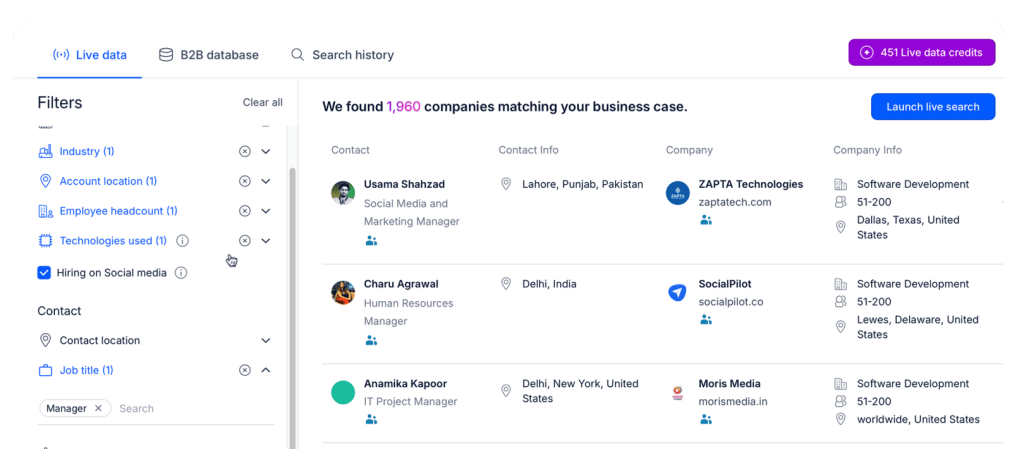
Segmentation works best when you have real context for each prospect. MCP lets your AI combine HubSpot with other systems, including B2B databases, LinkedIn, and internal tools. 

This is where Reply Data comes into play — a real-time B2B contact database with over 1 billion contacts across industries and locations, including: 

  • Validated emails, contact numbers, and LinkedIn URLs 
  • Firmographic and technographic data 
  • Both net-new prospecting data and enrichment for your existing CRM leads 

A typical enrichment loop might look like this:

  1. The AI uses HubSpot MCP to pull a segment like “all ICP Tier 1 accounts with no opportunities but recent marketing engagement”

  2. The same AI taps into Reply Data to verify emails and enrich those records with fresh job titles and missing firmographic/technographic fields

  3. The enriched profiles are pushed back into your systems, so both HubSpot and Reply.io sequences act on complete, high-quality data

End result: a constantly refreshed prospect universe where HubSpot MCP finds the right records, and Reply Data makes those records ready for AI-driven personalization.

Activating multichannel outreach with Reply.io

Once you’ve started building automated lists of relevant and enriched prospects, the next step is to set up the outreach automation. 

HubSpot MCP gives you the insights, while Reply.io is the execution layer that turns those insights into actual meaningful conversations:

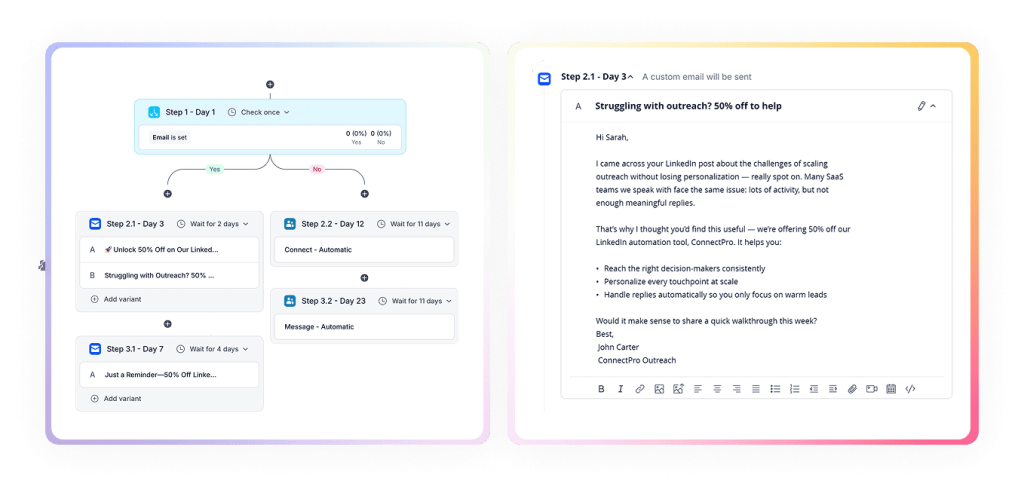
  • Run multichannel outreach across email, LinkedIn, calls, SMS, WhatsApp, and more

  • Build conditional, multi-step sequences that adapt to prospect behavior in real-time (opens, clicks, replies, meetings booked)

  • Leverage HubSpot and Reply data to personalize every email, follow-up, and LinkedIn message with relevant context, at scale 

  • Control throttling, A/B tests, and email deliverability to keep domains safe and performance high

  • Track results via in-depth analytics at the sequence, segment, and rep levels

Reply.io also offers a native HubSpot integration that keeps contacts, activities, and statuses synced so HubSpot stays your system of record.

That means contacts identified by AI via HubSpot MCP can be:

  • Automatically enrolled into Reply.io sequences via workflows, or
  • Manually enrolled by operators working from AI-generated lists

As outreach runs, opens, clicks, and replies live in Reply.io, while key activity flows back to HubSpot.

Positioning-wise, HubSpot is still the CRM and sales intelligence backbone. Reply.io is the multichannel engagement engine on top of that data. Together, they give you a practical, scalable AI sales outreach automation engine. 

Orchestrating outreach with HubSpot MCP + Reply MCP

To fully automate sales outreach, you don’t just “send lists to Reply.” You bring the Reply MCP into the picture and give AI direct control over execution.

Reply MCP is an MCP server for Reply.io that exposes core sales engagement actions as tools the AI can call and add to your sales engine.  With Reply MCP, an AI agent can:

  • Optimize outreach campaigns with AI-driven insights
  • Enroll contacts into specific sequences or move them between campaigns
  • Pause or stop sequences for selected contacts when certain conditions are met
  • Pull engagement metrics for reporting and optimization
  • Create multi-tool workflows with your CRM, Calendar, and more

When you combine HubSpot MCP and Reply MCP in the same AI client, you get a closed-loop system:

  • Use HubSpot MCP to analyze CRM data and propose an outreach plan
  • Use Reply MCP to execute that plan — enrolling contacts into multichannel sequences across email, LinkedIn, SMS, and more
  • Pause and adjust underperforming cadences, and pull updated performance data
  • Push summary insights back into HubSpot (via notes or custom fields) so team leaders can see what’s happening

In this setup:

  • HubSpot stays the central CRM and source of truth
  • HubSpot MCP is the AI access layer to that data
  • Reply.io is the execution platform
  • Reply MCP is the AI access layer to execution

That’s the real backbone behind HubSpot MCP for sales teams that want an AI-first stack instead of a patchwork of tools.

Jason AI — adding an AI sales agent to your stack 

The last piece is Jason AI — one of the top AI sales agents on the market that autonomously looks for potential buyers, launches multichannel outreach campaigns, personalizes messages, and even handles replies. 

HubSpot MCP and Reply MCP give a solid AI automation workflow with visibility and control. 

Jason AI executes that automation workflow on its own, behaving like a true SDR within your team. It’s designed to:

  • Use live data from Reply Data and synced HubSpot fields to find targeted prospects, research more context about them via LinkedIn, company websites, and more

  • Generate tailored multichannel sequences based on ICP definitions, product inputs, and prospect context

  • Write personalized emails and LinkedIn messages, and optimize them for timing

  • Handle replies, classify intent, and respond following your predefined playbooks

  • Book meetings directly on reps’ calendars, closing the loop from interest to conversation

Put together:

  • HubSpot MCP and Reply Data find and enrich the right prospects
  • Reply.io (with Reply MCP) manages multichannel orchestration
  • Jason AI runs inside Reply.io to generate content, handle replies, and schedule meetings.

Configured with proper guardrails, this stack becomes a fully autonomous AI sales automation engine, with humans now only focusing on strategy, complex qualification, and closing deals.

And because Jason AI sales outreach runs on top of your CRM data via MCP, it effectively behaves as an AI sales assistant for HubSpot and other connected tools as well, not just for Reply.io.

Practical MCP playbooks and prompts for sales teams

The AI sales architecture is great on paper, but teams need concrete workflows that plug into their day-to-day. Below are practical playbooks that show how sales and BD teams can use HubSpot MCP and Reply.io for common workflows:

1. Daily SDR briefing

Most SDRs start their day staring at dashboards and lists. With MCP in place, an AI assistant can compress this into a quick daily briefing. Using HubSpot MCP, an SDR can ask:

  • “Show new MQLs from the last 24 hours that match our ICP (industry, size, seniority) and haven’t been contacted”
  • “Highlight SQLs or opportunities I own with no logged activity in the last seven days”
  • “List contacts who engaged with recent campaigns (opens or clicks) but didn’t reply”

With Reply MCP connected, the AI can then:

  • Recommend which Reply.io sequences to use for each segment based on historical performance
  • Suggest subject line or message tweaks for underperforming sequences the SDR owns
  • Generate a prioritized call list that combines high-intent records from both HubSpot and Reply.io

The SDR ends up with a clear plan — who to email, who to call, which cadences to tweak, and where to spend their time. Over time, this “MCP briefing” can become a standard morning routine for the team.

2. Re-engagement of dormant opportunities

Every pipeline has a pile of stalled deals that represent real money. With HubSpot MCP and Reply.io, you can systematically work that backlog without overwhelming reps. A re-engagement playbook might look something like this:

  • The AI uses HubSpot MCP to pull deals stuck in late stages (Proposal, Negotiation, etc.) with no recent activity over a defined period, but still having meaningful deal value

  • It then groups those deals by reason codes, industry, or region, so the messaging can be tuned to each bucket instead of blasting one generic follow-up

  • Reply or Jason AI drafts tailored re-engagement sequences, with AI variables for pricing objections, lost champion, or product-gap scenarios

  • Via Reply MCP, the AI builds enrollment lists for every sequence and sends them to a sales rep or manager for a quick final review and approval
  • Once live, Jason AI takes care of first-line replies and surfaces positive signals or renewed interest so a human can step in and move the deal forward

3. Upsell and cross-sell campaigns

Customer expansion is another strong fit for HubSpot MCP-driven insight plus Reply.io automation. Instead of blasting generic upgrade emails, you can build highly targeted, behavior-based campaigns. A typical upsell/cross-sell motion:

  • Use HubSpot MCP and product usage data to find customers who are: close to plan limits, using just one of several modules, showing heavy engagement with features that naturally lead to a higher tier or add-on

  • Group these accounts by segment (size, industry, use case) so each segment gets its own upsell story

  • Have Reply or Jason AI draft multichannel upsell sequences for each segment and scenario

  • Use Reply MCP to enroll the right champions and decision-makers from those accounts into the correct sequences

  • Sync key replies and results back into HubSpot to track pipeline expansion and refine the targeting logic over time

Across all of these playbooks, MCP is the connective tissue. It lets one AI assistant see the full picture in HubSpot, orchestrate action in Reply.io, leverage Reply Data for enrichment, and support SDR and AE workflows at scale.

Closing thoughts

HubSpot MCP turns HubSpot from a static database and sales intelligence platform into an AI-accessible source of truth for your sales team, making advanced segmentation, prioritization, and insight generation available through simple natural language prompts.

When you connect that intelligence layer to Reply.io (and Jason AI), you’re not just bolting impressive AI features onto your CRM — you’re building a cohesive system that:

  • Identifies the right prospects at the right time
  • Enriches them with live, high-quality data
  • Executes multichannel outreach at scale
  • Personalizes each email and LinkedIn message 
  • Handles replies and books meetings with minimal manual effort

For teams serious about modernizing their sales operations, combining HubSpot MCP with Reply.io’s AI-powered sales stack is a practical, battle-ready way to automate sales outreach and build a high-performing, largely self-driving pipeline engine.

FAQ

What is HubSpot MCP in one sentence?

HubSpot MCP is a Model Context Protocol server that lets MCP-compatible AI clients securely read real-time HubSpot CRM data (contacts, companies, deals, and more) through a standardized interface for use in AI workflows.

Can HubSpot MCP update records in HubSpot?

As of the current public beta, the official remote HubSpot MCP server is read-only for CRM objects, so AI agents mainly use it for analysis, segmentation, and insight generation. Updates still happen via HubSpot itself, its APIs, or external tools like Reply.io that plug into your CRM.

Do I need developers to use HubSpot MCP for sales outreach?

You’ll need a technical admin or developer to configure and connect HubSpot MCP to your AI client, but once that’s done, sales teams can work with it via simple natural language prompts inside compatible tools — no coding for day-to-day use.

Where does Reply.io fit if HubSpot already has sales features?

HubSpot stays your CRM and system of record, while Reply.io is a dedicated sales engagement platform for scalable, multichannel outreach. Reply MCP gives AI control over sequences and engagement, and Jason AI automates content, reply handling, and meeting booking on top of your Reply.io HubSpot integration.

How is HubSpot MCP different from HubSpot workflows or sequences?

HubSpot workflows and sequences are built-in automation features that run inside HubSpot. HubSpot MCP is an external AI access layer that exposes HubSpot data to MCP-compatible AI clients. In other words, MCP powers HubSpot sales outreach automation from the outside, analyzing CRM data and coordinating actions across multiple systems, including HubSpot, Reply.io, and others.

Subscribe to our blog to receive the latest updates from the world of sales and marketing.
Stay up to date.

Related Articles

How to Use Reply.io + Jason for Lead Generation for Software Companies in 2026

How to Use Reply.io + Jason for Lead Generation for Software Companies in 2026

How to Use Reply.io + Jason for Lead Generation for Software Companies in 2026
Top 12 GTM Outbound Sales Platforms to Try in 2026

Top 12 GTM Outbound Sales Platforms to Try in 2026

Top 12 GTM Outbound Sales Platforms to Try in 2026
How to Use Reply.io + Jason for B2B Demand Generation in 2026

How to Use Reply.io + Jason for B2B Demand Generation in 2026

How to Use Reply.io + Jason for B2B Demand Generation in 2026