
How to Find Someone’s Email (Absolutely for Free)

How to Find Someone’s Email (Absolutely for Free)

Key takeaways:

  1. Popular email finder tools find only 70-80% of emails; this method can reach 90-95% success.
  2. Use free Chrome extensions like Name2Email, Findy, and Clearbit Connect for email discovery.
  3. Google search with specific queries can find emails when tools fail, especially using name variants.
  4. LinkedIn contact export works only for people already in your network, requiring prior connection.
  5. If no email is found, reach out through LinkedIn, social media DMs, or company contact forms.


Working as an SDR for the past 6 years, I’ve tried most of the popular email finder tools available on the market, including Hunter, Clearbit, and several dozen others.

One thing that I’ve noticed is that those tools can only find around 70-80% of all emails at best. In practice, however, the numbers might be much lower.

If you don’t have any problems with the total addressable market and prioritize quantity over the quality, this shouldn’t be a problem. But for those of us focusing on quality and putting together a laser-focused list, e.g., VP of Sales for the top 100 SaaS startups, it’s extremely important to get as many valid emails on your list as you can. 

Luckily, with a great attention to detail and the tactic I will share below, you can increase your email research success rate to 90-95%. And the best thing about this approach is that most of the operations can be performed without leaving your Gmail account tab.

Understanding email lookup: How it works and why it’s important

Let’s start with the basics—what is email lookup, anyway?

At its core, email lookup is the process of finding someone’s email address using bits of information you already have. Maybe it’s their name, company, website, or social media profile. You take that starting point and dig a little deeper to uncover their email. It sounds like detective work (and honestly, it kind of is).

So how does it actually work?

Most free email lookup methods rely on publicly available data. The internet is full of breadcrumbs—profiles, blog posts, bios, and contact forms. Smart tools and clever techniques gather those crumbs and piece them together.

Here’s what typically happens behind the scenes with email lookup free methods:

  • Pattern matching: Many companies follow standard email formats (like [email protected]). Once you figure out the pattern, you’re halfway there.
  • Domain checking: Some tools ping email servers to check if an address exists—without actually sending an email.
    Cross-referencing data: Public LinkedIn profiles, Twitter bios, or even old blog comments can point to the right address.

Pretty neat, right?

But why does this matter?

Because find the owner of an email address for free can open doors. No matter if  you’re a freelancer, a job seeker, a journalist, or just someone trying to reach the right person—it matters.

Here’s why email lookup is a powerful (and ethical) skill:

  • Direct contact = better results. No more generic “info@” black holes.
  • Build relationships. Personal emails feel human. People are more likely to respond.
  • Save time. You get straight to the source without bouncing between departments.
  • Professional edge. It shows initiative and a bit of digital savvy.

In short, knowing how to find emails gives you control. You’re not stuck waiting for someone to respond to a contact form. You can take the first step, directly.

And the best part? You don’t need fancy tools or a budget to do it. Just the right approach (which we’ll cover next).

10 free email lookup hacks

It’s quite easy to find someone’s email free of charge these days (for both corporate and personal adresses). In most cases, people use simple, standardized patterns like {FirstName}@{domain.com} etc. So you can simply guess the majority of email addresses for your prospecting list.

If guesswork is not for you, the following tactics I lay out in this post will come in handy.

To get started with the search, you will need the following free email lookup tools:

  1. Chrome browser and your Gmail account
  2. Findy (Chrome extension)
  3. Name2Email (Chrome extension)
  4. Clearbit Connect (Chrome extension)
  5. Google Spreadsheet

Once you’ve installed the required extensions, you’re good to go. Now, let’s get to the main question: How to find someone’s email address for free?
Use Name2Email extension for educated guessing

Let’s start with the easiest, most accurate tactic to search email by name using a handy Chrome extension we built a few years ago.

  1. Install the Name2Email extension using direct link or go to the Chrome Webstore in your browser and search for Name2Email manually.
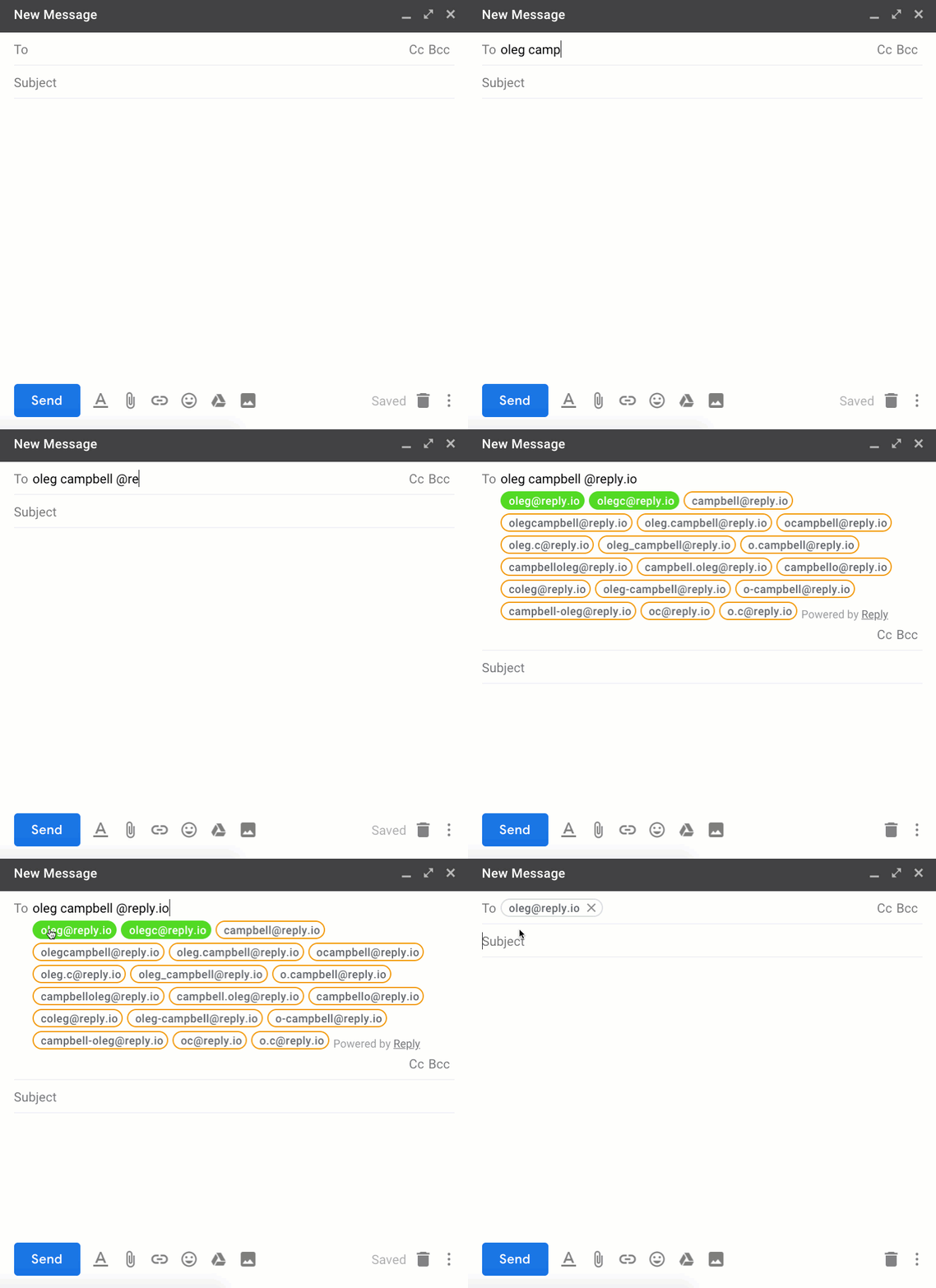
  2. Go to your Gmail account in a new tab and click “Compose” to open the New Message window. In the Recipients field, enter the person’s name and surname. Add the  @ symbol and the prospect’s company domain address. Your resulting input should look like this: FirstName Last Name @ Website.com
  3. Once you’re done, the extension will automatically start generating the possible email address options based on the common email patterns and then verify on the go. The valid ones will be highlighted in green. Here’s how it works:

If at this stage you see at least one option highlighted in green (which happens in most cases), congrats! Your research is finished and you don’t need to read this guide further :)

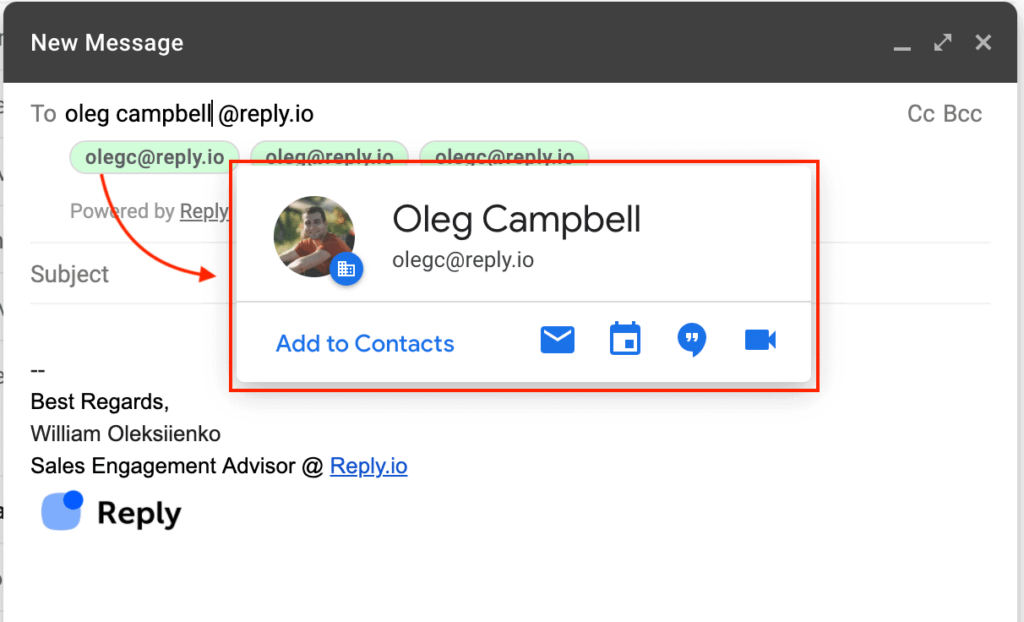
In case you didn’t get any valid email options at this stage, try hovering over the generated emails one by one. If the address is linked to an active Google account, you’ll see your target’s profile:

best free email lookup

But don’t get discouraged if you can’t find your prospect’s email using Name2Email. There are plenty of other best free email lookup hacks. Let’s move on to the hack #2.

Use Findy for Effortless Email Discovery on LinkedIn & Outreach

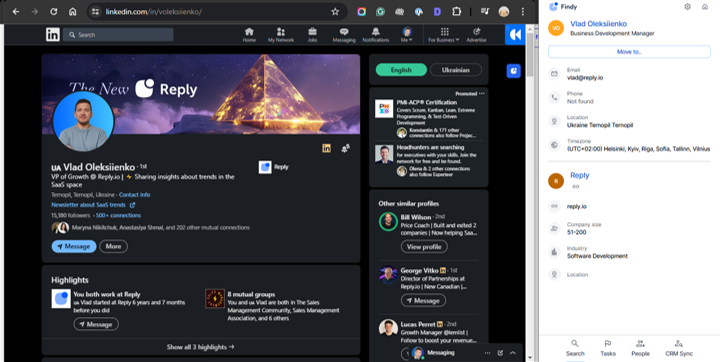
Now, let’s move on to another super easy way to find emails and streamline your outreach: Findy. It’s a Chrome extension that lets you discover verified prospect emails directly on LinkedIn. It also syncs this data with Reply, allowing you to automate your sales outreach seamlessly.

Imagine you’re browsing your favorite professional social media site (it’s LinkedIn, no doubts), checking out potential leads.

You find a few promising profiles and open the Findy extension. As you explore these profiles, Findy automatically searches for their email addresses. Signing up is a breeze with your Google account, just a couple of clicks, and you’re in.

All the contacts Findy discovers are added to your Reply trial account. You can then choose to save these contacts to a list in Reply or directly push them to an outreach sequence.

Plus, when you’re using Gmail, Salesforce, or HubSpot, opening the Findy extension on any contact profile or a page with multiple contacts syncs the data effortlessly with your Reply account.

If Findy doesn’t find the emails you need (almost impossible), no worries! We’ll cover a few more effective ways to find emails next, just in case.

Double-check the variants with Clearbit Connect

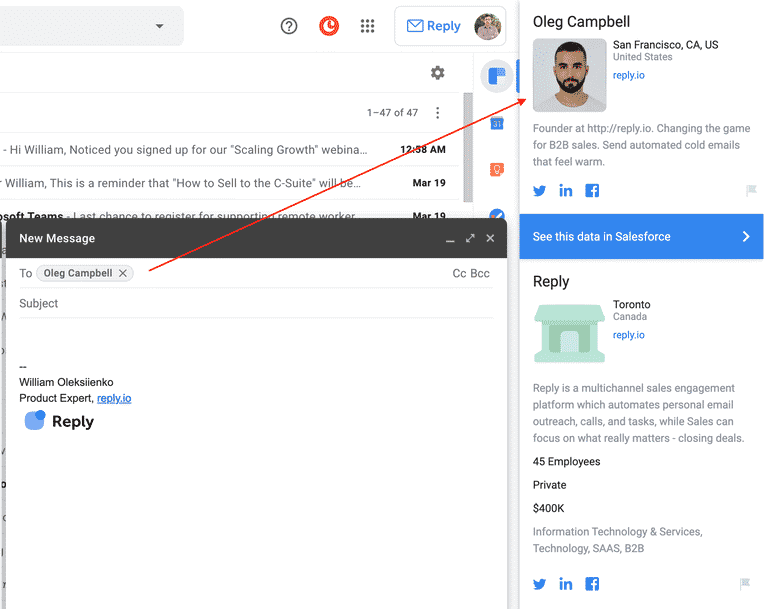
Clearbit Connect is another handy extension (aka Gmail finder) that works right in your Gmail and is free to use (though with certain limits). It  is also a handy addition to the Name2Email tactic to find email leads described above.

  1. Install the Clearbit Connect extension using direct link or look it up on the Chrome Webstore manually.
  2. Once you’re ready, check the email address variants you’ve generated using Name2Email one by one using the Clearbit Connect Sidebar. If a corporate email is valid, Clearbit will show all the information about that contact.

Pro tip: Clearbit Connect only offers 100 searches per month for free, so use it wisely. You can earn an additional 10 credits/month for each of your contacts who installs the extension.

Just Google it!

Googling an email might seem like a crazy and time-consuming idea, but believe me it works just fine (as long as you need to find just one high-priority contact, not thousands of them). 

Here are the common tactics you can use:

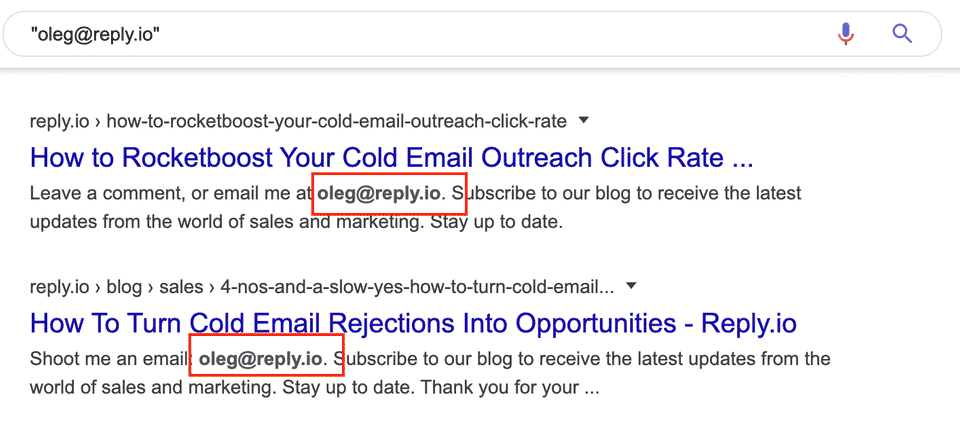
1. Use the query format “{FirstName} {LastName} @{Website}” – for example, “William Oleksiienko @reply.io”

2. If that doesn’t work, try a simpler option: {FirstName} @{Website} – e.g., “William @reply.io”

3. If you know the company’s email pattern (and it’s different from the common patterns), try searching other variants of that query as well:

free email search by name

4. Other helpful search queries that you can use are ““{FirstName} {LastName}” +email or “{FirstName} {LastName}” +contact.

Pro tips:

  • Use quotation marks to search for an exact phrase.
  • Search the website for specific keywords using the “site:” query, e.g., site:reply.io William.
  • To get only the results that feature a given word (email or contact), use +, e.g., William Oleksiienko +email.
  • Another handy search hack is to use * symbol which will return all pages containing variations of the searched word.

Your emails deserve the inbox

Stop letting your cold emails disappear into spam folders.

Discover the exact strategies we used to hit 50%+ open rates = backed by data from 50M+ real emails.

Learn how to win, every time.

Get creative with the prospect’s name

Having found tens of thousands of emails manually, I’ve noticed that some people use different forms of their first name for their corporate email address.

For example: Thomas → Tom, Matthew → Matt, Alexandr → Alex, Nicholas → Nick, Jonathan → Jo, Elizabeth → Liz.

So, when you search for a first name that can have a few variants, try searching for all of them using the previous scenarios, including Name2Email and Google search.

Pro tips:

  • This approach works both ways: Will → William, William → Will
  • Search Google for all possible name variants first because there are some names that may have 2+ alternate forms.

Try the “double name trick”

Sometimes people also have 2 given names, for example, William John Oleksiienko. In this case, use the following tactics:

  1. Try searching for the person’s email address with Name2Email using only the first name, e.g., William Oleksiienko @reply.io
  2. Try searching for the person’s email address with Name2Email using only the middle name, e.g., John Oleksiienko @reply.io

Pro tip: Some people might also have prepositions between their first name and  last name, e.g., van, van der, etc. Usually, they don’t use these prepositions in their email addresses, but you can try searching for both options.

Play around with the company’s website address

If you still can’t find the required email address, doublecheck the company’s website and make sure there aren’t any alternatives or website redirects. 

For example, reply.io has previously been replyapp.io, so some of our contacts might be still using the old domain for their email boxes. Some companies would also use secondary domains to create practically unlimited email accounts for outreach purposes.

Take hktteleservices.com for example. When you check their contact us page, you notice that they still use the old domain for email addresses: [email protected].

Another example here is ibexglobal.com (redirects to ibex.co).

Pro tip: The easiest way to check if they have alternative domains is to look up their corporate-wide inboxes like, hello@, support@, team@, help@, info@, etc.

Search on Twitter

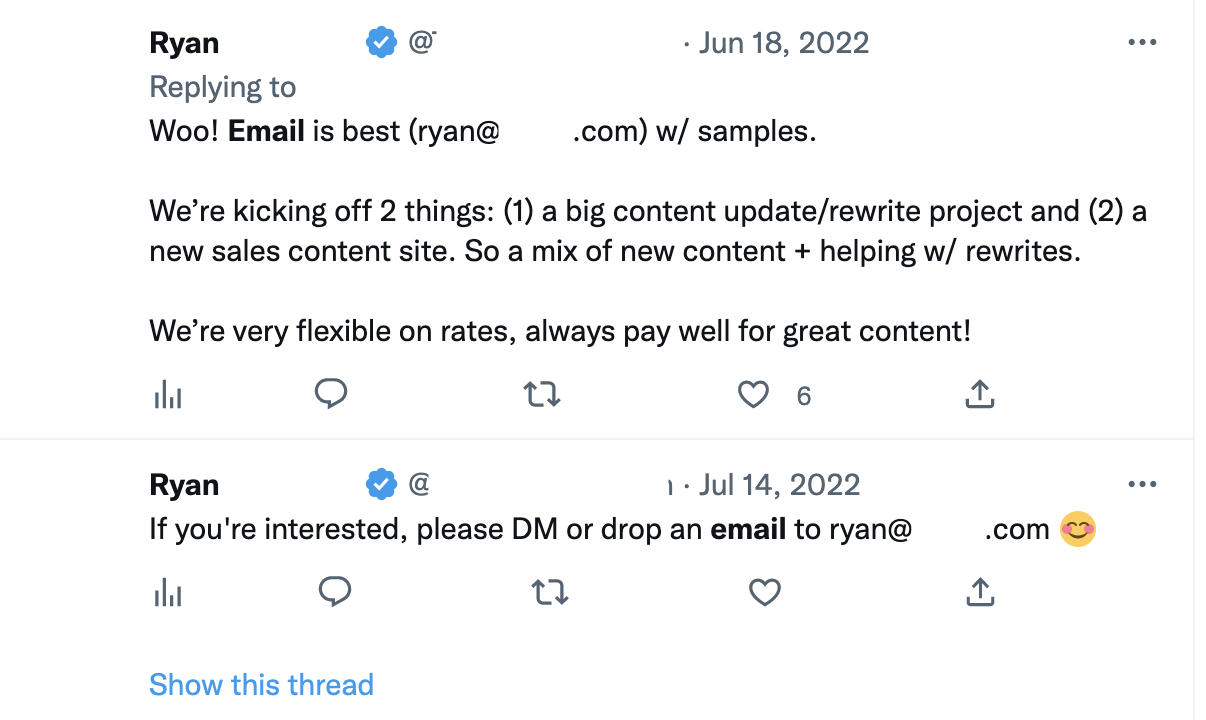
If the person you’re targeting is active on Twitter, there might be a chance that they have already shared their contact data with someone. You can check this using the Advanced Search feature. With a couple dozen filters, you can fine-tune your query to get exactly what is needed for free.

I recommend targeting the prospect’s profile (“From these accounts” filter) and use @domain.com, email, contact as the query under “Any of these words.”

With this simple hack – and some luck – you will be able to find someone by email for free.

Export data from LinkedIn

Did you know that all the data from your LinkedIn profile belongs to you? That includes all the contacts in your network! And the best part is that you can download an archive with all your contacts’ info, including the associated email addresses.

Note: This only works if the target prospect is already in your contacts list on LinkedIn and you want to reach them via email. So you will need to connect with the person first.

Here’s a simple workflow to get prospect email from LinkedIn:

  1. Find the target prospect on LinkedIn and send a connect.
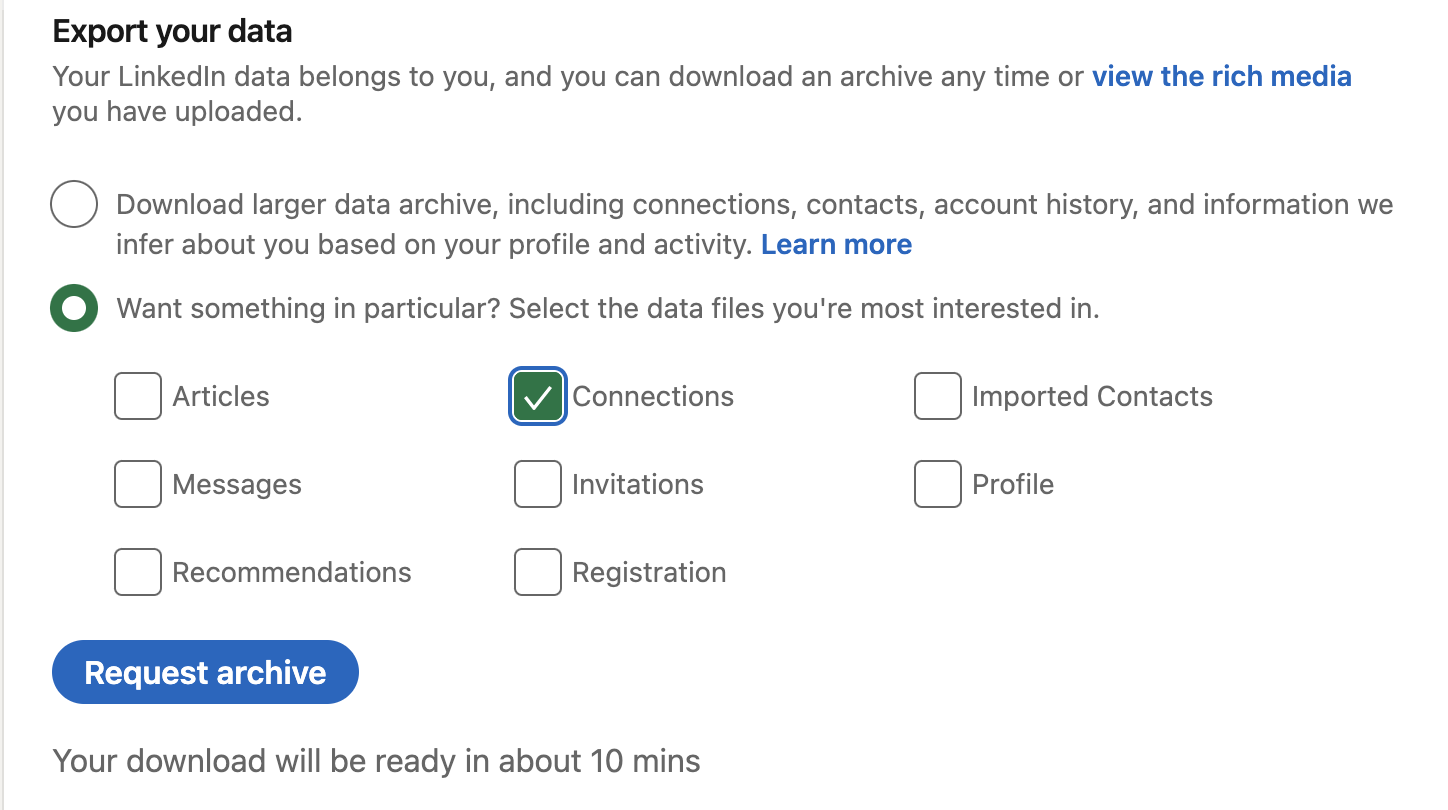
  2. Go to your LinkedIn Settings -> Data Privacy or follow this link.
  3. Choose the kind of info you want to export (in this case, the Connections).

The archive with the requested data will be sent to your email (which might take a few minutes).

Turn to Google Spreadsheets

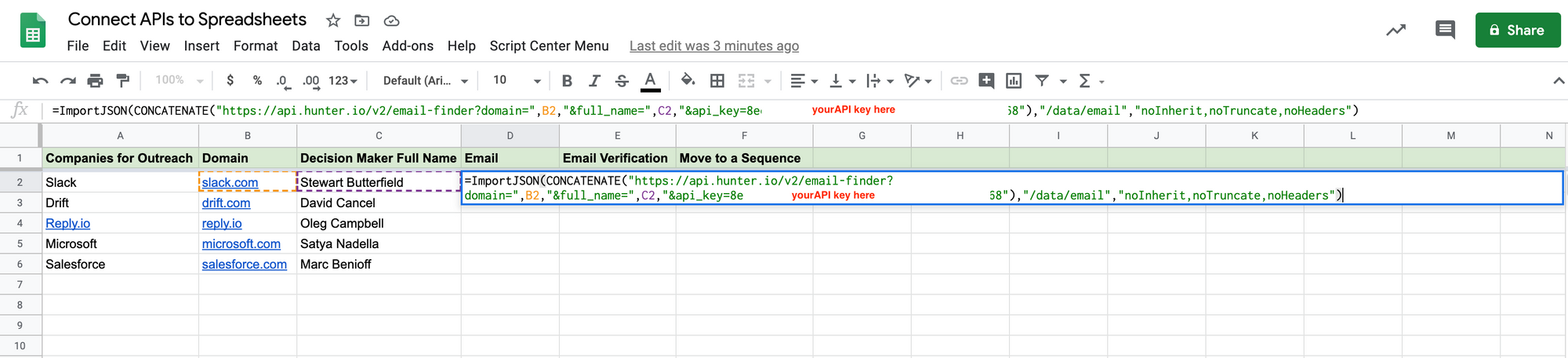
Google Spreadsheets can offer loads of features to the pro users who are ready to get their hands dirty with some basic coding. I’ve explained how to automate email lookup in Google Spreadsheets in a previous blog post. All you need is an email finder tool that offers a comprehensive and easy to use API.

If finding someone’s email address seems too complex, you can still use Google Sheets to optimize the list management process. Here’s just a couple of tips that might be helpful in this regard:

  • Use Google Spreadsheet as a faster way to manage a bigger list of prospects. If you need to find just 5-10 contacts, you can just use your Gmail Account
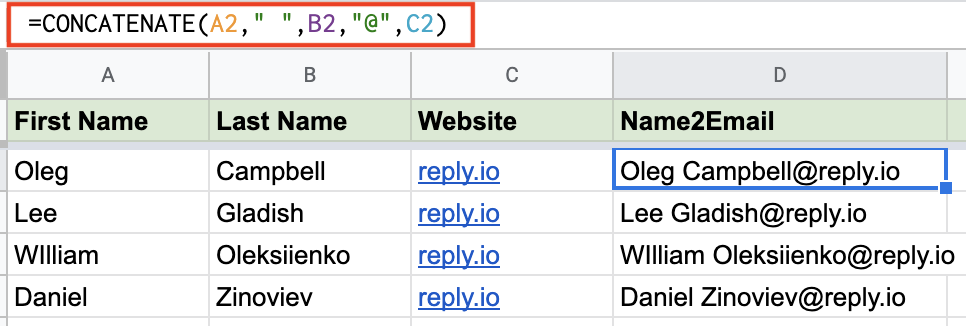
  • Use =CONCATENATE Function to speed up the process of generating the Input format: e.g., FirstName LastName @company.com

Ask for referral

If you’ve tried all the available options but still couldn’t find the right person’s email address, there’s one last hack you should try. While conducting your research, you might have come across a few other contacts from the target company – even if it’s a general address like sales@ or support@. So why not ask to be pointed in the right direction?

If you make sure to properly communicate your request and the person on the other end of the line’s kind enough, you will not just get the desired email address, but also will be able to use the person as a reference, increasing your chances of success with the outreach. 

This tactic works especially well when you contact a person in a lower level role as you’re trying to reach the senior manager.

Pro tip: Aside from asking for the right contact via email, you can also try to reach the target account via social media. An SMM person might not give you the top manager’s email address right away, but with the right approach you can expect to smooth your way up to the decision-makers.

How to scale your email lookup for free

Of course, manual research might seem like a time-consuming and wasteful process. Especially taking into account that there are tools that help you generate email lists in just a few clicks. Those are B2B databases containing millions of verified records to match any ICP.

Yet they all have one common problem: On average, only 60-80% of the emails you get there will be valid. If you think about it, it’s no surprise. Maintaining such huge databases is a real challenge. As a result, those few providers with top-quality, up-to-date lists will cost a pretty penny ($5k+).

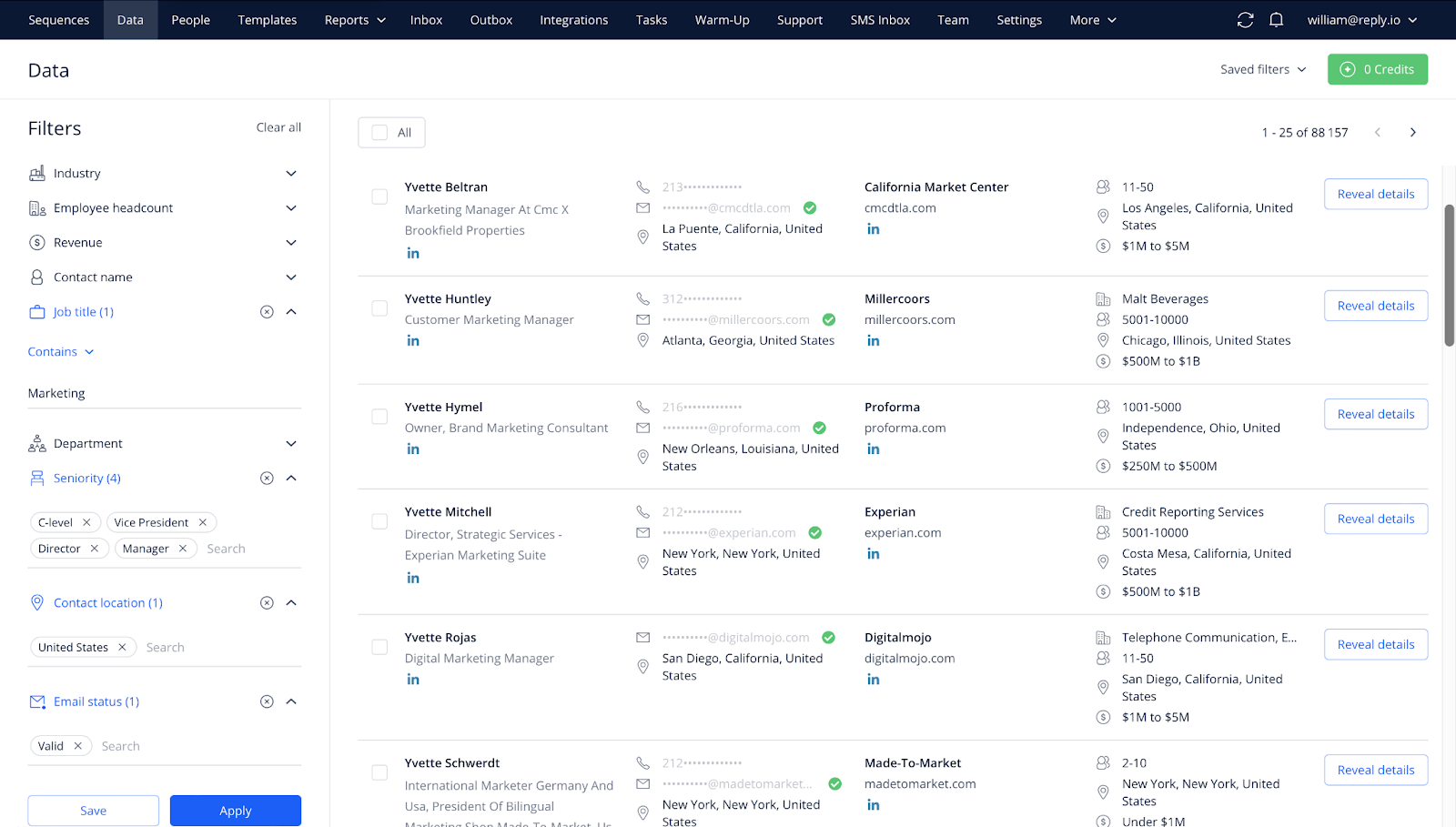
Luckily, I have a solution for that. We’ve built Reply Data to offer a contact database that helps you build larger prospect lists while keeping them laser-focused and maintaining high data quality.

Here’s how Reply Data works:

  1. Pick the right audience. Browse through the database of 140 million contacts using 10+ filters, such as Company Size, Location, Industry, Job Title, etc.
  2. Build your list. Export the selected data as a CSV file, add to your Reply account, sync to your CRM or any other tool you need using no-code tools like Zapier.
  3. Connect with your audience. Push the selected contacts to the right outreach sequence in Reply and engage your prospects at scale.

find someone by email for free

And the best part about it is that Reply Data is free to use! You can get 200 credits for free email search by name per month with our trial or Free plan, 1,000 credits are included in paid engagement plans, and you can ramp up your prospecting with up to 100,000 extra search credits via paid add-ons.

Alternative contact methods when an email can’t be found

So, you’ve tried all the tricks. You’ve searched, guessed, checked patterns with Outlook or Gmail email finder by name, even hunted through social profiles—and still no email. Don’t worry. It happens.

But here’s the good news: email isn’t your only option.

There are other smart, professional ways to get in touch. You just need to be a little creative and persistent.

Here’s what to try when email hits a dead end:

1. Reach out on LinkedIn

LinkedIn is a goldmine for professional connections.

Send a friendly, personalized message. Let them know why you’re reaching out. Keep it short and respectful—no one likes spammy pitches.

2. Use Twitter or Instagram DMs

People—especially creatives, entrepreneurs, and founders—often check their DMs.If they’re active on social, shoot them a casual but polite message. Mention something relevant (a recent post, their work, a shared interest).

Make it human.

3. Check their website

Sometimes people skip listing an email but include a contact form, phone number, or even a calendar link to book time with them. Poke around the site—footer, about page, blog author bios. Don’t just glance and bounce.

4. Try company contact channels

If you’re trying to reach someone at a company, and personal contact isn’t working, go through the company.

Use their general contact form or social media. Just be specific—explain who you’re trying to reach and why. It ups your chances of being forwarded to the right person.

5. Look for community spaces

Are they part of an online community? A Slack group, Discord server, or even a subreddit?

If you know where they hang out, you can often engage with them more casually, and then follow up privately.

6. Leave a thoughtful comment

Comment on their blog, LinkedIn post, or YouTube video—something meaningful, not just “great post!” This can catch their attention and open the door for further conversation.

Bottom line: if email doesn’t work out, don’t give up. There are plenty of respectful, creative ways to reach out using email search-free strategies.

Just keep it professional, kind, and genuine. You’re not being annoying—you’re just being resourceful. And that’s a good look.

Common email patterns and how to guess emails correctly?

Most business emails follow a handful of predictable patterns. Once you crack the pattern for a company, you’re already most of the way to the right address.

The usual formats look like this:

To figure out which one they actually use, start with what’s public. Look for any visible company emails on the website, blog, press releases, or support pages. One or two examples are usually enough to reverse-engineer the pattern for other company employees.

Using a reputable lead database like Reply Data will make this extremely easy, as it contains over 1 billion live contacts, so chances are the companies you’re after are there. Once you’ve found one or two emails within that company, at that point, any half-decent email finder will feel more like a confirmation tool than a guessing one.

As a simple flow:

  1. Identify the domain and grab 1–2 sample addresses.
  2. Match the pattern.
  3. Generate a few likely variants for your target.
  4. Verify them inside Reply or another validator, and only keep the green lights.

Done right, this gives you fast, low-cost accuracy at scale.

If you don’t want to build permutations manually, tools like Email Permutator+ can generate all the likely versions from a name and domain. Then you run those through a verifier before sending. It’s a simple way to answer the classic “how to find someone email address for free” without burning your domain in the process.

How to verify and check email accuracy before outreach?

Verifying emails isn’t the most exciting part of finding new clients, but it’s the part that keeps everything else working. Every send to a bad inbox chips away at your sender reputation, bumps up bounce rates, and quietly pushes your campaigns toward spam. A quick verification step upfront saves you from that mess later.

You don’t need a big budget or a lot of time to do it either. Plenty of tools offer free or freemium checks you can plug into your existing email lookup workflow:

  • NeverBounce → a small batch of free checks every month
  • Hunter.io Email Verifier → simple single-email lookups on a free tier
  • ZeroBounce → free credits you can use to validate new lists
  • Email Hippo → good for spot-checking a few addresses

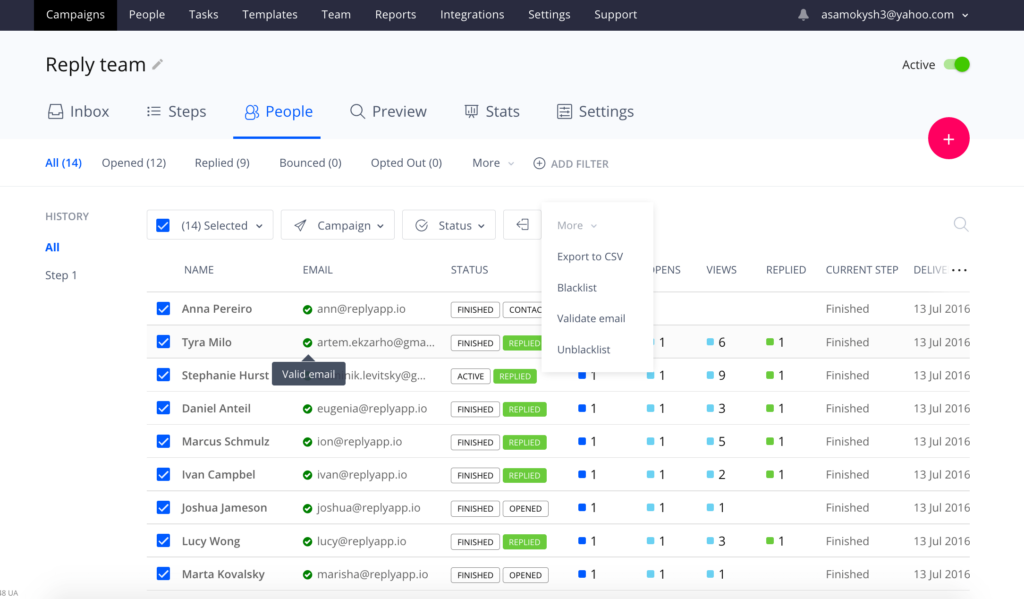
With an all-in-one sales platform like Reply.io, you already have email validation built in. Just run your contact list through its email and phone verification, tag anything marked invalid, and keep those out of your sequences entirely. Risky contacts can go into a separate bucket for a soft test send (with a separate, disposable email domain) instead of being blasted with your main campaign.

Think of this as ongoing hygiene, not a one-off clean-up. Re-verify older lists from time to time, remove hard bounces, and keep an eye on bounce rates inside Reply or your ESP. If they creep above a safe threshold, pause and clean.

Treated right, Reply basically acts as your personal email finder, plus a safety net for every free email search you run elsewhere. Oh, and it will also enrich your prospect profiles with additional data from LinkedIn and other sources while it’s at it! 

On top of that, Reply’s deliverability toolkit (Gmail API integration, spam complaint tracking, warm-ups via MailToaster.ai, etc.) helps your verified emails actually land where they should. 

What are the best practices to increase email outreach success?

Finding the right email address is step one. Turning that into a reply is a whole different game. 

Whether you used a quick Gmail lookup trick, a Chrome extension, or any of the other strategies we’ve discussed, the rules for good outreach stay the same.

  • Add meaningful personalization → use the correct first name instead of a general greeting (obviously), but also pull in something that proves you did your homework — role, company context, recent news, or a trigger event. Even one or two tailored lines at the top separate you from the generic blasts they’re ignoring all day.  
  • Only reach out to verified emails → if you’ve already cleaned your list with Reply or another verifier, don’t sabotage that work by pushing unverified addresses into the same sequence. One-off “spray and pray” sends are rarely worth the hit to your domain. 
  • Sequence your outreach → set up multichannel flows in Reply that combine email with LinkedIn, calls, SMS, or WhatsApp where it makes sense. Some people will never reply to an email but will answer a LinkedIn nudge instantly — you get the idea. 
  • From there, keep an eye on numbers: opens, replies, click-throughs, and bounce rates. Reply’s analytics and team reporting make it easy to spot underperforming steps and tighten your copy, timing, or targeting.

As you can see, the great thing about a sales suite like Reply.io is that it can do it all: help you find targeted prospects along with their email addresses, verify them, add them to multichannel outreach sequences, and Reply’s AI engine will research each individual prospect to ensure every email, follow-up, and LinkedIn message is personalized with relevant information. 

If you simply try to find someone by email for free as just the starting point — not the whole play — you’ll see a lot more of those hard-earned addresses turn into actual conversations.

Bottom line

For the last several years, I’ve tried almost every SaaS lead generation, email finding, email verification tool on the market (some of my favorites were included in the biggest catalog of sales tools). 

This helped me come up with my own tactics for email lookup and, as a result, build highly-targeted contact lists with a bounce rate of 5% or lower.

So, if you prioritize quality over quantity, the hacks and tips listed in this article will come in handy, whether you are looking to connect with the prospective customers, partners, investors, etc.

FAQs

What is email lookup and why is it useful?

Email lookup means finding a person’s email using information like their name or company. It helps you reach the right person directly and save time. This skill is valuable for job hunting, sales, or networking without guessing or sending emails blindly.

How can I find someone by email for free using simple tools?

You can guess common email patterns like [email protected]. Using free Chrome extensions helps check if the email exists. Combining guessing with tools like Gmail lookup improves your chances without paying for software.

How do Gmail lookup tools help in finding emails?

Gmail lookup tools work inside your Gmail to test email addresses or show contact info. These tools help verify if an email is real before sending messages, reducing bounce rates and wasted effort in your outreach.

What are easy ways to find someone’s email address for free?
Start with guessing their email based on name and company domain. Use Google with exact name and company queries. Look up LinkedIn or Twitter profiles that may show emails or hints. These methods often uncover emails at no cost.

How can extensions like Name2Email improve email lookup accuracy?

Name2Email shows likely email addresses by matching usual company patterns and verifies them in real time. It saves you time and gives confidence that the email you found is active, making your search simple and effective right inside Gmail.

Why should I cross-check email guesses with tools like Clearbit Connect?

Clearbit Connect searches multiple databases to confirm if an email is valid and provides details about the person. Checking guesses with such tools reduces errors and increases your success in email lookup while keeping outreach professional.

Can Google search techniques aid when standard email lookup fails?

Yes, searching phrases like “First Last @company.com” in quotes helps find emails shared online. Using keywords like “email” or “contact” with + signs narrows results. Google search acts as a powerful backup in your free email-finding toolkit.

How can Google Spreadsheets make finding emails and managing lists easier?

You can automate email combinations using formulas and even link APIs to verify emails. This speeds up your email lookup when handling many contacts and keeps your data organized for easier outreach efforts without extra cost.

What are alternative ways to contact someone if email lookup doesn’t work?

Try LinkedIn messages, Twitter or Instagram DMs, or use contact forms and phone numbers on websites. Reaching out through social media or company channels can help you connect when you can’t find an email address directly.

How can you scale email lookup without paying for big databases?

Use free trials and limited credits from services offering real-time data search. Combine manual methods with tools to get good quality emails. Scaling requires smart mix of guessing, tools like Gmail lookup, and organized list management for best results.

Subscribe to our blog to receive the latest updates from the world of sales and marketing.
Stay up to date.

Related Articles

How to Find Someone’s Phone Number (+ Google Phone Number Lookup)

How to Find Someone’s Phone Number (+ Google Phone Number Lookup)

How to Find Someone’s Phone Number (+ Google Phone Number Lookup)
Top 30 Less Annoying Alternatives to “Please Find the Attached File” in Cold Emails

Top 30 Less Annoying Alternatives to “Please Find the Attached File” in Cold Emails

Top 30 Less Annoying Alternatives to “Please Find the Attached File” in Cold Emails
9 Best Intent Data Platforms for Sales Teams in 2026

9 Best Intent Data Platforms for Sales Teams in 2026

9 Best Intent Data Platforms for Sales Teams in 2026