How to Use Instant Data Scraper for Cold Outreach Lists

How to Use Instant Data Scraper for Cold Outreach Lists

When you’re doing cold outreach, the quality of your contact list makes or breaks your results. Manually building lists takes hours and often misses good leads. 

That’s where Instant Data Scraper comes in. It’s a free Chrome extension that lets you quickly pull data from almost any website into a clean, ready-to-use spreadsheet.

In this article, you’ll learn exactly how to use it to build outreach lists without wasting time. 

We’ll cover:

  • How to install and set up Instant Data Scraper
  • Where and how to use it for building cold outreach lists
  • Tips to clean and manage your scraped data

You’ll understand how to quickly create targeted lists without relying on expensive tools or outsourcing. This means more time to focus on writing better outreach messages and booking more calls.

Ready to learn? Then let’s begin by looking at why data collection is so important.

Why data scraping matters in outreach

Every successful cold outreach campaign starts with the right list. You can have the best message and perfect timing, but if you’re reaching the wrong people, it won’t matter. 

That’s why list-building is the foundation of outreach and it’s where most people lose time.

Manually copying and pasting data from websites is old news. It’s slow, boring, and impossible to scale. Tools like Instant Data Scraper make the process fast and effortless. 

With just a few clicks, you can pull names, emails, job titles, or LinkedIn profiles directly from a page and turn them into a clean spreadsheet. What used to take hours now takes minutes.

Once your list is ready, you can make it even more powerful with Reply.io. It helps you:

  • Enrich your data → fill in missing details automatically.
  • Use Jason AI SDR → turn that list into ready-to-run outreach sequences that send personalized messages for you.

Data scraping gives you a faster, smarter way to build and use outreach lists. Combine it with automation, and you’ll go from raw data to live conversations in no time.

Now let’s take a closer look at the tool that can make your workflow a whole lot easier.

What is Instant Data Scraper?

Instant Data Scraper is a free Chrome extension that lets you extract structured data from almost any web page in seconds.

It automatically detects patterns and tables, pulling details like names, job titles, emails, company names, and links, all neatly organized into a downloadable spreadsheet.

It’s incredibly useful when you’re doing lead research for outreach. You can use it to pull data from places like:

  • Conference or event pages → collect attendee or speaker lists instantly.
  • Business directories or listings → extract company details, websites, and contact info.

Once you’ve pulled the data, you’ll have a solid list, but it’s often “raw.” That means it might miss important details like verified emails, company size, or funding info. 

This is where Reply.io’s enrichment feature steps in. It automatically fills in the gaps, adding verified and up-to-date information to make your list ready for action.

And it doesn’t stop there. With Jason AI SDR inside Reply.io, you can take that enriched list and instantly turn it into a ready-to-run outreach sequence. 

Jason personalizes messages, follows up automatically, and helps you start real conversations with your new leads.

Instant Data Scraper helps you collect the data fast, and Reply.io makes it usable. Together, they turn raw lists into real opportunities, saving you hours and boosting your outreach efficiency.

So, which data should you really focus on? Let’s find out.

What kind of data should we scrape?

When you’re building a cold outreach list, it’s tempting to scrape everything you can find. But more isn’t always better. The key is to collect useful, business-relevant data that helps you understand your prospects and personalize your outreach. Many teams also explore affordable data integration solutions to better organize and unify this data for more effective targeting.

Start with the fields that give your outreach context and personalization power:

  • Name → you’ll need it for a personal touch in your messages.
  • Role or Title → helps you spot decision-makers or influencers.
  • Company → so you know where they work and what their business does.
  • LinkedIn URL → handy for verifying info and sending connection requests.
  • Location → useful for time zones or regional targeting.
  • Industry → great for tailoring your messaging to specific verticals.

These fields alone are enough to get started. They’re public, relevant, and safe to collect.

Always avoid scraping personal or sensitive data like private emails, phone numbers, or social media handles. Stick to business information that is available publicly, which keeps your process compliant and professional.

If you find gaps in your scraped data (and you will), don’t worry. 

Reply’s contact enrichment automatically fills in the blanks, like verified work emails, phone numbers, and even company tech stack details, so your list stays complete and ready to go.

And to make things even smoother, Jason AI SDR can automatically filter your scraped contacts by ICP fit. That means you’ll spend time only on the leads that truly match your target audience.

Scrape smart, enrich efficiently, and let automation handle the rest. You’ll save time, stay compliant, and build outreach lists that actually convert.

But, how do you begin? What’s the data collection workflow? Let’s walk through it step by step.

How do we scrape lists step by step?

Collecting data with Instant Data Scraper is quick, easy, and perfect for beginners. You don’t need coding or fancy tools. Just your browser and a few clicks.

Here’s exactly how to do it.

Step 1: Install Instant Data Scraper

First, add the Instant Data Scraper extension to your Chrome browser. 

Step 1 Install Instant Data Scraper

You can find it in the Chrome Web Store by searching for “Instant Data Scraper.” Click Add to Chrome, then Add Extension. That’s it, you’re ready to scrape.

Step 2: Open a directory page

Head to the data source you want to scrape. 

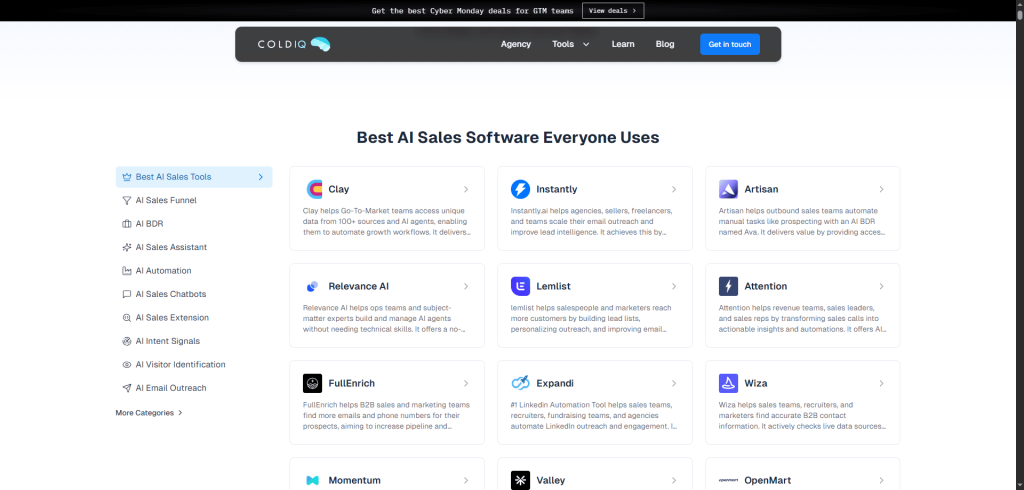
Step 2 Open a directory page

You can public directories, listings, or event attendee pages. The scraper works best when the data is structured in a table or list.

Step 3: Run the extension

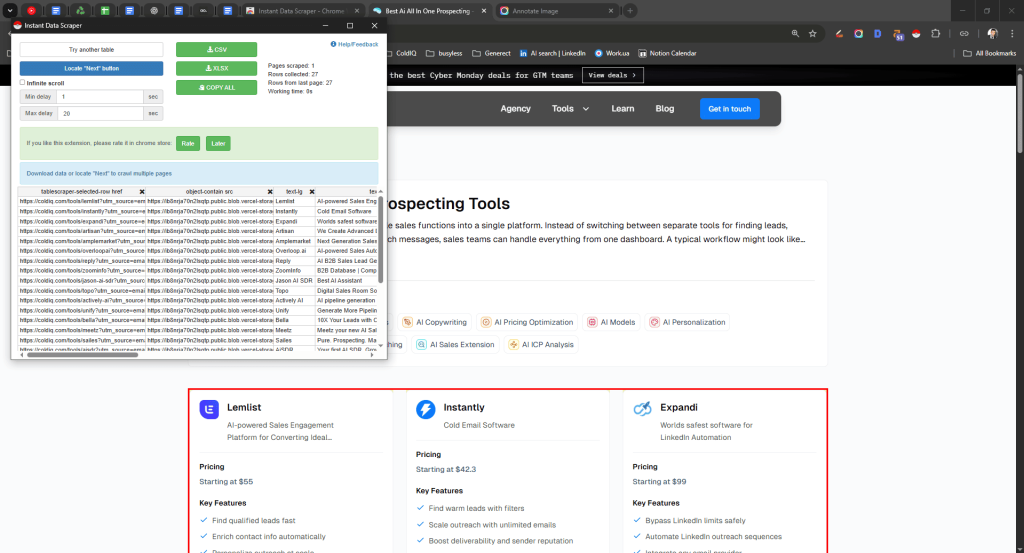
Once your page is loaded, click the Instant Data Scraper icon in your browser toolbar.

Step 3 Run the extension

The tool will automatically detect patterns on the page and start pulling data. 

You’ll see a preview window with rows and columns showing what it found.

Take a second to review the preview. If something looks off, like missing names or extra columns, you can adjust what’s captured. 

Use the “Next” and “Previous” buttons to switch between patterns until the data looks right.

Step 4: Adjust columns

You don’t need every column the scraper finds. Focus on the ones that matter for outreach: name, role, company, LinkedIn URL, location, and industry. 

You can deselect anything you don’t need. Keeping your export clean saves time later and makes enrichment faster.

Step 5: Export the data

When you’re happy with the preview, hit Export to CSV. The file will download to your computer. Open it in Excel or Google Sheets to double-check your data. 

Make sure names and roles are in the correct columns, since small fixes now can save you headaches later.

To make sure you don’t miss anything, use this quick guide. It shows the types of pages that work best and the exact settings for getting clean data.

Page type Prep before scraping (1–2 mins) IDS pattern tip Must-have columns to select Common pitfalls to avoid
Event speaker list Expand bios; load all speakers. Choose pattern that captures Name + Company in separate cols. Name, Title, Company, Talk URL If bios are merged into one cell, change the pattern
Business directory listing Filter by category/region. Set sort = “most reviewed”. Use pattern showing Company and Website in separate cols. Company, Website, Category, Location “Ad” placements, mark the source column so you can filter them later
Community/member page Show “all members”. Sort alphabetically. Pick pattern with distinct Name/Role columns. Name, Role, LinkedIn URL If there are duplicate members across chapters, remove duplicates later
Job board (for hiring trigger) Filter by role seniority. Pattern with Job Title + Company cleanly split. Company, Job Title, Location, Posting URL If company names appear inside brackets, clean them up later

Now, your CSV file holds valuable data, but it’s still “raw.” So, after exporting your list, upload it into Reply.io’s platform. 

Reply.io automatically validates and enriches your contacts, meaning it checks if emails are valid, adds missing details like company info or domains, and helps you keep your campaigns clean.

In just 5 quick steps, you will turn a directory data into a verified, ready-to-send list of prospects, with no manual copy-pasting, no coding, and no messy spreadsheets. Once you’ve done it once, you’ll see how easy it is to repeat the process for different industries or job titles.

Next, let’s see how to clean up your list and remove any outdated information.

How do we clean and verify scraped lists?

After scraping your data, the next step is to clean it up. Even if your list looks solid at first glance, it probably has duplicates, irrelevant contacts, or invalid emails hiding inside. 

Sending to a messy list can kill your deliverability and waste your effort, so let’s fix that before you hit send.

Start with a quick cleanup. You can do it in a spreadsheet or directly inside your outreach platform.

Here’s what to focus on:

  • Deduplicate contacts → remove any repeats. No one likes receiving the same email twice, as it looks unprofessional and hurts your credibility.
  • Remove irrelevant titles → stick to roles that fit your ICP. If you’re reaching out to founders or CMOs, skip interns or unrelated positions.
  • Validate emails → invalid or fake addresses bounce, and too many bounces will damage your sender reputation fast.

Manual checking works for small lists, but it’s slow, boring, and easy to mess up. That’s why it’s smarter to automate this step.

Reply.io makes it effortless. The platform includes built-in email verification and list health checks, so you’ll instantly see which contacts are valid, risky, or unreachable. 

This automation keeps your lists clean and ensures your messages actually reach real people.

Let’s fix the common messes fast. Here’s a tiny toolbox you can run in Sheets/Excel or skip by using Reply’s built-ins.

Problem Quick fix (Sheets/Excel) Reply.io equivalent Keep/Remove rule
Duplicates =UNIQUE(A:Z) on a temp tab, then VLOOKUP back Built-in dedupe on import Remove exact dupes; keep newest record
Mixed full names =SPLIT(full_name,” “) → first/last Auto-parse on import Keep if both parts exist; else flag
Off-ICP titles `=IF(REGEXMATCH(LOWER(title), “intern student assistant”),”Exclude”,”Keep”)`
Missing domains =IFERROR(REGEXEXTRACT(website,”[A-Za-z0-9.-]+\\.[A-Za-z]{2,}”),””) Enrichment → add company domain Keep if domain found; else review
Personal emails `=IF(REGEXMATCH(email,”@gmail @yahoo @outlook”),”Personal”,”Work”)`
Country chaos Map with a 2-col reference table + VLOOKUP Standardize location Keep ISO names; merge variants
Bad/invalid emails Spot-check with LEN(email)>5 then validator Email verification Remove “invalid” and “unknown” buckets for first send
No LinkedIn URL Leave blank, but keep role/company N/A Keep if role/company strong; enrich later

But cleaning is only half the job. Protecting your sender reputation is just as important. 

Reply’s Deliverability Suite, a collection of 30+ tools, helps you stay out of spam folders. It warms up inboxes, monitors deliverability, tracks domain health, and alerts you before issues snowball.

Clean your lists, verify your contacts, and let Reply handle the heavy lifting. You’ll reach real people, stay out of spam folders, and build stronger outreach results every time.

Now you’ve got a ready-to-use list. So, what’s next? Let’s take a look.

What should we do after we scrape?

So you’ve scraped your data, that’s a great start! But don’t start sending emails just yet. Raw scraped data isn’t ready for outreach. It’s often incomplete, inconsistent, and full of hidden risks. 

To make your list truly outreach-ready, follow a simple three-step process: enrich → segment → personalize.

Enrich your data

Scraped data usually gives you the basics: names, roles, and companies. But it’s not enough to run effective campaigns. You’ll need verified work emails, phone numbers, and company details to make your outreach accurate and professional.

Instead of doing this manually, let automation do the heavy lifting.

If you’re using Reply.io, enrichment happens automatically. 

The platform adds verified work emails, phone numbers, company details, and even tech stack information, so you know exactly who you’re contacting and what they use. This not only makes your list more accurate but also reduces bounce rates and boosts deliverability.

Once your data’s enriched, you’ll have complete, verified contact profiles that are safe to email.

Segment and personalize

Even with great data, blasting the same message to everyone doesn’t work. That’s why segmentation matters. Divide your list into smaller, meaningful groups so your outreach feels personal and relevant.

You can segment by industry, job title, or company size, as well as by region, language, or tech stack. Smaller, focused lists help you tailor your tone and offer to each audience type.

And here’s where Jason AI SDR makes it even easier. Inside Reply.io, Jason can automatically segment your scraped contacts into ICP tiers, so you instantly know which leads are your best fits. 

Even better, it can draft personalized outreach sequences for each tier, saving you hours of manual sorting and copywriting.

That means you skip hours of manual sorting and writing and go straight to launching smart, targeted campaigns.

Scraped data alone can be risky and unreliable. But once you enrich, segment, and personalize, you transform it into a clean, powerful outreach list. Add a bit of automation, and you’ll have ready-to-send sequences that convert.

Next, let’s see how to properly set up your campaigns so they actually deliver results.

How do we build outreach sequences from scraped data?

Once your scraped list is clean and verified, it’s time to put it to work. This is where your data turns into real outreach. 

You don’t need to overcomplicate things. Start small, stay consistent, and build a simple flow that helps you connect naturally with your prospects.

Begin with a 7–10 day cadence. That’s the sweet spot: long enough to get noticed, short enough to stay relevant. 

Keep it multichannel by mixing email, LinkedIn, and calls so you are not relying on just one platform. Different people respond differently, and you’ll reach more of them if you show up in more than one place.

Here’s a simple structure to follow:

  • Day 1 → send a personalized email introducing yourself or your offer.
  • Day 3 → send a LinkedIn connection request.
  • Day 5 → follow up with a quick email or share something useful (like a short insight or resource).
  • Day 7 → engage on LinkedIn by commenting on a post or sending a friendly message.
  • Day 9 → make a short, polite call or drop a voicemail.

It’s practical, respectful, and doesn’t feel pushy. You’re creating natural touchpoints that build familiarity instead of spam fatigue.

When your sequence is planned, upload your cleaned CSV to Reply.io. Inside Reply, you can easily build and manage sequences across email, LinkedIn, and calls, all in one place. 

The platform tracks opens, clicks, replies, and even outcomes, so you can see what’s working and what needs adjusting.

Want to save even more time? Let Jason AI SDR handle it for you. It can generate complete outreach sequences automatically from your CSV imports, including message timing, tone, and channel order. 

It even handles replies, analyzing the response and suggesting the best next move. That means you spend less time setting things up and more time focusing on conversations that actually matter.

The key is to stay consistent and sound human. Don’t blast identical messages. Keep them short, friendly, and relevant to each contact. 

Combine that personal touch with automation, and you’ll turn scraped data into real, qualified conversations faster than you think.

So, how do you handle a large volume? Let’s take a closer look.

How do we personalize at scale?

Personalization is what makes your cold outreach stand out. It turns a generic email into a real conversation starter. 

But when you’re working with hundreds of scraped contacts, doing it one by one just isn’t practical. That’s why you need a simple approach that balances real human touch with smart automation.

A great rule to follow is the 3×3 personalization rule, which means spending about 3 minutes to find 3 specific details about your prospect. That could be something about their role, company, or recent activity. 

For example, you might mention that you noticed they’re leading marketing at a fast-growing startup, congratulate them on a new product launch, or reference an expansion into a new market. 

Those small, specific touches are what show genuine interest. You don’t need to write a whole paragraph about each prospect. Just make sure your message feels personal and relevant.

Let’s turn the 3×3 rule into something you can use in minutes. Steal this quick map of signals, where to find them fast, and a one-line opener you can personalize at scale.

Signal to find (≤3 min) Where to spot it fast One-line opener template (copy → tweak) AI variable(s) to auto-fill If the signal’s missing, do this
Role & scope LinkedIn headline, About, current role “Saw you lead {{title}} at {{company}}—quick idea to help your team hit {{goal_hint}}.” {{first_name}} {{title}} {{company}} {{goal_hint}} Swap {{goal_hint}} for a safe default like “this quarter’s targets.”
Recent launch/news Company blog, press page, LinkedIn posts “Congrats on {{company}}’s {{recent_event}}—curious if you’re prioritizing {{related_outcome}} next.” {{company}} {{recent_event}} {{related_outcome}} Use an evergreen angle: “Congrats on the momentum—are {{related_outcome}} plans on the roadmap?”
Hiring signal Careers page, LinkedIn Jobs “Noticed you’re hiring for {{hiring_role}}—teams at that stage often need {{pain_point}} solved fast.” {{hiring_role}} {{pain_point}} Generalize: “Growing teams often need {{pain_point}} solved fast.”
Tech stack clue Website footer badges, BuiltWith-style hints, job posts “Since you’re on {{tech_tool}}, there’s a 10-minute win to improve {{metric}} without switching.” {{tech_tool}} {{metric}} Pivot to process: “There’s a 10-minute win to improve {{metric}} without new tools.”
ICP match (industry/size) LinkedIn company page, About section “We help {{industry}} teams at {{company_size}} headcount ramp {{result}} in weeks, not months.” {{industry}} {{company_size}} {{result}} Use only {{industry}} or only {{company_size}}, whichever you have.
Geography/time zone Location chip on profile “Happy to share a quick idea and work around your {{timezone}} mornings.” {{timezone}} Drop time ref entirely: “Happy to share a quick idea—2 mins.”
Content/voice Last 1–2 LinkedIn posts, talks, podcasts “Loved your take on ‘{{post_topic}}’—mind if I share a 2-step playbook we’ve seen work?” {{post_topic}} Swap to category: “Loved your take on {{industry}} trends…”
Triggered intent (events/webinars) Speaker/attendee lists, event pages “Since you’re at {{event_name}}, here’s a way peers there accelerate {{outcome}}.” {{event_name}} {{outcome}} Replace with community: “Since you follow {{community}}…”

Of course, scraped lists rarely give you all the context you need. They’re great for basic fields like name, role, and company, but they often lack deeper insights. 

That’s where Reply.io’s enrichment comes in. It automatically fills in the missing details, adding verified work emails, company size, tech stack, and other helpful info. This turns your raw scraped list into a complete, trustworthy database that is perfect for outreach.

Once your list is enriched, you can use Reply.io’s AI variables to personalize at scale. 

These let you automatically insert dynamic fields like a contact’s role, company name, or even a likely pain point into your emails. Each message feels tailored, but you don’t have to manually edit a thing.

And if you’re using Jason AI SDR, it gets even easier. Jason can generate AI-written intros tailored to each contact and sequence them automatically. 

It understands your data, segments your list, and crafts openings that feel natural, relevant, and human, all without manual typing.

The secret to personalizing at scale is not doing everything manually but combining smart research with automation. 

When you mix the 3×3 rule, data enrichment, and Reply’s AI tools, you’ll create outreach that feels real, connects fast, and actually gets replies.

Let’s also look at how to keep your outreach secure.

How do we keep deliverability safe with scraped lists?

Keeping your deliverability healthy is just as important as building your list. Even the best outreach sequence won’t work if your emails land in spam.

Scraped lists can be risky because they sometimes include invalid or outdated emails and sending to those addresses can hurt your sender reputation fast.

But with a few smart steps (and the right tools), you can stay safe and scale confidently.

Always clean your list before sending. Verify every email to make sure it’s real and active. 

Also, warm up your domain before launching big campaigns. This helps email providers recognize you as a trusted sender. 

And once your sequence is live, prune non-openers regularly. If someone hasn’t opened in a few weeks, remove them, as sending to disengaged contacts can lower your deliverability rate.

To make this process effortless, use Reply.io. It includes an entire anti-spam and deliverability suite designed to protect your campaigns. It automatically handles things like:

  • Free email warm-up → builds a positive sender reputation over time.
  • Gmail API sending → keeps emails compliant and reduces spam triggers.
  • List-unsubscribe headers → gives recipients a clean opt-out option (which Gmail loves).
  • Plain-text fallback → ensures your message is readable even if HTML is blocked.

All of this works quietly behind the scenes to keep your campaigns safe and deliverability high.

This is exactly why scraped lists + Reply.io = safe scaling. You get the speed and efficiency of Instant Data Scraper for list building, and the protection and automation of Reply.io for sending. 

Together, they help you move fast without sacrificing quality, allowing you to grow your outreach the smart way.

Next, let’s see which tools pair best with Instant Data Scraper.

What tools pair best with Instant Data Scraper Chrome extension?

Instant Data Scraper is an incredible starting point for building cold outreach lists. It does one thing extremely well: data extraction. For teams scraping data at scale, reliable proxy infrastructure helps maintain stable sessions, reduce blocks, and improve data collection consistency.

But scraping alone doesn’t build a working outreach machine. Once you’ve got the list, you still need to clean, enrich, and use it effectively.

That’s where the right tool combo comes in.

Let’s break down how these tools fit together in a real workflow.

Reply.io = enrichment, sequencing, and reporting

Once you’ve scraped your data, Reply.io steps in to turn that messy CSV into a polished, ready-to-use outreach list.

It bridges the gap between raw data and real conversations, helping you move from scraping to sending faster than you’d expect.

Reply makes your list usable in a few key ways. It enriches your contacts by filling in missing details, so you’ll instantly know who’s actually worth reaching out to.

Then, it helps you sequence your messages, letting you create multi-step campaigns across email, LinkedIn, and even SMS without switching tools.

It also takes care of the technical stuff that keeps your emails landing safely. Reply automatically warms up your sending domains, manages sending limits, and protects your deliverability so you stay out of spam folders.

On top of that, it gives you detailed reporting on opens, replies, and engagement across all your sequences, so you can track what’s working and double down on it.

In just a few steps, you can go from a simple spreadsheet to a fully functioning sales pipeline.

Here’s the practical workflow:

Scrape your list with Instant Data Scraper → import the CSV into Reply.io → enrich and clean it → build your sequences and start sending.

At this point, you’ve gone from raw data to usable outreach lists. But scaling that process, such as creating tailored sequences, managing replies, and segmenting leads, can still take time. So, enter your next partner.

Jason AI SDR = execution at scale

Jason AI, built into Reply.io, is your virtual SDR. It automates the heavy lifting so you can focus on results.

Jason AI can:

  • Auto-segment your scraped lists based on role, company type, or intent.
  • Build sequences automatically using AI that are personalized, contextual, and aligned with your goals.
  • Handle replies for you, drafting responses that sound natural and human.

You’ll save hours every week while still keeping that personal touch in your outreach.

Jason AI doesn’t replace your strategy. It amplifies it. You define your audience and tone, and it executes at scale. The system learns from your data and outreach results, so each campaign gets smarter over time.

The beauty of using Instant Data Scraper, Reply.io, and Jason AI together is that they cover the three essential steps of outreach: сollect, refine and activate.

Most people stop at scraping, thinking they’ve done the hard part. But without enrichment and automation, you’re sitting on potential, not results. 

This trio ensures every step flows smoothly, from discovery to reply.

Now you know how to quickly gather the contacts you need and which tools can make the process easier. It’s time to take action, but before that, let’s go over a quick recap.

Outro: how to actually make scraped lists work

Scraping is only the first step. Anyone can grab data from LinkedIn or a directory, but raw lists don’t close deals. 

To make scraped lists usable, you need the next steps: enrichment, validation, deliverability, and sequencing. That’s what turns random data into real outreach opportunities.

If you skip those steps, you’ll run into problems fast. Scraping without a proper system means messy CSVs, high bounce rates, and low trust from email providers. Your messages might never even reach the inbox.

That’s why Reply.io is the missing piece. It’s the single platform built to transform scraped lists into sales-ready pipelines. You get:

  • Access to 1B+ verified contacts for enrichment.
  • Automatic email validation and 30+ deliverability tools to protect your domain.
  • Multichannel sequencing (email, LinkedIn, calls) that makes outreach smooth and scalable.

With Reply, your scraped data becomes organized, verified, and ready to perform, with no manual cleanup or risky sending.

And if you want to go fully hands-off? Hire Jason AI SDR as your always-on sales rep. Just feed it a scraped list, and it’ll segment, personalize, and run the plays for you 24/7. 

You scrape. Reply refines. Jason delivers. Simple as that.

Subscribe to our blog to receive the latest updates from the world of sales and marketing.
Stay up to date.

Related Articles

How to Use Reply.io + Jason for Lead Generation for Software Companies in 2026

How to Use Reply.io + Jason for Lead Generation for Software Companies in 2026

How to Use Reply.io + Jason for Lead Generation for Software Companies in 2026
Top 12 GTM Outbound Sales Platforms to Try in 2026

Top 12 GTM Outbound Sales Platforms to Try in 2026

Top 12 GTM Outbound Sales Platforms to Try in 2026
How to Use Reply.io + Jason for B2B Demand Generation in 2026

How to Use Reply.io + Jason for B2B Demand Generation in 2026

How to Use Reply.io + Jason for B2B Demand Generation in 2026