

Transactional email is one of those things that’s invisible when it works and catastrophic when it doesn’t. A password reset that lands in spam, a confirmation email that never arrives, a verification link that expires before anyone sees it. Users don’t usually tell you when this happens, they just leave.
Mailtrap is an email delivery platform built around a REST API and SMTP service with a sharp focus on high deliverability. In this review, we’ll cover what it actually does in 2026, who it works for, what it costs, and where it runs out of road.
What is Mailtrap?
Mailtrap is an email delivery platform for developers and product teams that focuses on high deliverability, detailed analytics, and a clean developer experience.
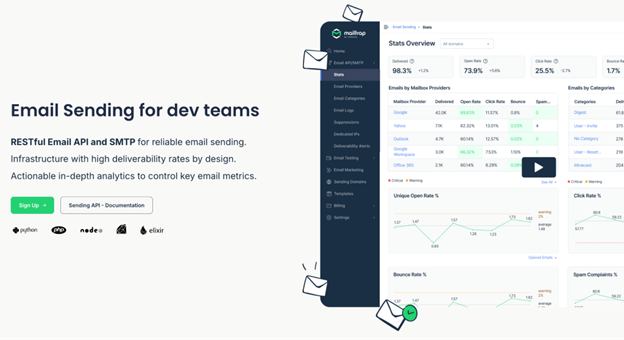
You connect through SMTP credentials (with 25+ ready-to-use code snippets) or a REST API with SDKs for Python, Ruby, PHP, Node.js, Java, .NET, and Elixir. Once integrated, your transactional and bulk emails run through separate sending streams, each on their own dedicated IP pools.
For AI-driven stacks, a native MCP server turns email delivery into a skill for agents. Supported by onboarding docs optimized for agent ingestion, it allows tools like Claude Code to self-configure and send emails autonomously.
The practical upside: a bulk campaign with poor engagement won’t drag down delivery rates for your password resets or order confirmations. Those two streams don’t touch each other. It’s the kind of architectural decision you only really appreciate the first time you send a batch that tanks your sender score and watch your transactional emails sail through anyway.
Who is Mailtrap best suited for in 2026?
Mailtrap is best suited for product and developer teams that need to send transactional emails at scale while maintaining full control over their sending infrastructure.
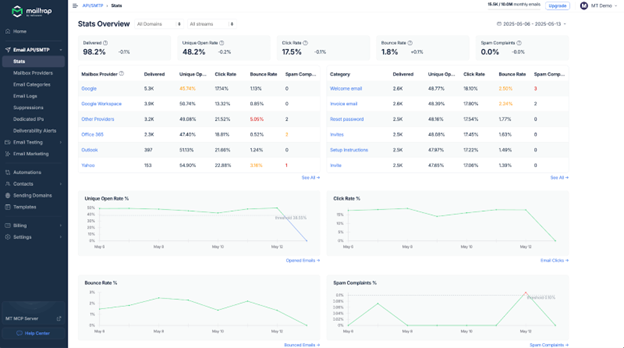
It works well for teams that want flexible API access and copy-paste code snippets for fast integration without heavy configuration overhead. It’s also a fit for AI-native developers and products that need reliable email infrastructure to plug into their stack. Teams that live in email logs also fit well here. You get per-email delivery status, bounce tracking, open and click-rate monitoring, spam scores, and drill-down analytics by mailbox provider, all included out of the box.
It’s less of a for marketing folks who need advanced multi-step automation, behavioral segmentation, or native A/B testing. Dedicated IPs are also locked behind Business and Enterprise plans, which is worth knowing before you commit.
Mailtrap’s main features in 2026
Email API
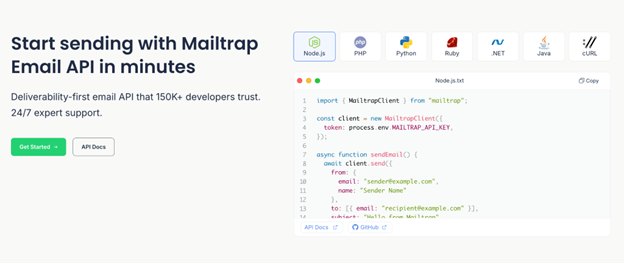
The Mailtrap Email API handles both transactional and bulk sending. You can send emails with attachments, custom headers, and dynamic content through Handlebars-based templates. It also covers contact management, webhook configuration for delivery events, and template management, all backed by well maintained SDKs for Python, Ruby, PHP, Node.js, Java, .NET, and Elixir.
SMTP service
If you want a drop-in replacement for your current SMTP setup, this is the fast route. Mailtrap provides 25+ pre-made code snippets across popular languages and frameworks, with no hard rate limits baked in. You get customizable throttling instead, so you can match sending speed to your warm-up schedule or use case.
Deliverability analytics
Every email is tracked from request to inbox. You get delivery status, bounce reports, open rates, click tracking, and spam scores. The dashboard gives a high-level view first, then lets you drill down by mailbox provider across Google, Google Workspace, iCloud, and Microsoft. If password resets stop landing in Gmail, you’ll see it before the support tickets pile up.
Email marketing suite
Mailtrap also includes a marketing side: contact segmentation, a drag-and-drop email builder with an AI assistant that generates text and images, and campaign scheduling. It handles straightforward campaigns well. It doesn’t go as deep as dedicated marketing automation platforms if you need conditional journeys or predictive segmentation, but it covers the basics.
Integrations and webhooks
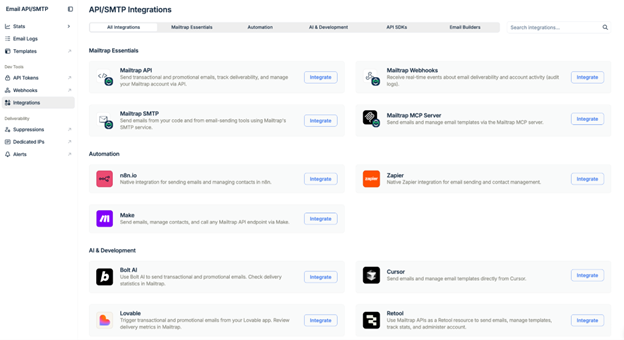
Mailtrap connects with modern dev tools including Supabase, Vercel, Claude Code, Cursor, and Antigravity. Webhooks provide real-time delivery event notifications so your app can react to bounces, opens, and complaints programmatically. For CRM or marketing tool connections outside the developer ecosystem, you’ll usually need Zapier or Make as middleware.
How to get started with Mailtrap
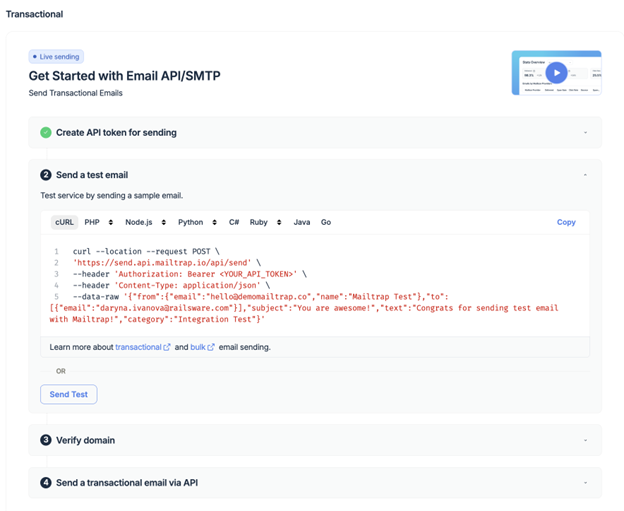
Setup is straightforward. Here’s what the process looks like:
- Sign up at mailtrap.io and verify your email address.
- Walk through the onboarding wizard to add and authenticate your sending domain.
- Configure SPF, DKIM, and DMARC records in your DNS. This is the step that takes real attention, though it’s standard across every email sending platform.
- Grab your API key or SMTP credentials from the dashboard.
- Copy one of the 25+ pre-built snippets into your app and send a test email.
If you’ve set up SendGrid or Postmark before, this will feel familiar.
What Mailtrap gets right
The separated sending streams are the real thing. Transactional and bulk emails running on independent IP pools means your password resets aren’t hostage to how a marketing campaign performed last week.
On compliance, Mailtrap holds ISO/IEC 27001:2022 certification and SOC 2 Type II attestation. It’s GDPR-compliant with data processing agreements in place, plus EU-US Data Privacy Framework coverage. If your team is going through an enterprise security audit or banking partner due diligence, having those certs already in place removes a real amount of friction.
The developer experience is also genuinely solid. Clear API docs, SDKs in 7 languages, 25+ copy-paste SMTP snippets, and 24/7 expert support on higher-tier plans. It’s also built with AI-first workflows in mind, with an MCP server that lets tools like Claude Code and Cursor interact with it directly. It doesn’t feel stripped down, and it doesn’t get in your way.
Where Mailtrap falls short
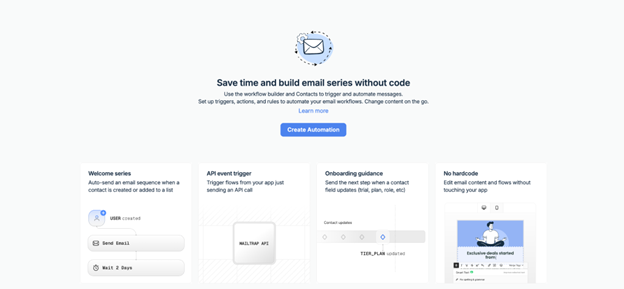
The automation builder covers basic workflows: welcome sequences, event-driven triggers. It doesn’t support complex conditional multi-path logic, so marketing teams building sophisticated customer journeys will hit a ceiling. That’s not what Mailtrap is designed for, but it’s worth knowing if your team expects to grow into that territory.
Connecting to CRMs or marketing platforms outside the developer ecosystem means routing through Zapier or Make. It works, just not seamlessly, and it adds a dependency most teams would rather not have.
Dedicated IPs are locked behind Business and Enterprise plans. Free and Basic use shared IP pools. If owning your IP reputation is a core part of your deliverability strategy, you’ll need to budget accordingly from the start.
There’s also no native A/B testing. Testing subject lines or content variants means building it yourself or bringing in another tool. For a platform competing in 2026, that’s a gap that shows up quickly for teams trying to optimize performance.
How much does Mailtrap cost in 2026?
Pricing scales with monthly email volume and the features you need.
| Plan | Monthly price | Emails per month | Contacts | Key extras |
| Free | $0 | 4,000 | 100 | 3-day log retention, 1 user seat |
| Basic | From $15 | 10,000 | 5,000 | More seats, click-rate tracking, IP whitelisting |
| Business | From $85 | 100,000 | 100,000 | Dedicated IPs, auto warm-up, SSO, 24/7 priority live chat |
| Enterprise | From $750 | Up to 1,500,000 | Custom | Custom onboarding, dedicated deliverability manager, extended activity logs |
The Free tier is useful for side projects or early testing. Click tracking and proper team seats come in at Basic. Dedicated IPs and auto warm-up are Business and above. If those are part of your deliverability plan, factor it into the decision upfront rather than later.
Mailtrap vs. the alternatives
The names you’ll most likely compare it against:
- SendGrid (Twilio) is the incumbent with a huge feature set, though reviews on support quality and deliverability consistency at scale are mixed.
- Postmark has a strong transactional reputation and fast delivery, but pricing climbs quickly at higher volumes.
- Mailgun is developer-friendly with solid built-in email validation.
- Amazon SES is the cheapest option per email by a distance, but you’re building your own deliverability infrastructure, support, and analytics on top of it.
Is Mailtrap worth it in 2026?
For developer and product teams whose main job is getting transactional emails into inboxes reliably, yes. The separated sending streams protect deliverability in a real and measurable way. The compliance certifications check the boxes enterprise procurement teams care about. The developer experience holds up from first integration through production.
It’s a good fit when your team writes code and transactional deliverability is the core concern, when you need compliance-ready sending infrastructure without building it yourself, and when you want per-mailbox-provider analytics baked in rather than bolted on.
It’s not the right call if your marketing team needs to run campaigns and journeys without developer support, or if advanced automation and behavioral segmentation are central to how you work. Those are different problems, and Mailtrap doesn’t try to solve them.
That’s actually the useful line to draw here. Mailtrap is email infrastructure for engineering and product teams. If your team’s outbound is more about finding prospects, personalizing sequences, and running multichannel campaigns across email, LinkedIn, and calls, that’s a sales engagement problem, and it needs a different tool. Reply.io is built for exactly that. The two can coexist in a stack without stepping on each other, since they’re doing fundamentally different jobs.
If you want to see what that looks like in practice, we’d love to show you. Start a free trial or book a demo and our team will walk you through it.

![B2B SaaS Marketing Strategy in 2026 [Step-by-Step Guide]](https://reply.io/wp-content/uploads/marketing.agency-300x158.jpg "B2B SaaS Marketing Strategy in 2026 [Step-by-Step Guide]")