What’s New in Reply: New API, AI Custom Fields, LinkedIn Enrichment, and More
Svitlana Shuliak02 Jun 2026
Most sales teams aren’t losing deals because of bad outreach.
They’re losing them because the data is wrong, the research takes too long, and the tools don’t talk to each other. Every piece of the process works – just not together.
These four updates are about fixing that.
Reply API – Connect Reply to Everything
Outbound doesn’t happen in one place.
Leads come in through your CRM. Enrichment runs in a separate tool. Sequences live in Reply. And somewhere in between, someone is copying data by hand, triggering things manually, and hoping nothing falls through the cracks.
That’s the gap API closes.
It covers the full Reply platform across 270+ endpoints – sequences, contacts, inbox, enrichment, webhooks, and AI features that didn’t exist in earlier versions at all. It follows standard REST conventions, which means it connects to whatever stack you’re already using: your CRM, your data warehouse, your internal dashboards, or automation tools like Zapier, Make, or n8n.
What that looks like in practice is a process that runs without someone driving it. A lead enters your CRM and gets automatically enriched. It scores against your ICP and only moves forward if it qualifies. The right sequence starts. Replies come back and sync to the right place. Every step happens in order, without a manual trigger and without anyone checking whether it ran.
That kind of consistency is hard to build when your tools are disconnected. When something fails silently – a webhook that timed out, a contact that didn’t sync – you usually find out too late. New version of Reply API handles heavy operations like bulk imports and email validation in the background and tells you when they’re done, so your integration doesn’t hang and you always know where things stand.
Here’s what’s changed:
Better coverage. V3 mirrors the entire Reply dashboard across 270+ endpoints – multichannel sequences, contacts, inbox, reports, webhooks, enrichment, and AI-native features that didn’t exist in V1/V2 at all.
Works with any tool or language. V3 follows standard REST conventions, so it connects out of the box with whatever stack you’re already using: Zapier, Make, custom code, or AI agents.
Clear errors, fast fixes. When something goes wrong, the API tells you exactly what failed and why – no guessing, no digging through logs. You get a specific error code and the exact field that caused the issue.
No timeouts on heavy operations. Running a large import or email validation? V3 handles it in the background and notifies you when it’s done – your integration won’t hang or time out waiting for a response.
Manage all your webhooks in one place. A new Webhooks tab in Reply gives you full visibility and control over every webhook, no matter how it was created. Whether you set it up through the Reply UI, Postman, or any other tool, it all shows up here. Create, edit, enable, disable, test, or delete webhooks without touching your code.
What you get isn’t just automation. It’s reliability. Every lead gets treated the same way, every time, regardless of how busy the team is or how many campaigns are running in parallel.
AI Custom Fields – Stop Researching Prospects Manually
Personalization only works when it’s specific. And specific usually means research.
The problem is that research doesn’t scale. You can do it properly for ten prospects, maybe twenty. Beyond that, something gets cut – and it’s usually the context that would have made the message land.
AI Custom Fields remove that ceiling.
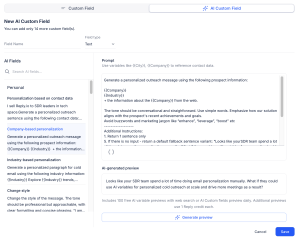
You write a prompt describing what you want to know about each prospect. It could be something straightforward – whether the company recently raised funding, whether they’re hiring for a specific role, whether they’ve been mentioned in the news. Or it could be something much more specific to your pitch – whether they’re running a particular technology, whether they’re expanding into a new market, whether they’re facing a regulatory change your product helps with. Reply takes that prompt and researches it across your entire contact list, then stores the result as a structured field.
That field becomes usable across your whole workflow. You can filter your list so only the contacts that match a certain profile enter a sequence. You can use the field as a personalization variable so each message opens with something relevant to that specific person’s situation. You can build branching logic that sends different follow-ups depending on what the research found.
This matters most when your ICP isn’t homogeneous. If you’re selling to companies at different stages, in different verticals, or with different pain points, the same message rarely works for all of them. AI Custom Fields give you the data to treat them differently – without doing the research yourself.
The result isn’t just faster research. It’s outreach that feels like it was written for the person reading it, at scale, without the manual work.
Put relevant context behind every message you send
LinkedIn URL Enrichment – Reach the Right Person, Not Who They Used to Be
Stale data is one of the quietest problems in outbound.
People change jobs, switch companies, update titles. The average professional changes roles every two to three years. But most contact databases update much slower than that – and lists you built from a CSV export, a trade show, or a year-old campaign can be significantly out of date before you ever send a message.
The cost shows up in ways that are easy to misread. Bounced emails look like a deliverability problem. Low reply rates look like a messaging problem. But sometimes the real issue is simpler: you reached out to someone who no longer works there or works there under a completely different remit.
LinkedIn URL enrichment fixes this before it costs you.
Using a contact’s LinkedIn URL as the anchor, Reply refreshes their current role, company, seniority, and profile details. If their email address has changed – because they moved to a new domain or because the old one has been deactivated – Reply searches for a valid one. Same for phone numbers, when they’re available. Your list goes from what it was when you built it to what’s actually true right now.
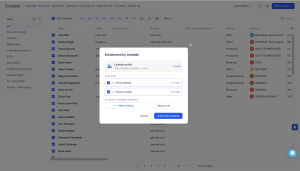
How it works: you go to the People page, select the contacts you want to update, and click Enrich by LinkedIn URL. Reply uses each contact’s LinkedIn profile as the source of truth. The whole process runs in the background, and your database reflects the results as soon as it’s done.
Running this before a high-priority campaign can meaningfully change the economics. Fewer wasted credits. Better deliverability. Higher engagement rates, because you’re reaching people in the right context, with a message that’s relevant to where they are now – not where they were eighteen months ago.
The campaigns that perform best aren’t the ones with the most contacts. They’re the ones where every contact is worth reaching.
Make sure every contact you reach is the right one
Attachments in Jason Sequences – Give Prospects a Reason to Engage
Most outreach asks for attention before it earns it.
You reach out, you make your case, you ask for a meeting. But the prospect doesn’t know you yet, doesn’t trust you yet, and has no reason to prioritize your message over everything else competing for their time.
That’s a hard position to win from. Especially when your product is complex, your deal size is significant, or your category requires some explaining before the value is obvious.
Sharing something valuable early changes that dynamic.
Now you can add attachments and lead magnets directly into Jason AI SDR sequences. Case studies, one-pagers, reports, ROI calculators, product guides – whatever gives a prospect the context they need to take your message seriously. The right content goes out at the right step automatically, across email and LinkedIn, without any manual follow-up required.
The timing matters as much as the content. A case study from a company the prospect recognizes, sent with the first email, does more than the same case study sent after two follow-ups. A report that validates the problem you’re solving, attached to a LinkedIn message, gives someone a reason to connect even if they weren’t ready to respond. You’re not waiting for someone to ask for more information. You’re providing it at the moment it would be most useful.
Multiple attachments can be added to the same Playbook, and Jason distributes them across the steps you configure. You set it up once, and every prospect who enters that sequence gets the right material at the right time – consistently, without anyone having to remember to send it.
For teams selling products that need explaining, or where trust takes time to build, this is where sequences stop feeling like templates and start feeling like conversations worth having.
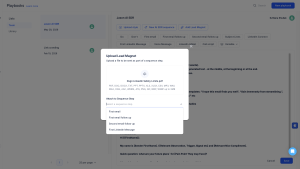
How it works: you open a Playbook, upload the file you want to include – a case study, a report, a one-pager – and assign it to a specific step in the sequence. When Jason runs that step, the attachment goes out with the message automatically. You can add multiple files to the same Playbook and assign different materials to different steps, so the right content reaches each prospect at exactly the right moment in the conversation.
See how Jason turns outreach into real conversations
They change how much of it you have to manage yourself.
Better data. Faster research. Relevant personalization. Sequences that deliver value from the first touch. When these things work together, the process becomes something you run – not something that runs you.
That’s what this release is about.
Explore what’s new and see how it fits into your workflow.
Subscribe to our blog to receive the latest updates
from
the world
of sales and marketing. Stay up to date.
We use cookies to enhance your browsing experience, serve personalised ads or content, and analyse our traffic. By clicking "Accept All", you consent to our use of cookies.