
Step-by-Step Guide to Personalize B2B Outreach with Zapier MCP

Step-by-Step Guide to Personalize B2B Outreach with Zapier MCP

Not that long ago, sales reps were spending hours manually researching each prospect and typing up every email from scratch. Initially, sales engagement tools fixed the scalability problem, but let’s be honest — most personalization stopped at {{first_name}}.

Today, an AI sales engagement platform like Reply.io can handle a big chunk of the heavy lifting: targeted lead generation, lead enrichment, multichannel outreach automation, and AI personalization. 

Pair that with Zapier MCP (Model Context Protocol), and you essentially plug your AI into your entire go-to-market stack. In practice, you connect AI to 8,000+ apps, stream live context into every touch, and suddenly your “cold” outreach doesn’t feel that cold anymore.

This guide breaks down how to personalize B2B outreach with Zapier MCP step by step, with Reply.io as the execution layer for AI-powered B2B sales outreach.

What is Zapier MCP (Model Context Protocol)?

Zapier MCP is Zapier’s implementation of the Model Context Protocol (MCP) — a new tech standard that lets AI assistants talk to external apps and data sources in a structured manner, without the need for any extensive coding knowledge. 

In the context of sales outreach, instead of your AI just generating text, Zapier MCP gives it access to real tools and data. Your AI client (Claude, ChatGPT, etc.) connects to a Zapier MCP server and can call tools exposed by Zapier to perform real actions: create and update records, send emails, look up data, and so on, all from inside a simple conversation flow.

In simple terms, Zapier MCP sits between your AI assistant and Zapier’s ecosystem. It exposes a catalog of tools, each mapped to a Zapier action, so the AI can orchestrate workflows with natural language. Zapier MCP handles the boring but critical stuff (authentication, encryption, rate limits) and lets you connect AI to 8,000+ apps and 30,000+ existing Zapier actions without any custom integrations.
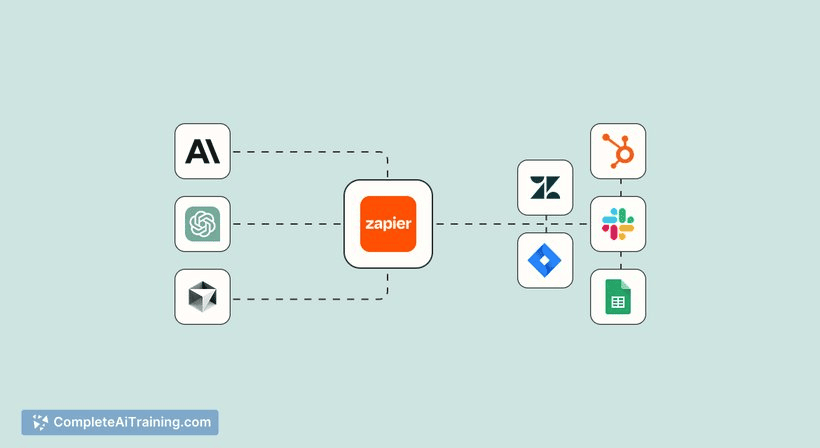
Source: CompleteAITraining

This is not the same thing as a traditional “Zap”, which is a preconfigured workflow that runs in the background on triggers and actions you define in the Zapier UI. Zapier MCP, on the other hand, is used in real time. The AI calls specific tools one action at a time, inside a chat, based on the current prompt and context — while still relying on the same integrations that power regular Zaps.

How Zapier MCP changes the game for AI-powered B2B outreach

In B2B outreach, everything depends on context: Who is this person? Do they match our ICP? What’s happening at their company? What did they last do with your product/website?

Zapier MCP gives your AI direct, controlled access to that context: CRM data, enrichment and firmographic info, buying intent signals, event data, product usage events, and more. Through a single standardized protocol, the AI can read from these systems, reason about what it sees, and then take the next best action.

So instead of blasting generic cold emails from a spreadsheet, your assistant can:

  • Look up recent website behavior, CRM notes, and account tier
  • Draft an email or LinkedIn message that actually references what the prospect has done
  • Then automatically create or update contacts, add them to the right sequence, and adjust deal stages or activity logs

For B2B teams, this is where Zapier MCP for sales outreach gets really interesting. AI stops being an email writing assistant and becomes a real operator inside your sales stack, using live data to personalize at scale and free humans up for what they’re best at — conversations and strategy.

How Zapier MCP personalizes B2B outreach (and where Reply.io fits)

At a high level, personalized B2B outreach with Zapier MCP follows a pretty simple pattern:

  • First, you connect your core sales and marketing tools (CRM, website and product analytics, forms, enrichment platforms, data providers, etc.) through Zapier. These tools generate triggers that describe who the lead is and what they’ve done. Zapier MCP then exposes those triggers and related actions as tools your AI assistant can call in real time.

  • Next, the AI uses that context to generate personalized messages: emails, follow-ups, LinkedIn connection messages, and even internal summaries for reps. Finally, an AI sales engagement platform like Reply.io fully automates multichannel sales outreach, launching tailored sequences across email, LinkedIn, and if needed, calls, and more, using AI-generated personalization fields and branching logic (more on that shortly). 

In this setup, Zapier MCP orchestrates the flow – it pulls the right signals into the AI at the right time, then routes the outputs into Reply MCP and any other systems you’re using.

The result: consistent, data-driven personalization at scale, instead of one-off emails that never turn into an automated system. The next sections walk through how to implement this in practice.
Before you start: define your B2B outreach personalization strategy

Tools like Zapier MCP and Reply MCP amplify a good strategy, but they don’t fix a bad one. So before wiring anything up, get clear on who you’re targeting, what “personalization” really means in your sales strategy, and which signals and outcomes truly matter.

1. Clarify ICP segments and tiers

Start with your ideal customer profile: industry, company size, region, tech stack, and key buying roles. From there, decide how you’ll tier accounts, for example:

  • Tier 1: strategic accounts
  • Tier 2: scalable mid-market
  • Tier 3: broader segments

Then define how personalization depth changes by tier. So, for instance, Tier 1 might justify deeper AI-driven research plus manual review, while Tier 3 might only get light, AI-assisted template customization.

Ideal Customer Profile and Buyer Personas Workbook (+ Templates)

Having accurate ICP and buyer personas is the key to highly targeted prospecting and effective sales process.

But do you really know who your customers are?

Spoiler: it’s often not who you think.

If you’re looking to build or update your ICP and create spot-on buyer personas, grab a copy of this workbook packed with handy tips and ready-to-use templates.

2. Define what personalization means in practice

“Personalization” can refer to the opener, problem framing, examples, value prop, and CTA. You need a concrete definition of what passes the criteria for personalization in your context.

For instance, you might require that:

  • The intro references a real signal (e.g., product launch, funding, hiring spike)
  • The body ties into a known pain point for the persona
  • The CTA matches their lifecycle stage

Write this down — these rules later become prompt instructions and template logic for your AI system.

3. Map your key data sources and signals

List out every system that will feed data into the AI via Zapier MCP: CRM, B2B databases like Reply Data, enrichment tools, website and product analytics, event platforms, intent providers, LinkedIn, etc.

From there, highlight the signals that are both available and actionable: pricing page visits, a recent job change, a specific product feature used, event attendance, a new user from a target account, and so on. Those will eventually drive your triggers and influence your personalization logic.

4. Define triggers and outcomes

For each meaningful signal, define: 

The trigger (what happened?) +  The outcome (what should we do?)

Examples:

  • New MQL → clean, enrich, and validate the contact, then drop them into the most relevant Reply.io sequence.
  • High-intent website visit (e.g., pricing page) → create a high-priority task for the AE, ping a Slack alert, and enroll the lead into a short “fast-lane” follow-up sequence.
  • New ICP contact added to a strategic account list → start an outbound sequence and add a plan task for the owner.
  • Event or webinar attendee → enroll in tailored event follow-up,  update lifecycle stage, and pause any outbound sequence that already has that prospect to avoid overlap.

Once this map is clear, configuring Zapier MCP, Reply MCP, and any other tools your team works with gets way easier.

Step-by-step: Set up Zapier MCP to personalize B2B outreach with Reply.io

Now, let’s turn the concept into an actual stack: your AI assistant, Zapier MCP, Reply MCP, and your data sources all working together to power AI-powered B2B sales outreach.

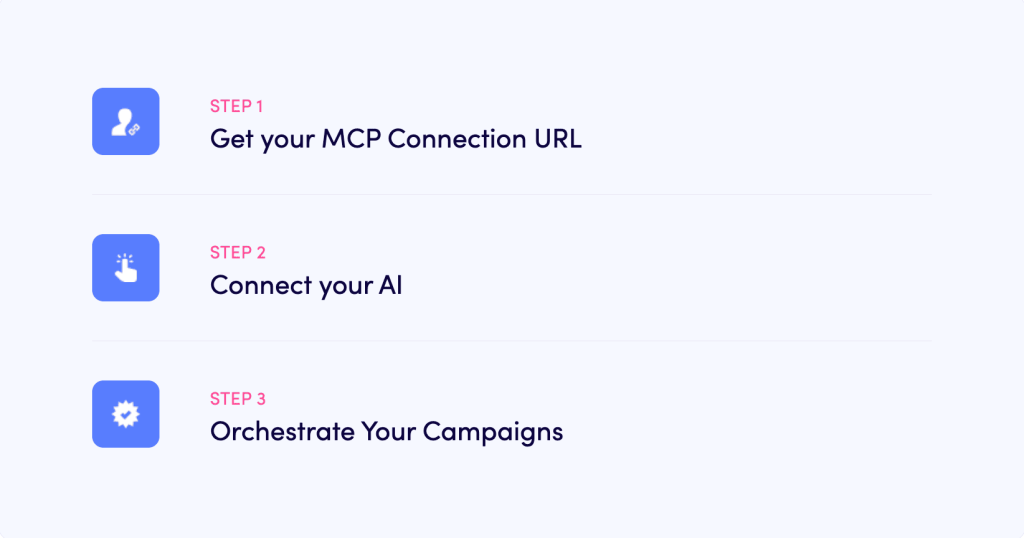
Step 1 – Connect your AI assistant to Zapier MCP

Start by picking an MCP-compatible AI client. Common choices today include Claude desktop, IDEs like Cursor, and other tools that support the Model Context Protocol. Zapier MCP is built to work with multiple clients, so you can adopt whatever environment your team prefers.

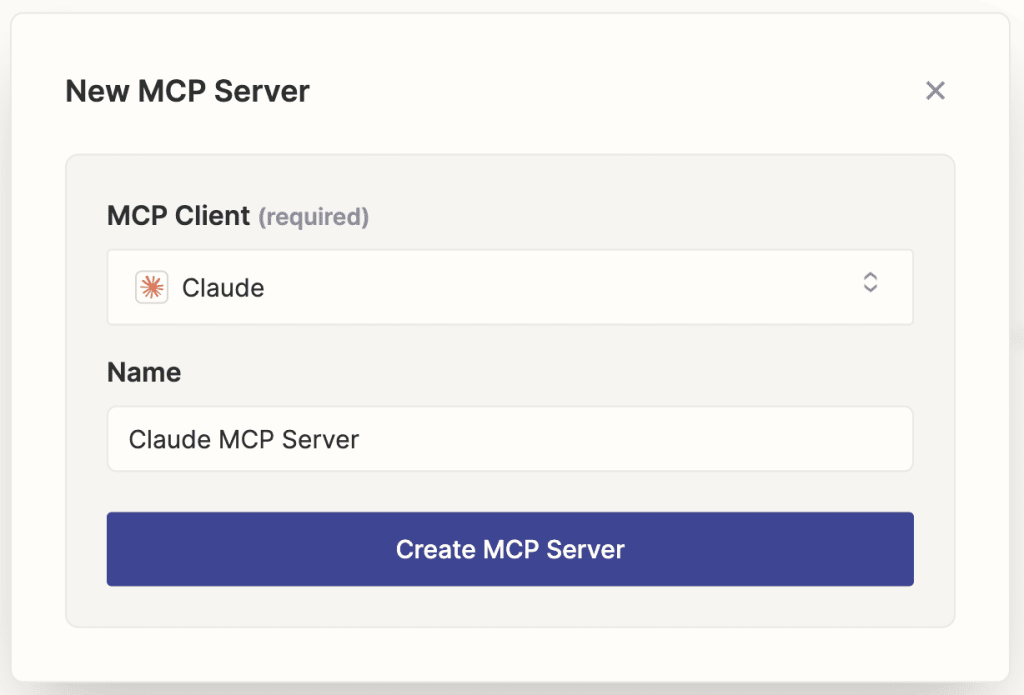
In your Zapier account, enable Zapier MCP and grab the Zapier MCP server connection details for your workspace. Typically, that’s:

  • A server URL
  • An authentication token

Source: Zapier MCP

Next, in your AI client settings, add Zapier MCP as a new MCP server. Paste in the server URL and token, then let the client discover available tools. To test if everything is wired up, ask your assistant to list Zapier tools or describe the apps it can access. If you see the usual suspects (email, CRM, spreadsheets, messaging, etc.), you’re good.

The nice part is that this first step is no-code, making it accessible for non-technical teams. Developers can, of course, go deeper if they want, but basic connectivity doesn’t require custom backend work.

Step 2 – Enable Reply MCP and map core actions

Once Zapier MCP is connected to your AI assistant, it’s time to bring Reply.io into the equation via Reply MCP.

On the Reply side, you’ll generate a connection URL or API key that represents your Reply.io MCP server. You then plug that into Zapier’s MCP configuration, so Reply MCP tools show up in your AI client alongside other Zapier tools.

The Reply MCP server exposes a set of sales-outreach-specific tools. Common examples include:

  • Run and control campaigns on command → Start, pause, and manage any sequence directly through your AI, without opening Reply.
  • Add and update contacts instantly → Tell your AI to add new leads to sequences or mark contacts as replied so outreach stops at the right moment.
  • See full campaign performance in real time → Get a complete list of sequences, drill into any one of them, and review performance step by step.
  • Optimize faster with AI-driven insights → AI can evaluate data, spot low-performing steps, and surface what needs attention so you adjust before results drop.

Through these tools, your AI assistant can (via Zapier MCP) create and update contacts in Reply, push them to specific campaigns, mark them as replied/finished based on responses, and move them through sequence steps. 

Under the hood, each action maps to the same operations you’d perform in Reply’s UI — including email and LinkedIn steps for multichannel sales outreach with Reply.io.

Take a moment to document which Reply MCP tools you’ll actually use and how they map to your sales plays. Clear naming and internal notes here will make prompt design and debugging much easier later.

Step 3 – Connect your data sources and triggers via Zapier

Now you need to give the AI actual context to work with.

Zapier already connects to most systems where your lead and account data lives, so the main job is to now define the right triggers and data flows. 

Typical tools in this layer:

  • CRM (HubSpot, Salesforce, Pipedrive, etc.)
  • Forms and landing page tools
  • Website/product analytics
  • Enrichment and intent platforms

You can configure triggers like:

  • “New contact that meets ICP criteria”
  • “New form submission on a high-intent page”
  • “Account hits a certain intent score”
  • “User completes a key product event”

When one of these fires, a Zap can clean, normalize, and enrich the data before it goes into the AI via Zapier MCP. For example:

  1. Prospect visits your pricing page
  2. Zap enriches the company (size, industry, tech stack) + attaches URL/UTM data
  3. Zap calls an AI tool like Reply.io via Zapier MCP to draft a personalized email or LinkedIn message, and add the contact to a relevant outreach sequence

Start small. Pick one or two high-impact triggers, like high-intent site visits and net-new marketing-qualified leads, and get those right before you expand.

Step 4 – Design AI-powered personalization logic

Zapier MCP gives your AI access to tools, but it’s your prompts and schemas that decide whether it uses them well.

On the input side, define a structured schema that includes:

  • Persona and role
  • Company descriptors (industry, size, region, tech stack)
  • Segment or tier
  • Trigger type (what just happened?)
  • Key behavioral and firmographic data
  • Existing CRM notes or lifecycle stage

So the AI might receive something like: industry, employee count, last visited pages, key product events, intent score, previous outreach history, and any internal notes.

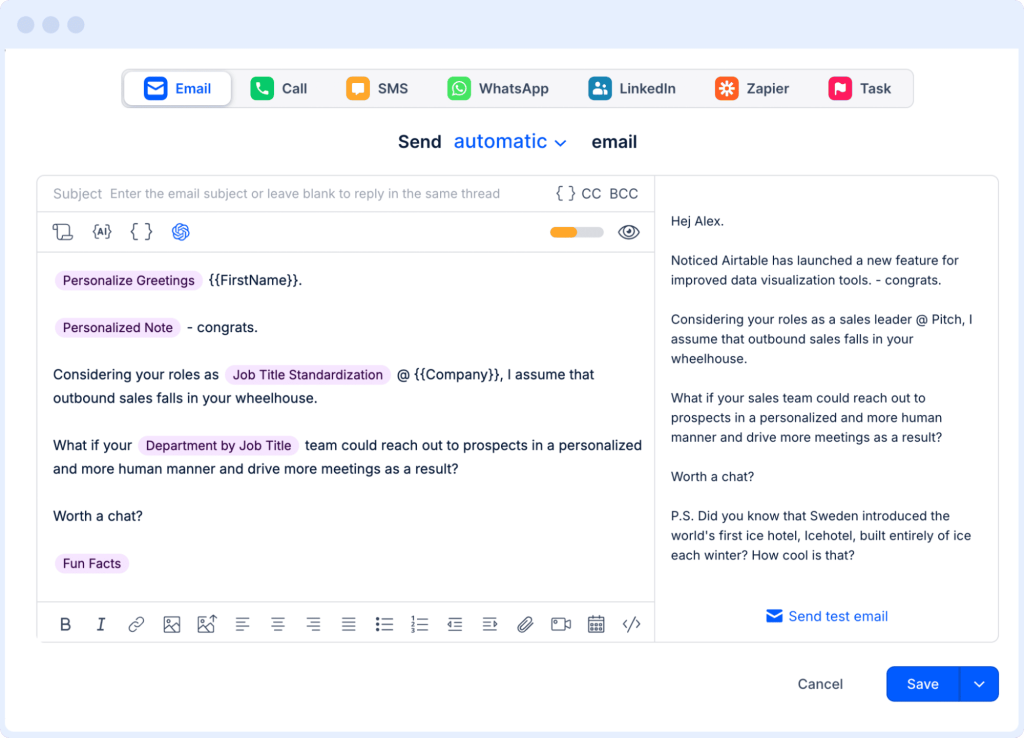
On the output side, you want the AI to return fields that map cleanly into your Reply.io outreach templates and AI variables:

  • Subject line
  • Personalized intro (from LinkedIn, company website, other approved sources)
  • Problem framing
  • Main value proposition
  • Call to action

Reply’s AI variables can then drop this content into your multichannel sequence steps automatically.

If you’re using generic AI tools, your prompts should set hard guardrails when it comes to generating personalized emails with Zapier MCP:

  • Use only the data provided (no guessing)
  • Follow brand tone, style, and compliance guidelines
  • Stay concise and clear
  • Avoid overpromising or false claims
  • Keep structure consistent so it maps well into templates

If you’re working with an AI outreach platform like Reply.io, however, all these guardrails are already built in, as the AI learns about your product, audience, and strategy, and only keeps self-improving over time (based on performance data).

You can keep separate prompt templates for outbound cold, inbound follow-up, product-qualified outreach, and event follow-ups — each tuned to the triggers and outcomes you care about most.

Step 5 – Orchestrate multichannel outreach (with Reply.io)

Once the data layer and personalization logic are in place, execution shifts to Reply.io.

Reply is an AI sales engagement platform built for multichannel sequences: email, LinkedIn, calls, SMS, WhatsApp, and more, along with analytics, email deliverability, and, last but not least, AI-powered personalization.

First, create the “blueprints” for your main revenue motions, such as:

  • Outbound new account outreach
  • High-intent inbound sequences
  • Product-qualified lead outreach
  • Re-engagement / churn prevention
  • Event/webinar follow-up

Each blueprint should then define:

  • Channel mix (email, LinkedIn, SMS, calls, etc.)
  • Timing and spacing between touches
  • Conditioning logic (opens/no opens, clicks, replies, positive vs negative intent)

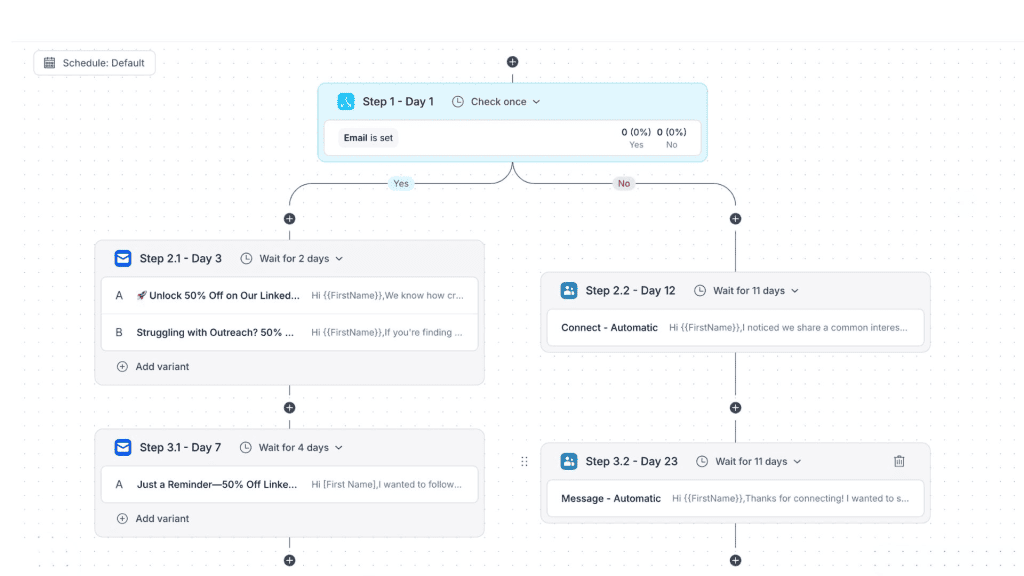
With Reply.io, all of this is done on autopilot — its AI examines each outreach sequence and lead segment to determine the best channel mix, spacing between touchpoints, and then branches the campaign to adjust steps in real time based on each lead’s online behavior:

Zapier MCP and Reply MCP connect these blueprints to your AI workflows. When a trigger fires, the AI can:

  1. Use Reply MCP to create or update the contact
  2. Decide which sequence fits based on segment, intent, and context
  3. Push the contact into the right campaign in Reply.io

As contacts engage, Reply and your CRM feed updated data back into Zapier, opening up more automations, for example:

  • Creating a LinkedIn task for a rep after a positive reply
  • Moving a low-intent contact into a nurture stream
  • Triggering a different sequence when someone stops engaging

This is where Zapier MCP for sales outreach shines: it turns your outreach into a responsive system that reacts to actual behavior rather than static lists or pre-determined logic structures.

Step 6 – Test, monitor, and iterate

Rolling out AI-driven outreach is not a “flip the switch and forget it” project.

Start small, launch your Zapier MCP + Reply MCP workflows on limited segments or less risky cohorts, and use Reply’s analytics to track: open rates, click rates, reply rates, positive vs negative intent classifications, meetings booked, and more. 

From there, make adjustments to your AI sales outreach system based on that concrete data. You can then optionally bring key metrics back into your AI workflows via Zapier or other data tools to have AI summarize patterns and suggest improvements

Keep humans in the loop, especially for Tier 1 accounts and in the early stages. Only reduce manual oversight once you’re confident that performance, quality, and compliance are where they need to be.

Going further with Jason AI: from workflows to autonomous AI SDR

Once Zapier MCP and Reply MCP are humming, you can layer Jason AI, an autonomous AI sales agent, to handle even more of the day-to-day execution.

Jason AI is Reply’s AI SDR that learns about your ICP, product, and strategy, looks for targeted buyers, builds multichannel sequences, and hyper-personalizes every email, follow-up, and LinkedIn message at scale. Oh, and it can also handle responses and book meetings on your behalf! 

You have two options here. 

  1. First, your Zapier MCP setup acts as the foundation for your AI sales engine, connecting data sources, enrichment tools, communication apps, and more, and ensures seamless data flow. Here, Jason AI will then be responsible for executing the final step — taking the discovered context and crafting personalized messages, on its own, and then handling responses.  

  2. On the other hand, instead of gluing together different tools and AI agents with Zapier MCP, teams can keep their entire AI sales engine within the Reply.io ecosystem. 

Reply comes with a native lead database, containing over 1billion real-time contacts, built-in enrichment (from LinkedIn, company websites, and more), rock-solid email deliverability, analytics, and multichannel outreach. 

Jason AI is the final layer of this suite that then runs the entire show, launching outreach, personalizing messages, and routing warm leads to your human reps. 

Many teams start with Jason AI in “approval mode,” where humans review or approve AI-generated outreach. As results stabilize and guardrails prove solid, you can move gradually toward more autonomous operation.

Closing thoughts

Zapier MCP turns your AI engine from a simple writing assistant into a real operator in your sales stack. It can pull in relevant context from across your tools and take precise actions, all through a single standardized interface.

When you combine that with Reply.io, you get a system that can truly personalize B2B outreach at scale: multichannel sales outreach that adjusts to real-time signals, LinkedIn automation, AI variables, and more. 

The playbook itself is pretty simple: nail down your personalization strategy and key signals, hook your data and AI together through Zapier MCP, then plug in Reply MCP as the execution layer.

After that, spin up a few high-impact workflows, watch the numbers, tweak as you go, and only then scale your outreach knowing every message is driven by fresh, relevant context in real time.

FAQ

What is Zapier MCP in simple terms?

Zapier MCP is basically how an AI assistant plugs straight into Zapier’s integrations without you building custom APIs. You connect your AI client to a Zapier MCP server (Zapier’s implementation of the Model Context Protocol, MCP), and from there the AI can call Zapier tools to read data and take actions using natural language — things like updating CRM records, sending emails, or creating tasks, all as part of the conversation.

How is Zapier MCP different from Zapier Agents?

Zapier MCP is a protocol layer for connecting AI assistants to tools, which makes it a better fit for teams working with AI clients like Claude or IDEs and wanting precise, real-time control. Zapier Agents live fully inside Zapier’s web UI and are aimed at non-technical users who want AI-driven workflows that run more complex, multi-step processes in the background. MCP is about on-the-fly tool calls from an AI chat; Agents are more “set it up once and let it run.”

Do I need to write code to use Zapier MCP with Reply.io?

Not for the basics. Most teams can configure Zapier MCP, connect an MCP-compatible AI client, and turn on Reply MCP using the provided connection URLs and API keys without touching code. Once that’s done, the AI can call predefined tools like creating contacts or pushing them into campaigns inside Reply, an AI sales engagement platform. If you want very custom behavior or advanced logic, a developer can step in later, but the core setup can stay no-code.

How does Reply MCP improve AI sales personalization?

Reply MCP gives your AI direct access to outreach-specific actions: creating and updating contacts, adding them to campaigns, marking replies, and moving people through steps in your multichannel sales outreach with Reply.io. When you combine that with Reply’s AI variables, conditional sequences, analytics, and even LinkedIn sales outreach automation, the AI can use live data to personalize messages and decide how and when to send them across channels, instead of just writing generic copy.

Is using Zapier MCP for sales outreach secure?

Yes, as long as it’s set up properly. Zapier MCP uses encrypted, authenticated connections and follows your existing Zapier permissions, so the AI only works with data your account can already access, and you choose which tools to expose or throttle. On the Reply side, Reply MCP and the Reply.io MCP server use API keys over HTTPS, and you can limit exactly what the AI is allowed to do in your outreach workflows, so most of the “security” question comes down to sensible guardrails and approvals on your end.

Subscribe to our blog to receive the latest updates from the world of sales and marketing.
Stay up to date.

Related Articles

What’s New in Reply: Pre-Warmed Domains, Agentic Chat, LinkedIn Enrichment, and More

What’s New in Reply: Pre-Warmed Domains, Agentic Chat, LinkedIn Enrichment, and More

What’s New in Reply: Pre-Warmed Domains, Agentic Chat, LinkedIn Enrichment, and More
AI for Improving Your GTM Operations in 2026: No BS Guide

AI for Improving Your GTM Operations in 2026: No BS Guide

AI for Improving Your GTM Operations in 2026: No BS Guide
Lead Generation for Startups in 2026: How to Get Leads Fast

Lead Generation for Startups in 2026: How to Get Leads Fast

Lead Generation for Startups in 2026: How to Get Leads Fast