
Instantly.ai Review in 2026: Is It the Right Sales Tool for Your Business?

Instantly.ai Review in 2026: Is It the Right Sales Tool for Your Business?

In our latest series of sales automation software reviews, we’re covering a relatively new player in the market —Instantly.ai. 

These reviews are designed to help you get an objective overview of some of the top sales outreach tools for your business to help you make the most informed decision. 

All modern businesses are automation-driven, and when it comes to sales and marketing tools, these are paramount, possessing the ability to supercharge efficiency, productivity, and ultimately — revenue. 

In this article, we’ll cover Instantly’s main features, pricing plans, user reviews, and how it measures up with other sales platforms, in order to answer the big question: Is it the right tool for your business? 

Let’s kick things off. 

What is Instantly.ai? Product overview

Right away, it’s worth mentioning that if you’re a business looking to leverage multichannel outreach in your sales efforts, Instantly AI is not the right choice for you. 

While fully equipped for sales outreach, Instantly can potentially be used by marketing and business development teams looking to scale and automate their email outreach campaigns.  

In a nutshell, Instantly started as a lightweight email outreach platform, but it has recently expanded into a broader sales platform with LinkedIn outreach, CRM features, AI research, and even AI agents. That said, its core strength is still cold email rather than full multichannel sales engagement.

Instantly provides mass email campaign automations, AI email writing assistant, email deliverability, robust email campaign management, powerful analytics, and last but not least — a dedicated B2B lead database to help you build targeted prospect lists right through the platform. 

While it doesn’t have some of the extra perks you would find in the more consolidated sales automation platforms like Reply.io, such as multiple channels for outreach also including calls, LinkedIn, WhatsApp, AI response handling, detailed campaign analytics, or dedicated agency plans, Instantly does offer everything you need to run successful email campaigns with full peace of mind. 
Getting started with Instantly review

Much like all modern sales/marketing platforms, Instantly.ai provides users a 14-day free trial to test out the product. 

To do so, you simply create a free account right from their product page in seconds, answer a few simple questions, and confirm your email, after which you will be transferred to your organization’s dashboard. 

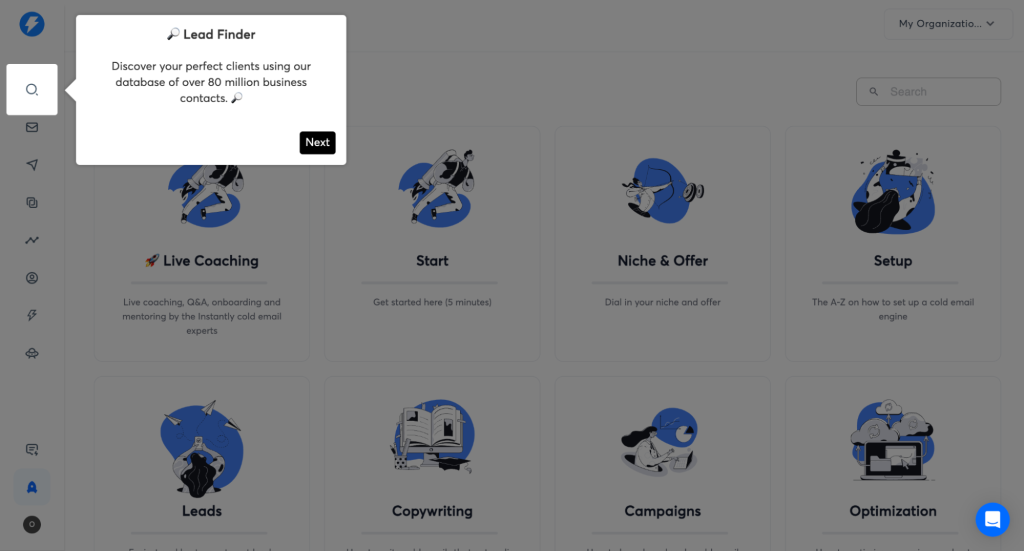
Following its reputation, Instantly greets you with a simple and easy-to-navigate interface, with step-by-step onboarding available right away to help new users cut the learning curve: 

instantly ai review of its onboarding plan

As you can see, Instantly also has a dedicated ‘Accelerator’ tab (bottom left) which provides tons of useful information to new users, from account and campaign set-up tutorials to email writing best practices and beyond. 

A neat additional touch if you ask me. 

Once ready, users can connect their mailbox (or multiple mailboxes straight away), follow the email warm-up set-up guide, and voila! You are now fully ready to source targeted leads and create your first email outreach campaign. 

Now, let’s take a closer look at Instnatly’s main features in action.

What are the main Instantly features?

As previously mentioned, Instantly does not offer an abundance of features, so there aren’t too many of them to dive into, but nonetheless let’s take a closer look at them.

The 5 main features we will cover are Instantly lead database, email campaign management, AI personalization, email warmup and deliverability, and their upcoming native CRM.

Lead database

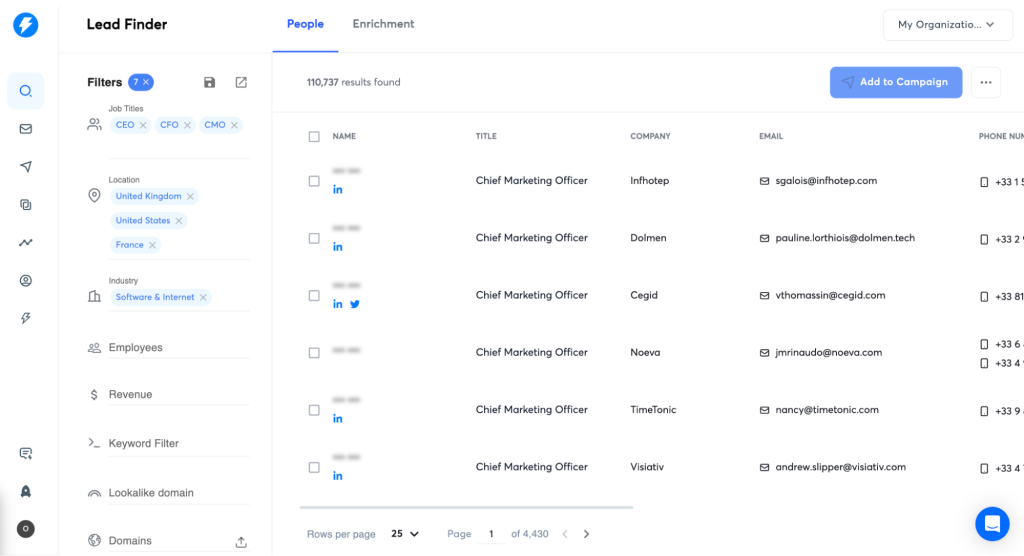
Instantly’s lead database now promotes access to 450M+ B2B contacts, with filters such as keywords and lookalikes, enrichment, AI research, and CRM/export options.

what is instantly ai and does it have its database

Instantly’s lead database 

In terms of usability, Instantly’s lead database is pretty straightforward—users simply put in their filters (location, company size, job title, company revenue, etc.), and get detailed lists of relevant prospects for their email outreach campaigns. Then, with a simple click of a button, users can ‘push’ those generated leads into one of their existing outreach sequences. 

While Instantly doesn’t offer an array of advanced search filters such as buyer intent signals, they do have a neat ‘keyword’ search filter and technographics that undoubtedly enhance the B2B prospecting process. 

They also have a cool ‘clone’ feature that automatically identifies very similar prospects/companies to help you find more targeted leads with ease. 

The only issue here is that, once again, due to the lack of any outreach channels besides email, some of the prospects you’ll find in the database will be better engaged via LinkedIn or cold calls, for instance, which will require switching between tools back and forth. 

At Reply.io, you can build hyper-targeted prospect lists from our native lead database and push them into your multichannel sequences with a click of a button, leaving it up to AI to determine the best channels to use and personalize the messaging for each unique prospect.

Outreach campaign management 

When it comes to outreach campaigns, Instantly is still primarily built around cold emails. The platform has expanded with LinkedIn touchpoints, which is a huge step, no doubt, but it still doesn’t offer the same multichannel engagement workflows as some other platforms.

For instance, Reply.io has an AI engine that builds and manages fully coordinated campaigns with email, LinkedIn (automated messages, connection requests, post engagement, etc.), calls, SMS, and WhatsApp.

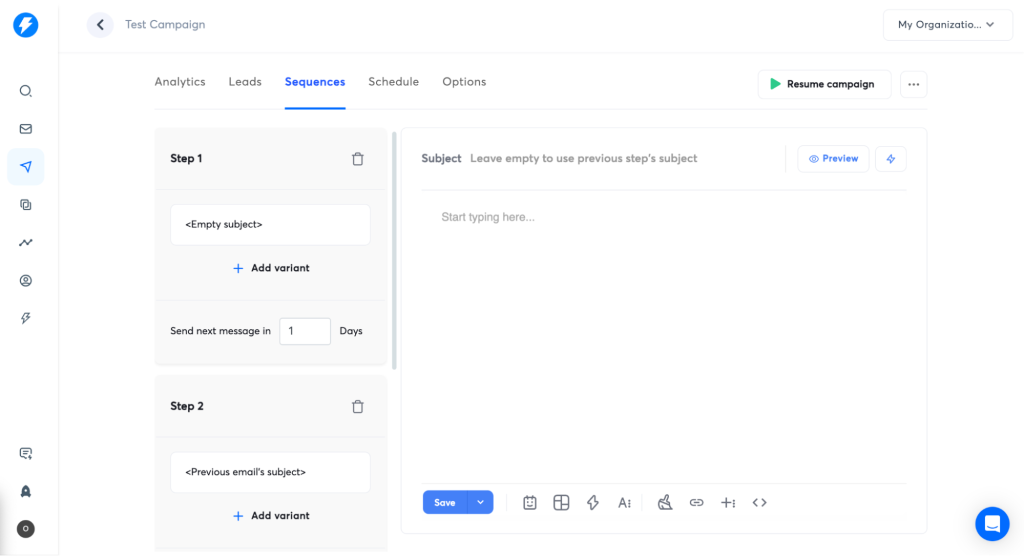
However, users can still use Instantly to create simple yet effective outreach sequences with automated emails, follow-ups, and LinkedIn messages, with effective A/B testing features available to determine the most effective context, timing, and so on.  

instantly ai review on its outreach feature

Instantly’s outreach campaign

Instantly has a dedicated centralized ‘Unibox’ feature which integrates all your mailboxes under one roof, allowing for easier campaign management. 

When it comes to crafting emails and follow-ups, Instantly provides users with numerous variables to create personalized emails at scale, as well as some pretty cool ready-to-use email templates to spend less time on the actual writing process.

Generative AI has become a common theme in most outreach tools, but very few of them take it one step further, with AI also handling responses by answering queries, handling objections, and even booking meetings on their behalf, quite literally adding new 24/7 SDRs to the sales team. 

AI personalization 

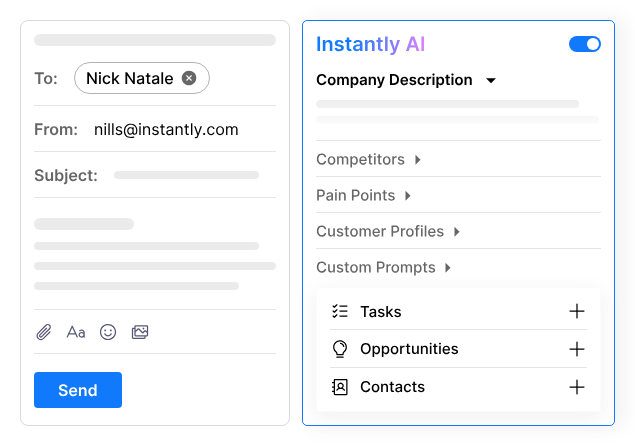
And if the above-mentioned email templates and variables aren’t enough, Instantly also provides the power of AI to double down on personalization. 

Users can use Instantly’s AI features to optimize their subject lines, email content, and send times for the best engagement and conversion rates. 

In your campaign sequence dashboard, users can simply click on the little robot button to access the AI generator, after which they will be greeted with Instantly’s AI personalization tab that’s super easy to use: 

instantly ai pricing differ for AI features

Instantly and its AI feature

After filling in any relevant prospect/company info, AI will then use it to hyper-personalize the messaging, further saving the time and effort that sales and marketing teams would otherwise need to write effective, tailored emails at scale. 

For those looking to take their sales outreach to the next level, Reply.io’s AI SDR not only generates hyper-personalized messages from sourcing relevant prospect data, but also creates entire tailored outreach sequences by determining the best channels, timing, and touchpoints to use for each unique prospect. Check it out for yourself! 

Email warm-up & deliverability 

When it comes to email warm-up and deliverability, Instantly can definitely take a bow.  

In fact, Instantly’s unlimited email warm-up and detailed deliverability dashboard are some of its biggest selling points, and rightfully so, considering just how important email deliverability has become in 2026 in light of Google’s new strict email policies. 

After connecting your email accounts, jump-starting your email deliverability with Instantly is just one click away! 

From their slow ramp-up mode, which gradually builds up your sender reputation to real-time spam monitoring, businesses can rest assured that their email campaigns are running smoothly while adhering to all the increasing mass email policies. 

After initial setup, Instantly users can completely forget about warm-up and deliverability, while it runs in the background, only periodically keeping an eye on their email deliverability dashboard to analyze performance.

Deliverability is undoubtedly one of the most crucial elements of email outreach in 2026, so if your business works with mass email campaigns, tools like Reply.io take it a step further with Google’s Postmaster integration and a dedicated team of deliverability specialists at users’ disposal. 

After all, it would be a real shame to find targeted leads and create top-quality converting messages, only to have Gmail prevent your emails from reaching your prospects’ inboxes in the first place!

Boost your inbox hits!

Tired of your awesome emails ending up in SPAM?

Our Email Deliverability Checklist, packed with proven tools, will help you dodge those filters and land right in your prospect’s inbox. Follow these easy steps for top-notch email deliverability.

CRM and newer sales workflow features

Instantly’s CRM is a fairly recent addition, and it’s positioned as a core feature that gives users one place to manage leads, replies, calls, SMS, and tasks.

The idea is pretty clear — to have a full overview of all leads in the pipeline. Instantly CRM includes a master inbox, plus AI for lead research and messaging. Users can also call and text prospects right from the browser, which makes the platform a lot broader than the email-only tool it started as.

That said, Instantly still feels strongest as an outreach platform first. The CRM adds useful pipeline and follow-up functionality, but teams that need deeper multichannel sequencing, stronger sales engagement analytics, deeper LinkedIn automation, or AI reply handling may still lean toward a more complete sales engagement platform like Reply.io.

From AI workflows (Dealflow), multichannel sequences (including calls and SMS), seamless Instantly.ai integrations with its lead database and other software, and more targeted sales campaigns (Salesflow), Instantly has definitely improved the product over the last few years. 

Some other features worth mentioning include Instantly.ai API integration capabilities, allowing businesses to seamlessly add this platform to their existing tool stacks, as well as a cool app Instantly.ai recently released to empower users to write and respond to emails on the go. 

What are the Instantly pricing plans?

When it comes to the Instantly.ai pricing plans, things aren’t quite as straightforward as one would expect. 

For starters, they have separated their platform into three main buckets: Outreach, Instantly Credits, and VIP (custom).

Outreach covers the sending side — email volume, warmup, uploaded contacts, Unibox, analytics, automation, and deliverability features. In other words, these are the plans most people will look at when they want to run outreach campaigns.

Instantly Credits cover the AI side — these add-ons include access to Instantly’s 450M+ B2B lead database, along with AI research tools, AI email writer access, AI agents, profile enrichment, and more. 

Here’s the current pricing structure for the outreach plans:

Growth Plan ($47/month monthly, $37.60/month annually)

The Growth plan comes with unlimited email accounts, unlimited email warmup, 1,000 uploaded contacts, 5,000 monthly emails, and chat support. It works for basic testing or smaller campaigns, but for larger sales or marketing teams, the limits will feel tight pretty quickly.

Hypergrowth ($97/month monthly, $77.60/month annually)

Hypergrowth includes unlimited email accounts and warmup, 25,000 uploaded contacts, 100,000 monthly emails, and premium live support. This is the more practical option for teams running outbound continuously and at higher volume.

Light Speed ($358/month monthly, $286.30/month annually)

Light Speed includes everything in Hypergrowth, plus 100,000 uploaded contacts, 500,000 monthly emails, and Instantly’s SISR system. SISR stands for Server & IP Sharding and Rotation, and it’s meant to assign dedicated/private server and IP blocks to reduce deliverability risk as sending volume increases.

So yes, Instantly can still be cost-effective, mainly because its pricing is workspace-based instead of seat-based. But the real monthly cost depends on what you actually need, and more so, whether you’ll need additional credits to efficiently run your workflows.

What are Instantly.ai reviews by real users?

You know what they say—software is only as good as the user reviews! 

While Instantly.ai has only been around for just over 3 years, they have already generated over 2.5k reviews on G2 with 4.9 / 5 grade.

Unfortunately, there aren’t any reviews on other top review sites like Capterra and ProductHunt, but it’s definitely still enough to make an accurate judgment of how satisfied users are with this product:

After looking through hundreds of Instantly.ai reviews from real users, the most often-mentioned pros and cons include: 

✅Users consistently praise Instantly’s email deliverability, reporting high deliverability rates in their outreach campaigns;
✅Simple, easy-to-use user interface, which is a breath of fresh air for such complex automation tools;
✅Centralized ‘Unibox’ feature that allows users to seamlessly manage multiple mailboxes under one roof; 

❎Low-accuracy lead data at times, often resulting in higher bounce rates and affecting deliverability; 
❎Instantly doesn’t have a freemium plan (more on that later), and some users report that the low-tier plan is fairly limited for full-functional business outreach;
❎Some users report limited integration capabilities with third-party tools like CRMs (though, Instantly position themselves as a CRM of their own).  

And, some real-world Instantly.ai review examples:

“I’ve been using Instantly for a few months now and have achieved astounding results.”

What do you like best about Instantly?

Instantly has an exceptionally helpful team. They are consistently quick to respond and have helped me when I’ve got stuck.

What do you dislike about Instantly?

The app is a little wonky at times. Sometimes, I can’t type in numbers; I have to type my message out in my notes and paste it into the Instantly app. Also, a couple of times, it wouldn’t let me reply to a client.

What problems is Instantly solving and how is that benefiting you?

I tried cold outreach emailing for my marketing business with no luck. The time it took to find a potential client, write out an email, and do follow-ups was exhausting. I wish I’d found Instantly sooner. The first week of sending out my campaigns, I got replies. I’ve never gotten any replies or even booked calls with clients when I was doing the “slow” way of cold outreach. Now, my marketing strategy is on fire. I book calls every week, which Instantly gets me in the inboxes of my potential clients.

“Beginner Friendly Email Marketing Tool”

What do you like best about Instantly?

I like the ease of use and implementation into my workflow. It was very easy to import leads, create a campaign, draft my emails, and set up a schedule. I also enjoy the accessibility of customer support; I often ask questions to the support chat while working. I’m excited to play with the API integrations in the future for more seamless lead importing. I upgraded to a paid subscription since I run multiple campaigns multiple times a week; I use it very frequently to check email performance as well.

What do you dislike about Instantly?

While you can put the same person into multiple campaigns, the data from one campaign is not merged with the data from another campaign. I wish you could import leads separately and then upload a CSV to show which leads among the ones you’ve imported go to each campaign; this way the lead data is keyed by the contact rather than the campaign and contact pair. The bot doesn’t perfectly answer questions so it feels like I’m asking my question once, waiting for the bot to give a flawed answer, and then asking it again to the human.

What is the best Instantly alternative?

We’ve spent countless hours comparing the top sales automation platforms ourselves, and it’s safe to say that Instantly has definitely built up its reputation to be in the conversation. 

Overall, Instantly AI is a good choice for businesses that solely rely on emails for their outreach. For a relatively affordable price, sales and marketing teams can create automated email campaigns with top-notch deliverability and AI writing assistance. 

However, businesses that need a more powerful sales engagement platform with additional outreach channels and AI automations should probably take a look at alternatives like Reply.io, Apollo, or lemlist

Much like other leading sales platforms, Reply.io has consolidated over the years into an all-in-one sales automation suite, now offering a dedicated lead database, multichannel campaign sequences, an AI SDR for personalized outreach at scale, powerful email deliverability tools, as well as team management and analytics features.

We have a detailed comparison of Reply.io vs Instantly if you’d like to check it out, but here’s a quick rundown of how Reply.io offers users more bang for their buck: 

On this note, we invite you to check out Reply.io to see if that would be a better fit for you. 

Key differences include: 

  • With Reply.io, you get more channels for your outreach campaigns (including email, cloud calls, LinkedIn, SMS, and WhatsApp); 
  • With Reply’s native B2B contact database, users can build targeted prospect lists right through the platform, and then add them to tailored, AI-generated outreach campaigns with a click of a button;
  • Reply.io comes with a native AI SDR that hyper-personalizes your outreach AND handles responses on your behalf (including booking meetings);
  • With Reply’s Google Postmaster and MailToaster integrations, and a dedicated deliverability team at their disposal, users can enjoy the same top-class email deliverability as with Smartlead; 
  • Take advantage of LinkedIn automation to step up your outreach game on one of the top professional networks, making it a breeze to connect with key decision-makers.
  • Last but not least, Reply.io provides much more powerful team management features to keep better track of sales reps’ performance, tasks, KPIs, etc.

Instantly has revealed plans to incorporate more outreach channels and integrations, which will take it to the next level in terms of competition, but for now — tools like  Reply.io might be the better option for businesses seeking more advanced outreach and AI features.  

For those interested, here are some more back-to-back comparisons of Reply.io and some of the leading sales automation platforms: 

Is Instantly the right tool for your business?

The role of sales automation software in modern-day businesses cannot be overstated, they have the potential to directly impact your business efficiency and profitability, while shaping the way you interact with your audience. 

On this note, we emphasize the importance of taking your time and conducting thorough research when deciding which sales platform you will commit to, focusing on your unique business needs and objectives. 

All top sales automation platforms have their own unique selling points and limitations, so it’s not a matter of which tool is better, but which tool is most suitable for your business.  

Good luck, and until next time!

FAQ: Instantly.ai Review

How does Instantly compare to other cold email tools for pricing?

Instantly.ai has per-seat rather then per-user pricing, which makes it cheaper for larger teams. But given its credit system for AI features, costs can potentially grow, depending on usage.

How does Instantly.ai handle large contact lists?

Instantly makes it fairly easy to find, upload, and manage larger contact lists. You can then segment them by role, industry, and other filters, which helps keep campaigns more targeted.

Can I use Instantly email marketing on my phone?

You can do the basics on mobile, like checking replies, but that’s about it. For actual campaign setup and management, desktop is by far the only way. So for quick checks, mobile works. For real work, not really.

Is AI reply handling in Instantly.ai reliable?

It’s useful, yes, but not something you’d want to trust blindly. The AI can save time with drafts and quick handling, but most replies will still need a human eye. Best way to think about it? Assistant, not replacement.

What happens if my emails bounce a lot with Instantly?

Too many bounces will hurt your sender reputation. Instantly does help with email warm-up, deliverability, and bounce handling, but you still need to watch list quality closely and clean bad data before it causes issues.

Subscribe to our blog to receive the latest updates from the world of sales and marketing.
Stay up to date.

Related Articles

How to Use Reply.io + Jason for Lead Generation for Software Companies in 2026

How to Use Reply.io + Jason for Lead Generation for Software Companies in 2026

How to Use Reply.io + Jason for Lead Generation for Software Companies in 2026
Top 12 GTM Outbound Sales Platforms to Try in 2026

Top 12 GTM Outbound Sales Platforms to Try in 2026

Top 12 GTM Outbound Sales Platforms to Try in 2026
How to Use Reply.io + Jason for B2B Demand Generation in 2026

How to Use Reply.io + Jason for B2B Demand Generation in 2026

How to Use Reply.io + Jason for B2B Demand Generation in 2026