How to Find Startups on LinkedIn and Save Hours in 2026
Eugene Suslov26 Jan 2026
There are 67+ million companies listed on LinkedIn, along with over 1+ billion users. Those are astronomical figures.
If you’re trying to find promising startups for networking, sales, recruiting, investment, or market research, the massive data means three things.
LinkedIn is a goldmine for solid leads.
LinkedIn is also a minefield of noise.
Searching for good leads manually on LinkedIn is like digging a well with a toothpick— it’s slow, messy, and prone to errors.
This guide shows how to find startups on LinkedIn using practical workflows, automation tools, and battle-tested tactics. You’ll get exact filters, tools, and systems used by top sellers, recruiters, and investors.
Let’s dive right in.
How do startups appear on LinkedIn, and what should you look for?
Most startups don’t leave obvious cues, and if you’re not paying attention, you’ll scroll right past them.
Startups appear on LinkedIn in several ways, including:
Company pages, typically lean, recently created, and still gaining followers
Founder and team profiles, which are perhaps the most apparent giveaway
Job posts, especially when they’re hiring for growth-critical roles early on
Here’s what to look for:
Company size, usually 1–50 employees
Founding date. Newer companies typically show “Founded On” or “Years Active.”
Industries such as tech, biotech, fintech, AI, cleantech, and consumer apps
Keywords in bios or posts including “startup,” “seed,” “early-stage,” “series A,” “venture-backed.”
The question then becomes. How can you train LinkedIn to surface more startups on your feed? Well, you’ll need to take deliberate action, including the following:
Like and comment on startup-related posts to shape your algorithm
Join startup-specific groups to bring niche content into your feed
Follow early-stage founders and engage with their updates
Check the Activity section on company pages and founder profiles. In fact, that’s where you can get the “real” signals
Whichever strategies you choose to go with, it’s crucial to have your LinkedIn profile fully optimized and active, as that’s when other company execs will be more inclined to accept your connection requests and respond to your messages.
This is also known as social selling, it’s a key element in modern-day sales, especially in B2B.
Unlock the Power of LinkedIn: Your Hands-on Guide to Social Selling
With over 900 million users worldwide, LinkedIn offers an unparalleled opportunity to reach a highly targeted audience and grow your business.
Whether you’re a small business owner, a sales professional, or a marketer, here’s a hands-on guide to building your brand, generating leads, and closing more sales through LinkedIn.
What LinkedIn search features help find startups quickly?
Sure, LinkedIn is a powerful platform for sourcing leads. No doubt. And when used right, it can surface high-quality startup leads in minutes.
The problem is, most people search too broadly or they don’t take full advantage of the built-in filters. Let’s help you fix that.
Use LinkedIn’s native filters to your advantage
LinkedIn’s free search filters are super effective when you know which ones to combine. Most early-stage startups fall into distinct categories based on team size, industry, and location.
So, use filters like:
Company size: Start with 1–10 and 11–50 employees
Industry: Look for sectors like tech, biotech, fintech, cleantech, AI, or consumer apps
Location: Focus on metros known for startup activity, such as San Francisco, Berlin, Tel Aviv, and Austin
Keywords: In descriptions or job posts, search for “early-stage,” “seed,” “startup,” “funding,” “accelerator.”
Layering these filters lets you zero in on a narrow lead list rather than hundreds of irrelevant results.
Use a Boolean search to narrow things down
Filters give structure. Boolean logic, on the other hand, adds precision. And that can make the difference between hoping you’ll land a good lead and targeting the right prospects.
You can, for instance, try this format:
(“seed” OR “series A” OR “early-stage”) AND NOT “enterprise.”
Pro tip: Use quotation marks for exact phrases, OR to expand results, and NOT to exclude anything irrelevant. Applying Boolean allows you to narrow your search.
Save your best filters
If you run startup searches regularly, don’t rebuild them every time. Once you’ve dialed in a useful combination, save it and get alerts when there’s a match.
Below are a few best practices to get your juices flowing:
Name your saved searches by segment, e.g., Seed Fintech – Berlin
Turn on LinkedIn alerts to get notified when new results match
Keep a short list of 3–5 high-performing searches and review weekly
Leverage Sales Navigator
LinkedIn’s Sales Navigator offers more advanced filters and is ideal for finding fast-growing startups. You can use it to track headcount changes, funding rounds, and recent job moves. Then build live lead lists and sync them to your CRM.
Lead databases
Finally, companies can turn to reliable lead databases like Reply Data to skim through hundreds of millions of company accounts across industries and locations. Once you’ve found your target accounts, you can then just as easily find the decision-makers within those firms to reach out to.
Reply Data will have their contact email address and LinkedIn URL ready, and if you’re using the full Reply.io suite — you can launch AI-powered outreach and start connecting with target startups with just a few clicks.
How can LinkedIn Sales Navigator improve startup discovery?
Sales Navigator is LinkedIn’s premium prospecting tool, and it’s a powerful one.
If you’re looking for high-growth startups, it offers deeper data, smarter filters, and real-time signals.
Here’s how to find startups on LinkedIn using Sales Navigator
Use advanced filters built for prospecting
Sales Navigator gives you filters that the free version doesn’t even come close to.
You can use it to find startups based on company growth, funding activity, and more. You won’t get that with the regular LinkedIn interface.
Employee growth to identify companies hiring quickly
Funding alerts to know when startups raise capital, pulled from trusted sources
Recent hires to identify scale-up activity
Tech tags and company size to filter leads by the tools they use or specific team sizes
With these filters, you can easily zero in on startups actively building.
Tap into AI-driven lead suggestions
Save a few searches and lead lists. Thereafter, Sales Navigator begins to surface suggestions based on your targeting behavior, connections, and industry overlap.
These recommendations can help uncover startups that aren’t using the typical keywords, but still match your ICP.
It’s a smart way to catch early-stage companies flying under the radar.
Build and manage lead lists effectively
You can create dynamic lead lists using filters like funding stage, team size, geography, or industry vertical. Once saved, apply alerts to be notified when a company hires, grows, or posts new content.
Pro tip: Organize lists by persona, deal stage, or territory. That way, you can ensure your outreach is a repeatable, easy-to-implement process.
Prioritize startup decision-makers
Use role filters to find the right people, such as founders, CEOs, Heads of Growth, or VP-level roles.
In addition, check profile activity, recent job changes, and shared connections to prioritize who to contact first and how to approach them.
Know when Sales Navigator is worth it
Sure, Sales Navigator is powerful. However, it’s not free.
To achieve a positive ROI, it’s best to get it if you’re prospecting daily or coordinating across a team. Otherwise, you’re better off starting with a free trial and scaling as needed.
How to identify and connect with startup founders and key employees?
Finding a startup is one thing. However, pinpointing startup founders on LinkedIn, and by extension, the decision-makers is another.
Luckily, we’ll show you how to do it in the section below.
Target the right titles with smart filters
Start by narrowing your search by job title, company size, and founding date. The combo helps you filter out enterprise roles and hone in on early-stage teams.
Look for titles such as Founder, Co-founder, CEO, Head of Growth, Product Lead, or Early Employee. These usually tie directly to startup decision-makers, especially in teams of fewer than 50 people.
Spot startup signals in profiles and pages
Scan profiles and company pages quickly for signs of activity.
Typical indicators include recent funding, accelerator programs, or product launches. In addition, check how often founders mention these milestones directly in their headlines, bios, or pinned posts.
Follow and connect with intent
Before you reach out, follow the founder or company.
That way, you can get them on their radar and pull their content into your feed. Once you’re ready to connect, you can personalize your message based on what they’ve shared. The benefit is that your outreach feels more natural and timely.
Use contact enrichment tools to go further
LinkedIn alone doesn’t always provide verified contact information.
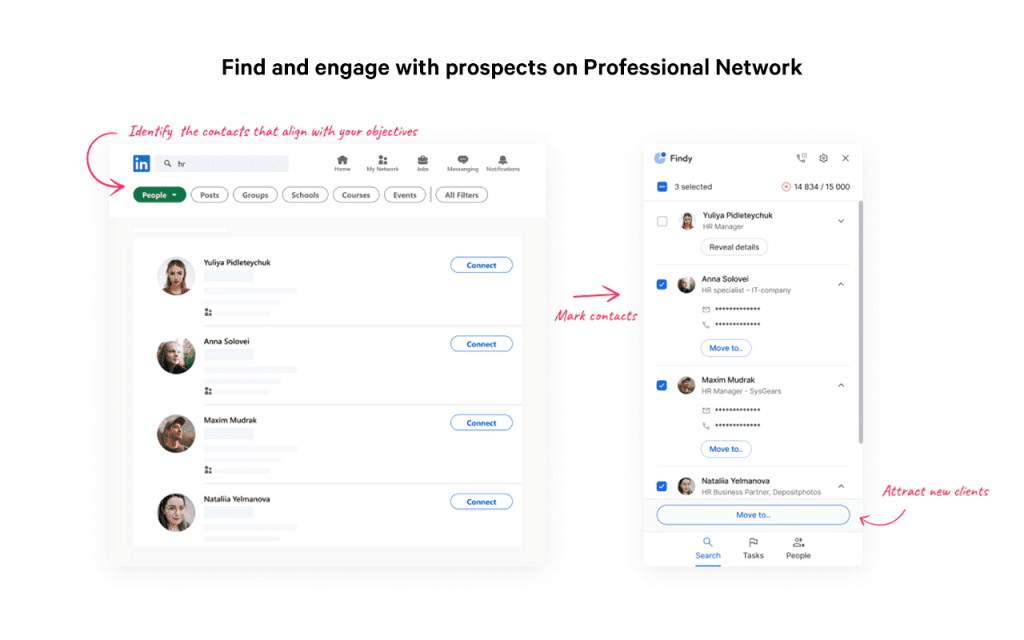
Therefore, you can use Reply Data or a dedicated LinkedIn scraper like Findy to find email addresses linked to profiles.
Pro tip: Be sure toenrich your lead list before you reach out, especially if you plan to follow up by email after a connection request.
Personalize your outreach to get replies
When it’s time to reach out, send a short, focused message.
One of the easiest ways to capture the founder’s attention is to reference something specific, such as a recent post, a shared interest, or a mutual connection. As a rule of thumb, keep your value proposition clear and end with a soft CTA.
Example:
“Hi [Name], came across your profile via [group/post]. I loved your take on [topic]. I help early-stage teams with [value prop]. Happy to connect and discuss this further.”
Now, the issue here is that if we’re talking about hundreds, let alone thousands, of potential startup founders and decision makers that you need to reach out to, this simply cannot be done manually.
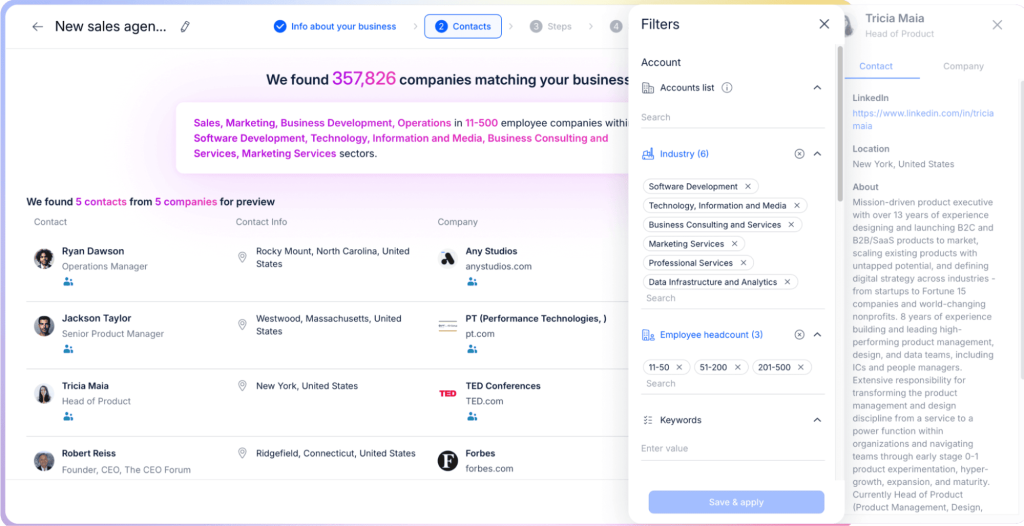
This is where it is absolutely necessary to gear up with a multichannel outreach tool like Jason AI, an AI-powered sales agent, to automate your entire LinkedIn lead generation, LinkedIn outreach, and email outreach under one roof.
Once Jason AI learns about your company, product, and value proposition, it will then start going through LinkedIn, its native lead database, and other external sources to find the most relevant companies and professionals. So, if you’re targeting tech startups in the US market — you simply tell Jason, and he will take care of the rest.
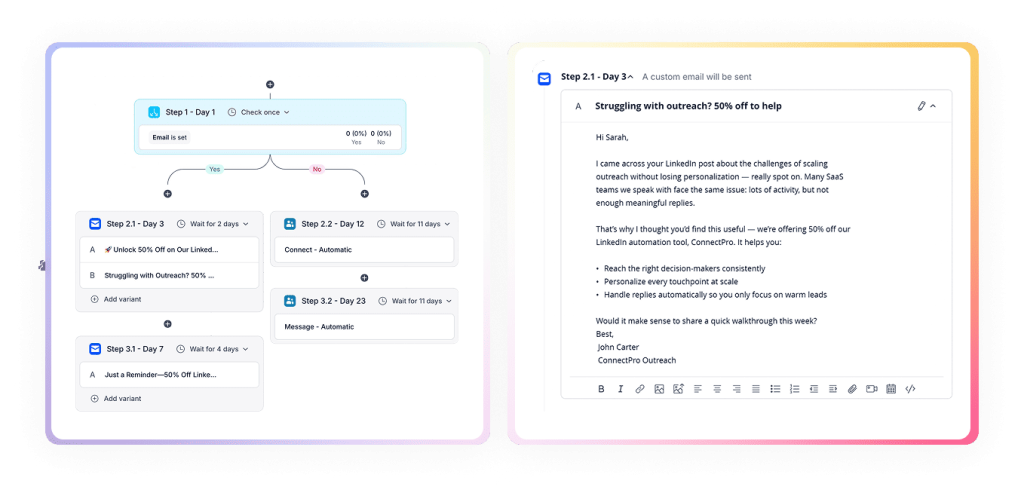
And once he’s got those contact lists ready, its AI engine will then create tailored outreach sequences for each unique account, using conditional logic to choose the most optimal channel, message, and timing for each step based on real-time behavior.
Let’s say Jason sets day 1 as a LinkedIn connection request. If it’s not accepted by day 3, it will then send a hyper-personalized email to the prospect, perhaps referencing their recent post about an achievement. If another 2 days pass — a short, personalized follow-up, and so on.
This way, your team can actually focus on improving the product and building long-term connections with their target startups, while Jason AI handles virtually all admin work on their behalf.
How to use LinkedIn groups, hashtags, and communities to find startups?
When learning the ropes of how to search for startups on LinkedIn, we recommend using a powerful yet overlooked feature—communities.
These spaces give you real-time access to founder updates, funding news, and pitch activity, straight from the source.
Join the right LinkedIn groups
Join groups that would attract the kind of founders and operators you want to connect with.
Look for startup-specific communities, industry-focused circles, and regional hubs where people talk about launches, hiring, and funding.
Use keyword searches to find groups such as “Startup Founders Network,” “Fintech Innovators,” “Healthtech Early Stage,” etc.
In addition, apply filters to narrow by location, industry, or member count.
Monitor group activity with purpose
Don’t just join. Observe what’s happening.
Inside active groups, you’ll find pinned posts, product updates, pitch invites, and job announcements. These are startup signals in plain sight.
While at it, check the group Activity tab to see what members are posting. That’s where deals, events, and new products usually surface first.
Use notifications and influencer-led communities
Turn on notifications for high-signal groups.
You can also follow group admins or founders of invite-only communities. These groups are often more curated and have stronger participation.
Meanwhile, check out influencer-led startup circles. Some function as mini-accelerators, giving you faster access to qualified leads.
Search the right hashtags
Hashtags can surface founders posting real-time updates, especially around product launches or funding rounds. You can follow them or plug them into LinkedIn’s search bar.
Some of the hashtags you can try include:
#startup
#earlystage
#startupfunding
#fintechfounders
Niche hashtags help you narrow your focus to specific verticals.
Cross-check on X and automate review time
A good number of startup teams post first on X (formerly Twitter)
You’ll, therefore, want to use the platform to cross-reference names, company news, and hashtags.
Pro tip: Set aside 15–30 minutes each week to review your top groups and feeds. In addition, set a recurring calendar reminder to keep you on track.
What third-party tools and automation help save time on startup research?
You can’t talk about how to find startups on LinkedIn without mentioning the tools to handle the repetitive work.
Below, we’ve handpicked the best LinkedIn automation tools, starting with the one that replaces most of the stack.
Here is a comparison table for a quick overview.
Tool
Best For
Data Source Size
Outreach Automation
Jason AI SDR
Full-cycle startup research and outreach automation
1B+ verified contacts
LinkedIn, email, phone, multichannel
Apollo.io
Startup discovery with enrichment and sequencing
260M+ contacts
Email and multichannel sequences
PhantomBuster
Scraping startup data from LinkedIn and the web
Depends on the source
Task-based automation
LinkedHelper
Scaling LinkedIn connections and follow-ups
LinkedIn profiles
LinkedIn messages only
Dux-Soup
Automating LinkedIn profile activity
LinkedIn profiles
LinkedIn drip campaigns
Crunchbase
Evaluating startups using funding data
Millions of companies
None
PitchBook
Deep financial and VC-backed startup research
Curated private market data
None
Lusha
Pulling verified emails and phone numbers
Global B2B database
None
Hunter.io
Finding and verifying emails by domain
Domain-level email data
Email campaigns only
Jason AI SDR
Jason AI SDR is an all-in-one, AI-powered platform that handles every stage of startup lead gen, without you needing to juggle 5+ tools.
It taps into a database of 1B+ verified contacts, enriches them, personalizes outreach across LinkedIn, email, and phone, and automatically books meetings on your behalf.
Unlike most tools on this list, which cater to a single task at a time, Jason handles everything from lead discovery to message personalization and everything in between.
More specifically, Jason can:
Monitor LinkedIn 24/7 for startups that match your ICP
Detect signals like funding rounds, team size, hiring activity, or title changes
Enrich leads with verified emails and contact data from 1B+ records
Personalize messages using startup context (e.g., product launches, funding)
Send outreach via LinkedIn, email, or multichannel cadences
Handle follow-ups, reply logic, and auto-schedule meetings
Continuously refine lead lists without manual input
Simply put, Jason AI SDR is a prospecting engine built to replace hours of manual research, scraping, and outbound work.
Apollo.io
Apollo.io is a sales intelligence platform that helps users discover, enrich, and engage leads.
It integrates with LinkedIn and CRMs to streamline outreach and improve targeting precision.
Apollo boasts an extensive database, combined with intent signals and enrichment features. The functionalities make it especially useful for startup discovery and B2B prospecting.
Apollo offers:
Access over 260M+ contacts and company profiles
Enrich LinkedIn profiles with email addresses and phone numbers
Filter by funding stage, headcount, tech stack, and more
Sync leads to HubSpot, Salesforce, and other CRMs
Trigger automated multichannel outreach via sequences
PhantomBuster
PhantomBuster automates web data extraction and LinkedIn actions using pre-built “Phantoms.”
It’s ideal for scraping lists of startups from search results, group members, or hashtags.
With API access and scheduling, it’s a solid pick for growth hackers and marketers looking to build repeatable lead-generation workflows.
PhantomBuster allows you to:
Extract company and profile data from LinkedIn searches
Scrape members from startup-focused groups or events
Schedule automation runs at set intervals
Export results to Google Sheets, Airtable, or CRMs
Combine with other tools for scalable growth loops
LinkedHelper
LinkedHelper is a LinkedIn automation tool that streamlines profile visits, connection requests, follow-ups, and message sequencing.
It comes with built-in throttling and personalization features. That way, users can run outreach campaigns that mimic human behavior and efficiently scale lead engagement.
LinkedHelper enables you to:
Send personalized connection requests at scale
Automate follow-ups across multiple steps
Visit profiles to increase visibility before outreach
Segment contacts into custom funnels
Export data or integrate with CRMs for tracking
Dux-Soup
Dux-Soup automates LinkedIn prospecting by visiting profiles, endorsing skills, and sending drip messages.
It’s designed for users who want to remain visible on LinkedIn while automating routine tasks without overstepping the platform’s limits.
With Dux-Soup, you can:
View and tag LinkedIn profiles automatically
Send connection requests with custom messages
Create automated drip campaigns
Monitor responses and track engagement
Export profile data to CSV
Crunchbase Chrome Extension
Crunchbase’s Chrome Extension overlays funding and financial data directly on LinkedIn profiles.
It helps users make faster, better-informed decisions when evaluating startups for outreach. You can also use it to evaluate investment opportunities based on recent funding rounds and investor activity.
Crunchbase Chrome Extension enables you to:
View company funding rounds and investors in-browser
Assess traction and relevance before messaging
Filter results by funding stage or investor type
Combine with LinkedIn search for enriched targeting
Sync key data to lead tracking sheets
PitchBook
PitchBook provides in-depth financial and company intelligence on startups, including valuation, cap tables, deal history, and investor profiles. It’s widely used by VCs and sales teams pursuing high-ticket accounts.
PitchBook allows users to:
Access private market data, including valuations and exits
Track startups by funding stage and sector
Analyze competitor landscapes or investor activity
Integrate with CRM platforms or export reports
Build lead lists from verified financial data
Lusha
Lusha enables fast, GDPR-compliant enrichment of LinkedIn profiles with contact info. Its Chrome extension lets you pull emails and phone numbers instantly. It’s a good pick for sales teams looking to bypass LinkedIn’s messaging limits.
With Lusha, you can:
Get direct emails and mobile numbers
Verify contacts before outreach
Build lists within Lusha or export to CRM
Use its real-time API or browser extension
Score and prioritize leads by title or company size
Hunter.io
Hunter.io is an email discovery tool. You can use it to find and verify emails by domain or LinkedIn profile.
It’s effective for follow-up after a LinkedIn connection or for outreach to people who aren’t active on the platform.
Key features:
Discover emails by entering the company domain
Verify deliverability with high accuracy
Use its browser plugin for LinkedIn enrichment
Export lists and use campaign tools
Integrate the tool with Zapier, CRMs, and outreach platforms
How to use these tools the smart way
You can use the tools above to find startup founders on LinkedIn. However, to derive the most value, you must know how to use them correctly.
Here are some tips to max out value:
Automate startup list extraction with tools like PhantomBuster, then schedule drip campaigns via LinkedHelper or Dux-Soup
Sync leads to your CRM or workspace tools like HubSpot, Airtable, or Notion
Enrich lead data with Crunchbase or PitchBook to prioritize by funding and opportunity size
Be compliant, respect LinkedIn limits, avoid spam, and test outreach in small batches
Build full pipelines using Zapier or Make to connect tools, storage, and outreach
With that out of the way, let’s look at a few other issues pertinent to how to find startups on LinkedIn.
How to stay updated with new startups and news efficiently?
Timing is crucial when you’re prospecting startups.
For instance, a funding round, leadership change, or product launch can open the perfect window for outreach.
Even so, the last thing you want to do is to track those developments manually. It’s time-consuming and laborious.
Instead, do the following:
Use alerts to automate discovery
Set up saved searches on LinkedIn and Sales Navigator to keep tabs on startup activity, without checking every day.
More specifically:
Save searches using filters like “early-stage,” “seed funded,” or “Series A”
Enable email or in-app alerts to catch updates on new job posts, headcount growth, or funding events
Use Google Alerts with smart queries such as: “startup funding (year)” site:linkedin.com to surface real-time updates outside LinkedIn.
Follow the right people and pages
Founders, VCs, and accelerators often share updates before they hit the news cycle. By following them directly, you gain early access to high-signal opportunities.
To stay in the loop:
Follow startup accelerators like Y Combinator, Techstars, or 500 Global
Track VCs, founders, and operators who regularly post about startup milestones
Subscribe to curated LinkedIn newsletters and join groups that send weekly startup digests
Monitor company pages for announcements, hiring sprees, or post frequency spikes
Use aggregation and AI tools
Centralize your sources instead of moving between tabs and tools. Or, automate what you can.
You can, for instance, use Feedly, Pocket, or Flipboard to aggregate startup content into a single, scrollable queue.
Better yet, use Jason AI — it auto-monitors funding news, job openings, and intent signals across LinkedIn, company websites, and other external sources. It also continuously refreshes lead data, enriches account profiles, and sends alerts based on real-time startup activity.
And once that’s all done, it will also launch AI-powered outreach across email and LinkedIn, ensuring each message is personalized based on relevant, verified info.
Start finding startups faster and smarter
Mastering how to search for startups on LinkedIn means knowing what signals to watch for.
It also involves using smart filters, tapping into Sales Navigator. You’ll also need to connect with founders through communities and hashtags.
When paired with automation, lead tracking, and regular updates, this framework helps you surface better leads, faster.
Apply this approach consistently, and you’ll not only save hours each week but also improve the quality of your outreach dramatically.
So, start testing filters, join the right groups, and automate where it counts.
In addition, keep refining your workflow as LinkedIn continues to evolve.
And, for serious scale, plug into Jason AI, your all-in-one solution for automated prospecting, personalized outreach, and real-time startup intelligence.
Subscribe to our blog to receive the latest updates
from
the world
of sales and marketing. Stay up to date.
We use cookies to enhance your browsing experience, serve personalised ads or content, and analyse our traffic. By clicking "Accept All", you consent to our use of cookies.








![B2B SaaS Marketing Strategy in 2026 [Step-by-Step Guide]](https://reply.io/wp-content/uploads/marketing.agency-300x158.jpg "B2B SaaS Marketing Strategy in 2026 [Step-by-Step Guide]")