
How to Book More Meetings with Companies Hiring Now in 2026

How to Book More Meetings with Companies Hiring Now in 2026

Booking meetings with companies that are hiring right now is mostly a targeting problem. You need to spot where growth is actually happening, read the signals, then show up with the right message at the right time.

And hiring signals are everywhere: new roles, team expansions, location changes, funding, even a sudden spike in recruiter activity. The people who move fast (and don’t spray generic outreach) usually win.

In this guide, we’ll cover how to find hiring companies, turn those signals into outreach that gets replies, and build a follow-up system that doesn’t fall apart after day two. 

We’ll also show how Jason AI, an autonomous AI sales agent, can automate the research + personalization + outreach loop so you can scale while every email, LinkedIn message, and touchpoint stays tailored to each recipient.

How do I find companies that are hiring right now?

Before you think about messaging, sequences, or “booking meetings,” you need a clean list of actual companies hiring today.

And not “Apple is hiring” hiring. That’s usually noise for most B2B teams. What you want are companies where hiring = growth = budget movement.

Target industries and companies with active hiring demand

Start where hiring is tied to real expansion: tech (especially SaaS), healthcare, fintech, edtech, logistics, and VC-backed startups.

In these worlds, hiring spikes usually mean one of three things:

  • they just got money
  • they’re shipping something new
  • they’re expanding into a new market / segment

All of that creates urgency… and a lot of “we need a solution yesterday” pain.

So the goal here is simple: pick a few verticals where your ICP actually lives, then hunt for companies showing consistent hiring momentum (not a one-off backfill role).

Use real-time hiring data sources

Once you know where to look, you need sources that show hiring activity early. Start with the obvious:

  • Company careers pages (often the first place roles appear)
  • LinkedIn Jobs + company page updates
  • Well-known job boards for your niche (e.g., startup-focused boards if you sell to startups)

Then layer in sources that reveal patterns, not just postings:

  • startup directories / communities (good for early-stage velocity)
  • labor-market / hiring trend sites
  • “who just raised” lists + press releases (because hiring usually follows funding)

The point isn’t to collect links but to answer: who is scaling teams right now, and what kind of team are they building?

Filter and prioritize high-intent companies

A huge list doesn’t help if half the accounts are low-intent. Here’s a fast way to clean it up:

  • prioritize multiple open roles (especially across teams)
  • deprioritize single replacement hires
  • look for recurring hiring over the last 30–90 days

You can also use quick keyword filters when searching job posts or news:

  • “hiring rapidly”
  • “growing the team”
  • “expanding”
  • “new office” / “new market”
  • “Series A/B/C” + “hiring”

Then sort your target list using a few practical filters:

  • company size (match your ACV + sales motion)
  • funding stage (if relevant)
  • role types they’re hiring for (signals what they care about)
  • geography (if it impacts your delivery/market)

You’re trying to find the overlap between “they’re moving” and “you can help.”

Add intent-based hiring signals for stronger timing

Job posts are one signal. The better signals are the events that cause hiring:

  • funding announcements
  • product launches
  • leadership hires
  • new market expansion
  • tech stack changes
  • sudden jump in hiring velocity

You can track a lot of this with lightweight monitoring:

  • LinkedIn alerts (jobs + company updates)
  • Google Alerts for specific target accounts + keywords like “expanding” or “now hiring”
  • founder/operator communities where hiring is discussed before it hits mainstream channels

Timing matters — reaching out after they’ve solved the problem is too late. Reaching out right when hiring ramps is where meetings happen.

If you don’t want this to turn into a manual research project, Jason AI can handle a lot of the heavy lifting. It helps you:

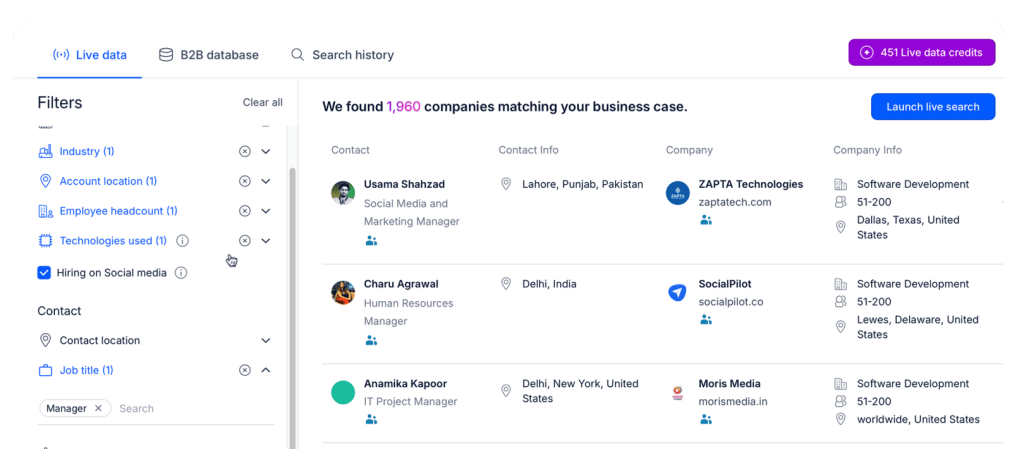
  • identify companies hiring now using real-time hiring + growth signals
  • prioritize accounts based on ICP fit (size, industry, stage, etc.)
  • track intent signals like funding, hiring velocity shifts, and tech changes
  • generate personalized outreach and keep follow-ups running without dropping the thread

So instead of “research → spreadsheet → forget,” you get a system that keeps your pipeline pointed at companies that are actively expanding.

How do I research companies before reaching out?

If you reach out without context, you sound like everyone else. The whole point of research is to understand what’s actually going on inside the company so your message feels timely and specific (not “nice website, quick question”).

Here’s what to look for.

Understand the company’s direction

Start with the basics, but do it with intent:

  • What do they say they do (in plain English)?

  • Who are they built for?

  • What do they keep repeating (speed, compliance, cost, “AI,” whatever)?

Scan the homepage, product pages, and positioning copy. You’re not writing a book report. You’re grabbing language you can mirror in outreach so it feels like you’re speaking their world.

Also note their go-to-market direction: enterprise vs SMB, new regions, new segments. That stuff impacts budget, urgency, and who cares enough to reply.

Identify recent growth signals

Now, let’s cover the “why now.” Look at what changed in the last 6–12 months:

  • funding

  • launches

  • partnerships

  • expansion moves

  • clear hiring acceleration

These are the moments where teams are rethinking tools, processes, vendors, and “how are we going to pull this off.” That’s your opening.

Review current job openings

Jobs pages are basically a live roadmap. A few fast reads:

  • lots of sales roles = pipeline push

  • clusters of engineering roles = product build / rebuild

  • more CS / support = customer growth (and usually churn/firefighting behind the scenes)

Don’t stop at titles — skim descriptions for tools, workflows, and keywords (CRM, data stack, support platform, “outbound,” “RevOps,” etc.). If you reference one real detail like that in your message, you instantly separate yourself from any generic template outreach.

Analyze leadership and org changes

New leaders (or new roles that didn’t exist a year ago) often mean new priorities. Check:

  • recent exec hires or promotions on LinkedIn

  • interviews/podcasts where they talk strategy

  • org reshuffles (new teams, merged functions, new department heads)

Early in a leader’s tenure, vendor stacks and processes get reviewed. That’s a real window to start a conversation.

Where to find this info (fast)

Keep it simple — most of what you need is public:

  • LinkedIn company page + employee posts

  • company blog / news page

  • careers page

  • press releases + industry publications

  • startup directories (if you sell into that world)

If you want tools, use them for a reason:

  • Sales Navigator (org + people + changes)

  • Crunchbase (funding / stage)

  • BuiltWith (tech stack hints)

  • SimilarWeb (traction patterns)

  • Google Alerts (so you don’t miss key updates)

Do this right and your outreach stops sounding cold, and starts sounding relevant and meaningful, which is exactly what drives higher response rates.

2025 Playbook: Convert Competitors` Fans Into Hot Leads

Stop chasing cold leads.
Start talking to people who already want what you sell.

Your competitors’ followers?
They know the problem. They’re paying attention.
Some are even looking for something better, right now.

This playbook shows you exactly how to turn them into hot leads:

→ Find and pull competitor followers in minutes
→ Clean, segment, and enrich your list for max fit
→ Launch outreach that’s personal, not pushy
→ Automate follow-ups so no lead slips away

Finding a company that’s hiring is step one. Step two is reaching the right person inside that company — the one who actually feels the pain and can do something about it. Because “someone in recruiting” isn’t always the move.

Identify the hiring decision-makers

Start by mapping the situation to the role: 

  • If it’s a hiring process / tooling problem: recruiters, Head of Talent, Talent Ops.
  • If it’s a team scaling problem: the hiring manager, department head, VP.
  • In startups: founders or the operator who owns the function.

Pretty straightforward: target the person who owns the outcome you’re talking about.

Use LinkedIn to filter and qualify contacts

LinkedIn (and Sales Navigator if you have it) is your fastest filter for titles, seniority, location, company size, and team scope.

But don’t just grab the first matching title and call it “qualified.” Quick sanity checks help:

  • tenure (new leaders often change things)
  • recent activity (posts, hiring announcements, comments)
  • team context (are they actually connected to the hiring motion?)

You’re trying to avoid messaging a “Manager, People” who has zero influence over what you’re selling.

Find and verify direct contact information

Once you’ve got the right person, get reliable contact details.

Use tools like Reply Data — a B2B lead database with over 1 billion live contacts across industries and locations, with verified email addresses and additional prospect and company info. The goal is simple: fewer bounces, better deliverability, less damage to your sending domain.

Prioritize contacts based on influence and timing

Not all “decision-makers” are equal. If you want faster replies, prioritize people who:

  • recently joined the company
  • are publicly talking about hiring / scaling
  • manage a team that’s actively expanding

Timing beats hierarchy a lot of the time. A VP who’s buried won’t reply, but a newly hired director setting up their stack just might.

Leverage warm introduction paths

Cold outreach works, but warm paths work better (obviously). A few easy plays:

  • check mutual connections and ask for an intro when it’s natural
  • engage with their posts before you DM/email them (not fake engagement — one real comment is enough)
  • show up where they already hang out: Slack groups, Discord communities, industry forums, webinars

You’re basically creating familiarity before you ask for their time.

Jason AI can help here too by finding the right decision-makers, pulling verified emails/LinkedIn profiles, and prioritizing contacts based on relevance and hiring activity — plus it can run the actual sequences for you, from writing personalized emails to sending LinkedIn connection requests, and much more.

How do I craft outreach messages that get replies?

If you’re reaching out to companies that are hiring right now, you’re already late to the party. Everyone’s inbox is full. The only way you get replies is if your message feels like it was written because of something real that’s happening inside their company.

Not because you “wanted to connect.”

Get the basics right

This part is boring, but it’s where most outreach dies. Always make sure to follow the basics of writing effective cold emails:

  1. Start with a real trigger → Funding, hiring push, new leader, product launch, expansion into a new market — anything that proves you’re not guessing.
  2. Say why you’re reaching out in one sentence → Be specific. Tie it to the trigger. No vague “thought I’d reach out” lines.
  3. Make the value obvious fast → One sentence, outcome-driven. If it takes you three sentences to explain what you do, the prospect is gone.
  4. Close with an easy CTA → A simple question beats a mini-essay. If you include a calendar link, don’t make it the whole close. Give them a couple of options too.

If you’re using an AI outreach tool like Reply.io, this is also where your life gets easier because you can build this into scalable multichannel sequences (email + LinkedIn), where the AI engine uses prospect and company data available and crafts hyper-personalized messages and follow-ups.

Use proven frameworks to structure your message

You don’t need to be obsessed with frameworks, but you do need structure. Two that work consistently:

AIDA (Attention → Interest → Desire → Action)

  • hook with the trigger
  • connect it to a goal they care about
  • show a clear outcome
  • ask a direct question

PAS (Problem → Agitate → Solve)

  • name the problem tied to the trigger
  • make the cost real (time, pipeline, churn, etc.)
  • position your solution as the obvious next step

The catch? Don’t write like you’re filling out a template. Use the framework silently, keep the email short. A tighter example (that doesn’t sound like a robot):

“Hey [Name] — saw you’re hiring [role/team] and ramping up fast. Usually that’s when [relevant pain] shows up (more leads needed, more handoffs, more follow-up chaos).
We help teams like yours [specific outcome] without adding headcount. Worth a quick 10 minutes this week to see if it maps?”

Apply advanced personalization techniques

Most personalization is not meaningful at all. Mentioning a company name and a generic compliment doesn’t count.

Real personalization = connecting a specific and personal element, in our case — hiring intent, to a specific operational need. Examples:

  • Hiring 5+ SDRs → pipeline generation + ramp time + process consistency
  • Hiring RevOps → they’re fixing reporting, attribution, workflows
  • Hiring CS / Support → customer growth, churn pressure, onboarding load
  • Hiring engineers → shipping velocity, infrastructure scaling, technical debt

And when you reference it, don’t overdo it. One good line is enough to show you’ve done your research and are actually here to provide potentially- needed value. 

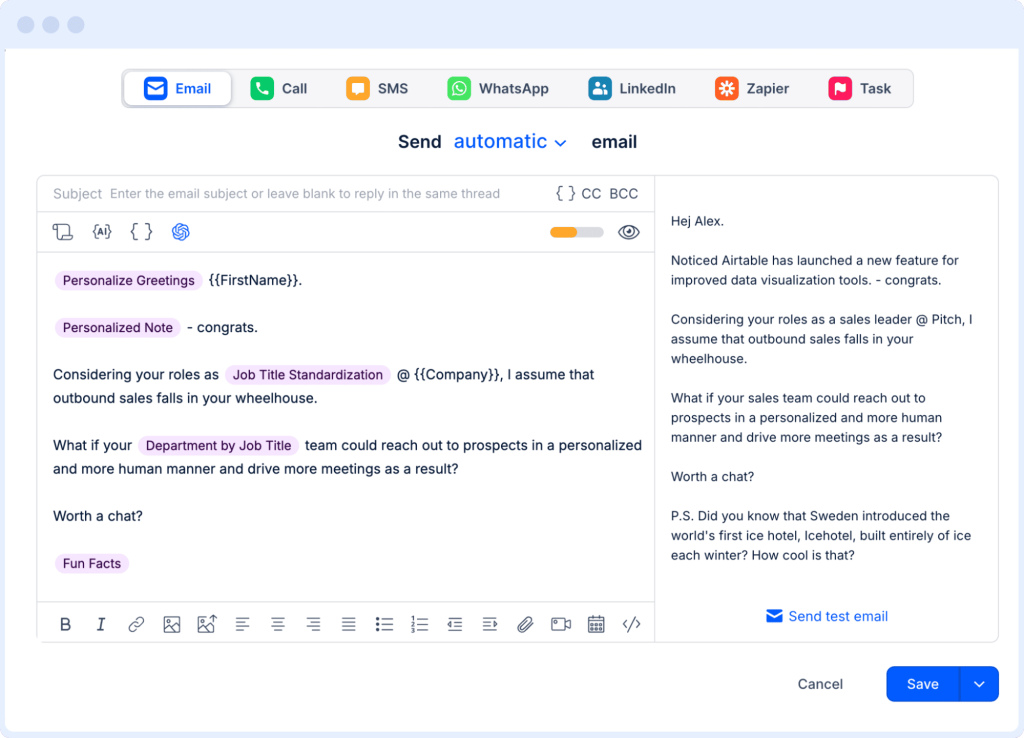
This is also where tools can seriously help save time and manpower. With Reply.io, you can use its AI Variables feature to pull in real account details (roles they’re hiring for, tech stack notes, recent signals) and drop them into a clean, human-sounding opener.

Same message structure, but different, highly personalized context each time, at scale. 

Use the right channel mix (and stop betting everything on one email)

If you’re only sending one email and praying, you’re doing outreach the hard way. Instead, a practical flow could include:

  • email first (short + direct)
  • LinkedIn touchpoint (profile view + connect with a one-liner)
  • follow-up email that adds one more relevant detail
  • a final simple nudge (“worth a quick chat?”)

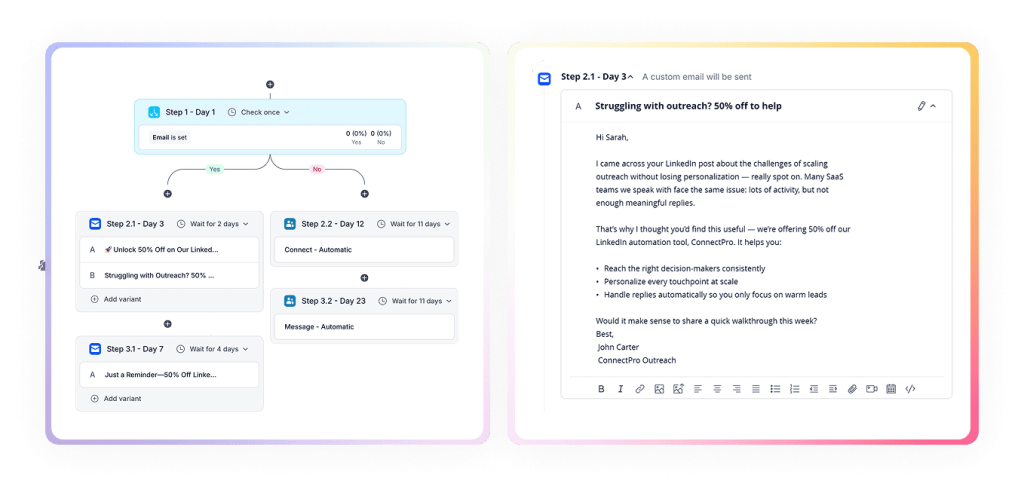
Jason AI shines here because you can build multichannel sequences with conditional steps, meaning the outreach strategy (channel, context, timing) adjusts in real time based on each prospect’s behavior. 

For instance, Jason starts the outreach sequences with a personalized email; if they haven’t replied to your initial email, Jason sends out an automated LinkedIn connection request; If that connection request is accepted, Jason sends a short personalized LinkedIn message and cancels the scheduled email follow-up, and so on.

That’s how you truly scale while keeping all conversations meaningful and value-driven. 

How do I schedule and manage meetings efficiently?

Simply booking the meeting isn’t the win — managing it well is.

If scheduling is messy, reminders are inconsistent, or the call feels unprepared, you’ll watch “interested” turn into “let’s circle back next quarter.” So you want a simple system that removes friction and keeps momentum.

Use scheduling tools that sync with your calendar

Don’t do the back-and-forth email dance. Use a scheduler that syncs with your calendar and updates in real time.

Calendly, Chili Piper, Google Calendar, Microsoft Bookings, OnceHub… all fine. The only real requirement: it must match your workflow and ideally connect to your CRM, so meetings get logged automatically (no manual cleanup later).

If you’re running sequences in Reply.io, one-click scheduling inside the email is present. Less thinking for them, fewer dropped threads for you.

Offer flexible time options when booking

Make saying “yes” easy for your prospect. 

  • Give a couple of time windows (not just a link and a prayer)
  • Respect time zones if you’re booking internationally
  • Keep the first call short (15–20 minutes is usually the sweet spot)

One underrated move: add a mini agenda in the invite. Two bullets is enough — it signals you’re organized and stops the “wait, what is this call about?” challenge.

Automate confirmations and reminders

No-shows are usually process problems. At minimum:

  • instant confirmation after booking
  • reminder 24 hours before
  • reminder shortly before (optional, depends on audience)

Always include the meeting link, and make rescheduling painless. A reschedule link beats a cancellation almost every time.

Prepare before the meeting

You don’t need a 3-page doc. You just need to show up like you’ve done this before. Have:

  • your objective (what you want coming out of the call)
  • 5–7 questions that get to pain + process + urgency
  • a clear next step in mind

Frameworks like SPIN or BANT can help, but don’t turn the call into a checklist. Use them as guardrails.

Capture and organize meeting insights

Take notes in the moment, or you’ll forget the good stuff and remember the fluff.

Use whatever you actually stick with (Notion, Evernote, OneNote). If recording is relevant, do it with consent — and keep it organized so it’s usable, not a graveyard of files.

Update CRM and outreach platform immediately

Right after the meeting:

  • log key notes
  • confirm next steps + owner
  • update stage
  • set follow-up tasks

This is the part people skip, then wonder why the pipeline feels “off.” Fast updates keep deals moving and stop things from slipping through cracks.

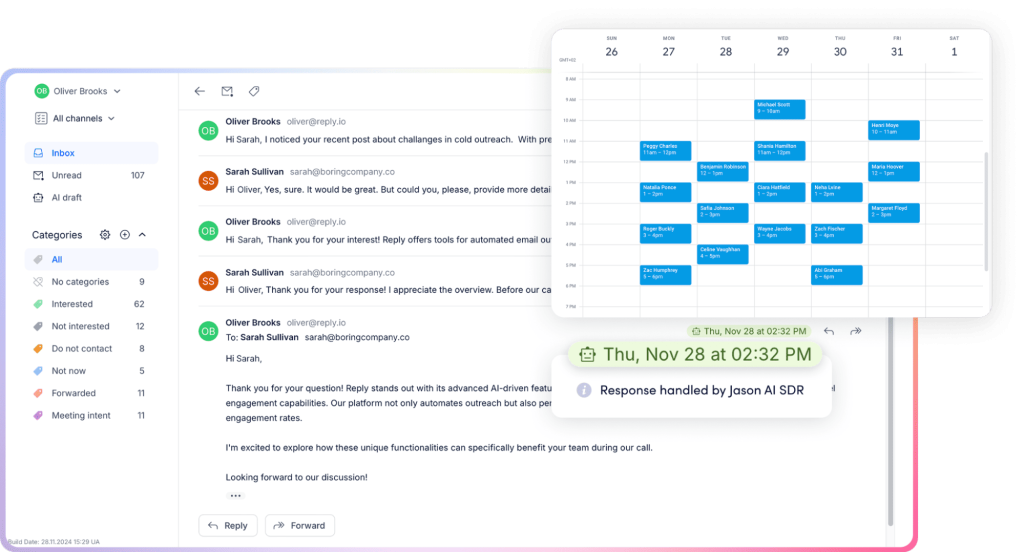
Jason AI can help on the operational side here too — not only does he continuously look for potential buyers and launch multichannel outreach campaigns, but he also handles incoming replies. 

That’s right, once you’ve connected your Calendar app with Jason, he will be answering incoming questions, handling common objections (based on your pre-designed sales playbooks), and even booking meetings on your behalf!

This way, your team will be getting a steady flow of interested and qualified leads, ready to talk numbers and have those demo calls, and hopefully, close the deals. 

What tools can support my whole outreach and meeting booking process?

Managing outreach manually can quickly become overwhelming.

Research, contact discovery, messaging, scheduling, tracking, and follow-ups all require coordination. But with the right tools, you streamline each step and minimize manual effort: 

Category tools What they do
All-in-one AI assistant Jason AI SDR Lead generation, personalization, multichannel outreach, reply handling, and automated meeting booking in one platform.
Research and job discovery LinkedIn, Glassdoor, Indeed, company career pages, YC Startup Directory, Angel.co Identify hiring activity, company growth signals, and decision-makers.
Email discovery and contact data Reply Data, ZoomInfo, Clearbit, RocketReach, UpLead Find and verify professional contact details.
CRM and pipeline management HubSpot CRM, Salesforce, Pipedrive Manage relationships, track pipeline stages, automate follow-ups.
Outreach automation Mailshake, Lemlist, Reply.io, Outreach.io, Yesware, Mixmax Run multichannel campaigns, automate sequences, and track engagement.
Scheduling and calendar integration Calendly, Chili Piper, Google Calendar, Microsoft Bookings, OnceHub Automate meeting booking, manage availability, and send reminders.
Analytics and reporting Google Analytics, Mixpanel, PostHog, HubSpot Reports, Salesforce Dashboards Track outreach performance and funnel metrics.
Productivity and collaboration Trello, Asana, Notion, Slack, Monday.com Organize tasks, coordinate workflows, and manage internal communication.
Personalization and monitoring Crystal Knows, Seabro, Albacross, Vidyard, Loom Improve tone matching, track website visitors, and enhance engagement with video.

As you can see from the table above, Jason AI doubles as an all-in-one AI sales agent.

With Jason, you don’t have to juggle separate tools for lead generation, personalization, outreach, reply handling, and scheduling. Instead, you can manage the workflow in a single platform, while Jason, quite literally, runs the whole show on its own. 

Jason works around the clock, researches all your prospects, uses AI to personalize each email and message at scale, and books meetings on your behalf. Its AI engine and your custom-designed playbooks also make sure Jason always chooses the right channel and the most optimal timing for each recipient (keeping in mind timezones), and it’s fluent in over 50 languages, so entering new markets is no problem! 

Compared to hiring traditional SDRs, Jason AI enables you to significantly reduce costs while maintaining 24/7 coverage and consistent execution across the outreach funnel. 

The playbook: hiring signals → relevance → meetings

Booking meetings with companies that are hiring comes down to timing + targeting + execution.

Find the teams that are clearly scaling (not just replacing someone), do enough research to sound like you actually understand what’s happening, then run tight outreach with real personalization and consistent follow-up.

No magic. Just discipline.

Start tracking hiring signals today, build a simple multichannel sequence, and keep iterating based on what gets replies. And if you want to move faster without turning this into a full-time research + follow-up job, Jason AI can fully automate the research, personalization, follow-ups, and booking flow end-to-end. Book a demo and see Jason in action right away! 

Subscribe to our blog to receive the latest updates from the world of sales and marketing.
Stay up to date.

Related Articles

What’s New in Reply: New API, AI Custom Fields, LinkedIn Enrichment, and More

What’s New in Reply: New API, AI Custom Fields, LinkedIn Enrichment, and More

What’s New in Reply: New API, AI Custom Fields, LinkedIn Enrichment, and More
Top 12 Cognism Alternatives for Finding Leads in 2026

Top 12 Cognism Alternatives for Finding Leads in 2026

Top 12 Cognism Alternatives for Finding Leads in 2026
Mailtrap Review 2026: Is This Email API the Right Fit for Your Team?

Mailtrap Review 2026: Is This Email API the Right Fit for Your Team?

Mailtrap Review 2026: Is This Email API the Right Fit for Your Team?