How to Automate Your Sales Outreach with n8n MCP in 2026
Vlad Oleksiienko20 Feb 2026
Building complex AI sales workflows used to mean months of engineering work, custom scripts everywhere, and constant firefighting when something broke. In 2026, that model is slowly dying out.
With n8n and its Model Context Protocol (n8n MCP) support, businesses can design advanced, data-driven outreach systems without having to rebuild every integration from scratch.
And once you stack AI sales tools like Reply.io on top of an n8n MCP backbone, you’re no longer just “automating sales outreach” — you’re moving toward an AI-powered, autonomous sales outreach engine that generates leads, launches outreach, and fills your calendar with meetings, while your team can actually focus on closing those deals.
What is n8n Model Context Protocol (n8n MCP)?
n8n is a workflow automation platform where you visually connect different tools, define logic, and orchestrate processes across your entire go-to-market stack. It’s source-available, can run in your own environment or in the cloud, and ships with hundreds of native integrations plus generic HTTP/database nodes for anything else you may need.
For sales and RevOps teams, n8n works great as the orchestration layer in the middle of everything:
It ties together CRMs, enrichment tools, outbound platforms, data providers, and internal systems into end-to-end flows
Branching, looping, delays, and rate limits let you build complex cadences and multi-stage lead processing
Built-in AI nodes and MCP support make it a natural foundation for AI sales outreach automation and agentic workflows
There are already plenty of workflow templates covering personalized outreach, automated lead management, and similar use cases — so n8n is way beyond simple trigger/action automations. It’s already a real engine for B2B lead generation with AI.
Model Context Protocol (MCP) in plain language
Model Context Protocol (MCP) is an open standard that explains how AI apps should talk to external tools, data sources, and services.
Instead of hardwiring one-off integrations between each model and each tool, MCP defines a reusable client–server protocol that any compatible AI system can plug into.
How does this all fit into sales outreach?
Because it turns AI from “a feature inside one product” into a universal operator that can safely work across your whole stack — CRM, lead enrichment, an AI sales engagement platform like Reply.io, analytics, billing, you name it — without rebuilding a new integration every time a model or tool changes.
How n8n implements MCP: server and client
n8n sits on both sides of the Model Context Protocol:
The MCP Server Trigger node lets you expose an n8n workflow as an MCP server. External AI clients (desktop AI apps, copilots, etc.) can call high-level tools that represent entire workflows instead of juggling raw APIs
The MCP Client Tool node turns n8n into an MCP client. It can connect to any compatible MCP server, discover available tools, and call them as part of a workflow. This is where Reply.io MCP becomes especially powerful (more on that later)
It’s also worth separating MCP from standard workflow integration. For a lot of day-to-day operational work in n8n, Reply can now plug in through native nodes. MCP becomes more useful when AI needs to discover and invoke tools more dynamically across the workflow itself.
There are also community projects that provide ready-made n8n MCP workflows that others can tweak to their unique stack, instead of building from scratch.
For a concrete example, check out n8n’s “Generate sales emails based on business events with MCP” workflow: it listens to key events, enriches them with external data, and then uses MCP-powered tools to draft tailored sales emails.
It’s a practical illustration of how n8n’s MCP server and client capabilities come together for real-world sales outreach:
Put together, the n8n MCP is not just a software connector, but a simple way to let AI agents reliably run complex workflows across your sales stack while n8n enforces structure, guardrails, and observability.
Building Outbound from Scratch [2026 Playbook]
This playbook shows you how to build outbound from zero, step by step.
No theory. No BS. Just clear guidance you can use right away.
What’s inside:
→ How to define your ICP and micro-segments → Proven outbound message frameworks → Copy-paste cold email templates → A practical outbound tool stack → 30 quick outbound shortcuts used by top sellers
Get the free playbook and start sending better outbound.
Why n8n MCP is a game-changer for sales outreach in 2026
Most classic sales outreach setups tend to suffer from the same problems:
Data is scattered across CRM, outbound tools, enrichment, product analytics, and random spreadsheets
Integrations are point-to-point, fragile, and painful to maintain on a technical level
“AI” usually shows up as a subject line helper or email assistant in one tool, not a brain that sees the entire lead lifecycle
The result? SDRs and RevOps spend a ridiculous amount of time exporting/importing lists, syncing statuses across tools, and manually pushing leads from one stage to another.
Trying a new sequence, adding a new data signal, or spinning up a new segment turns into a mini “plumbing” project instead of a quick configuration change.
How MCP + n8n unlock AI-native outreach
With n8n MCP in place, the architecture looks very different:
AI agents can call tools exposed by MCP servers, such as Reply.io MCP, enrichment MCP servers, internal microservices, etc. — all through one standard protocol
n8n runs the deterministic side of the house: workflow logic, branching, SLAs, approvals, error handling, and logging
For sales outreach, this unlocks scenarios like:
Automatically enriching and scoring new leads, then routing them into different outreach campaigns based on fit and intent signals
Letting AI choose the right channel mix and sequence in Reply.io for each segment, while n8n handles handoffs and status changes across CRM and the rest of your stack
Reacting to product usage or intent signals in real time and updating campaigns without anyone manually touching the settings
The building blocks of an AI-powered sales outreach engine
To automate your sales outreach engine with n8n MCP in a way that doesn’t collapse under its own weight, it helps to break it down into a few core building blocks.
n8n can ingest leads from pretty much anywhere — your CRM, inbound forms, spreadsheets, product signups, lead databases — and normalize them into one consistent schema.
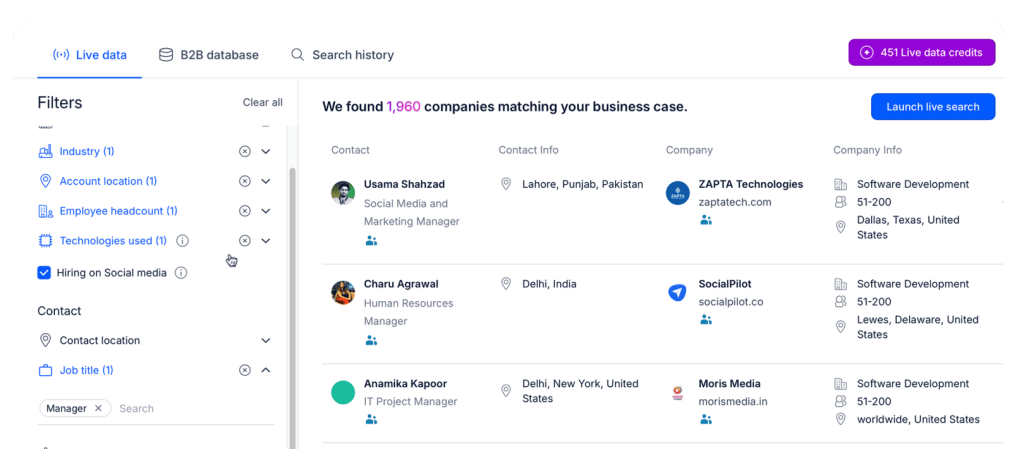
This is where it’s best to leverage multiple data sources like a CRM, LinkedIn, and a reputable lead provider like Reply Data to enrich customer profiles with relevant data points that will then be used to personalize outreach.
Reply Data offers over 1 billion live contacts, advanced filters by role, company attributes, and much more, along with built-in email verification and validation so your contact data actually stays usable.
This combination lets you mix inbound leads with net-new outbound prospects into a single pipeline that every n8n MCP sales outreach workflow can process in the same way.
2. Segmentation, scoring, and routing
Once leads enter the pipeline, the next job is to figure out who they are and where they belong.
n8n workflows can:
Apply rule-based scoring (industry, company size, role, source, engagement, etc.)
Segment leads into tiers based on that scoring
Use AI models to interpret unstructured inputs, like firmographic descriptions, notes, LinkedIn profiles, or product usage summaries, and add a qualitative score on top.
These segments then map naturally into your sales outreach sequences, for instance:
High-fit, high-intent leads get intensive, multichannel outreach
Mid-tier leads get lighter cadences
Low-fit or non-ICP leads go into nurture campaigns
3. AI-powered personalization and multichannel delivery
This is the part everyone actually sees — the messages and the channels. AI models running in n8n or via n8n MCP can research accounts and contacts, surface real triggers and insights, and generate tailored emails, follow-ups, and LinkedIn messaging that actually matches your ICP and positioning.
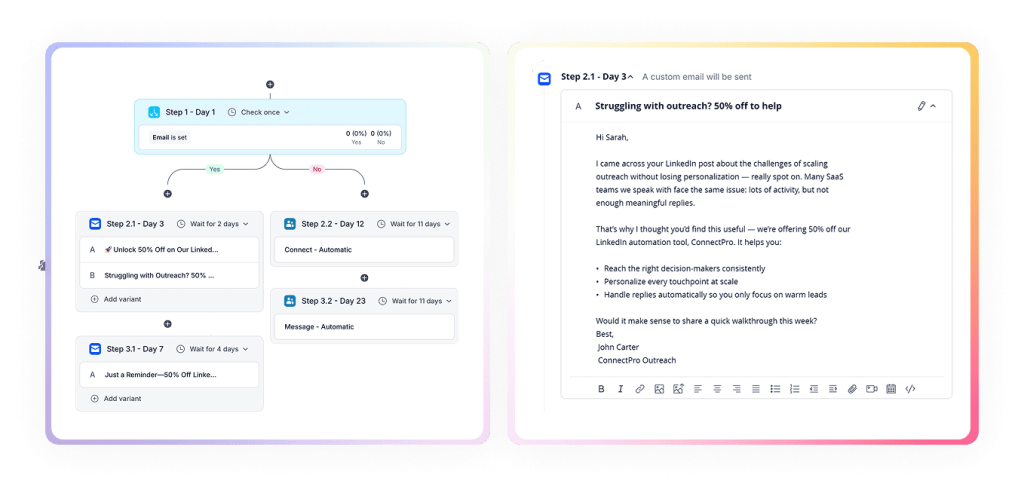
With an AI-powered outreach platform like Reply.io, teams can then build multichannel sequences where it all comes together, combining emails, follow-ups, LinkedIn touchpoints (automated connection requests, messages, post engagement, etc.), calls, SMS, and WhatsApp, into one cohesive outreach campaign.
Key capabilities here:
AI-generated sequences and messaging aligned with your brand and ICP
Conditional logic that adapts based on opens, clicks, replies, or channel availability
Advanced LinkedIn automation and task management so reps (or AI agents) can cover the full journey under one roof
n8n MCP pulls data from your CRM, product, and data tools and feeds each segment into the most appropriate sequences in Reply.io. Reply then makes sure messages hit the right channels, at the right time, with the right context.
That’s your AI-powered sales outreach engine in practice.
How Reply.io fits into an n8n MCP stack
In an AI-powered outreach engine, n8n handles the orchestration side and, Reply.io serves as the multichannel execution layer. When needed, MCP gives that AI system the power to actually decide which tools to use and how to use them.
In practice, there are now two complementary ways to connect Reply with n8n. The native Reply nodes work well for simple workflow actions and event-driven automations, while Reply MCP is better suited for cases where AI needs to make more dynamic, tool-level decisions inside the workflow.
Option 1: Native Reply n8n nodes for operational workflows
Use the native Reply nodes inside n8n when the workflow needs standard, deterministic Reply actions. That includes things like creating or updating contacts, changing contact status, adding leads to sequences, pausing or launching sequences, or reacting to Reply events such as replies, bounces, LinkedIn activity, sequence milestones, or account health issues.
This is usually the cleanest option for rule-based flows because the credential is set up once and then reused across Reply triggers and actions in the workflow.
Option 2: n8n MCP Client → Reply MCP:
Then you add the AI-native layer: connect n8n’s MCP Client to a Reply MCP server so AI steps in your workflows can call a set of pre-defined “tools” that represent typical sales actions. Instead of hand-wiring every API call, you let AI pick which campaigns or plays to run via those tools, while n8n MCP still owns the bigger picture — orchestration, rules, and guardrails around how and when those tools are allowed to fire.
The practical distinction is simple: use the native Reply nodes when you already know the workflow logic and just need Reply to execute it reliably, and use Reply MCP when you want the AI to choose which tools or actions to call as part of a more complex and autonomously-running process.
Step-by-Step: How to automate your sales outreach with n8n MCP and Reply.io
Once you’ve got the building blocks down, the next move is turning them into an actual system. You’re not just wiring tools together here — you’re designing a repeatable, AI-powered sales outreach engine that can grow with your pipeline and your product.
Prerequisites and environment setup:
Before you start building workflows, make sure the foundation is in place.
You need an n8n account (cloud or self-hosted) with access to MCP nodes so you can both call external MCP servers and, if needed, expose your own workflows as tools. Plus, if you plan to run n8n beyond light usage, hosting it yourself avoids per-execution costs entirely. This guide to self-hosting n8n covers the setup, resource requirements, and a flat-cost deployment for unlimited workflow runs.
So your Reply.io account should be configured with the basics:
Make sure you have Reply API access ready. If you plan to use the native Reply n8n nodes for standard workflow operations, configure the Reply credential in n8n once using your API key so it can be reused across Reply triggers and actions.
Finally, you need a Reply.io MCP server configured and reachable from n8n, with credentials stored securely in n8n’s credentials system. The setup is extremely straightforward.
Step 1 — Capture and normalize leads into n8n
The first step is to ensure every relevant lead enters a single, coherent pipeline. Set up n8n triggers for the main entry points in your funnel:
CRM events (new leads or new contacts on target accounts)
Marketing forms and website sign-ups
Product trial or activation events
Outbound lists from data providers or internal uploads
If you use Reply’s B2B data capabilities, you can also pull net-new prospects directly into n8n, rather than treating them as a separate silo.
Inside n8n, normalize everything into a single unified lead schema. That schema should spell out the minimum fields your downstream logic expects: key contact details, account attributes, acquisition source, lifecycle stage, plus the IDs you need to sync with your CRM and product data. At this point, add deduplication and basic validation so incomplete, junk, or duplicate records don’t move any further. This normalized pipeline becomes the backbone of your entire engine.
At this stage, add deduplication and basic validation so incomplete, junk, or duplicate records do not progress further. This normalized pipeline becomes the backbone of your entire engine.
Step 2 — Enrich, score, and segment leads with AI and data tools
Once leads are flowing into n8n in a consistent format, the next objective is to understand their quality and potential.
Use data providers and Reply.io’s data layer to:
Fill in missing firmographic and technographic details
Verify emails and communication preferences
Attach intent, product usage, or engagement signals where available
n8n orchestrates the enrichment sequence, merges results, and applies precedence rules when multiple sources disagree.
Scoring and segmentation combine deterministic rules with AI. A typical pattern is:
Rule-based scoring for ICP fit (industry, size, role, region, source)
AI-based scoring to interpret unstructured data (descriptions, usage patterns, notes) into a qualitative “fit” or “priority” label
The workflow then assigns each lead to a segment such as Tier 1 strategic, Tier 2 core ICP, Tier 3 long tail, or nurture.
These segments directly map to different outreach strategies and sequences in Reply.io. The result is a reusable pipeline where every new lead is processed, enriched, scored, and segmented in exactly the same way.
With a segmented pipeline, you can focus on the quality and relevance of your messaging.
In this step, n8n uses AI models and, where needed, MCP-connected tools to research accounts and contacts, then feed that info to Reply.io, which generates personalized emails, follow-ups, and LinkedIn messages based on relevant, real-time data.
For high-value segments, this can involve collecting public information about the company and role, extracting pain points and triggers, and summarizing them into personalization angles. For lower tiers, you can rely more on structured data such as industry, size, and role.
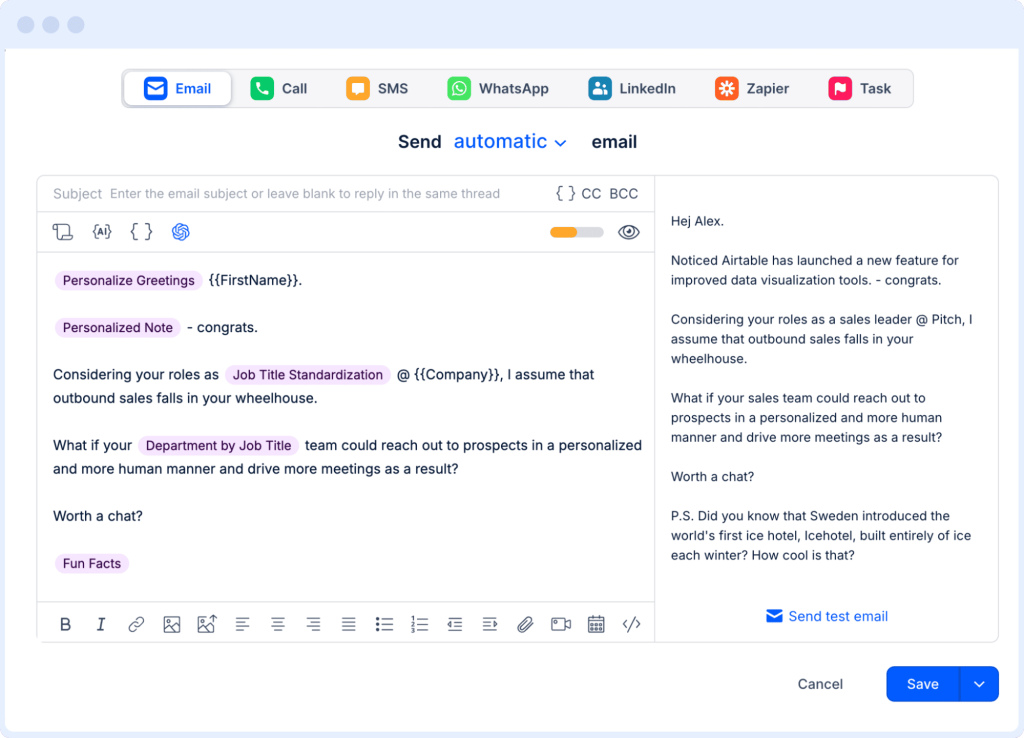
Reply’s AI variables feature makes it easy to create top-performing template structures for each lead segment while leaving room for custom personalization points, giving you:
Consistent structure and tone across campaigns
High personalization depth where it matters most
The ability to refine prompts or templates without touching every individual sequence
Because AI provides building blocks and Reply.io sequences decide how to assemble and deliver them, you get a balance between creativity and control.
Step 4 — Orchestrate multichannel sequences via Reply.io and MCP
Once personalized content is available, you need to deliver it through the right mix of channels and touchpoints.
Reply.io is your multichannel execution engine. For each segment, design sequences that combine:
Email steps with personalized variables and AI-generated components
Automated LinkedIn profile views, connection requests, and messages
Call tasks for reps where appropriate
SMS or WhatsApp touchpoints when they make sense for your market
Use Reply’s conditional logic to adapt journeys based on engagement signals: adjusting in real time when a prospect clicks, replies, or ignores several steps, and automatically changing intensity or channel mix.
n8n’s responsibility is to decide:
Which leads enter which sequences and at what time
What constraints apply (send limits, quiet hours, compliance rules)
When to transfer leads between sequences based on changes in score or behavior
For straightforward routing, the native Reply n8n nodes can be your default operational layer. They cover the common workflow steps most teams use in their day-to-day workflows: creating or updating contacts, assigning statuses, adding leads to sequences, and reacting to live outreach events inside n8n without having to build every action from scratch with raw API requests.
When you want AI to take a more active role in decision-making, that’s where Reply MCP starts to shine. In that setup, n8n can use the MCP Client Tool so the AI steps within your workflows can discover which tools are available, decide which ones to call, and when. For example, it could move a subset of leads into a shorter, product-led sequence instead of a heavier outbound motion based on recent product usage, intent signals, or broader campaign context.
That separation keeps things clean — Reply.io stays focused on lead generation and multichannel outreach execution, the native n8n nodes handle standard workflow operations, and the MCP connection handles the AI reasoning layer, strategy decisions, and tool selection.
This separation of processes keeps Reply.io focused on execution, multichannel campaign building, and AI personalization, while n8n MCP runs strategy, timing, and guardrails.
Step 5 — Analytics and continuous optimization
With outreach running, the final core step is to close the feedback loop and continuously improve the system.
n8n can pull and aggregate performance data from Reply.io — delivered, open, click, reply, positive reply, and meeting rates — alongside CRM and revenue outcomes. Instead of limiting yourself to campaign-level reports, you can analyze results by:
Segment (Tier 1 vs Tier 2 vs nurture)
Channel mix and sequence design
AI strategy used (prompt variants, personalization depth, or scoring models)
With the native Reply node, optimization does not have to rely only on periodic reporting. You can also build event-driven feedback loops directly in n8n. For example, you can:
Send bounced contacts into cleanup flows
Alerting the team on high-value replies
Branch when a contact finishes a sequence
Pause outreach activity when Reply surfaces account health issues
Test different channel orders (email-first vs LinkedIn-first)
AI models in n8n can regularly review performance data, summarize what is working or failing, and propose changes such as rewriting specific steps, altering thresholds, or shifting a segment to a different play.
Once approved, n8n can update Reply.io configurations via API or Reply.io MCP, turning optimization into an ongoing, semi-automated process rather than an occasional manual project.
Once approved, n8n can push those changes back into Reply through the native node for common actions, through API-based steps for custom cases, or through Reply MCP for autonomous AI operations — turning optimization into an ongoing, automated process.
Let Jason AI operate your n8n MCP outreach engine
Once this system is in place, you can decide whether you want to take the next step and delegate the execution to an AI sales agent, aka AI SDR.
Jason AI is Reply.io’s native AI SDR agent designed to generate targeted leads, run multichannel outreach campaigns, handle a large share of replies and objections, and book meetings on your behalf.
In an n8n MCP-centric architecture:
n8n MCP owns the cross-system logic: lead capture, enrichment, scoring, routing, analytics, and safeguards
Reply.io and Reply.io MCP provide the multichannel outreach and campaign tools
Jason AI SDR operates inside Reply.io as the “virtual SDR” that executes those plays
This means you can keep the strategic decisions, like how segments are defined, which plays exist, and what guardrails apply inside n8n, while letting Jason AI:
Run day-to-day multichannel outreach for selected segments
Respond to straightforward replies and objections within clear guidelines
Push qualified, interested prospects toward booked meetings on your reps’ calendars
Because n8n remains in the loop, you can control where Jason AI is allowed to act autonomously (for example, mid- and low-tier segments) and where humans must review or take over (for example, strategic accounts).
In practice, this turns your n8n MCP + Reply.io setup from an AI automation engine into an AI-operated one, without sacrificing governance or visibility.
Best practices for AI-driven outreach with n8n MCP
AI- and MCP-powered outreach massively increases leverage — and the impact of mistakes. To keep your system effective, compliant, and on-brand, you want guardrails baked into your n8n MCP and Reply.io setup from day one.
Key best practices:
Maintain high-quality, consent-aware data → enrich and verify leads, keep records fresh, and honor unsubscribes + regional rules everywhere. Reply.io’s data/deliverability layer plus centralized suppression in n8n cuts risk and protects your sender reputation.
Expose only safe, high-level tools via MCP → in Reply MCP (and other MCP servers), expose clear actions like “add to campaign” or “pause sequence,” not raw APIs. It’s easier to control what AI can do and shrinks the blast radius of bad configs or prompt-injection. As autonomous workflows expand, agentic AI security can add another layer of control by continuously evaluating agent identities, access, and risky behavior.
Use human approval for high-impact actions → for new campaigns, high-level segments, or sensitive regions, keep a human in the loop. Let Jason AI run in copilot/approval mode so people sign off on sequences and key message variants before they go live.
Log and monitor all AI-initiated actions → log every AI move in n8n — which MCP tool, which agent, which configurations, and set alerts for weird patterns like send spikes, odd classifications, or unexpected campaign changes.
Respect deliverability and sending limits → use n8n’s pacing plus Reply.io’s native email deliverability controls to manage volume, domains, and time windows. Watch bounce/spam rates and tweak sequences early, before mailbox providers or LinkedIn start giving you trouble.
With these safeguards in place, you can lean into AI sales outreach automation confidently, knowing exactly where AI is allowed to act and where humans stay in charge.
Wrapping up
n8n MCP gives you a flexible, AI-aware orchestration layer for your sales data and processes. Reply.io adds an AI sales engagement platform with multichannel conditional sequences, a deep B2B data foundation, and a dedicated AI SDR agent with Jason AI.
By combining these components, starting with simple workflows, then gradually adding n8n MCP, Reply.io MCP, and Jason AI, you move from manual, tool-siloed outreach to an AI-powered system that takes over most of the operational heavy lifting.
In practice, that gives you an AI-powered sales outreach engine custom-built around your business that finds the right prospects, keeps them engaged, and feeds real opportunities to your team, while they focus on what actually moves revenue: conversations, relationships, and closing.
FAQ: Automating sales outreach with n8n MCP and Reply.io
What is n8n MCP in the context of sales outreach?
n8n MCP is n8n’s use of the Model Context Protocol to let AI agents discover and call tools across your sales stack. In practice, it turns n8n into an AI-ready control plane that orchestrates CRM, data, and sales engagement workflows (including Reply.io) for automated outreach.
How do I automate my sales outreach with n8n MCP and Reply.io?
Use n8n to capture, enrich, score, and segment leads, then route them into Reply.io. For standard workflow steps like contact updates, sequence assignment, and event-based automation, the native Reply n8n node is usually enough. Use MCP when you want AI to make more dynamic decisions about routing, timing, or tool usage.
Why would I add Reply MCP on top of the Reply.io API?
Use Reply MCP when you want AI agents to work through a standardized tool layer instead of fixed API logic. For straightforward, rule-based workflows, the native Reply n8n node is often the simpler option. MCP becomes more useful when AI needs to decide which action to take.
How does Jason AI fit into an n8n MCP sales outreach stack?
Jason AI is an AI SDR agent that operates on top of your Reply.io sequences and data, running multichannel outreach, handling many replies, and driving meetings. n8n MCP defines the overall logic and guardrails, while Jason AI executes day-to-day outreach within those constraints.
Where should I start if my team is new to n8n MCP and Reply.io?
Start with one simple workflow in n8n and use the native Reply node for the core handoff into Reply.io. Once that flow is stable, add AI for enrichment and personalization. Bring in Reply MCP later only where dynamic AI decision-making actually adds value.
Subscribe to our blog to receive the latest updates
from
the world
of sales and marketing. Stay up to date.
We use cookies to enhance your browsing experience, serve personalised ads or content, and analyse our traffic. By clicking "Accept All", you consent to our use of cookies.