
For most B2B sales teams and founders, the problem is not a lack of leads. The problem is a lack of precision. There is no shortage of companies out there, and truthfully, finding them is not that challenging.
But if your business is looking to grow its client list with the right companies, that’s a whole other story. What do we mean by the right companies?
Organizations that match your (or your competitors’) best existing customers, share similar characteristics, and are therefore much more likely to buy for the same reasons.
In a sales context, we’re talking about lookalike accounts that match your Ideal Customer Profile (ICP) and give you a higher probability of conversion. Because the golden rule of modern sales is: 10 targeted clients beats 100 random ones any day of the year.
This guide explains how to find those similar companies in a structured, scalable way, with numerous actionable strategies, and then how to effectively shift from research to turning them into buyers.
Why finding similar companies matters
Before we start exploring tools and workflows, it helps to take a step back and emphasize why should companies even care about finding similar companies at all?
When you narrow your focus to lookalike accounts instead of going after that outdated “everyone who might buy” strategy, you’re basically cloning your best customers, which translates into very real advantages for sales and GTM teams:
- Higher conversion rates → companies with a similar size, industry, and motion tend to recognize the problems you solve much faster. You don’t have to convince them the problem exists. Instead, you just have to show why you’re the right solution.
- More predictable pipeline → if your target list is made up of accounts that actually look like your existing customers, your sales forecasts aren’t a shot in the dark. They’re based on patterns you’ve already seen work in the past.
- Shorter ramp for new reps → new SDRs and AEs don’t have to play “guess who’s a fit.” They can get good at one clear type of account, one set of patterns, one set of conversations. That alone cuts down ramp time.
- Better messaging resonance → you can reuse the same core value props, case study angles, and objection handling you already know land with this kind of company, instead of reinventing the script for every new logo.
- More efficient tools and data → lead databases, enrichment, and AI prospecting tools all perform noticeably better when they’re pointed at a well-defined segment, not a random mix of “maybe they’re a fit, maybe not.”
So finding similar companies isn’t just a nice research project. It’s how you take what already works and turn it into something you can actually scale and repeat.
Without further ado, let’s take a look at the key steps on how to find similar companies, fast.
Step 1: Define what “similar” means for your ICP
Everything downstream depends on getting this part right.
If your definition of “similar” is fuzzy, every tool you touch will spit out a different set of accounts, and you’ll end up with a broken Frankenstein-list that won’t yield the expected results.
In B2B, similar companies = companies that match your ICP. They resemble your best customers across three main angles: what they are, how they go to market, and what they’re running under the hood.
1. First, nail the firmographic profile. This is the structural DNA of your ideal accounts that covers elements like: industry and sub-industry, employee count, revenue range, and geography.
A 30-person US-based SaaS selling to mid-market and a 5,000-person global enterprise vendor do technically share the same label, but they live in completely different realities. For your unique product, one of them might be a perfect fit, while the other, a total distraction.
2. Next, zoom in on the business model and go-to-market. Are you selling into B2B or B2C companies?
Does your product live best in sales-led orgs with quota-carrying reps, or in product-led companies with self-serve trials and upgrades? Do you usually win in SMB, mid-market, or enterprise?
A B2C subscription app with the right headcount, budget, and geography is still the wrong target if your product is designed for B2B sales teams.
3. Finally, layer in technographics where it matters. If your solution integrates with specific software, then companies already using those tools are simply closer to your ideal customer than those who don’t.
And at this point, any compatibility or integration point should become part of your main value proposition during outreach.
By the end of this step, you want to have a battle-ready, short, and clear ICP that will be embedded in all your sales playbooks and used as a benchmark in all the next steps, for example:
“North American and European B2B SaaS, 50–500 employees, $5–50M revenue, multi-seat subscription model, using either HubSpot or SalesForce.”
Step 2: Learn how to find similar companies on LinkedIn
Once your ICP is clear, LinkedIn becomes the most practical starting point to find similar companies online.
You get a mix of structured company data, hiring and employee signals, plus the network graph that naturally exposes competitors and adjacent players.
Start off with a hero account, that is, pick one of your absolute best-fit prospect companies that matches your ICP perfectly. Open its company page on LinkedIn and treat it like a mini case study.
Check:
- industry label, size band, HQ location – do they match your ICP notes?
- “About” section and specialties – which keywords and category labels are they using?
- recent posts and job ads – what roles they’re hiring, which tools or initiatives pop up?
This gives you a live example of what a “perfect” account actually looks like in LinkedIn’s language, not just in your internal docs.
Now it’s time to move on to LinkedIn search. Use the main search bar, switch to “Companies,” and start with keywords that match your hero account’s category – e.g., “sales engagement software,” “sales prospecting platform,” “B2B SaaS for revenue teams,” etc.
Then apply filters so the results fall inside your ICP ranges, be it region, industry, employee count, and so on.
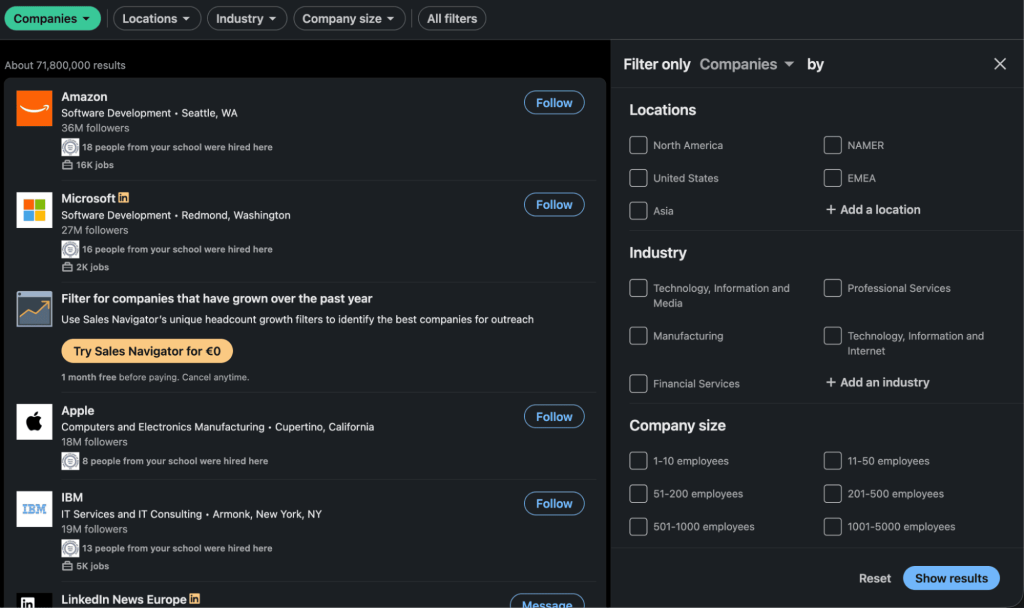
Instantly, you’ll see a bunch of companies that at least resemble your hero account on the surface. From here, it’s manual but not random. Open each company profile one by one and quickly run it through your ICP checklist:
- Are they selling to similar types of customers?
- Do size and geography match your ranges?
- Does the category/product look like something that fits your motion?
If yes, add it to your Excel, CRM, or outreach platform along with their LinkedIn URL and quick context points (“SaaS, 100–200 employees, US-based, sells to sales teams, uses Salesforce”)
Also, another LinkedIn hidden gem is the “People also viewed” tab that shows up on company pages and often shows direct competitors and close neighbors.
Finally, if you have LinkedIn Sales Navigator, everything above just gets even more efficient with advanced filters that let you stack more search filters, build account lists per segment, and get alerts about new companies that match your criteria or when tracked accounts raise funding, grow, or hire specific roles.
All in all, LinkedIn is perhaps one of the most effective ways to find leads for your business, regardless of your industry, geography, or product.