
How to Find Employees of a Company: Ultimate 2026 Guide

How to Find Employees of a Company: Ultimate 2026 Guide

Key takeaways:

  1. Finding employees helps recruiters hire faster and identify relevant candidates directly.
  2. Sales teams need clear employee roles to reach decision-makers and avoid dead-end contacts.
  3. LinkedIn reveals active employees; Boolean search refines position and company-specific results.
  4. Reliable lead databases offer 70-80% accurate employee contacts, saving research time.
  5. Frequent updates and alerts keep employee lists current, avoiding wasted outreach efforts.


Whether you’re recruiting, selling, or analyzing competitors, the same question may inevitably come up: who actually works at this company? 

Without that answer, everything else leans towards guesswork. You can’t pitch products without knowing who the decision-makers are, look for potential talent without seeing the entire team, or size up a competitor without understanding how their team is structured. 

The problem is that employee info is often hidden, outdated, and scattered across multiple sources and privacy walls. That’s why knowing where and how to look matters more than ever in 2026.

This guide breaks down the proven methods on how to find a list of employees at a company quickly and accurately, while staying 100% compliant at all times

Why finding employees in a company matters

Knowing which employees work in a certain company opens numerous new opportunities across almost every area of business. To put this in perspective, here are a few brief real-world scenarios where knowing the employee list and structure of a company would be of value:

  • For recruiters, the value is very straightforward — they can’t build a shortlist of potential candidates if they don’t know who already holds the roles they’re hiring for. Teams with sharper visibility into their talent pools move faster and consistently land better hires. 

Let’s imagine the talent lead at a startup is hiring a compliance manager. Instead of waiting around on job boards, they look at employees holding that title in more established companies who may be enticed by a fresh startup culture, and then build their prospect lists from there. 

  • For sales, this corporate structure visibility is borderline necessary for survival, especially since email addresses like “[email protected]” are pretty much a black hole. Deals can only move when you identify the decision-makers, key influencers, and end users to tailor messaging, cut dead loops with gatekeepers, and shorten the path to a yes (or a clean no).

Selling HR software? Start by identifying HR directors and payroll managers at target companies instead of blasting messages to whoever you can find in that target company, or asking them to point you in the right direction (9/10 times — they won’t). 

  • For business development (BD) and partnerships, it’s equally important to reach out to the right person with tailored messaging, and that can only happen with a clearly mapped ecosystem (at least roughly). Without that visibility, BD is just cold networking.

Let’s say a lead gen agency is scouting partnerships and sees that a SaaS company recently hired a new “Head of Partnerships.” That’s their best entry point for a strategic conversation.

And then there’s the competitive intelligence element, which could mean tracking who’s been hired, who left, and how teams are structured to uncover potential expansion or exposure spots, both of which are signals you can act on.

Whatever your role, understanding who’s inside the walls gives you leverage, whether it’s to hire, sell, partner, or compete. 

How to find the employees of a company

There’s no single way to uncover employees at a company. The best results come from combining traditional manual gruntwork with digital tactics, and layering automation on top when it makes sense — exactly how many agencies plan and run cold outreach for their clients.

Think of it as learning how to search employees by company across a mix of channels instead of betting everything on one website or platform.

Here’s a breakdown of the main approaches:

LinkedIn & other social platforms

For most professionals, LinkedIn has become the go-to place to build their personal brand and keep their experiences, achievements, and work history updated at all times. And that’s what makes it the number-one place to identify company employees quickly.

Sometimes the most effective way to get something done is the simplest one. There are a few very straightforward tactics on how to find employees of a company on LinkedIn. 

If you’re interested in a full-picture overview of the workers in a certain company, use LinkedIn’s “company” search bar with whichever filters you may need (company name, location, industry, size) to narrow down your search, available even for free accounts.

how to find a list of employees at a company - Linkedin filters

For smaller teams, this is also one of the easiest ways to find employees of a company for free before you even think about paying for data tools.

Then, simply click on your target company, and you will see a clickable “x number employees” tab, as shown below:
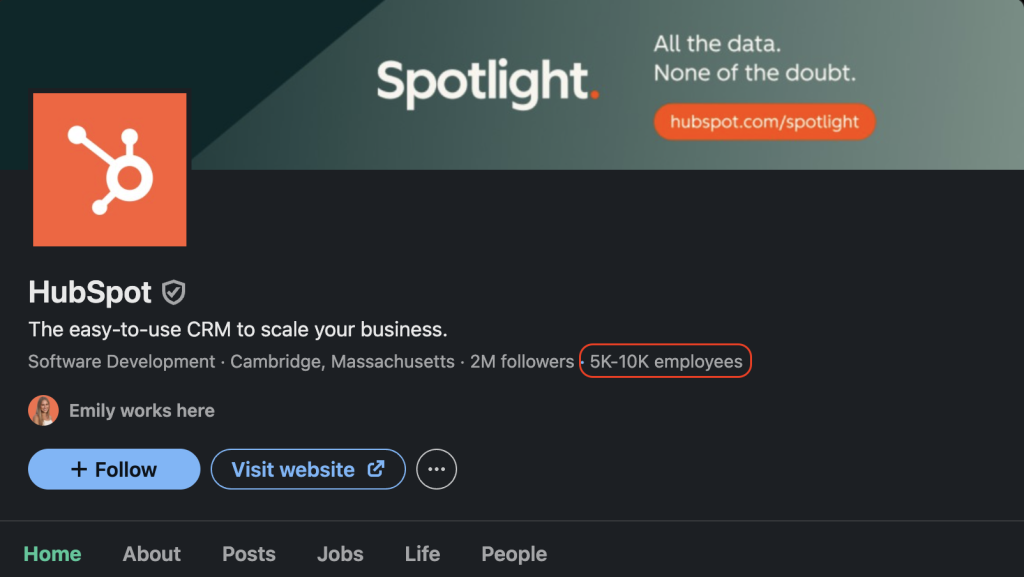
how to find number of employees in a company with its company page on linkedin

Simply click it, and you have the full list of the company’s employees, at least those who have a LinkedIn profile that is! And if you’re wondering how to find the number of employees in a company, LinkedIn’s headcount data gives a quick estimate too. 

If you don’t have a specific company in mind and are more looking for key decision makers in your industry, another tactic is to simply use LinkedIn’s search feature for individuals rather than companies. 

This is where LinkedIn Boolean search can be of great assistance, which means combining keywords with operators like AND, OR, and quotation marks to refine your results. For example: (“sales development” OR “SDR”) AND “CompanyName”  will show people at that specific company with either job title. 
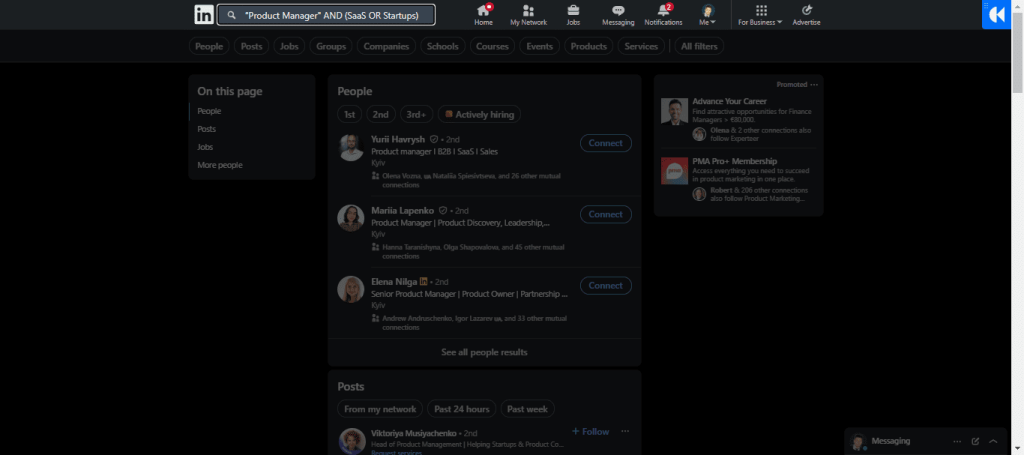
how to find employees of a company on linkedin - boolean search

Once you’ve found the select few decision-makers, there are many legit ways to get email addresses from LinkedIn to begin your outreach right away.

In fact, you can even use AI to find contact information for company employees in a clean, compliant way instead of scraping random sites and hoping for the best. 

Pro tip: Save your LinkedIn searches and set custom alerts. That way, when a prospect company hires someone new in your target role, you’ll get notified immediately.

3 steps to turn competitor fans into your leads

Stop chasing cold prospects. Use this 3-step playbook to build warm, ready-to-buy lists in minutes.

Company website & careers page

Another straightforward option to try is to visit the target company’s website. Search for some sort of “About Us,” “Team,” or “Leadership” pages that most companies have, these often reveal names, roles, and even photos. 

“Careers” sections also give hints about team structure, for instance, if they’re hiring a “Senior Product Manager,” chances are there’s already a product team in place.

The catch is accuracy, since smaller firms may update these pages only once a year or so. Other companies may strip leadership names entirely for privacy. Still, it’s a useful sweep to have in your back pocket. 

Additional tips:

  • Check press releases or newsrooms for any recent announcements about new leadership joining; 
  • Look for staff directories in PDF reports or investor decks, these sometimes list department heads;
  • Pay attention to job postings — they expose reporting lines (“reports to VP Sales”), which helps you roughly map org charts.

Professional directories & lead databases

LinkedIn is great, but it won’t cover everyone. That’s where professional directories and third-party lead databases come in. They’re not all created equal, and the difference usually comes down to freshness and verification, which is why it’s crucial to go for reputable companies. 

These company employee search tools act like constantly updated snapshots of who works where, with advanced filters you’ll never get from a static spreadsheet.

Lead databases are cloud-based directories that contain publicly-sourced information about millions of professionals across all industries, and they are one of the most effective ways for businesses to find leads

Unlike with most purchased email lists, where you’ll get wrong emails, outdated titles, and in some cases, people who left the company years ago, these databases keep all records clean, fresh, and verified at all times. 

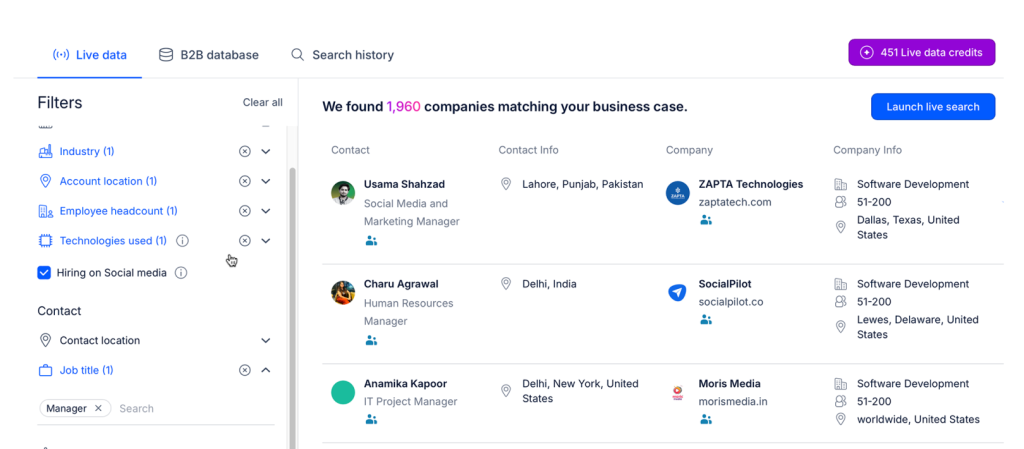
One great example is Reply’s lead database, containing over 1 billion live contacts, regularly updated, always verified, and following all the regulatory standards: 

reply database

With its vast search filters, users can simply create a targeted search for the companies they are interested in, and then skim through all their publicly-listed employees, along with additional information like emails, phone numbers, technology used, headcount, and the list goes on.  

Will directories like these give you everyone’s info? No. But they’ll get you 70–80% of the way there, free up time you’d otherwise waste on manual digging, and help collect and validate clean data at scale. 

As part of the full Reply.io suite, users can launch AI-powered outreach campaigns in just a few clicks, ensuring that each message is highly personalized with all the uncovered data.

Search engines & Boolean tricks 

Sometimes the best “database” for any kind of information is still Google. Not glamorous, but with the right search strings, you can pull up stuff LinkedIn or directories won’t show you. Some people call it “X-ray searching,” but in practice, it’s just using Google’s operators smartly.

Couple of simple examples that you could try running for a targeted search:

  • site:linkedin.com/in “Job Title” “CompanyName” → pulls LinkedIn profiles that match both terms. Good for targeting specific roles inside a single company.
  • site:company.com “Job Title” or site:company.com filetype:pdf “org chart” → company-hosted pages or investor decks that accidentally reveal team lists.

And these are just the most common examples, there is plenty of room to experiment here. This works best when LinkedIn doesn’t provide great results right away, and you want one last try before committing to a lead database. 

In any case, Google won’t replace LinkedIn or a directory, but it’s a solid supplement. When you hit a dead end on “official” channels, a clever query can break things open.

Networking & referrals 

Not every employee discovery happens online, or at least not with ‘outbound’ effort. Good-old-fashioned referrals remain one of the most reliable methods.

Start with people you already know, be it current employees, ex-colleagues, or trusted industry contacts. Ask them directly: “Who handles X at your old company?” 

You’ll often get names you’d never dig up through any LinkedIn filters or Google queries. And in many cases not only will you get the name but also a warm intro or at least a heads up. 

Alumni networks (corporate or even school-based) are just as underrated — people tend to open doors for “one of their own.” 

The upside is clear: warm intros bring trust, context, and often better response rates. The trade-off? It won’t scale, and unless you’ve got an established, solid network, this won’t yield great results. But for high-value hires, big-ticket sales, or partnership conversations, one solid referral beats blasting fifty cold emails into a black hole.

Common challenges in finding the employees of a company

It may sound very simple at first glance — just “look up” who works where on LinkedIn. In practice, it’s rarely that easy for a few key reasons:

  • Outdated information: job changes happen constantly, so someone who looked like a perfect lead in January may be gone by June. Relying on static spreadsheets or old lists is a sure way to waste effort on the wrong contacts.
  • Inconsistent titles: not every company labels roles the same way. One hires a “Customer Success Manager,” while another uses “Client Relationship Lead” to refer to the same position. Without normalizing or broadening your search, you’ll miss people who actually fit the profile.
  • Hidden data: some employees lock down their profiles or avoid social platforms altogether. Smaller companies often skip publishing org charts, leaving you piecing things together from press releases or job ads.
  • Messy data: teams pulling from multiple sources frequently end up with duplicates, misspellings, or dead emails. That means double-contacting the same person, or worse, hitting a bounce list and hurting your email deliverability.
  • Privacy and compliance: GDPR in Europe and new U.S. state laws mean you can’t just scrape and blast like back in the day. Cold outreach is possible, but it has to be backed by all the legal and ethical best practices. 

The bottom line is that without a clear process to keep employee data fresh, standardized, and compliant, your outreach or recruiting pipeline will leak before it even starts.

Instead of rebuilding everything from scratch, treat your lists as living documents — save key LinkedIn searches, set alerts, and log role changes in your CRM, outreach tool, or even excel, so you’re not re-learning how to find employees of a company every quarter.

This is exactly where reputable prospecting and outreach platforms like Reply.io come into play, helping teams not only find the right professionals, but also find additional data and leverage AI to reach out with the right message at the right time.  

How to find company employees and start outreach with Reply.io

Sure, you can cobble lists together from LinkedIn, spreadsheets, and random databases. But it’s clunky, error-prone, and by the time you’re done, half the emails bounce back and hurt your domain reputation. 

Reply.io kills that entire mess by putting the entire process, from discovering leads and validating their data to launching outreach, all under one roof, without the need to juggle between tools, email accounts, and spreadsheets.

Step 1 — Collect & clean employee data:

Start building targeted lists in Reply.io’s native database using its numerous search filters, or simply upload your own lists. Either way, every contact gets checked and verified automatically, and any bad emails, duplicates, or typos get flagged right away. On top of that, Reply’s AI engine will search for any additional prospect/company data and enrich profiles. 

Step 2 — Launch outreach:

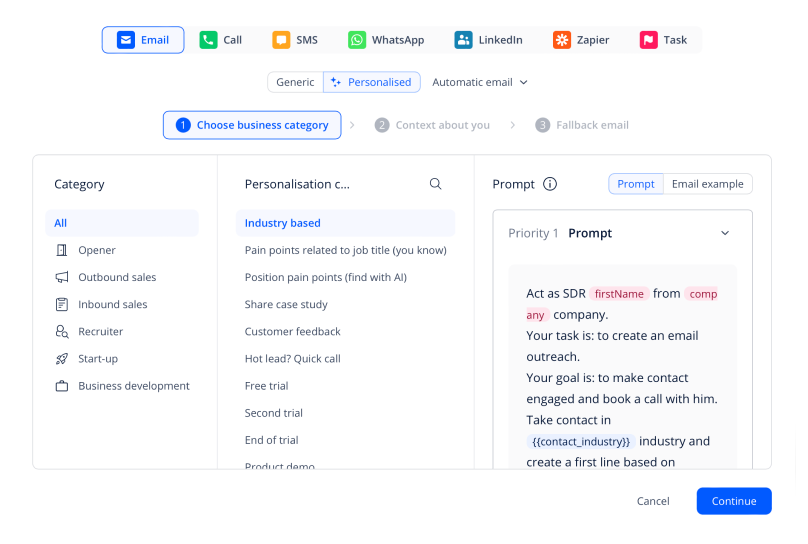
Validated contacts push straight into tailored multichannel sequences with email, LinkedIn, calls, and more. No manual exports, no clunky imports. Reply’s AI will auto-generate personalized messages at scale by leveraging all the existing and enriched data, ensuring your outreach reads human without you having to burn hours on copy. 

multichannel outreach

Step 3 — Track, refine, repeat: 

Once campaigns go live, you see what’s working in real time with powerful analytics that show opens, clicks, replies, bounces, and more. Lists that convert stay hot, those that flop get reworked. This feedback loop sharpens every new list, so your next round is cleaner and more on target.

With tools like Reply.io, you can go from figuring out how to find employees in a company to reaching out to them with personalized messages in a matter of hours, not weeks. 

For recruiters, sales reps, and BD managers, that speed compounds. Fewer ghosts, fewer dead ends, more conversations that matter. That’s the real edge.

How to use employee skills and salary data for smarter decisions

Once you know who works at a target company, you can go a level deeper and look at what they actually do and roughly what they’re paid. That’s where skills and salary data start to matter.

For recruiting, this shows you where the gaps are. If competitors have stacked teams around a certain skill set and your target company hasn’t, that’s either a gap you can help fill or a sign they’re about to start hiring. Salary benchmarks help you write offers that are serious without guessing.

For sales and partnerships, skills data helps you zero in on who actually owns the tools, processes, or projects you care about. Filtering employees by tech stack, certifications, or seniority makes it easier to find decision makers at a company who actually move deals forward.

You don’t need a heavy setup here — basic data from LinkedIn and B2B sources, dropped into a simple sheet or BI view, is enough. With an AI outreach tool like Reply.io, you can then put that insight to work, as it uses its AI engine to match your message and value proposition to what the prospect actually does, not just their job title.

How to find former employees of a company on LinkedIn

Sometimes the people you really want aren’t inside the company anymore, they’ve already left. 

Former employees carry context you’ll never get from a press release, and they often have stronger networks because they’ve moved on.

So, why would someone need to look for former employees?

  • Recruiting → Boomerang hires are real. People return to old companies, and even if they don’t, they’ll point you to peers who fit the role.
  • Business development → Ex-managers and specialists land in new orgs where they control budgets or influence partnerships. If you catch them early, that’s a warm path in.
  • Due diligence → Investors and analysts lean on former staff for the unfiltered story on how the culture works, what systems are in place, where the cracks are.
  • Networking → Ex-staff broaden your reach. One message can turn into three new intros in companies you weren’t even looking at.

Here’s how to find former employees of a company on LinkedIn:

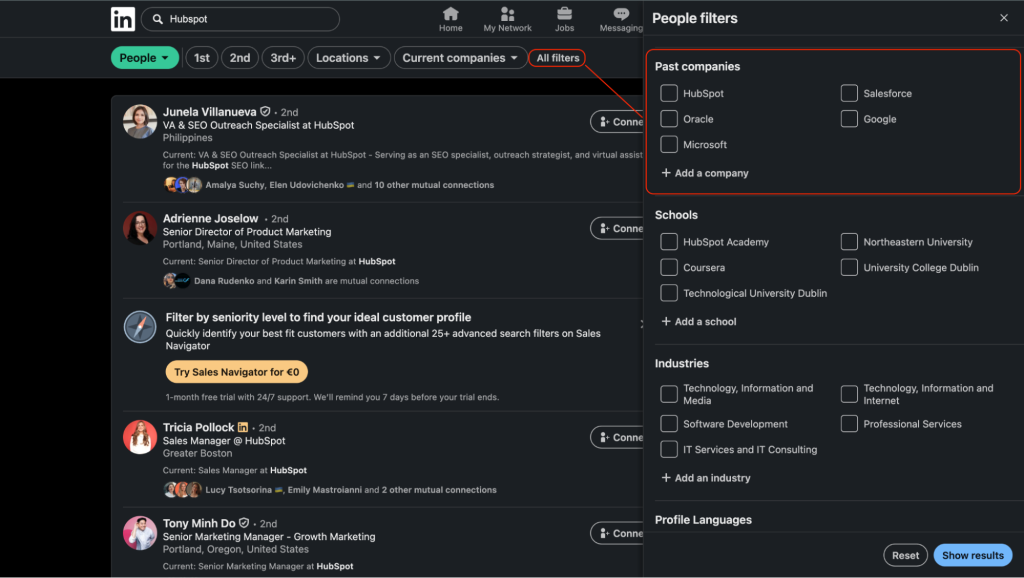
  • Go to the company’s LinkedIn page → hit the People tab.
  • Use the Past company filter, leave Current company blank.
  • Layer in job title, seniority, or location.

linkedin search the way of how to find a list of employees at a company

Ex-employees bring a perspective that current staff won’t. Play it right, and they become an extension of your network and a backchannel for real intel.

How to turn former employees into warm allies

Once you know how to find former employees of a company on LinkedIn, the real value isn’t the list itself but rather what you do with it.

Former employees are perfect for three things: warm intros, unfiltered intel, and potential future deals. A past manager who’s now leading a team somewhere else can open doors into both their old company and their current one. That’s a lot more useful than another random “Head of Something” you pulled from a generic search.

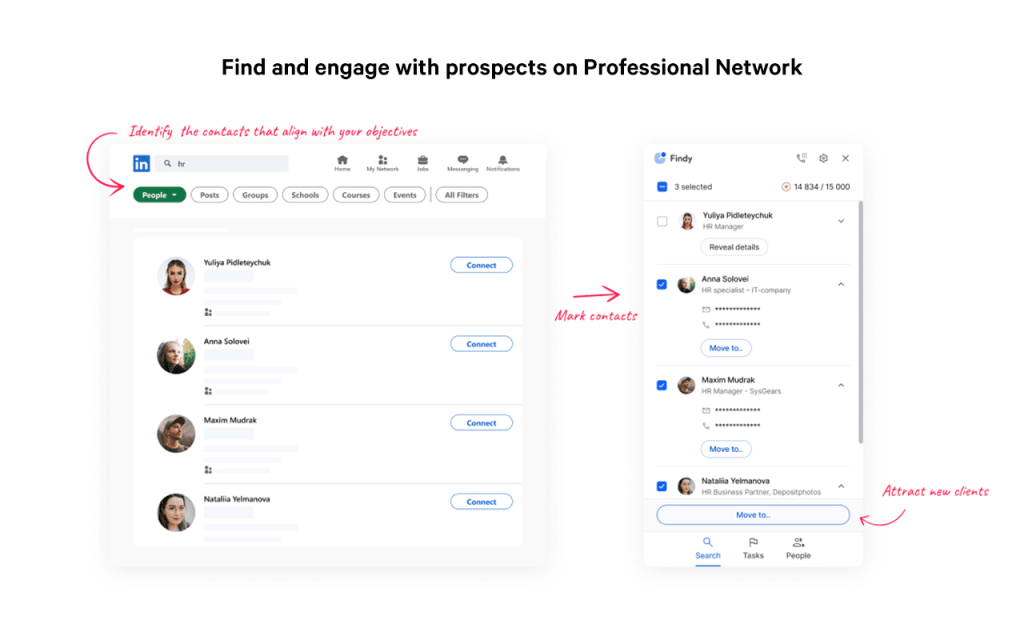
Before reaching out, sanity-check that they’re still active and hold the same title (people switch roles more often than you’d think). Skim their recent activity, then grab a reliable LinkedIn email scraper like Findy to get their verified work email. 

When you message them, be honest about why you’re reaching out (“I’m working on this / exploring a partnership / doing due diligence”) and reference their connection to the company in one clean line. 

Reply’s AI variables are perfect for this, as users can create a custom variable like “reference to previous company” and the AI will do the rest. And we’re not just talking about referencing the company name, but also logically tying that to your actual outreach purpose. 

Used this way, former employees become a tiny, high-trust advisory network around each company you care about.

Moving forward

By now, you’ve seen that finding employees inside a company isn’t one trick but a mix of methods, each with its own strengths and drawbacks. 

Company websites give you the official picture, LinkedIn and social platforms offer real-time visibility, search engines dig up hidden info, referrals bring trust, and platforms like Reply.io tie it all together at scale.

The mistake most teams make is treating this as a one-off project for when a new role or opportunity comes up. Instead, treat it as an ongoing system built into your workflow — keep searches saved, set up alerts on LinkedIn, and refresh lists regularly.  

If you’re hiring, selling, or scouting partnerships, start with a single method this week. Test it, measure the results, and layer on more channels once you’ve got some traction going. 

And if you’re tired of juggling tools, navigating spreadsheets, and hitting dead ends, consider automating the full workflow with Reply.io to collect, validate, and contact professionals in one place.

FAQs

What are the easiest ways to find employees of a company?

You can use social media like LinkedIn, visit the company website, or use lead databases. Combining these methods gives you a better chance to get a complete and updated list of employees in a company.

How can I create a detailed list of employees in a company?

Start with LinkedIn company pages and filter by location or role. Then add info from public directories and company sites. Use search engines for extra data and organize everything in a simple spreadsheet to keep track.

How do I see who works at a company on LinkedIn?

Look for the company page, click on the employees link or tab. Filter results by job title or department. You will then see profiles of people currently working there or even former employees if needed.

What should I do if company staff information isn’t public?

Try searching press releases or company reports. Also, check job openings to learn about team roles. Sometimes networking or referrals can give you names and contacts where public info is missing.

Can search engines help me find who works at a company?

Yes. Using smart Google searches with keywords and operators can uncover profiles or documents that show company staff. This works well when social media or directories have limited info about employees.

How often should I update my list of employees in a company?

Regular updates are important because people change jobs often. Aim to refresh your list every few months to keep contact details accurate and avoid reaching out to people who no longer work there.

What are some drawbacks when trying to find employees of a company?

Data can be outdated, job titles vary, and some staff keep profiles private. Additionally, inconsistent info makes it hard to be sure your list of employees in a company is complete.

How can referrals improve finding company staff?

Referrals often give real names and positions you won’t find online. People in your network may introduce you to current or former employees, which can save time and build trust in your outreach.

What tools can automate how to find employees of a company?

Some platforms combine databases, verification, and outreach tools. They let you search, clean contact info, and send messages without juggling multiple apps. This speeds up the process and improves accuracy.

Why is it important to know how to see who works at a company?

Knowing the staff helps you target your efforts better, whether recruiting, selling, or partnering. It stops guesswork by showing you the right contacts so you can act efficiently and with confidence.

Subscribe to our blog to receive the latest updates from the world of sales and marketing.
Stay up to date.

Related Articles

How to Use Reply.io + Jason for Lead Generation for Software Companies in 2026

How to Use Reply.io + Jason for Lead Generation for Software Companies in 2026

How to Use Reply.io + Jason for Lead Generation for Software Companies in 2026
Top 12 GTM Outbound Sales Platforms to Try in 2026

Top 12 GTM Outbound Sales Platforms to Try in 2026

Top 12 GTM Outbound Sales Platforms to Try in 2026
How to Use Reply.io + Jason for B2B Demand Generation in 2026

How to Use Reply.io + Jason for B2B Demand Generation in 2026

How to Use Reply.io + Jason for B2B Demand Generation in 2026